
[UWP]组合CompositionBrush并使用BlendEffect
1. 什么是BlendEffect
上一篇文章介绍了CompositionLinearGradientBrush的基本用法, 这篇文章再结合BlendEffec介绍一些更复杂的玩法。
Microsoft.Graphics.Canvas.Effects命名空间下的BlendEffect 用于组合两张图片(分别是作为输入源的Background和Foreground),它包含多种模式,如下图所示:

其中最简单的是Screen模式,它的计算公式如下

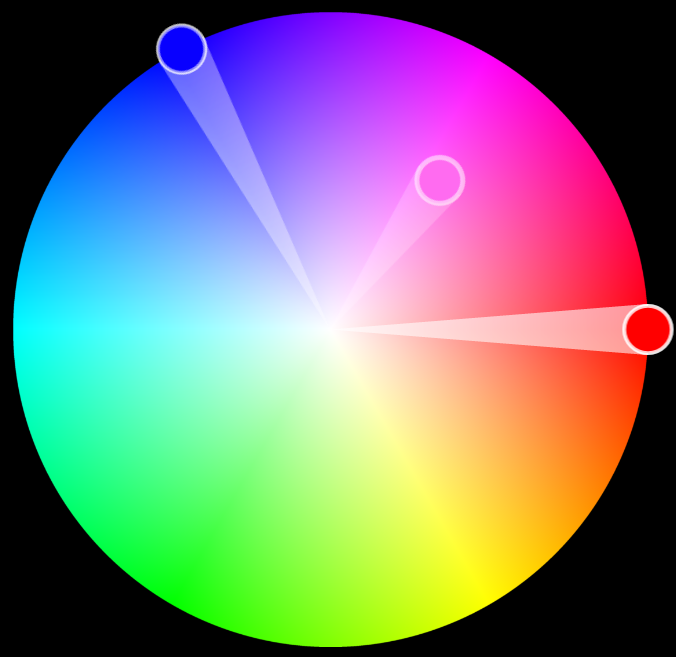
看起来有点复杂, 我的理解是它相当于色轮中Background和Foreground之间拉直线,在直线的中间点的颜色,如下面这张图,红色和蓝色组合成为紫色:
2. 组合CompositionBrush并使用BlendEffect
许多 CompositionBrushes 使用其他 CompositionBrushes 作为输入。 例如,使用 SetSourceParameter 方法可以将其他 CompositionBrush 设为 CompositionEffectBrush 的输入。这是CompositionBrush最好玩的地方之一。下面的例子介绍了怎么使用BlendEffect创建CompositionBrush。
首先创建两个CompositionLinearGradientBrush:
var foregroundBrush = compositor.CreateLinearGradientBrush();

foregroundBrush.StartPoint = Vector2.Zero;

foregroundBrush.EndPoint = new Vector2(1.0f);

var redGradientStop = compositor.CreateColorGradientStop();

redGradientStop.Offset = 0f;

redGradientStop.Color = Color.FromArgb(255, 255, 0, 0);

var yellowGradientStop = compositor.CreateColorGradientStop();

yellowGradientStop.Offset = 1f;

yellowGradientStop.Color = Color.FromArgb(255, 0, 178, 255);

foregroundBrush.ColorStops.Add(redGradientStop);

foregroundBrush.ColorStops.Add(yellowGradientStop);

var backgroundBrush = compositor.CreateLinearGradientBrush();

backgroundBrush.StartPoint = new Vector2(0, 1f);

backgroundBrush.EndPoint = new Vector2(1f, 0);

var blueGradientStop = compositor.CreateColorGradientStop();

blueGradientStop.Offset = 0f;

blueGradientStop.Color = Color.FromArgb(255, 0, 0, 255);

var greenGradientStop = compositor.CreateColorGradientStop();

greenGradientStop.Offset = 1f;

greenGradientStop.Color = Color.FromArgb(255, 0, 255, 0);

backgroundBrush.ColorStops.Add(blueGradientStop);

backgroundBrush.ColorStops.Add(greenGradientStop);
它们的效果分别如下面两张图片所示:

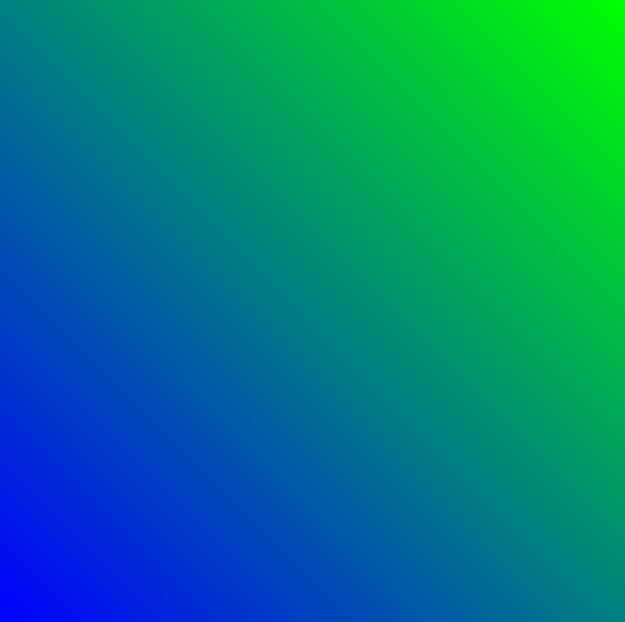
接下来创建BlendEffect,并将Foreground和Background设置为CompositionEffectSourceParameter
var blendEffect = new BlendEffect()

{

    Mode = BlendEffectMode.Screen,

    Foreground = new CompositionEffectSourceParameter("Main"),

    Background = new CompositionEffectSourceParameter("Tint"),

};
使用BlendEffect创建Brush,并用SetSourceParameter设置它的Foreground和Background。
var effectFactory = compositor.CreateEffectFactory(blendEffect);

var blendEffectBrush = effectFactory.CreateBrush();

blendEffectBrush.SetSourceParameter("Main", foregroundBrush);

blendEffectBrush.SetSourceParameter("Tint", backgroundBrush);
最后就是一般的使用这个blendEffectBrush的代码:
//创建SpriteVisual并设置Brush

var spriteVisual = compositor.CreateSpriteVisual();

spriteVisual.Brush = blendEffectBrush;

//将自定义 SpriteVisual 设置为元素的可视化树的最后一个子元素。

ElementCompositionPreview.SetElementChildVisual(Gradient, spriteVisual);
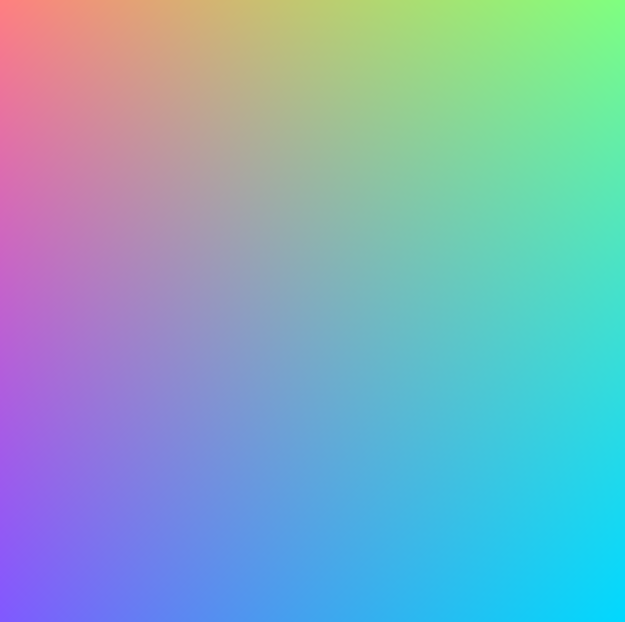
最终运行效果如下:
3. 创建动画
和上一篇文章一样,我也把这篇文章用到的技术用在了一个番茄钟应用里,,简单地使用ColorKeyFrameAnimation和ScalarKeyFrameAnimation制作动画:
private void StartOffsetAnimation(CompositionColorGradientStop gradientOffset, float offset)

{

    var offsetAnimation = _compositor.CreateScalarKeyFrameAnimation();

    offsetAnimation.Duration = TimeSpan.FromSeconds(1);

    offsetAnimation.InsertKeyFrame(1.0f, offset);

    gradientOffset.StartAnimation(nameof(CompositionColorGradientStop.Offset), offsetAnimation);

}

private void StartColorAnimation(CompositionColorGradientStop gradientOffset, Color color)

{

    var colorAnimation = _compositor.CreateColorKeyFrameAnimation();

    colorAnimation.Duration = TimeSpan.FromSeconds(2);

    colorAnimation.Direction = Windows.UI.Composition.AnimationDirection.Alternate;

    colorAnimation.InsertKeyFrame(1.0f, color);

    gradientOffset.StartAnimation(nameof(CompositionColorGradientStop.Color), colorAnimation);

}
完整代码在这里,具体运行效果如下:

4. 结语
上面的动画可以安装我的番茄钟应用试玩一下,安装地址:
这篇文章的动画和代码都参考了JustinLiu的代码,感谢他的分享。
使用XAML画笔难以做到这种多向渐变的效果,这都多亏了UWP提供了BlendEffect这个好玩的东西。BlendEffect还有很多其它好玩的模式,大家有空可以多多尝试。
参考
合成画笔 - Windows UWP applications _ Microsoft Docs
源码
OnePomodoro_GradientsWithBlend.xaml.cs at master
[UWP]组合CompositionBrush并使用BlendEffect的更多相关文章
- [UWP]CompositionLinearGradientBrush加BlendEffect,双倍的快乐
原文:[UWP]CompositionLinearGradientBrush加BlendEffect,双倍的快乐 1. 什么是BlendEffect# 上一篇文章介绍了CompositionLinea ...
- UWP 响应键盘组合快捷键
方法1:响应Ctrl+?快捷键 首先在load事件或者keydown事件内注册事件 public MainPage() { this.InitializeComponent(); // Registe ...
- [UWP]用Win2D和CompositionAPI实现文字的发光效果,并制作动画
1. 成果 献祭了周末的晚上,成功召唤出了上面的番茄钟.正当我在感慨"不愧是Shadow大人,这难道就是传说中的五彩斑斓的黑?" "那才不是什么阴影效果,那是发光效果.& ...
- [UWP]抄抄《CSS 故障艺术》的动画
1. 前言 什么是故障艺术(Glitch Art 风)?我们熟知的抖音的 LOGO 正是故障艺术其中一种表现形式.它有一种魔幻的感觉,看起来具有闪烁.震动的效果,很吸引人眼球.故障艺术它模拟了画面信号 ...
- New UWP Community Toolkit - XAML Brushes
概述 上一篇 New UWP Community Toolkit 文章中,我们对 V2.2.0 版本的重要更新做了简单回顾.接下来会针对每个重要更新,结合 SDK 源代码和调用代码详细讲解. 本篇我们 ...
- [UWP]使用AlphaMaskEffect提升故障艺术动画的性能(顺便介绍怎么使用性能探测器分析UWP程序)
前几天发布了抄抄<CSS 故障艺术>的动画这篇文章,在这篇文章里介绍了如何使用Win2D绘制文字然后配合BlendEffect制作故障艺术的动画.本来打算就这样收手不玩这个动画了,但后来又 ...
- MVVM框架从WPF移植到UWP遇到的问题和解决方法
MVVM框架从WPF移植到UWP遇到的问题和解决方法 0x00 起因 这几天开始学习UWP了,之前有WPF经验,所以总体感觉还可以,看了一些基础概念和主题,写了几个测试程序,突然想起来了前一段时间在W ...
- UWP简单示例(三):快速开发2D游戏引擎
准备 IDE:VisualStudio 2015 Language:VB.NET/C# 图形API:Win2D MSDN教程:UWP游戏开发 游戏开发涉及哪些技术? 游戏开发是一门复杂的艺术,编码方面 ...
- 【uwp】浅谈China Daily 中划词翻译的实现
学习uwp开发也有一段时间了,最近上架了一个小应用(China Daily),现在准备将开发中所学到的一些东西拿出来跟大家分享交流一下. 先给出应用的下载链接:China Daily , 感兴趣的童鞋 ...
随机推荐
- [C++]invalid initialization of non-const reference of type 'std::__cxx11::string& {aka std::__cxx11::basi
解决方法:在参数前面加一个cosnt或者把引用符号去掉
- PacMan 04——道具生成吃下道具怪物的移动
版权申明: 本文原创首发于以下网站: 博客园『优梦创客』的空间:https://www.cnblogs.com/raymondking123 优梦创客的官方博客:https://91make.top ...
- java项目打包
http://blog.csdn.net/qq_34845382/article/details/53885907 自己用Rinnable JAR file 方法也可以.更简单.直接点击Finish即 ...
- 商用hadoop集群的配置命令分布
角色 安装 hdfs配置 yarn配置 hdfs 格式化 启动yarn服务 启动hdfs服务 master yum install hadoop-hdfs-namenode yum install h ...
- 难题解决:Mycat数据库中间件+Mybatis批量插入数据并返回行记录的所有主键ID
一.mybatis的版本必须为3.3.1及其以上 项目所依赖的mybatis的版本必须为3.3.1及其以上,低版本的不行,保证hap项目的依赖的mybatis的jar的版本必需为需要的版本: 二.在 ...
- 编写shell脚本实现一键创建KVM虚拟机
shell脚本一键创建虚拟机 代码如下: #!/bin/bashname=$1 #把位置变量$1重新定义为name(创建虚拟机的名字)path1=/var/lib/libvirt/images/ #i ...
- uC/OS-III 软件定时器(三)
软件定时器是uC/OS 操作系统的一个内核对象,软件定时器是基于时钟节拍和系统管理创建的软件性定时器,理论上可以创建无限多个,操作简单,但精准度肯定比硬件定时稍逊一筹. 原理和实现过程 要用到的函数: ...
- WCF尝试创建与发布IIS(含问题描述)
技术贴技术贴就直接讲技术来,客套的话我也不多说了,各位看官包涵包涵. 跟着园内高手一步一步发布成功,欣喜若狂之际,发个贴纪念纪念一下. 废话不多说,不正确之处,还望大家积极指出,共同进步.哈哈~~~ ...
- 第10项:重写equals时请遵守通用约定
重写equals方法看起来似乎很简单,但是有许多重写方式会导致错误,而且后果非常严重.最容易避免这类问题的办法就是不覆盖equals方法,在这种情况下,类的每个实例都只能与它自身相等.如果满足了以 ...
- 树莓派(4B)Linux + .Net Core嵌入式-HelloWorld(二)
一.新建.Net Core项目 新建.Net Core3.0的控制台应用,代码如下 namespace Demo { class Program { static void Main(string[] ...