
『Python』matplotlib划分画布的主要函数
1. subplot()
- 绘制网格区域中几何形状相同的子区布局
函数签名有两种:
subplot(numRows, numCols, plotNum)subplot(CRN)
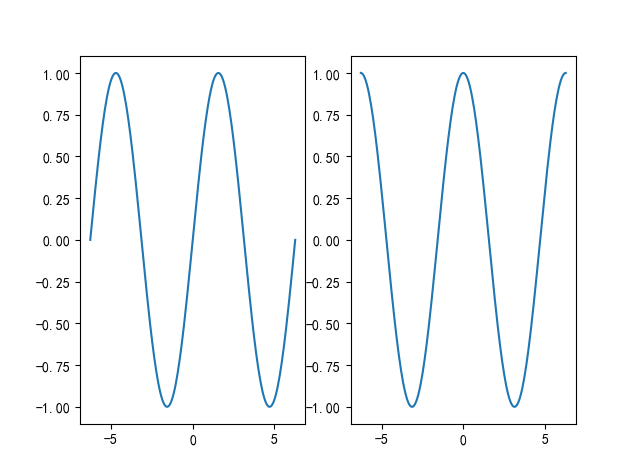
都是整数,意思是将画布划分为C行R列个子区,此时定位到第N个子区上,子区编号按照行优先排序。
下面就是最喜爱的举例环节
【Example 1】
import numpy as np

import matplotlib.pyplot as plt

import matplotlib as mpl

mpl.use('Qt5Agg')

mpl.rcParams['font.sans-serif'] = ['SimHei']

mpl.rcParams['font.serif'] = ['SimHei']

mpl.rcParams['axes.unicode_minus'] = False  # 解决保存图像是负号'-'显示为方块的问题,或者转换负号为字符串

x = np.linspace(-2 * np.pi, 2 * np.pi, 200)

y = np.sin(x)

y1 = np.cos(x)

plt.subplot(121)

plt.plot(x, y)

plt.subplot(122)

plt.plot(x, y1)

plt.show()
【Example 2】
import numpy as np

import matplotlib.pyplot as plt

import matplotlib as mpl

mpl.use('Qt5Agg')

mpl.rcParams['font.sans-serif'] = ['SimHei']

mpl.rcParams['font.serif'] = ['SimHei']

mpl.rcParams['axes.unicode_minus'] = False  # 解决保存图像是负号'-'显示为方块的问题,或者转换负号为字符串

fig = plt.figure()

x = np.linspace(0.0, 2 * np.pi)

y = np.cos(x) * np.sin(x)

ax1 = fig.add_subplot(121)

ax1.margins(0.03)

ax1.plot(x, y, ls="-", lw=2, color="b")

ax2 = fig.add_subplot(222)

ax2.margins(0.7, 0.7)

ax2.plot(x, y, ls="-", lw=2, color="r")

ax3 = fig.add_subplot(224)

ax3.margins(x=0.1, y=0.3)

ax3.plot(x, y, ls="-", lw=2, color="g")

plt.show()
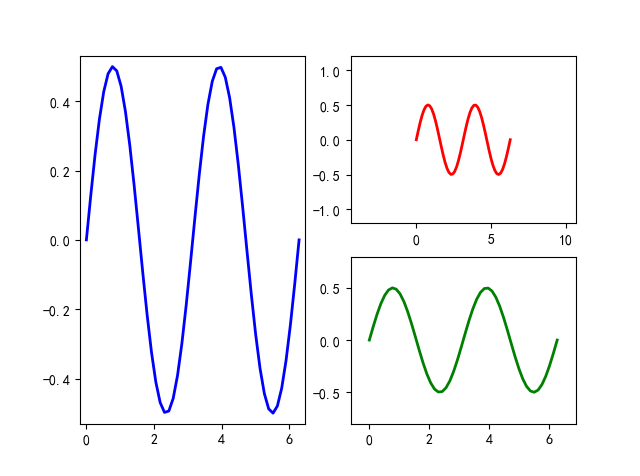
非等分画布可以多次使用等分画布来实现
2. subplot2grid()
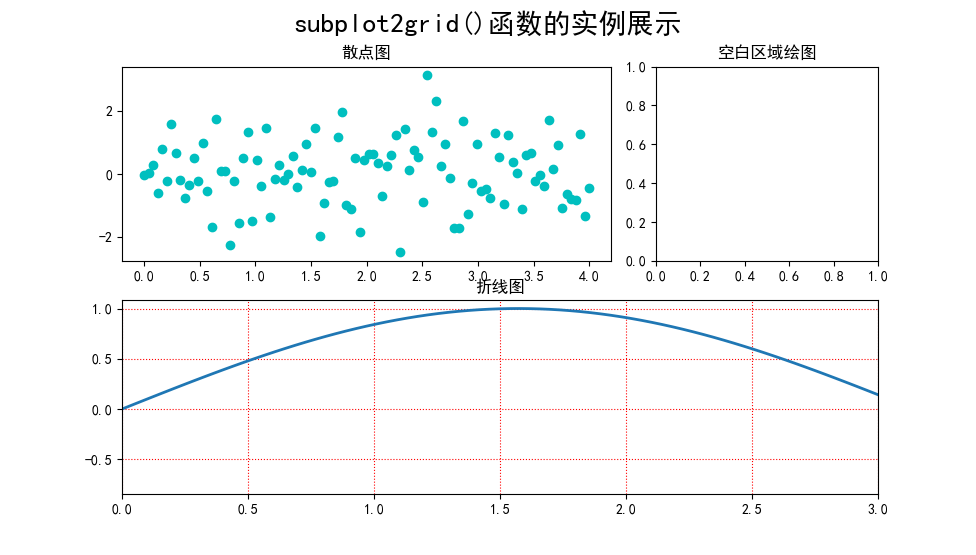
- 让子区跨越固定的网格布局
直接上示例
import numpy as np

import matplotlib.pyplot as plt

import matplotlib as mpl

mpl.use('Qt5Agg')

mpl.rcParams['font.sans-serif'] = ['SimHei']

mpl.rcParams['font.serif'] = ['SimHei']

mpl.rcParams['axes.unicode_minus'] = False  # 解决保存图像是负号'-'显示为方块的问题,或者转换负号为字符串

plt.subplot2grid((2, 3), (0, 0), colspan=2)

x = np.linspace(0.0, 4.0, 100)

y = np.random.randn(100)

plt.scatter(x, y, c="c")

plt.title("散点图")

plt.subplot2grid((2, 3), (0, 2))

plt.title("空白区域绘图")

plt.subplot2grid((2, 3), (1, 0), colspan=3)

y1 = np.sin(x)

plt.plot(x, y1, lw=2, ls="-")

plt.xlim(0, 3)

plt.grid(True, ls=":", c="r")

plt.title("折线图")

plt.suptitle("subplot2grid()函数的实例展示", fontsize=20)

plt.show()
3. subplots()
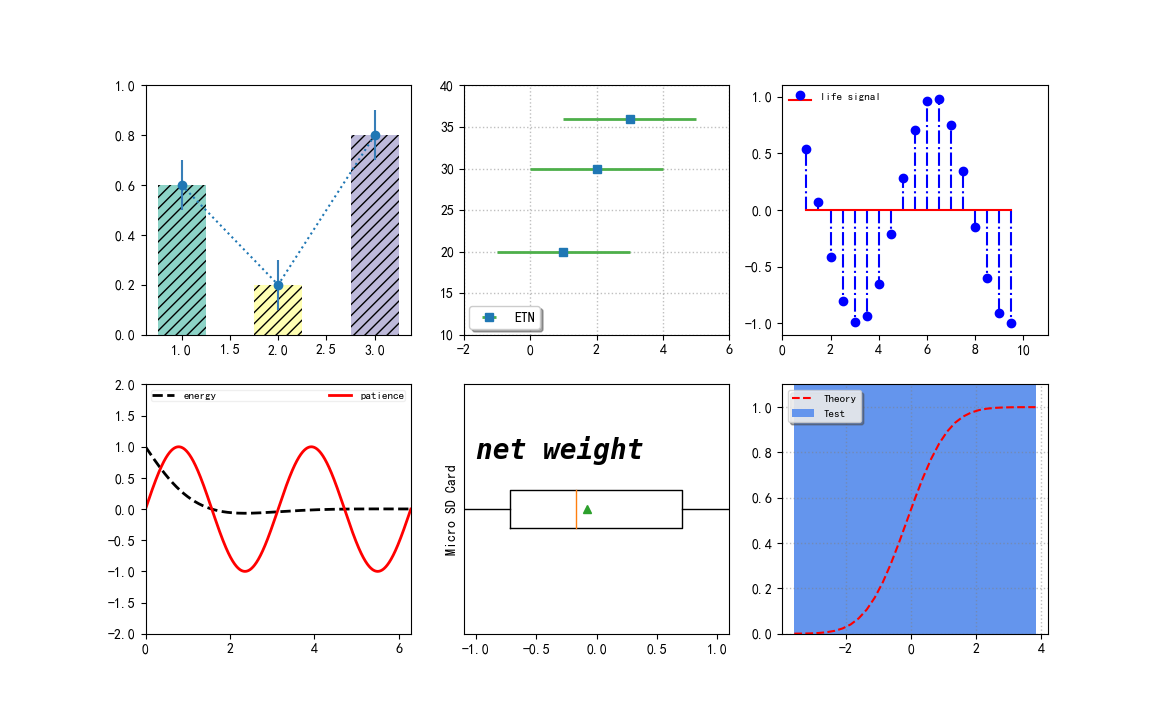
创建一张画布带有多个子区的绘图模式
其返回值是
(fig, ax)的元组,fig是Figure的实例,ax是axis对象数组或者一个axis对象
【综合示例】
import numpy as np

import matplotlib.pyplot as plt

import matplotlib as mpl

mpl.use('Qt5Agg')

mpl.rcParams['font.sans-serif'] = ['SimHei']

mpl.rcParams['font.serif'] = ['SimHei']

mpl.rcParams['axes.unicode_minus'] = False  # 解决保存图像是负号'-'显示为方块的问题,或者转换负号为字符串

fig, ax = plt.subplots(2, 3)

# subplot(231)

colors = ["#8dd3c7", "#ffffb3", "#bebada"]

ax[0, 0].bar([1, 2, 3], [0.6, 0.2, 0.8], color=colors, width=0.5, hatch="///", align="center")

ax[0, 0].errorbar([1, 2, 3], [0.6, 0.2, 0.8], yerr=0.1, capsize=0, ecolor="#377eb8", fmt="o:")

ax[0, 0].set_ylim(0, 1.0)

# subplot(232)

ax[0, 1].errorbar([1, 2, 3], [20, 30, 36], xerr=2, ecolor="#4daf4a", elinewidth=2, fmt="s", label="ETN")

ax[0, 1].legend(loc=3, fancybox=True, shadow=True, fontsize=10, borderaxespad=0.4)

ax[0, 1].set_ylim(10, 40)

ax[0, 1].set_xlim(-2, 6)

ax[0, 1].grid(ls=":", lw=1, color="grey", alpha=0.5)

# subplot(233)

x3 = np.arange(1, 10, 0.5)

y3 = np.cos(x3)

ax[0, 2].stem(x3, y3, basefmt="r-", linefmt="b-.", markerfmt="bo", label="life signal", use_line_collection=True)

ax[0, 2].legend(loc=2, fontsize=8, frameon=False, borderpad=0.0, borderaxespad=0.6)

ax[0, 2].set_xlim(0, 11)

ax[0, 2].set_ylim(-1.1, 1.1)

# subplot(234)

x4 = np.linspace(0, 2 * np.pi, 500)

x4_1 = np.linspace(0, 2 * np.pi, 1000)

y4 = np.cos(x4) * np.exp(-x4)

y4_1 = np.sin(2 * x4_1)

line1, line2, = ax[1, 0].plot(x4, y4, "k--", x4_1, y4_1, "r-", lw=2)

ax[1, 0].legend((line1, line2), ("energy", "patience"),

                loc="upper center", fontsize=8, ncol=2,

                framealpha=0.3, mode="expand",

                columnspacing=2, borderpad=0.1)

ax[1, 0].set_ylim(-2, 2)

ax[1, 0].set_xlim(0, 2 * np.pi)

# subplot(235)

x5 = np.random.randn(100)

ax[1, 1].boxplot(x5, vert=False, showmeans=True, meanprops=dict(color="g"))

ax[1, 1].set_yticks([])

ax[1, 1].set_xlim(-1.1, 1.1)

ax[1, 1].set_ylabel("Micro SD Card")

ax[1, 1].text(-1.0, 1.2, "net weight", fontsize=20, style="italic",

              weight="black", family="monospace")

# subplot(236)

mu = 0.0

sigma = 1.0

x6 = np.random.randn(10000)

n, bins, patches = ax[1, 2].hist(x6, bins=30,

                                 histtype="stepfilled", cumulative=True,

                                 color="cornflowerblue", label="Test")

y = ((1 / (np.sqrt(2 * np.pi) * sigma)) * np.exp(-0.5 * (1 / sigma * (bins - mu)) ** 2))

y = y.cumsum()

y /= y[-1]

ax[1, 2].plot(bins, y, "r--", linewidth=1.5, label="Theory")

ax[1, 2].set_ylim(0.0, 1.1)

ax[1, 2].grid(ls=":", lw=1, color="grey", alpha=0.5)

ax[1, 2].legend(loc="upper left", fontsize=8, shadow=True, fancybox=True, framealpha=0.8)

# adjust subplots() layout

plt.subplots_adjust()

plt.show()
『Python』matplotlib划分画布的主要函数的更多相关文章
- 『Python』matplotlib坐标轴应用
1. 设置坐标轴的位置和展示形式 import numpy as np import matplotlib.pyplot as plt import matplotlib as mpl mpl.use ...
- 『Python』matplotlib初识
1. 核心原理 使用matplotlib绘图的原理,主要就是理解figure(画布).axes(坐标系).axis(坐标轴)三者之间的关系. 下面这幅图更详细: 以"美院学生张三写生画画&q ...
- 『Python』matplotlib的imshow用法
热力图是一种数据的图形化表示,具体而言,就是将二维数组中的元素用颜色表示.热力图之所以非常有用,是因为它能够从整体视角上展示数据,更确切的说是数值型数据. 使用imshow()函数可以非常容易地制作热 ...
- 『Python』matplotlib实现GUI效果
1. 类RadioButtons的使用方法 类似单选框 import numpy as np import matplotlib.pyplot as plt import matplotlib as ...
- 『Python』matplotlib实现动画效果
一般而言,在绘制复杂动画时,主要借助模块animation来完成 import numpy as np import matplotlib.pyplot as plt import matplotli ...
- 『Python』matplotlib共享绘图区域坐标轴
1. 共享单一绘图区域的坐标轴 有时候,我们想将多张图形放在同一个绘图区域,不想在每个绘图区域只绘制一幅图形.这时候,就可以借助共享坐标轴的方法实现在一个绘图区域绘制多幅图形的目的. import n ...
- 『Python』matplotlib常用图表
这里简要介绍几种统计图形的绘制方法,其他更多图形可以去matplotlib找examples魔改 1. 柱状图 柱状图主要是应用在定性数据的可视化场景中,或是离散数据类型的分布展示.例如,一个本科班级 ...
- 『Python』matplotlib常用函数
1. 绘制图表组成元素的主要函数 1.1 plot()--展现量的变化趋势 import numpy as np import matplotlib.pyplot as plt import matp ...
- 『Python』__getattr__()特殊方法
self的认识 & __getattr__()特殊方法 将字典调用方式改为通过属性查询的一个小class, class Dict(dict): def __init__(self, **kw) ...
随机推荐
- 你知道那些JVM性能调优
设定堆内存大小 -Xms :堆初始空间大小 -Xmx : 堆内存最大限制. 设置新生代大小.新生代不宜太小,否则会有大量对象涌入老年代 -XX:NewSize : 新生代大小 -XX:NewRatio ...
- WPF简易聊天室
一.聊天界面如下
- axios 请求数据跳转页面报'$router' of undefined问题
代码: this.$axios.post("/auth", { 'username': this.username, 'password': this.password }).th ...
- Nacos集群部署:
Nacos集群部署: 官网: https://nacos.io/zh-cn/docs/cluster-mode-quick-start.html 1: 下载 Nacos1.2.0 链接:http ...
- Lambda Expressions and Functional Interfaces: Tips and Best Practices
转载自https://www.baeldung.com/java-8-lambda-expressions-tips 1. Overview Now that Java 8 has reached ...
- 从eclipse转idea不适记录【持续更新】
使用eclipse和idea时,快捷键对比 从一些最扎心的开始: 关于print一类的打印输出:System.out.println()补全 idea中可以sout.souf.serr:分别对应out ...
- ProjectEuler 009题
题目: A Pythagorean triplet is a set of three natural numbers, a b c, for which, a2 + b2 = c2 For exam ...
- Linkerd 2.10(Step by Step)—配置超时
Linkerd 2.10 系列 快速上手 Linkerd v2 Service Mesh(服务网格) 腾讯云 K8S 集群实战 Service Mesh-Linkerd2 & Traefik2 ...
- kubebuilder实战之六:构建部署运行
欢迎访问我的GitHub https://github.com/zq2599/blog_demos 内容:所有原创文章分类汇总及配套源码,涉及Java.Docker.Kubernetes.DevOPS ...
- windows下mysql5.7.17配置
1.官网下载mysql5.7.17 64位 https://dev.mysql.com/downloads/mysql/ 2.安装完解压到E盘主目录下,改文件名为mysql 3.配置环境变量 我的电脑 ...