
C# 学习之旅(1)
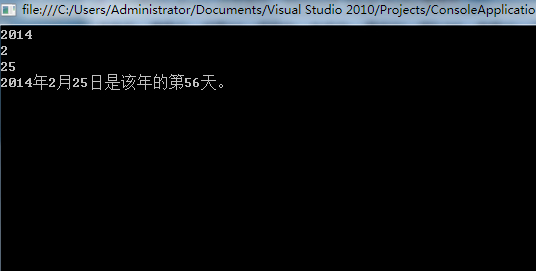
第一, 输入输出流都来自控制台。
 using System;

 using System.Collections.Generic;

 using System.Linq;

 using System.Text;

 namespace ConsoleApplication1

 {

     class Program

     {

         static void Main(string[] args)

         {

             int year = int.Parse(System.Console.ReadLine());

             int month = int.Parse(System.Console.ReadLine());

             int day = int.Parse(System.Console.ReadLine());

             int days = fun(year, month, day);

             Console.WriteLine("{0}年{1}月{2}日是该年的第{3}天。", year, month, day, days);

             Console.ReadLine();

         }

         static int fun(int year, int month, int day)

         {

             int[] mon = new int[]{,,,,,,,,,,,};

             if ((year %  ==  && year %  != ) || year %  == )

                 mon[] = ;

             int days = ;

             for (int i=; i < month - ; i++)

                 days = mon[i] + days;

             days = days + day;

             return days;

         }

     }

 }
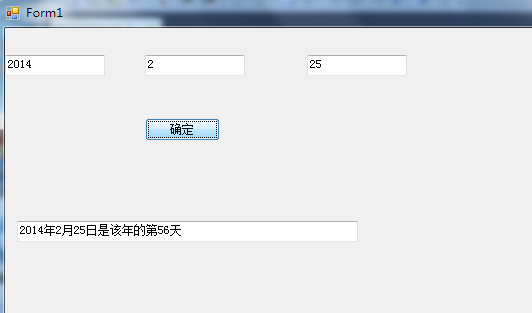
第二, 输入输出都来自于窗口的textBox。
下面的的代码是双击“按钮”键之后的程序段
 using System;

 using System.Collections.Generic;

 using System.ComponentModel;

 using System.Data;

 using System.Drawing;

 using System.Linq;

 using System.Text;

 using System.Windows.Forms;

 namespace WindowsFormsApplication1

 {

     public partial class Form1 : Form

     {

         public Form1()

         {

             InitializeComponent();

         }

         private void button1_Click(object sender, EventArgs e)

         {

             int year =  int.Parse(textBox1.Text);

             int month = int.Parse(textBox2.Text);

             int day = int.Parse(textBox3.Text);

             int days = fun(year, month, day);

             textBox4.Text = string.Format("{0}年{1}月{2}日是该年的第{3}天",year,month,day,days);

         }

         static int fun(int year, int month, int day)

         {

             int[] mon = new int[] { , , , , , , , , , , ,  };

             if ((year %  ==  && year %  != ) || year %  == )

                 mon[] = ;

             int days = ;

             for (int i = ; i < month - ; i++)

                 days = mon[i] + days;

             days = days + day;

             return days;

         }

     }

 }
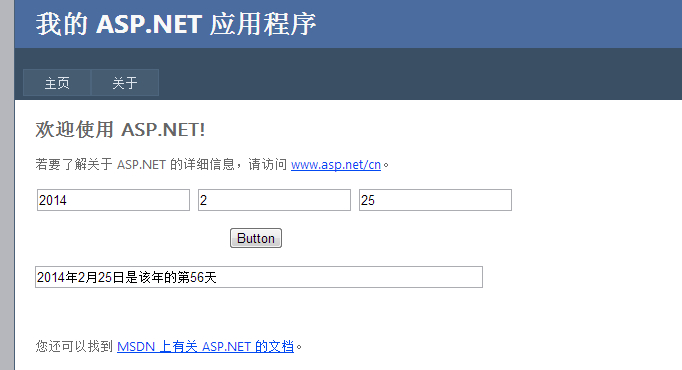
第三, 输入输出都来自于网页上的TextBox(表格)。
下面的的代码是双击“按钮”键之后的程序段
 using System;

 using System.Collections.Generic;

 using System.Linq;

 using System.Web;

 using System.Web.UI;

 using System.Web.UI.WebControls;

 namespace WebApplication1

 {

     public partial class _Default : System.Web.UI.Page

     {

         protected void Page_Load(object sender, EventArgs e)

         {

         }

         protected void Button1_Click(object sender, EventArgs e)

         {

             int year = int.Parse(TextBox1.Text);

             int month = int.Parse(TextBox2.Text);

             int day = int.Parse(TextBox3.Text);

             int days = fun(year, month, day);

             TextBox4.Text = string.Format("{0}年{1}月{2}日是该年的第{3}天", year, month, day, days);

         }

         static int fun(int year, int month, int day)

         {

             int[] mon = new int[] { , , , , , , , , , , ,  };

             if ((year %  ==  && year %  != ) || year %  == )

                 mon[] = ;

             int days = ;

             for (int i = ; i < month - ; i++)

                 days = mon[i] + days;

             days = days + day;

             return days;

         }

     }

 }
———————————————————————————————————————————————————————————————————————————
声明:
本文为 大Yi巴狼 对自己所学的知识整理和实现。
本文档欢迎自由转载,但请务必保持本文档完整或注明来之本文档。本文档未经 大Yi巴狼 同意,不得用于商业用途。最后,如果您能从这个简单文档里获得些许帮助,大Yi巴狼 将对自己的一点努力感到非常高兴;由于作者本人水平有限,如果本文档中包含的错误给您造成了不便,在此提前说声抱歉。
祝身体健康,工作顺利。
C# 学习之旅(1)的更多相关文章
- WCF学习之旅—第三个示例之四(三十)
上接WCF学习之旅—第三个示例之一(二十七) WCF学习之旅—第三个示例之二(二十八) WCF学习之旅—第三个示例之三(二十九) ...
- Hadoop学习之旅二:HDFS
本文基于Hadoop1.X 概述 分布式文件系统主要用来解决如下几个问题: 读写大文件 加速运算 对于某些体积巨大的文件,比如其大小超过了计算机文件系统所能存放的最大限制或者是其大小甚至超过了计算机整 ...
- WCF学习之旅—第三个示例之二(二十八)
上接WCF学习之旅—第三个示例之一(二十七) 五.在项目BookMgr.Model创建实体类数据 第一步,安装Entity Framework 1) 使用NuGet下载最新版的Entity Fram ...
- WCF学习之旅—第三个示例之三(二十九)
上接WCF学习之旅—第三个示例之一(二十七) WCF学习之旅—第三个示例之二(二十八) 在上一篇文章中我们创建了实体对象与接口协定,在这一篇文章中我们来学习如何创建WCF的服务端代码.具体步骤见下面. ...
- WCF学习之旅—WCF服务部署到IIS7.5(九)
上接 WCF学习之旅—WCF寄宿前的准备(八) 四.WCF服务部署到IIS7.5 我们把WCF寄宿在IIS之上,在IIS中宿主一个服务的主要优点是在发生客户端请求时宿主进程会被自动启动,并且你可以 ...
- WCF学习之旅—WCF服务部署到应用程序(十)
上接 WCF学习之旅—WCF寄宿前的准备(八) WCF学习之旅—WCF服务部署到IIS7.5(九) 五.控制台应用程序宿主 (1) 在解决方案下新建控制台输出项目 ConsoleHosting.如下 ...
- WCF学习之旅—WCF服务的Windows 服务程序寄宿(十一)
上接 WCF学习之旅—WCF服务部署到IIS7.5(九) WCF学习之旅—WCF服务部署到应用程序(十) 七 WCF服务的Windows 服务程序寄宿 这种方式的服务寄宿,和IIS一样有一个一样 ...
- WCF学习之旅—WCF服务的WAS寄宿(十二)
上接 WCF学习之旅—WCF服务部署到IIS7.5(九) WCF学习之旅—WCF服务部署到应用程序(十) WCF学习之旅—WCF服务的Windows 服务程序寄宿(十一) 八.WAS宿主 IIS ...
- WCF学习之旅—WCF服务的批量寄宿(十三)
上接 WCF学习之旅—WCF服务部署到IIS7.5(九) WCF学习之旅—WCF服务部署到应用程序(十) WCF学习之旅—WCF服务的Windows 服务程序寄宿(十一) WCF学习之旅—WCF ...
- WCF学习之旅—第三个示例之五(三十一)
上接WCF学习之旅—第三个示例之一(二十七) WCF学习之旅—第三个示例之二(二十八) WCF学习之旅—第三个示例之三(二十九) WCF学习 ...
随机推荐
- Asp.Net 之 调用分享接口
一.后台分享方式 腾讯QQ.腾讯空间.腾讯微博.新浪微博分享接口,如下: 注意:在网站对接前,请先申请注册好您的QQ登录appid.新浪登录Appkey.腾讯微博appkey. //腾讯QQ分享 ht ...
- Javascript 数组与字典
Javascript 的数组Array,既是一个数组,也是一个字典(Dictionary). 先举例看看数组的用法. var a = new Array(); a[0] = "Acer&qu ...
- 不支持关键字:metadata
将 string sqlConnectionString = System.Configuration.ConfigurationManager.ConnectionStrings["Cos ...
- 协议Protocol
1.协议:是一组声明方法的集合,不能声明成员变量,作用类似于接口. 遵守此协议的类就相当于拥有了这个协议的所有方法的声明,如果父类遵守了某个协议,子类也遵守了这个协议. ...
- iOS 获取内存大小使用情况(进度条显示)
一.获取设备内存大小方法 //返回存储内存占用比例 - (NSString *)getFreeDiskspaceRate{ float totalSpace; .f; NSError *error = ...
- jboss之mod_cluster集群
本篇针对的mode_cluster版本是mod_cluster-1.2.6.Final-linux2-x64.tar.gz / mod_cluster-1.2.6.Final-windows-amd6 ...
- POJ 3253 Fence Repair (贪心)
Fence Repair Time Limit:2000MS Memory Limit:65536KB 64bit IO Format:%I64d & %I64u Submit ...
- MSP430常见问题之通信类
Q1: 430 串口中,有个R/D 控制线,在接收上位机的数据,但本身的数据有无发送完毕不知道啊,什么时候才可置低R/d 位来接收数据啊?好像430 没有发送完中断标志A1:字节主动发送,一般都能发出 ...
- JAVA基础之理解JNI原理
JNI是JAVA标准平台中的一个重要功能,它弥补了JAVA的与平台无关这一重大优点的不足,在JAVA实现跨平台的同时,也能与其它语言(如C.C++)的动态库进行交互,给其它语言发挥优势的机会. 有了J ...
- 定义label标签宽度需要设置display:inline-block;
label{ display:inline-block; width:120px; line-height:22px; text-align: right;}