
OpenCascade Shape Representation in OpenSceneGraph
OpenCascade Shape Representation in OpenSceneGraph
摘要Abstract:本文通过程序实例,将OpenCascade中的拓朴数据(边、面)离散化后在OpenSceneGraph中进行显示。有了这些离散数据,就可以不用OpenCascade的显示模块了,可以使用其他显示引擎对形状进行显示。即若要线框模式显示形状时,就绘制离散形状拓朴边后得到的多段线;若要实体渲染模式显示形状时,就绘制离散形状拓朴面得到的三角网格。理解这些概念也有助于理解显示模块的实现,及拓朴数据中包含的几何数据的意义。
关键字 Key Words:OpenCascade, polygon curve, triangulation,discrete edge, discrete face, OpenSceneGraph, OSG
一、引言 Introduction
“实体造型技术主流的是边界表达BRep,就是模型由面和边组成,这些面和边都是参数化的解析曲面和曲线,当拉伸或切割实体操作时候,就是用生成的实体和已有的实体进行实体布尔运算,其实是进行的面和边的相交运算,从而算出到新的面或者边。比如圆柱面和平面相交,以前的圆柱面分成了两个,同时产生出一条相交的空间椭圆曲线段,这些解析面/线边要通过三角化算法离散成三角网格或者线段条作为逼近表达,才能用OpenGL画出来。”以上内容来自博客:http://yrcpp.blog.163.com/blog/static/126045259201310199515969/ ,感谢网友的分享,言简意赅地把造型的核心进行了说明。
以前看《计算机图形学》相关的书时,从数学概念到具体实现的桥梁总是无法衔接。现在,通过学习OpenCascade,终于把这些都串起来了。正如上面网友所说,面和边要在OpenGL中显示出来就需要离散化,即把边离散为多段线,把面离散为三角网格。这样就可以把用参数精确表示的几何数据在计算机布满像素点的屏幕上逼近显示了。
本文通过程序实例,将OpenCascade中的拓朴数据(边、面)离散化后在OpenSceneGraph中进行显示。有了这些离散数据,就可以不用OpenCascade的显示模块了,可以使用其他显示引擎对形状进行显示。即若要线框模式显示形状时,就绘制离散形状拓朴边后得到的多段线;若要实体渲染模式显示形状时,就绘制离散形状拓朴面得到的三角网格。理解这些概念也有助于理解显示模块的实现,及拓朴数据中包含的几何数据的意义。
二、程序示例
以下通过一个具体程序实例,来对OpenCascade中的拓朴边和拓朴面进行离散化。
/*

*    Copyright (c) 2013 eryar All Rights Reserved.

*

*           File : Main.cpp

*         Author : eryar@163.com

*           Date : 2013-12-03 18:09

*        Version : 1.0v

*

*    Description : Draw OpenCascade polygon Curves of the edge

*                  and triangulations of the face in OpenSceneGraph.

*                  When you want to display the shape in the computer,

*                  you can not display the geometry exactly, the only

*                  way to show them is in the approximation form.

*

*      Key Words : OpenCascade, polygon curve, triangulation,

*                  discrete edge, discrete face, OpenSceneGraph, OSG

*

*/

// OpenCascade library.

#define WNT

#include <gp_Circ.hxx>

#include <gp_Elips.hxx>

#include <gp_Sphere.hxx>

#include <Poly_Polygon3D.hxx>

#include <Poly_Triangulation.hxx>

#include <TopoDS_Edge.hxx>

#include <TopoDS_Face.hxx>

#include <BRep_Tool.hxx>

#include <BRepMesh.hxx>

#include <BRepBuilderAPI_MakeEdge.hxx>

#include <BRepBuilderAPI_MakeFace.hxx>

#pragma comment(lib, "TKernel.lib")

#pragma comment(lib, "TKMath.lib")

#pragma comment(lib, "TKBRep.lib")

#pragma comment(lib, "TKMesh.lib")

#pragma comment(lib, "TKTopAlgo.lib")

// OpenSceneGraph library.

#include <osgDB/ReadFile>

#include <osgViewer/Viewer>

#include <osgGA/StateSetManipulator>

#include <osgViewer/ViewerEventHandlers>

#pragma comment(lib, "osgd.lib")

#pragma comment(lib, "osgDBd.lib")

#pragma comment(lib, "osgGAd.lib")

#pragma comment(lib, "osgViewerd.lib")

/*

* @breif Descret the shape: edge.

*        For Edge will be discreted to polylines; (GCPnts_TangentialDeflection)

*        To get the polyline of the edge, use BRep_Tool::Polygon3D(Edge, L);

*/

osg::Node* BuildPolyline(const TopoDS_Edge& edge, double deflection = 0.1)

{

    osg::ref_ptr<osg::Geode> geode = new osg::Geode();

    osg::ref_ptr<osg::Geometry> linesGeom = new osg::Geometry();

    osg::ref_ptr<osg::Vec3Array> pointsVec = new osg::Vec3Array();

    TopLoc_Location location;

    BRepMesh::Mesh(edge, deflection);

    Handle_Poly_Polygon3D polyline = BRep_Tool::Polygon3D(edge, location);

    for (int i = ; i < polyline->NbNodes(); i++)

    {

        gp_Pnt point = polyline->Nodes().Value(i);

        pointsVec->push_back(osg::Vec3(point.X(), point.Y(), point.Z()));

    }

    // Set the color of the polyline.

    osg::ref_ptr<osg::Vec4Array> colors = new osg::Vec4Array;

    colors->push_back(osg::Vec4(1.0f, 1.0f, 0.0f, 0.0f));

    linesGeom->setColorArray(colors.get());

    linesGeom->setColorBinding(osg::Geometry::BIND_OVERALL);

    // Set vertex array.

    linesGeom->setVertexArray(pointsVec);

    linesGeom->addPrimitiveSet(new osg::DrawArrays(osg::PrimitiveSet::LINE_LOOP, , pointsVec->size()));

    geode->addDrawable(linesGeom.get());

    return geode.release();

}

/*

* @breif Descret the shape: face.

*        For Face will be discreted to triangles; (BRepMesh_FastDiscret)

*        To get the triangles of the face, use BRep_Tool::Triangulation(Face, L);

*/

osg::Node* BuildMesh(const TopoDS_Face& face, double deflection = 0.1)

{

    osg::ref_ptr<osg::Geode> geode = new osg::Geode();

    osg::ref_ptr<osg::Geometry> triGeom = new osg::Geometry();

    osg::ref_ptr<osg::Vec3Array> vertices = new osg::Vec3Array();

    osg::ref_ptr<osg::Vec3Array> normals = new osg::Vec3Array();

    TopLoc_Location location;

    BRepMesh::Mesh(face, deflection);

    Handle_Poly_Triangulation triFace = BRep_Tool::Triangulation(face, location);

    Standard_Integer nTriangles = triFace->NbTriangles();

    gp_Pnt vertex1;

    gp_Pnt vertex2;

    gp_Pnt vertex3;

    Standard_Integer nVertexIndex1 = ;

    Standard_Integer nVertexIndex2 = ;

    Standard_Integer nVertexIndex3 = ;

    TColgp_Array1OfPnt nodes(, triFace->NbNodes());

    Poly_Array1OfTriangle triangles(, triFace->NbTriangles());

    nodes = triFace->Nodes();

    triangles = triFace->Triangles();

    for (Standard_Integer i = ; i <= nTriangles; i++)

    {

        Poly_Triangle aTriangle = triangles.Value(i);

        aTriangle.Get(nVertexIndex1, nVertexIndex2, nVertexIndex3);

        vertex1 = nodes.Value(nVertexIndex1).Transformed(location.Transformation());

        vertex2 = nodes.Value(nVertexIndex2).Transformed(location.Transformation());

        vertex3 = nodes.Value(nVertexIndex3).Transformed(location.Transformation());

        gp_XYZ vector12(vertex2.XYZ() - vertex1.XYZ());

        gp_XYZ vector13(vertex3.XYZ() - vertex1.XYZ());

        gp_XYZ normal = vector12.Crossed(vector13);

        Standard_Real rModulus = normal.Modulus();

        if (rModulus > gp::Resolution())

        {

            normal.Normalize();

        }

        else

        {

            normal.SetCoord(., ., .);

        }

        //if (face.Orientable() != TopAbs_FORWARD)

        //{

        //    normal.Reverse();

        //}

        vertices->push_back(osg::Vec3(vertex1.X(), vertex1.Y(), vertex1.Z()));

        vertices->push_back(osg::Vec3(vertex2.X(), vertex2.Y(), vertex2.Z()));

        vertices->push_back(osg::Vec3(vertex3.X(), vertex3.Y(), vertex3.Z()));

        normals->push_back(osg::Vec3(normal.X(), normal.Y(), normal.Z()));

    }

    triGeom->setVertexArray(vertices.get());

    triGeom->addPrimitiveSet(new osg::DrawArrays(osg::PrimitiveSet::TRIANGLES, , vertices->size()));

    triGeom->setNormalArray(normals);

    triGeom->setNormalBinding(osg::Geometry::BIND_PER_PRIMITIVE);

    geode->addDrawable(triGeom);

    return geode.release();

}

osg::Node* BuildScene(void)

{

    osg::ref_ptr<osg::Group> root = new osg::Group();

    gp_Ax2 axis;

    // 1. Test circle while deflection is default 0.1;

    TopoDS_Edge circleEdge1 = BRepBuilderAPI_MakeEdge(gp_Circ(axis, 6.0));

    root->addChild(BuildPolyline(circleEdge1));

    // 2. Test circle while deflection is 0.001.

    axis.SetLocation(gp_Pnt(8.0, 0.0, 0.0));

    axis.SetDirection(gp_Dir(1.0, 1.0, 1.0));

    TopoDS_Edge circleEdge2 = BRepBuilderAPI_MakeEdge(gp_Circ(axis, 6.0));

    root->addChild(BuildPolyline(circleEdge2, 0.001));

    // 3. Test ellipse while deflection is 1.0.

    TopoDS_Edge ellipseEdge = BRepBuilderAPI_MakeEdge(gp_Elips(gp::XOY(), 16.0, 8.0));

    root->addChild(BuildPolyline(ellipseEdge, 1.0));

    // 4. Test sphere face while deflection is default 0.1.

    axis.SetLocation(gp_Pnt(26.0, 0.0, 0.0));

    TopoDS_Face sphereFace1 = BRepBuilderAPI_MakeFace(gp_Sphere(axis, 8.0));

    root->addChild(BuildMesh(sphereFace1));

    // 5. Test sphere face while deflection is 2.0.

    axis.SetLocation(gp_Pnt(26.0, 18.0, 0.0));

    TopoDS_Face sphereFace2 = BRepBuilderAPI_MakeFace(gp_Sphere(axis, 8.0));

    root->addChild(BuildMesh(sphereFace2, 2.0));

    // 6. Test sphere face while deflection is 0.001.

    axis.SetLocation(gp_Pnt(26.0, -18.0, 0.0));

    TopoDS_Face sphereFace3 = BRepBuilderAPI_MakeFace(gp_Sphere(axis, 8.0));

    root->addChild(BuildMesh(sphereFace3, 0.001));

    return root.release();

}

int main(void)

{

    osgViewer::Viewer myViewer;

    myViewer.setSceneData(BuildScene());

    myViewer.addEventHandler(new osgGA::StateSetManipulator(myViewer.getCamera()->getOrCreateStateSet()));

    myViewer.addEventHandler(new osgViewer::StatsHandler);

    myViewer.addEventHandler(new osgViewer::WindowSizeHandler);

    return myViewer.run();

}
示例程序测试了不同的离散精度情况下同一个形状的显示效果,程序结果如下图所示:
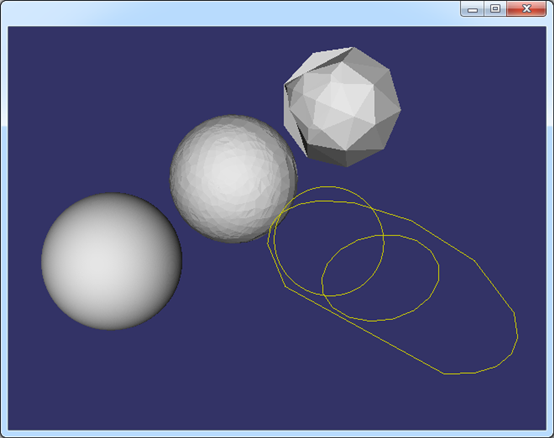
Figure 2.1 Edge and Face representation in OpenSceneGraph
从图中可知,离散精度越高,离散后得到线上的点或三角网格就越多,显示越细腻。
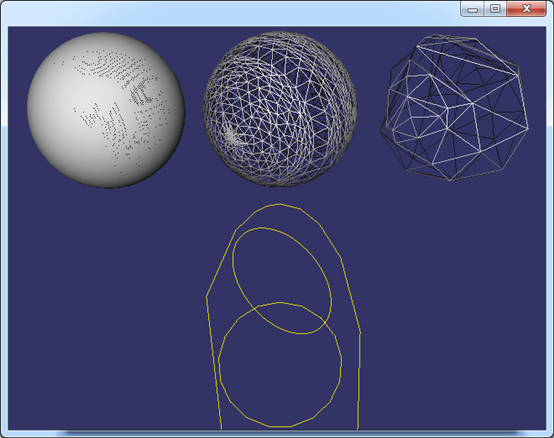
Figure 2.2 Edge and Face representation in OpenSceneGraph
其中,边的离散化使用到了类:GCPnts_TangentialDeflection;面的离散化使用到了类:BRepMesh_FastDiscret。有兴趣的读者可跟踪调试,理解其具体实现的算法。边的离散应该很好理解,面的离散使用了Delauney三角剖分算法。关于Delauney三角剖分算法的介绍可参考博客:http://www.cppblog.com/eryar/archive/2013/05/26/200605.aspx。
三、结论
通过把OpenCascade中的拓朴边和面离散化用OpenSceneGraph显示,填补了形状数学精确表示与在计算机屏幕上近似显示之间的隔阂。也有助于理解拓朴结构中包含几何数据的BRep_TFace、BRep_TEdge、BRep_TVertex中除了包含面、边的精确的参数表示数据外,还包含了用于近似显示的离散数据的意义。
四、参考资料
1. 博客:http://yrcpp.blog.163.com/blog/static/126045259201310199515969/
2. 博客:http://www.cppblog.com/eryar/archive/2013/05/26/200605.aspx
PDF Version: OpenCascade Shape Representation in OpenSceneGraph
OpenCascade Shape Representation in OpenSceneGraph的更多相关文章
- OpenCASCADE Shape Location
OpenCASCADE Shape Location eryar@163.com Abstract. The TopLoc package of OpenCASCADE gives resources ...
- Render OpenCascade Geometry Surfaces in OpenSceneGraph
在OpenSceneGraph中绘制OpenCascade的曲面 Render OpenCascade Geometry Surfaces in OpenSceneGraph eryar@163.co ...
- Render OpenCascade Geometry Curves in OpenSceneGraph
在OpenSceneGraph中绘制OpenCascade的曲线 Render OpenCascade Geometry Curves in OpenSceneGraph eryar@163.com ...
- Opencascade、OpenGL和OpenSceneGraph的区别与联系
OpenGL只是三维显示 Openscenegraph基于场景图的概念,它提供一个在OpenGL之上的面向对象的框架,从而能把开发者从实现和优化底层图形的调用中解脱出来 Opencascade更适合算 ...
- Representation Data in OpenCascade BRep
Representation Data in OpenCascade BRep eryar@163.com 摘要Abstract:现在的显示器大多数是光栅显示器,即可以看做一个像素的矩阵.在光栅显示器 ...
- Polynomial Library in OpenCascade
Polynomial Library in OpenCascade eryar@163.com 摘要Abstract:分析幂基曲线即多项式曲线在OpenCascade中的计算方法,以及利用OpenSc ...
- {ICIP2014}{收录论文列表}
This article come from HEREARS-L1: Learning Tuesday 10:30–12:30; Oral Session; Room: Leonard de Vinc ...
- Open Cascade DataExchange IGES
Open Cascade DataExchange IGES eryar@163.com 摘要Abstract:本文结合OpenCascade和Initial Graphics Exchange Sp ...
- CVPR2011录取结果
CVPR2011论文录取已经结束了,虽然论文都还没有在线公布出来,不过相信http://www.cvpapers.com/会很快有的.这里大体看一下结果统计与分析: At the end of the ...
随机推荐
- AsyncOperation变成同步的代码
template <typename TResult> TResult PerformSynchronously(Windows::Foundation::IAsyncOperation& ...
- Android中自定义checkbox样式
1.首先在drawable文件夹中添加drawable文件checkbox_style.xml.
- Junit3与Junit4的区别
Junit4最大的亮点就是引入了注解(annotation),通过解析注解就可以为测试提供相应的信息,抛弃junit3使用命名约束以及反射机制的方法. /** * 被测试类 */ package co ...
- 浅析C语言指针问题
首先明白c语言操作符的优先级及结合性就很容易理解了. 链接 1.关于char *s 及 char s[] char *s指向的是一个字符串对象的指针,可以理解为间接引用,比如 char *s = “1 ...
- iOS 时间戳的转换
在开发iOS程序时,有时候需要将时间格式调整成自己希望的格式,这个时候我们可以用NSDateFormatter类来处理.例如: //实例化一个NSDateFormatter对象 NSDateForma ...
- Linux Kernel 3.11.4/3.10.15/3.4.65/3.0.99
Linux 今天又发布了4个更新版本,分别是: 3.11.4 2013-10-05 [tar.xz] [pgp] [patch] [view patch] [view inc] [cgit] [cha ...
- centos 6.5 X64 安装 mongodb 2.6.1 (笔记 实测)
环境: 系统硬件:vmware vsphere (CPU:2*4核,内存2G) 系统版本:Centos-6.5-x86_64 *** Centos编译安装mongodb 2.6 系统最好是64位的,才 ...
- [Openwrt 项目开发笔记]:Openwrt平台搭建(一)
[Openwrt项目开发笔记]系列文章传送门:http://www.cnblogs.com/double-win/p/3888399.html 正文: 最近开始着手进行Openwrt平台的物联网网关设 ...
- Web Essentials之样式表StyleSheets
返回Web Essentials功能目录 本篇目录 智能感知 视觉提示 验证 Web标准 转换器 Web Essentials中大多数的CSS功能也适用于LESS. 智能感知 生成供应商特定的属性 如 ...
- Wix 安装部署教程(十) --来,用WPF做个漂亮的安装界面
在上一篇中曾留下两个问题,.Net捆绑安装不触发以及路径选择的问题现在都已经解决,这段时间花的最多的地方还是WPF调样式上面,奈何WPF功力不够,暂时还是没有达到自己想要的效果.另外ViewModel ...