
一步一步学Silverlight 2系列(24):与浏览器交互相关辅助方法
概述
Silverlight 2 Beta 1版本发布了,无论从Runtime还是Tools都给我们带来了很多的惊喜,如支持框架语言Visual Basic, Visual C#, IronRuby, Ironpython,对JSON、Web Service、WCF以及Sockets的支持等一系列新的特性。《一步一步学Silverlight 2系列》文章将从Silverlight 2基础知识、数据与通信、自定义控件、动画、图形图像等几个方面带您快速进入Silverlight 2开发。
本文是Silverlight 2与浏览器交互的最后一篇,将介绍相关的辅助类方法。
获取浏览器信息
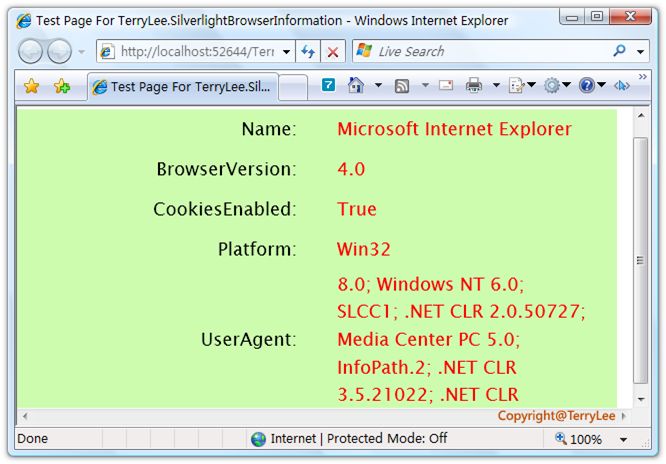
在Silverlight 2中提供了获取浏览器信息的一个类BrowserInformation,可供我们直接调用,如获取浏览器名称及浏览器版本,是否禁用Cookies等信息。做一个简单的示例,定义XAML如下:
<Grid x:Name="LayoutRoot" Background="#CDFCAE">

    <Grid.RowDefinitions>

        <RowDefinition Height="40"></RowDefinition>

        <RowDefinition Height="40"></RowDefinition>

        <RowDefinition Height="40"></RowDefinition>

        <RowDefinition Height="40"></RowDefinition>

        <RowDefinition Height="140"></RowDefinition>

    </Grid.RowDefinitions>

    <Grid.ColumnDefinitions>

        <ColumnDefinition Width="300"></ColumnDefinition>

        <ColumnDefinition Width="300"></ColumnDefinition>

    </Grid.ColumnDefinitions>

    <TextBlock Text="Name:" Style="{StaticResource title}"

               Grid.Row="0" Grid.Column="0"></TextBlock>

    <TextBlock x:Name="Name" Style="{StaticResource content}"

               Grid.Row="0" Grid.Column="1"></TextBlock>

    <TextBlock Text="BrowserVersion:" Style="{StaticResource title}"

               Grid.Row="1" Grid.Column="0"></TextBlock>

    <TextBlock x:Name="BrowserVersion" Style="{StaticResource content}"

               Grid.Row="1" Grid.Column="1"></TextBlock>

    <TextBlock Text="CookiesEnabled:" Style="{StaticResource title}"

               Grid.Row="2" Grid.Column="0"></TextBlock>

    <TextBlock x:Name="CookiesEnabled" Style="{StaticResource content}"

               Grid.Row="2" Grid.Column="1"></TextBlock>

    <TextBlock Text="Platform:" Style="{StaticResource title}"

               Grid.Row="3" Grid.Column="0"></TextBlock>

    <TextBlock x:Name="Platform" Style="{StaticResource content}"

               Grid.Row="3" Grid.Column="1"></TextBlock>

    <TextBlock Text="UserAgent:" Style="{StaticResource title}"

               Grid.Row="4" Grid.Column="0"></TextBlock>

    <TextBlock x:Name="UserAgent" Style="{StaticResource content}"

               Grid.Row="4" Grid.Column="1" TextWrapping="Wrap"></TextBlock>

</Grid>
在Loaded事件中获取相关信息:
private void UserControl_Loaded(object sender, RoutedEventArgs e)

{

    BrowserInformation browser = HtmlPage.BrowserInformation;

    Name.Text = browser.Name;

    BrowserVersion.Text = browser.BrowserVersion.ToString();

    CookiesEnabled.Text = browser.CookiesEnabled.ToString();

    Platform.Text = browser.Platform;

    UserAgent.Text = browser.UserAgent;

}
运行之后,如下图所示:
HttpUtility方法
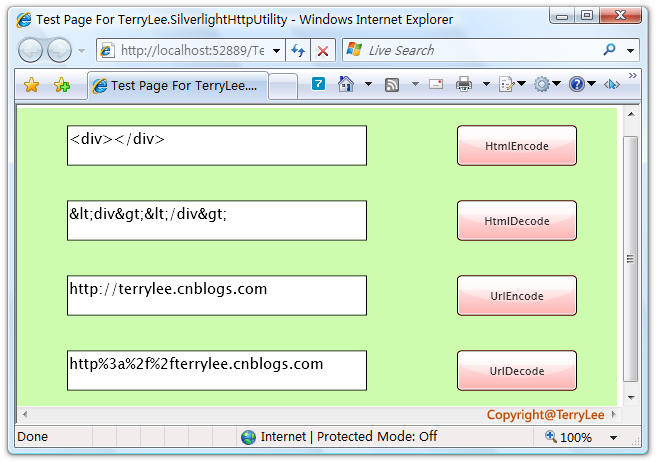
类似于WebForm开发中一样,在Silverlight 2中同样提供了一一些HttpUtility方法,共有四个HtmlEncode、HtmlDecode、UrlEncode、UrlDecode,看一个简单的例子:
<Grid x:Name="LayoutRoot" Background="#CDFCAE">

    <Grid.RowDefinitions>

        <RowDefinition Height="75"></RowDefinition>

        <RowDefinition Height="75"></RowDefinition>

        <RowDefinition Height="75"></RowDefinition>

        <RowDefinition Height="75"></RowDefinition>

    </Grid.RowDefinitions>

    <Grid.ColumnDefinitions>

        <ColumnDefinition Width="400"></ColumnDefinition>

        <ColumnDefinition Width="200"></ColumnDefinition>

    </Grid.ColumnDefinitions>

    <TextBox x:Name="txtHtmlEncode" Grid.Row="0" Grid.Column="0"

             Width="300" Height="40"></TextBox>

    <Button x:Name="btnHtmlEncode" Grid.Row="0" Grid.Column="1"

            Background="Red" Width="120" Height="40" Content="HtmlEncode"

            Click="btnHtmlEncode_Click"></Button>

    <TextBox x:Name="txtHtmlDecode" Grid.Row="1" Grid.Column="0"

             Width="300" Height="40"></TextBox>

    <Button x:Name="btnHtmlDecode" Grid.Row="1" Grid.Column="1"

            Background="Red" Width="120" Height="40" Content="HtmlDecode"

            Click="btnHtmlDecode_Click"></Button>

    <TextBox x:Name="txtUrlEncode" Grid.Row="2" Grid.Column="0"

             Width="300" Height="40"></TextBox>

    <Button x:Name="btnUrlEncode" Grid.Row="2" Grid.Column="1"

            Background="Red" Width="120" Height="40" Content="UrlEncode"

            Click="btnUrlEncode_Click"></Button>

    <TextBox x:Name="txtUrlDecode" Grid.Row="3" Grid.Column="0"

             Width="300" Height="40"></TextBox>

    <Button x:Name="btnUrlDecode" Grid.Row="3" Grid.Column="1"

            Background="Red" Width="120" Height="40" Content="UrlDecode"

            Click="btnUrlDecode_Click"></Button>

</Grid>
编写按钮处理事件:
private void btnHtmlEncode_Click(object sender, RoutedEventArgs e)

{

    this.txtHtmlDecode.Text = HttpUtility.HtmlEncode(this.txtHtmlEncode.Text);

}

private void btnHtmlDecode_Click(object sender, RoutedEventArgs e)

{

    this.txtHtmlEncode.Text = HttpUtility.HtmlDecode(this.txtUrlDecode.Text);

}

private void btnUrlEncode_Click(object sender, RoutedEventArgs e)

{

    this.txtUrlDecode.Text = HttpUtility.UrlEncode(this.txtUrlEncode.Text);

}

private void btnUrlDecode_Click(object sender, RoutedEventArgs e)

{

    this.txtUrlEncode.Text = HttpUtility.UrlDecode(this.txtUrlDecode.Text);

}
运行后测试如下:
结束语
本文简单介绍了Silverlight 2与浏览器交互的相关辅助类方法。
出处:http://terrylee.cnblogs.com
本文版权归作者和博客园共有,欢迎转载,但未经作者同意必须保留此段声明,且在文章页面明显位置给出原文连接,否则保留追究法律责任的权利。
一步一步学Silverlight 2系列(24):与浏览器交互相关辅助方法的更多相关文章
- 一步一步学Silverlight 2系列文章
概述 由TerryLee编写的<Silverlight 2完美征程>一书,已经上市,在该系列文章的基础上补充了大量的内容,敬请关注.官方网站:http://www.dotneteye.cn ...
- 一步一步学Silverlight 2系列(32):图形图像综合实例—“功夫之王”剧照播放
概述 Silverlight 2 Beta 1版本发布了,无论从Runtime还是Tools都给我们带来了很多的惊喜,如支持框架语言Visual Basic, Visual C#, IronRuby, ...
- 一步一步学Silverlight 2系列(31):图形图像综合实例—实现水中倒影效果
概述 Silverlight 2 Beta 1版本发布了,无论从Runtime还是Tools都给我们带来了很多的惊喜,如支持框架语言Visual Basic, Visual C#, IronRuby, ...
- 一步一步学Silverlight 2系列(30):使用Transform实现更炫的效果(下)
概述 Silverlight 2 Beta 1版本发布了,无论从Runtime还是Tools都给我们带来了很多的惊喜,如支持框架语言Visual Basic, Visual C#, IronRuby, ...
- 一步一步学Silverlight 2系列(29):使用Transform实现更炫的效果(上)
概述 Silverlight 2 Beta 1版本发布了,无论从Runtime还是Tools都给我们带来了很多的惊喜,如支持框架语言Visual Basic, Visual C#, IronRuby, ...
- 一步一步学Silverlight 2系列(28):图片处理
概述 Silverlight 2 Beta 1版本发布了,无论从Runtime还是Tools都给我们带来了很多的惊喜,如支持框架语言Visual Basic, Visual C#, IronRuby, ...
- 一步一步学Silverlight 2系列(27):使用Brush进行填充
概述 Silverlight 2 Beta 1版本发布了,无论从Runtime还是Tools都给我们带来了很多的惊喜,如支持框架语言Visual Basic, Visual C#, IronRuby, ...
- 一步一步学Silverlight 2系列(26):基本图形
概述 Silverlight 2 Beta 1版本发布了,无论从Runtime还是Tools都给我们带来了很多的惊喜,如支持框架语言Visual Basic, Visual C#, IronRuby, ...
- 一步一步学Silverlight 2系列(25):综合实例之Live Search
概述 Silverlight 2 Beta 1版本发布了,无论从Runtime还是Tools都给我们带来了很多的惊喜,如支持框架语言Visual Basic, Visual C#, IronRuby, ...
随机推荐
- *Codeforces989D. A Shade of Moonlight
数轴上$n \leq 100000$个不重叠的云,给坐标,长度都是$l$,有些云速度1,有些云速度-1,风速记为$w$,问在风速不大于$w_{max}$时,有几对云可能在0相遇.每一对云单独考虑. 多 ...
- C++函数传递指向指针的指针的应用
传递指向指针的引用假设我们想编写一个与前面交换两个整数的 swap 类似的函数,实现两个指针的交换.已知需用 * 定义指针,用 & 定义引用.现在,问题在于如何将这两个操作符结合起来以获得指向 ...
- 深入探究Java中hashCode()和equals()的关系
目录 一.基础:hashCode() 和 equals() 简介 equals() hashCode() 二. 漫谈:初识 hashCode() 与 equals() 之间的关系 三. 解密:深入理解 ...
- Jetson TK1 二:usb无线网卡的使用
一.总体是按照群里的文档“TK1连接无线网络”的步骤操作的,但也遇到了一些问题,如下: 1.自动配置设备并下载内核源代码到指定的目录下时(估计是解压时),出现时间超前之类的问题,原因是当前本地时间是几 ...
- 【Java TCP/IP Socket】应用程序协议中消息的成帧与解析(含代码)
程序间达成的某种包含了信息交换的形式和意义的共识称为协议,用来实现特定应用程序的协议叫做应用程序协议.大部分应用程序协议是根据由字段序列组成的离散信息定义的,其中每个字段中都包含了一段以位序列编码(即 ...
- Java常用的集合类(转)
继上一篇文章http://www.cnblogs.com/EasonJim/p/6937690.html中介绍的集合类有非常多,但是在实际使用中,最常用的应该是下面这几种: Java的集合框架分为Li ...
- [转] java中volatile关键字的含义
在java线程并发处理中,有一个关键字volatile的使用目前存在很大的混淆,以为使用这个关键字,在进行多线程并发处理的时候就可以万事大吉. Java语言是支持多线程的,为了解决线程并发的问题,在语 ...
- TFS2018 获取所有Build变量及变量值
添加一个Command Line 步骤,Tool设置为 cmd ,并设置参数为 /k set 注意:若在执行时出现如下报错信息,Tool的值改成 cmd.exe --20T02::.0416435Z ...
- Filter和Interceptor的终归作用还是从入口修改或验证请求进来的数据
Filter是Java EE标准.Inteceptor是Spring 标准. Filter在servlet前面,Interveptor在servlet之后 Filter和Inteceptor都可以改变 ...
- 反混淆:恢复被OLLVM保护的程序
译者序: OLLVM作为代码混淆的优秀开源项目,在国内主流app加固应用中也经常能看到它的身影,但是公开的分析研究资料寥寥.本文是Quarkslab团队技术博客中一篇关于反混淆的文章,对OLLVM项目 ...