
Python爬虫爬取1905电影网视频电影并存储到mysql数据库
数据获取方式:微信搜索关注【靠谱杨阅读人生】回复【电影】。
整理不易,资源付费,谢谢支持!
代码:
  1 import time

  2 import traceback

  3 import requests

  4 from lxml import etree

  5 import re

  6 from bs4 import BeautifulSoup

  7 from lxml.html.diff import end_tag

  8 import json

  9 import pymysql

 10

 11 def get1905():

 12     url='https://www.1905.com/vod/list/n_1/o3p1.html'

 13     headers={

 14         'User-Agent':'Mozilla/5.0 (Windows NT 10.0; Win64; x64) AppleWebKit/537.36 (KHTML, like Gecko) Chrome/90.0.4430.212 Safari/537.36'

 15     }

 16     templist=[]

 17     dataRes=[]

 18     #最热

 19     #1905电影网一共有99页,每页24部电影 for1-100 输出1-99页

 20     for i in range(1,100):

 21         url_1='https://www.1905.com/vod/list/n_1/o3p'

 22         auto=str(i)

 23         url_2='.html'

 24         url=url_1+auto+url_2

 25         print(url)

 26         response = requests.get(url, headers)

 27         response.encoding = 'utf-8'

 28         page_text = response.text

 29         soup = BeautifulSoup(page_text, 'lxml')

 30         # print(page_text)

 31         movie_all = soup.find_all('div', class_="grid-2x grid-3x-md grid-6x-sm")

 32         for single in movie_all:

 33             part_html=str(single)

 34             part_soup=BeautifulSoup(part_html,'lxml')

 35             #添加名字

 36             name=part_soup.find('a')['title']

 37             templist.append(name)

 38             # print(name)

 39             #添加评分

 40             try:

 41                 score=part_soup.find('i').text

 42             except:

 43                 if(len(score)==0):

 44                     score="1905暂无评分"

 45             templist.append(score)

 46             # print(score)

 47             #添加path

 48             path=part_soup.find('a',class_="pic-pack-outer")['href']

 49             templist.append(path)

 50             # print(path)

 51             #添加state

 52             state="免费"

 53             templist.append(state)

 54             print(templist)

 55             dataRes.append(templist)

 56             templist=[]

 57         print(len(dataRes))

 58     # print(movie_all)

 59

 60     #---------------------------------------------

 61     #好评

 62     templist = []

 63     # 1905电影网一共有99页,每页24部电影 for1-100 输出1-99页

 64     for i in range(1, 100):

 65         url_1 = 'https://www.1905.com/vod/list/n_1/o4p'

 66         auto = str(i)

 67         url_2 = '.html'

 68         url = url_1 + auto + url_2

 69         print(url)

 70         response = requests.get(url, headers)

 71         response.encoding = 'utf-8'

 72         page_text = response.text

 73         soup = BeautifulSoup(page_text, 'lxml')

 74         # print(page_text)

 75         movie_all = soup.find_all('div', class_="grid-2x grid-3x-md grid-6x-sm")

 76         for single in movie_all:

 77             part_html = str(single)

 78             part_soup = BeautifulSoup(part_html, 'lxml')

 79             # 添加名字

 80             name = part_soup.find('a')['title']

 81             templist.append(name)

 82             # print(name)

 83             # 添加评分

 84             try:

 85                 score = part_soup.find('i').text

 86             except:

 87                 if (len(score) == 0):

 88                     score = "1905暂无评分"

 89             templist.append(score)

 90             # print(score)

 91             # 添加path

 92             path = part_soup.find('a', class_="pic-pack-outer")['href']

 93             templist.append(path)

 94             # print(path)

 95             # 添加state

 96             state = "免费"

 97             templist.append(state)

 98             print(templist)

 99             dataRes.append(templist)

100             templist = []

101         print(len(dataRes))

102         #---------------------------------------------

103         # 最新

104         templist = []

105         # 1905电影网一共有99页,每页24部电影 for1-100 输出1-99页

106     for i in range(1, 100):

107         url_1 = 'https://www.1905.com/vod/list/n_1/o1p'

108         auto = str(i)

109         url_2 = '.html'

110         url = url_1 + auto + url_2

111         print(url)

112         response = requests.get(url, headers)

113         response.encoding = 'utf-8'

114         page_text = response.text

115         soup = BeautifulSoup(page_text, 'lxml')

116         # print(page_text)

117         movie_all = soup.find_all('div', class_="grid-2x grid-3x-md grid-6x-sm")

118         for single in movie_all:

119             part_html = str(single)

120             part_soup = BeautifulSoup(part_html, 'lxml')

121             # 添加名字

122             name = part_soup.find('a')['title']

123             templist.append(name)

124             # print(name)

125             # 添加评分

126             try:

127                 score = part_soup.find('i').text

128             except:

129                 if (len(score) == 0):

130                     score = "1905暂无评分"

131             templist.append(score)

132             # print(score)

133             # 添加path

134             path = part_soup.find('a', class_="pic-pack-outer")['href']

135             templist.append(path)

136             # print(path)

137             # 添加state

138             state = "免费"

139             templist.append(state)

140             print(templist)

141             dataRes.append(templist)

142             templist = []

143         print(len(dataRes))

144     #去重

145     old_list = dataRes

146     new_list = []

147     for i in old_list:

148         if i not in new_list:

149             new_list.append(i)

150             print(len(new_list))

151     print("总数:     "+str(len(new_list)))

152     return new_list

153 def insert_1905():

154     cursor = None

155     conn = None

156     try:

157         count = 0

158         list = get1905()

159         print(f"{time.asctime()}开始插入1905电影数据")

160         conn, cursor = get_conn()

161         sql = "insert into movie1905 (id,name,score,path,state) values(%s,%s,%s,%s,%s)"

162         for item in list:

163             print(item)

164             # 异常捕获,防止数据库主键冲突

165             try:

166                 cursor.execute(sql, [0, item[0], item[1], item[2], item[3]])

167             except pymysql.err.IntegrityError:

168                 print("重复!跳过!")

169         conn.commit()  # 提交事务 update delete insert操作

170         print(f"{time.asctime()}插入1905电影数据完毕")

171     except:

172         traceback.print_exc()

173     finally:

174         close_conn(conn, cursor)

175     return;

176

177 #连接数据库  获取游标

178 def get_conn():

179     """

180     :return: 连接,游标

181     """

182     # 创建连接

183     conn = pymysql.connect(host="127.0.0.1",

184                     user="root",

185                     password="000429",

186                     db="movierankings",

187                     charset="utf8")

188     # 创建游标

189     cursor = conn.cursor()  # 执行完毕返回的结果集默认以元组显示

190     if ((conn != None) & (cursor != None)):

191         print("数据库连接成功!游标创建成功!")

192     else:

193         print("数据库连接失败!")

194     return conn, cursor

195 #关闭数据库连接和游标

196 def close_conn(conn, cursor):

197     if cursor:

198         cursor.close()

199     if conn:

200         conn.close()

201     return 1

202

203 if __name__ == '__main__':

204     # get1905()

205     insert_1905()
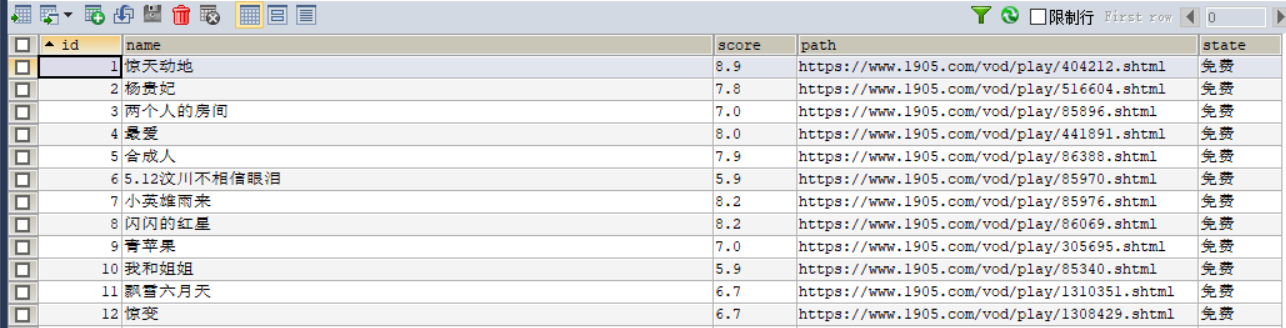
运行截图:

数据库
Python爬虫爬取1905电影网视频电影并存储到mysql数据库的更多相关文章
- Python爬虫爬取BT之家找电影资源
一.写在前面 最近看新闻说圣城家园(SCG)倒了,之前BT天堂倒了,暴风影音也不行了,可以说看个电影越来越费力,国内大厂如企鹅和爱奇艺最近也出现一些幺蛾子,虽然目前版权意识虽然越来越强,但是很多资源在 ...
- 如何利用python爬虫爬取爱奇艺VIP电影?
环境:windows python3.7 思路: 1.先选取你要爬取的电影 2.用vip解析工具解析,获取地址 3.写好脚本,下载片断 4.将片断利用电脑合成 需要的python模块: ##第一 ...
- Python爬虫---爬取抖音短视频
目录 前言 抖音爬虫制作 选定网页 分析网页 提取id构造网址 拼接数据包链接 获取视频地址 下载视频 全部代码 实现结果 待解决的问题 前言 最近一直想要写一个抖音爬虫来批量下载抖音的短视频,但是经 ...
- python爬虫–爬取煎蛋网妹子图片
前几天刚学了python网络编程,书里没什么实践项目,只好到网上找点东西做. 一直对爬虫很好奇,所以不妨从爬虫先入手吧. Python版本:3.6 这是我看的教程:Python - Jack -Cui ...
- Python 爬虫 爬取 煎蛋网 图片
今天, 试着爬取了煎蛋网的图片. 用到的包: urllib.request os 分别使用几个函数,来控制下载的图片的页数,获取图片的网页,获取网页页数以及保存图片到本地.过程简单清晰明了 直接上源代 ...
- python爬虫爬取煎蛋网妹子图片
import urllib.request import os def url_open(url): req = urllib.request.Request(url) req.add_header( ...
- Python爬虫训练:爬取酷燃网视频数据
前言 本文的文字及图片来源于网络,仅供学习.交流使用,不具有任何商业用途,版权归原作者所有,如有问题请及时联系我们以作处理 项目目标 爬取酷燃网视频数据 https://krcom.cn/ 环境 Py ...
- 利用Python网络爬虫爬取学校官网十条标题
利用Python网络爬虫爬取学校官网十条标题 案例代码: # __author : "J" # date : 2018-03-06 # 导入需要用到的库文件 import urll ...
- 用Python爬虫爬取广州大学教务系统的成绩(内网访问)
用Python爬虫爬取广州大学教务系统的成绩(内网访问) 在进行爬取前,首先要了解: 1.什么是CSS选择器? 每一条css样式定义由两部分组成,形式如下: [code] 选择器{样式} [/code ...
- Python爬虫爬取全书网小说,程序源码+程序详细分析
Python爬虫爬取全书网小说教程 第一步:打开谷歌浏览器,搜索全书网,然后再点击你想下载的小说,进入图一页面后点击F12选择Network,如果没有内容按F5刷新一下 点击Network之后出现如下 ...
随机推荐
- 问题处理:java.sql.SQLException: Value '0000-00-00 00:00:00' can not be represented as java.sql.Timestamp
问题说明 今天跑spring boot项目,在查看列表数据时后台抛异常了,一看是这玩意: 问题原因 "0000-00-00 00:00:00"在mysql中是作为一个特殊值存在的但 ...
- Maven如何打包可执行jar包
假设我有一个maven项目叫:hello-world 新建一个HelloWorld类: package com.dylan.mvnbook.helloworld; public class Hello ...
- 【Android逆向】IDA动态调试JNI_OnLoad 和 .init_array
由于 JNI_OnLoad 和 .init_array 执行时间很早,so一加载到内存中就执行了,所以动态调试步骤会稍微要麻烦一些 1. 进入手机, 执行./android_server (如果是64 ...
- 一个自定义可扩展的检测变量的函数typeofIt();
自定义方法typeofIt()是用来判断传入的变量或属性是什么类型的; 1.如果是基础类型变量则返回代表基础变量类型小写格式的字符串及一些简易说明; 2.如果是对象类型变量则返回结尾带有"O ...
- java基础字符串---02
String 概述 String类在java.lang包下,所以使用的时候不需要导包 String类代表字符串,java程序中的所有字符串文字(例如"abc")都被实现为此类的实例 ...
- NebulaGraph v3.3.0 发布:支持子图过滤、和大量性能优化
NebulaGraph 3.3.0 支持了 GET SUBGRAPH 和 GetNeighbors 的点过滤.引入了大量性能优化,同时,开始对无 tag 顶点的支持默认关闭. 优化 优化了 k-hop ...
- 用 NetworkX + Gephi + Nebula Graph 分析<权力的游戏>人物关系(下篇)
在上一篇[1]中,我们通过 NetworkX 和 Gephi 展示了<权力的游戏>中的人物关系.在本篇中,我们将展示如何通过 NetworkX 访问图数据库 Nebula Graph. N ...
- Glide源码解析四(解码和转码)
本文基于Glide 4.11.0 Glide加载过程有一个解码过程,比如将url加载为inputStream后,要将inputStream解码为Bitmap. 从Glide源码解析一我们大致知道了Gl ...
- 好用网址分享-77ai导航与77搜索导航
AI(人工智能)技术正在改变我们的生活方式和工作方式,越来越多的人开始关注和使用AI相关的网站和应用程序.在这篇文章中,我将为大家介绍一些常用的AI网址导航,帮助您更好地了解和使用AI技术. AI H ...
- Java 递归方法的使用 + 例子
1 /* 2 * 递归方法的使用 3 * 1.递归方法:一个方法体内调用它自身 4 * 2.方法递归包含了一种隐式的循环,它会重复执行某段代码,但这种重复执行无须循环控制 5 * 递归一定要想已知方向 ...