
[游戏模版7] Win32 最简单贴图
>_<:this is the first using mapping.
>_<:There will be introducing how to do:
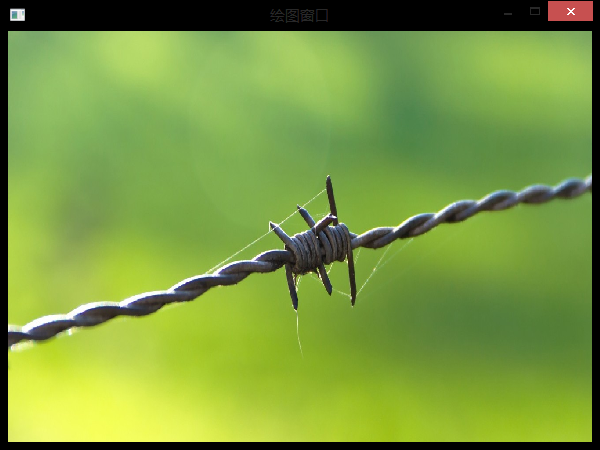
- First load bitmap picture return handle give hbmp, as following:
- hbmp=(HBITMAP)LoadImage(NULL,"bg.bmp",IMAGE_BITMAP,600,450,LR_LOADFROMFILE);
- there "bg.bmp" must put in the project folder!
- Second if you want draw this picture in the window,I suggest you should create a CompatibleDC, maybe now you don't know why do this, the reason is also hard to explane. You just remember doing is better for showing many pictures reducing Flash.
- hdc=GetDC(hWnd);
- mdc=CreateCompatibleDC(hdc);
- Third when you finish upper two steps, you can use SelectObject(mdc,hbmp); give the picture to CompatibleDC mdc
- Finally just use BitBlt(hdc,0,0,600,450,mdc,0,0,SRCCOPY); copy mdc including to hdc to show in the window.
 //{{NO_DEPENDENCIES}}

 // Microsoft Visual C++ generated include file.

 // Used by FE.RC

 //

 #define IDR_MAINFRAME                    128

 #define IDD_FE_DIALOG        102

 #define IDD_ABOUTBOX                    103

 #define IDS_APP_TITLE                    103

 #define IDM_ABOUT                        104

 #define IDM_EXIT                        105

 #define IDS_HELLO                        106

 #define IDI_FE                107

 #define IDI_SMALL                        108

 #define IDC_FE                109

 #define IDC_MYICON                        2

 #define IDC_STATIC                        -1

 // Next default values for new objects

 //

 #ifdef APSTUDIO_INVOKED

 #ifndef APSTUDIO_READONLY_SYMBOLS

 #define _APS_NEXT_RESOURCE_VALUE        129

 #define _APS_NEXT_COMMAND_VALUE         32771

 #define _APS_NEXT_CONTROL_VALUE         1000

 #define _APS_NEXT_SYMED_VALUE           110

 #endif

 #endif
resourse.h
 // stdafx.h : include file for standard system include files,

 //  or project specific include files that are used frequently, but

 //      are changed infrequently

 //

 #if !defined(AFX_STDAFX_H__A9DB83DB_A9FD_11D0_BFD1_444553540000__INCLUDED_)

 #define AFX_STDAFX_H__A9DB83DB_A9FD_11D0_BFD1_444553540000__INCLUDED_

 #if _MSC_VER > 1000

 #pragma once

 #endif // _MSC_VER > 1000

 #define WIN32_LEAN_AND_MEAN        // Exclude rarely-used stuff from Windows headers

 // Windows Header Files:

 #include <windows.h>

 // C RunTime Header Files

 #include <stdlib.h>

 #include <malloc.h>

 #include <memory.h>

 #include <tchar.h>

 // Local Header Files

 // TODO: reference additional headers your program requires here

 //{{AFX_INSERT_LOCATION}}

 // Microsoft Visual C++ will insert additional declarations immediately before the previous line.

 #endif // !defined(AFX_STDAFX_H__A9DB83DB_A9FD_11D0_BFD1_444553540000__INCLUDED_)
StdAfx.h
main.cpp
 #include "stdafx.h"

 #include "resourse.h"

 #define MAX_LOADSTRING 100

 // Global Variables:

 HINSTANCE hInst;                                // current instance

 TCHAR szTitle[MAX_LOADSTRING];                                // The title bar text

 TCHAR szWindowClass[MAX_LOADSTRING];                                // The title bar text

 HBITMAP hbmp;

 HDC mdc;

 // Foward declarations of functions included in this code module:

 ATOM                MyRegisterClass(HINSTANCE hInstance);

 BOOL                InitInstance(HINSTANCE, int);

 LRESULT CALLBACK    WndProc(HWND, UINT, WPARAM, LPARAM);

 LRESULT CALLBACK    About(HWND, UINT, WPARAM, LPARAM);

 void                MyPaint(HDC hdc);

 //========================================================================================

 int APIENTRY WinMain(HINSTANCE hInstance,

                      HINSTANCE hPrevInstance,

                      LPSTR     lpCmdLine,

                      int       nCmdShow)

 {

      // TODO: Place code here.

     MSG msg;

     MyRegisterClass(hInstance);//调用函数向系统注册窗口类别,输入参数hInstance是目前运行程序的对象代码;

     // 调用InitInstance函数,进行初始化操作;

     if (!InitInstance (hInstance, nCmdShow))

     {

         return FALSE;

     }

     // 消息循环(通过消息循环来获取信息,

     //进行必要的键盘信息转换而后将控制权交给操作系统,

     //有操作系统决定哪个程序的消息处理函数处理消息

     while (GetMessage(&msg, NULL, , )) //获取程序消息

     {

             TranslateMessage(&msg);//转换伪码及字符

             DispatchMessage(&msg);//将控制权交给系统,再有系统决定负责处理消息的程序;

     }

     return msg.wParam;

 }

 //=====================================================================================

 //=============================================================================================

 //在建立程序窗口实体之前,必须先定义一个窗口类别,其中包含所要建立窗口的信息,

 //并向系统注册,这里的MyRegisterClass函数就是进行定义及注册窗口类别的函数。

 //==============================================================================================

 ATOM MyRegisterClass(HINSTANCE hInstance)

 {

     WNDCLASSEX wcex;            //申请一个窗口类别“WNDCLASSEX”和结构”wcex“

                                 //--------------------------------------------------------------

                                 //定义vcex结构的各项信息,其中设定信息处理函数(lpfnWndProc)

                                 //为WNDPROC,类别名称为(lpszClassName)为”fe";

                                 //--------------------------------------------------------------

     wcex.cbSize = sizeof(WNDCLASSEX);

     wcex.style            = CS_HREDRAW | CS_VREDRAW;

     wcex.lpfnWndProc    = (WNDPROC)WndProc;

     wcex.cbClsExtra        = ;

     wcex.cbWndExtra        = ;

     wcex.hInstance        = hInstance;

     wcex.hIcon            = NULL;

     wcex.hCursor        = NULL;

     wcex.hCursor        = LoadCursor(NULL,IDC_ARROW);

     wcex.hbrBackground    = (HBRUSH)(COLOR_WINDOW+);

     wcex.lpszMenuName    = NULL;

     wcex.lpszClassName    = "fe";

     wcex.hIconSm        = NULL;

     return RegisterClassEx(&wcex);//调用RegisterClassEx函数注册类别,返回一个“ATOM"形态的字符串

                                   //此字符串即为类别名称”fe";

 }

 //============================================================================================

 //============================================================================================

 //按照前面所定义的窗口类别来建立并显示实际的程序窗口

 //============================================================================================

 BOOL InitInstance(HINSTANCE hInstance, int nCmdShow)

 {

    HWND hWnd;

    HDC hdc;

    hInst = hInstance; // 把instance handle 储存在全局变量中;

    hWnd = CreateWindow("fe","绘图窗口",WS_OVERLAPPEDWINDOW,

       CW_USEDEFAULT, , CW_USEDEFAULT, , NULL, NULL, hInstance, NULL);

                       //-----------------------------------------------

                       //调用CreateWindow函数来建立一个窗口对象

                       //第一个参数就是窗口建立依据的类别名称

                       //-----------------------------------------------

    if (!hWnd)

    {

       return FALSE;

    }

    //------------------------------------------------

    //设定窗口的位置及窗口的大小,然后绘制显示在设备上

    //-------------------------------------------------

    MoveWindow(hWnd,,,,,true);//位置及大小

    ShowWindow(hWnd, nCmdShow);//改定窗口显示时的状态

    UpdateWindow(hWnd);//将窗口绘制在显示设备上

    hdc=GetDC(hWnd);

    mdc=CreateCompatibleDC(hdc);

    hbmp=(HBITMAP)LoadImage(NULL,"bg.bmp",IMAGE_BITMAP,,,LR_LOADFROMFILE);

    //名、类型、大小、加载方式;

    SelectObject(mdc,hbmp);

    MyPaint(hdc);

    ReleaseDC(hWnd,hdc);

    return TRUE;

 }

 //============================================================================================

 //============================================================================================

 //绘图函数,初始化函数中将图片已经放在mdc中了,现在将mdc再贴在窗口DC上

 //============================================================================================

 void MyPaint(HDC hdc)

 {

     BitBlt(hdc,,,,,mdc,,,SRCCOPY);//在窗口位置、大小、原图剪切位

 }

 //============================================================================================

 //============================================================================================

 //在前面定义类别的时候把WndProc定义为消息处理函数(当某些外部消息发生时,会按消息的类型

 //来决定该如何进行处理。此外该函数也是一个回叫函数(CALLBACK)(windows系统函数)每一个

 //程序都会接收信息,选择性接受、处理;

 //============================================================================================

 LRESULT CALLBACK WndProc(HWND hWnd, UINT message, WPARAM wParam, LPARAM lParam)

 {

     PAINTSTRUCT ps;

     HDC hdc;

     switch (message)                   //判断消息类型

     {

         case WM_PAINT:                //窗口重绘制

             hdc = BeginPaint(hWnd, &ps);

             MyPaint(hdc);

             EndPaint(hWnd, &ps);

             break;

         case WM_DESTROY:              //处理窗口结束消息

             DeleteDC(mdc);

             DeleteObject(hbmp);

             PostQuitMessage();

             break;

         default:

             return DefWindowProc(hWnd, message, wParam, lParam);

    }

    return ;

 }

 //============================================================================================
[游戏模版7] Win32 最简单贴图的更多相关文章
- [游戏模版10] Win32 平面地图贴图 正
>_<:picture resource >_<:If you master the ways of mapping picture,then this problem is ...
- [游戏模版13] Win32 透明贴图 主角移动
>_<:just add previous two ways to achieve this new result // stdafx.h : include file for stand ...
- [游戏模版8] Win32 透明贴图
>_<:The same with previous introduction. In the InitInstance fanction make a little change: &g ...
- [游戏模版2] Win32最小框架
>_<:Just the minimum Win32 frame don't have any other special function. //{{NO_DEPENDENCIES}} ...
- [游戏模版12] Win32 稳定定时
>_<:The last time,we learned how to use timer to make the picture run and change show,but some ...
- [游戏模版14] Win32 键盘控制
>_<:compared with the previous article,this one only adds key-message listener. >_<:up d ...
- [游戏模版15] Win32 飞机射击
>_<:Only give you the code,try to understand it! >_<:picture resource #include <windo ...
- [游戏模版16] Win32 飞机射击 敌人追踪
>_<:AI introduction. >_<:According the plane position (nowX,nowY) relative to birds' pos ...
- [游戏模版17] Win32 推箱子 迷宫
>_<:Here introduce a simple game: >_<:resource >_<:only can push a box and finally ...
随机推荐
- Eclipse相关设置
eclipse 默认设置的换行长度, 格式化代码后,同一个方法里面参数也经常被,换行,非常难看. 1.Java代码打开Eclipse的Window菜单,然后 Preferences->Java- ...
- 计算机病毒实践汇总二:bufferzone沙盘使用体验
在尝试学习分析的过程中,判断结论不一定准确,只是一些我自己的思考和探索.敬请批评指正! 1. 安装bufferzone及其简单使用 (1)安装BufferZone BufferZone的msi安装文件 ...
- 使用max() 函数
/********************************* 代码功能:使用串口输出a和b的最大值 使用函数:max(a,b); 创作时间:2016*11*04 作者邮箱:jikexianfe ...
- notepad++对systemverilog的支持
找到notepad++根目录中的"langs.xml",用notepad++打开,并搜索"verilog", 找到后,修改后面那句话为ext=" ...
- display 显示隐藏 ESAYuI
$("#rejectCauseDisplay").css('display',"block"); $("#rejectCauseDisplay ...
- 浅析Java内存模型
概述 Java内存模型的主要目标是定义程序中各个变量的访问规则,即在虚拟机中将变量存储到内存和从内存中取出变量这样的底层细节.此处的变量是线程共享的,存在竞争问题的. Java内存模型规定了所有的变量 ...
- 杀死你网站SEO的5个技术
胡亮亮先生(网迈SEO总监)在其微信公众帐号里发布了文章<杀死你网站SEO的5个技术>,发出来给大家分享一下: 应百度站长平台邀请,抽空把这篇文章做一些细节上的补充 ,欢迎大家关注并讨论. ...
- Observer设计模式中-委托事件-应用在消息在窗体上显示
Observer设计模式:监视者模式.在类中的方法中处理的结果或者消息通过事件委托 的方式发送给主窗体. 因为在其它类中直接访问主窗体类,显示内容是不能直接调用控件赋值的,当然也有别的类似查阅控件名, ...
- .net mvc 微信支付
一.微信第三方登录 通过微信打开链接:http://www.hzm.com/Entry/Login 微信OAuth2.0授权登录目前支持authorization_code模式,适用于拥有server ...
- 【Java】XML解析之SAX
SAX介绍 SAX(Simple API for XML)是一种事件驱动的流式XML文件处理方式,区别与DOM方式的是不需要在内存中建一棵DOM树,而是根据读取XML时遇到的标签事件来顺序处理,因此具 ...