
Spring Cloud Gateway实战之五:内置filter
欢迎访问我的GitHub
https://github.com/zq2599/blog_demos
内容:所有原创文章分类汇总及配套源码,涉及Java、Docker、Kubernetes、DevOPS等;
本篇概览
- 作为《Spring Cloud Gateway实战》系列的第五篇,是时候了解过滤器(filter)的作用了,本篇咱们一起来了解Spring Cloud Gateway内置好的过滤器,真是种类繁多功能强大
AddRequestHeader
- AddRequestHeader过滤器顾名思义,就是在请求头部添加指定的内容
- 带有predicate的完整配置:
server:

  #服务端口

  port: 8081

spring:

  application:

    name: hello-gateway

  cloud:

    gateway:

      routes:

        - id: path_route

          uri: http://127.0.0.1:8082

          predicates:

            - Path=/hello/**

          filters:

            - AddRequestHeader=x-request-foo, bar-config
- 带有predicate的完整动态配置:
[

    {

        "id": "path_route_addr",

        "uri": "http://127.0.0.1:8082",

        "predicates": [

            {

                "name": "Path",

                "args": {

                    "pattern": "/hello/**"

                }

            }

        ],

        "filters": [

            {

                "name": "AddRequestHeader",

                "args": {

                    "name": "x-request-foo",

                    "value": "bar-dynamic"

                }

            }

        ]

    }

]
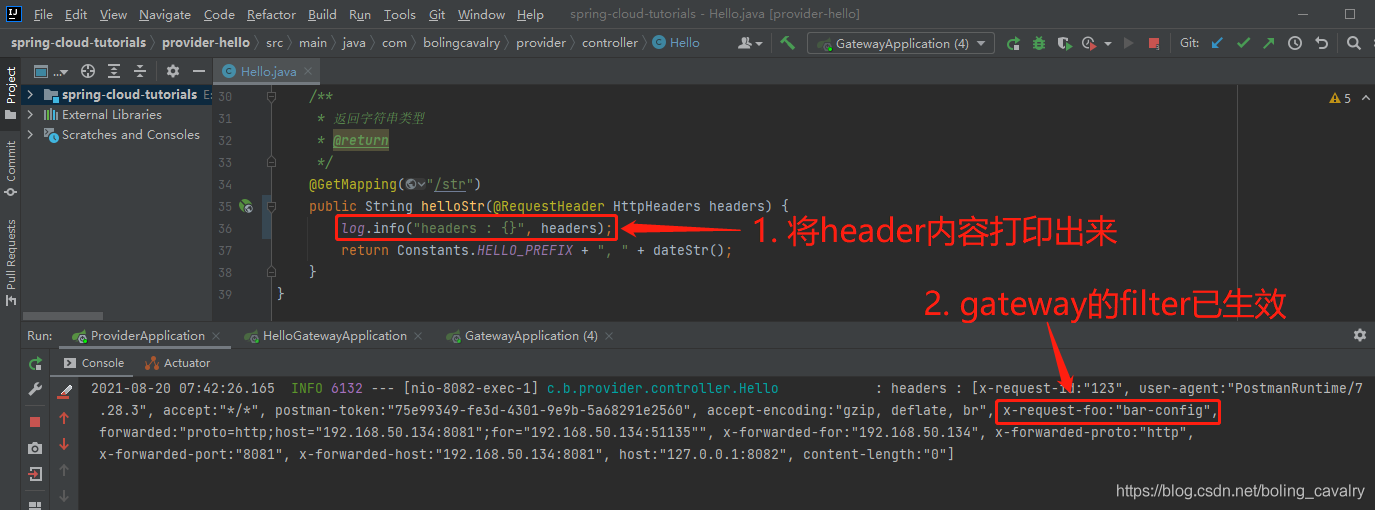
- 实际效果:
AddRequestParameter
AddRequestParameter过滤器顾名思义,就是添加请求参数
配置如下,服务提供方收到的请求中会多一个参数,名为foo,值为bar-config:
server:

  #服务端口

  port: 8081

spring:

  application:

    name: hello-gateway

  cloud:

    gateway:

      routes:

        - id: path_route

          uri: http://127.0.0.1:8082

          predicates:

            - Path=/hello/**

          filters:

            - AddRequestParameter=foo, bar-config
- 带有predicate的完整动态配置:
[

    {

        "id": "path_route_addr",

        "uri": "http://127.0.0.1:8082",

        "predicates": [

            {

                "name": "Path",

                "args": {

                    "pattern": "/hello/**"

                }

            }

        ],

        "filters": [

            {

                "name": "AddRequestParameter",

                "args": {

                    "name": "foo",

                    "value": "bar-dynamic"

                }

            }

        ]

    }

]
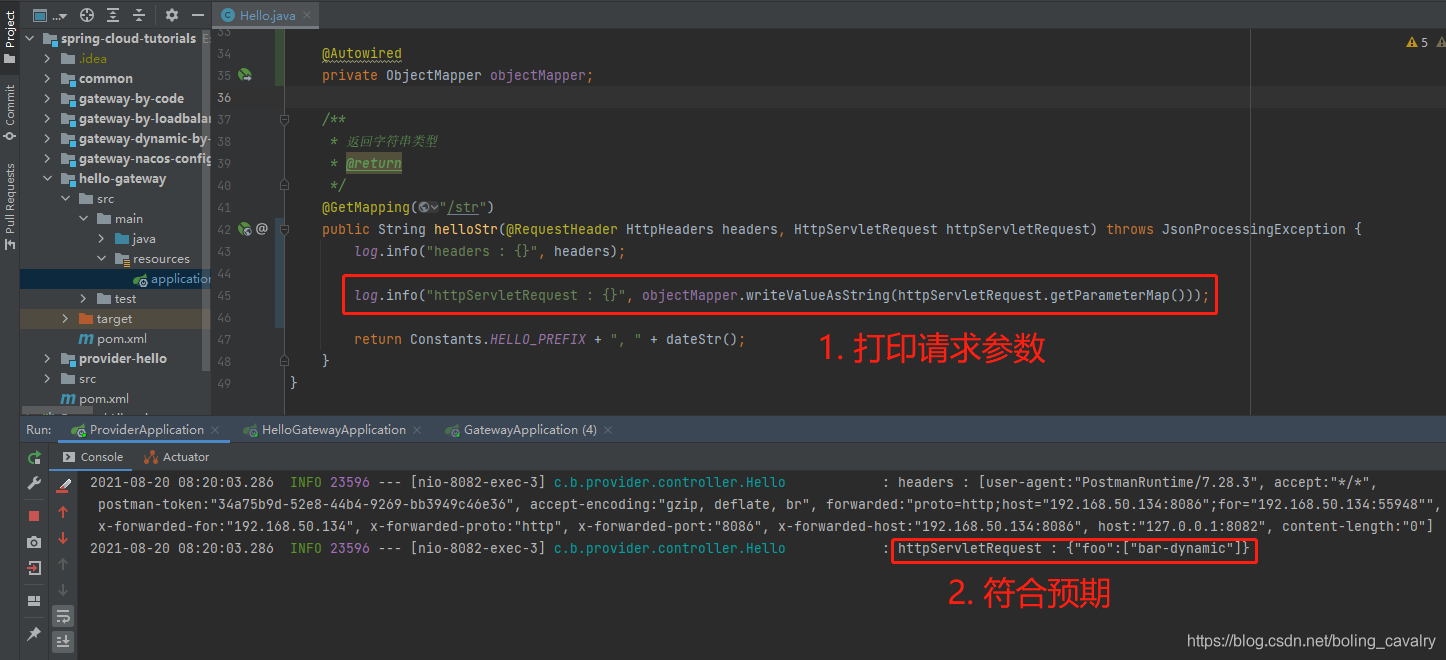
- 实际效果:
AddResponseHeader
AddResponseHeader过滤器就是在响应的header中添加参数
配置如下,客户端收到的响应,其header中会多一个参数,名为foo,值为bar-config-response:
server:

  #服务端口

  port: 8081

spring:

  application:

    name: hello-gateway

  cloud:

    gateway:

      routes:

        - id: path_route

          uri: http://127.0.0.1:8082

          predicates:

          - Path=/hello/**

          filters:

          - AddResponseHeader=foo, bar-config-response
- 带有predicate的完整动态配置:
[

    {

        "id": "path_route_addr",

        "uri": "http://127.0.0.1:8082",

        "predicates": [

            {

                "name": "Path",

                "args": {

                    "pattern": "/hello/**"

                }

            }

        ],

        "filters": [

            {

                "name": "AddResponseHeader",

                "args": {

                    "name": "foo",

                    "value": "bar-dynamic-response"

                }

            }

        ]

    }

]
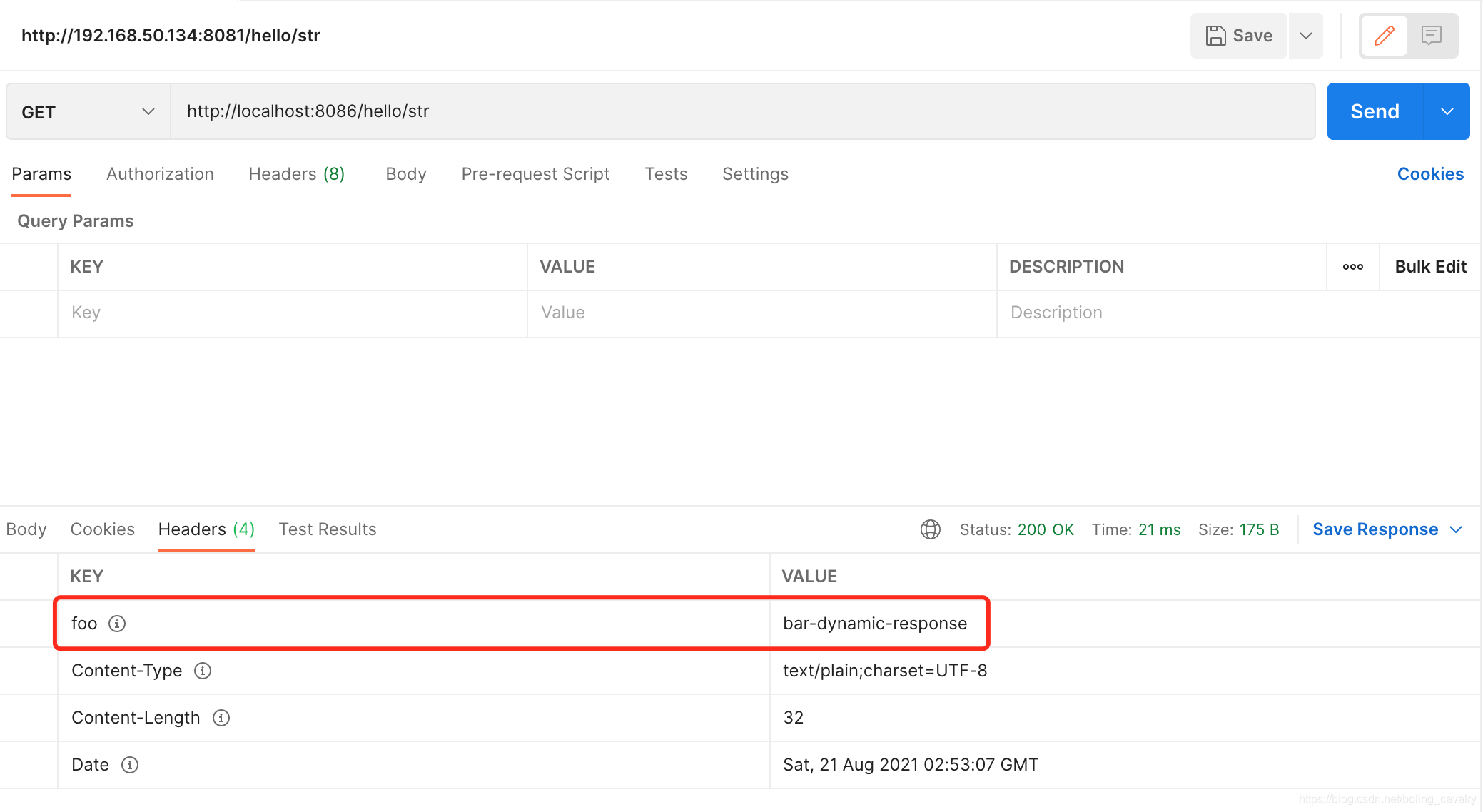
- 实际效果:
DedupeResponseHeader
服务提供方返回的response的header中,如果有的key出线了多个value(例如跨域场景下的Access-Control-Allow-Origin),DedupeResponseHeader过滤器可以将重复的value剔除调,剔除策略有三种:RETAIN_FIRST (保留第一个,默认), RETAIN_LAST(保留最后一个), RETAIN_UNIQUE(去重)
配置如下,指定了两个header key的去重,策略是保留最后一个:
server:

  #服务端口

  port: 8081

spring:

  application:

    name: hello-gateway

  cloud:

    gateway:

      routes:

        - id: path_route

          uri: http://127.0.0.1:8082

          predicates:

          - Path=/hello/**

          filters:

          - DedupeResponseHeader=Access-Control-Allow-Credentials Access-Control-Allow-Origin, RETAIN_LAST
DedupeResponseHeader
服务提供方返回的response的header中,如果有的key出线了多个value(例如跨域场景下的Access-Control-Allow-Origin),DedupeResponseHeader过滤器可以将重复的value剔除调,剔除策略有三种:RETAIN_FIRST (保留第一个,默认), RETAIN_LAST(保留最后一个), RETAIN_UNIQUE(去重)
配置如下,指定了两个header key的去重,策略是保留最后一个:
server:

  #服务端口

  port: 8081

spring:

  application:

    name: hello-gateway

  cloud:

    gateway:

      routes:

        - id: path_route

          uri: http://127.0.0.1:8082

          predicates:

          - Path=/hello/**

          filters:

          - DedupeResponseHeader=Access-Control-Allow-Credentials Access-Control-Allow-Origin, RETAIN_LAST
CircuitBreaker
- CircuitBreaker即断路器,咱们在单独的一篇中深入体验这个强大的功能吧
FallbackHeaders
- FallbackHeaders一般和CircuitBreaker配合使用,来看下面的配置,发生断路后,请求会被转发FallbackHeaders去处理,此时FallbackHeaders会在header中指定的key上添加异常信息:
spring:

  cloud:

    gateway:

      routes:

      - id: ingredients

        uri: lb://ingredients

        predicates:

        - Path=//ingredients/**

        filters:

        - name: CircuitBreaker

          args:

            name: fetchIngredients

            fallbackUri: forward:/fallback

      - id: ingredients-fallback

        uri: http://localhost:9994

        predicates:

        - Path=/fallback

        filters:

        - name: FallbackHeaders

          args:

            executionExceptionTypeHeaderName: Test-Header
MapRequestHeader
MapRequestHeader用于header中的键值对复制,如下配置的意思是:如果请求header中有Blue就新增名为X-Request-Red的key,其值和Blue的值一样
配置如下,指定了两个header key的去重,策略是保留最后一个:
server:

  #服务端口

  port: 8081

spring:

  application:

    name: hello-gateway

  cloud:

    gateway:

      routes:

        - id: path_route

          uri: http://127.0.0.1:8082

          predicates:

          - Path=/hello/**

          filters:

          - MapRequestHeader=Blue, X-Request-Red
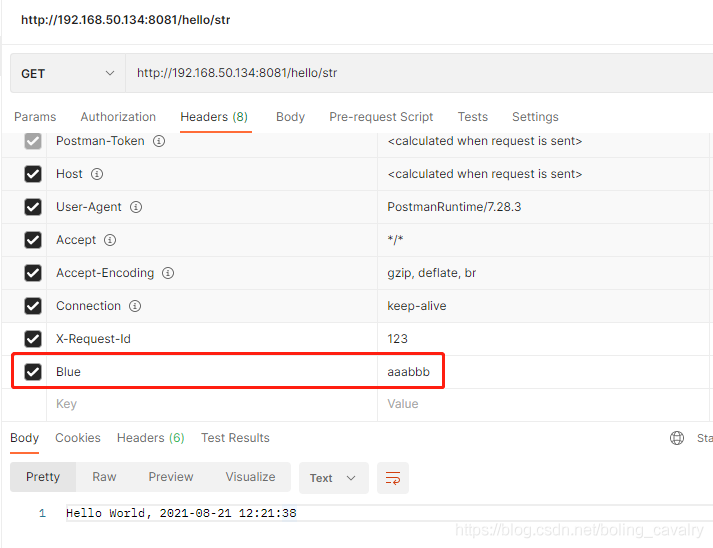
- 如下图,请求header中有Blue:
- 再看服务提供方的日志,显示header中多了X-Request-Red:

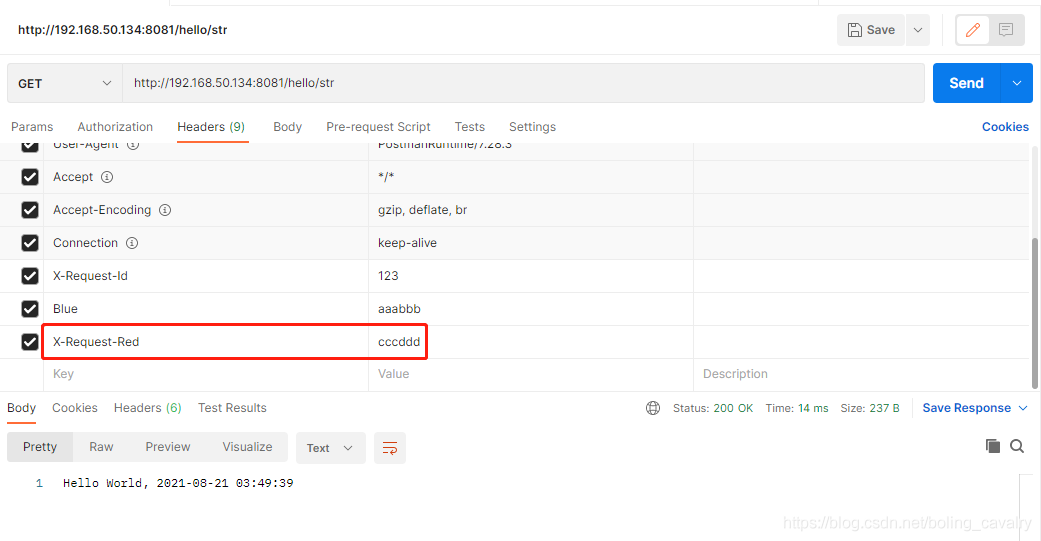
- 如果请求的header中已经存在X-Request-Red会出现什么情况呢?如下图,咱们把X-Request-Red写在请求header中:
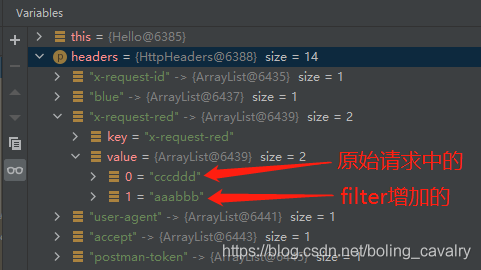
- 在服务提供方打断点,可以发现神奇的一幕,header中的所有key,对应的值其实都是集合,只是大多数情况下集合里面只有一个元素,而MapRequestHeader新增的元素会被放入这个集合,不会影响原有内容:
PrefixPath
PrefixPath很好理解,就是转发到服务提供者的时候,给path加前缀
例如我这边服务提供者原始地址是http://127.0.0.1:8082/hello/str配置如下,如果我给网关配置PrefixPath=hello,那么访问网关的时候,请求路径中就不需要hello了,配置如下:
server:

  #服务端口

  port: 8081

spring:

  application:

    name: hello-gateway

  cloud:

    gateway:

      routes:

        - id: path_route

          uri: http://127.0.0.1:8082

          predicates:

          - Path=/str

          filters:

          - PrefixPath=/hello
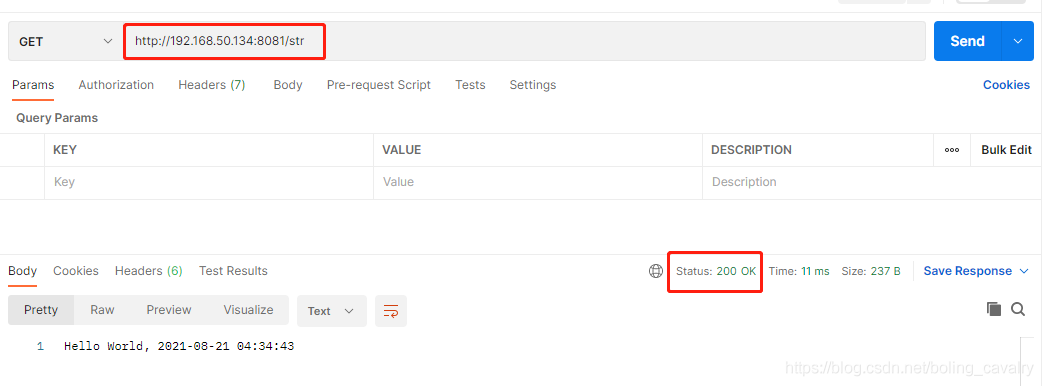
- 如下图,请求路径无需hello:
PreserveHostHeader
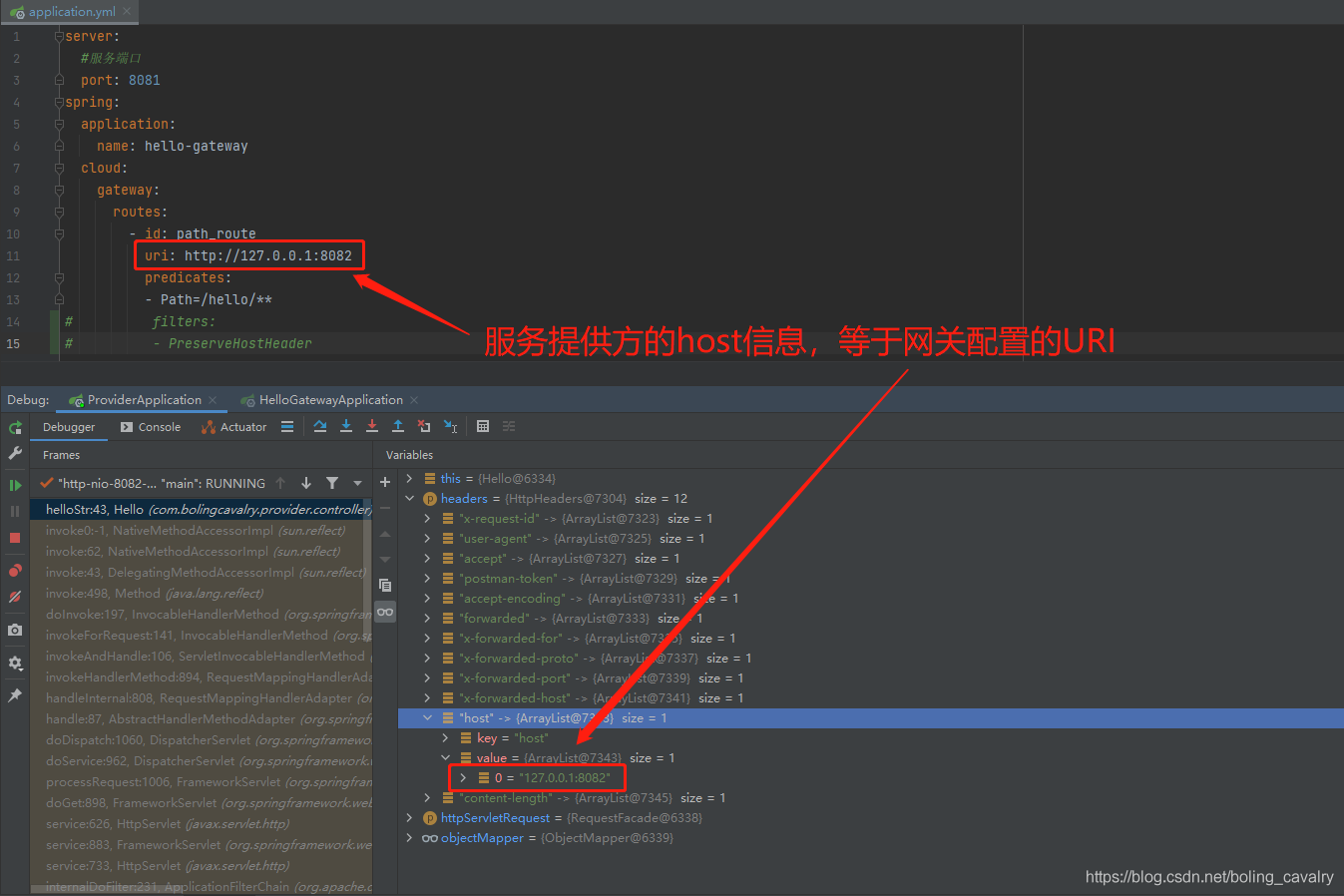
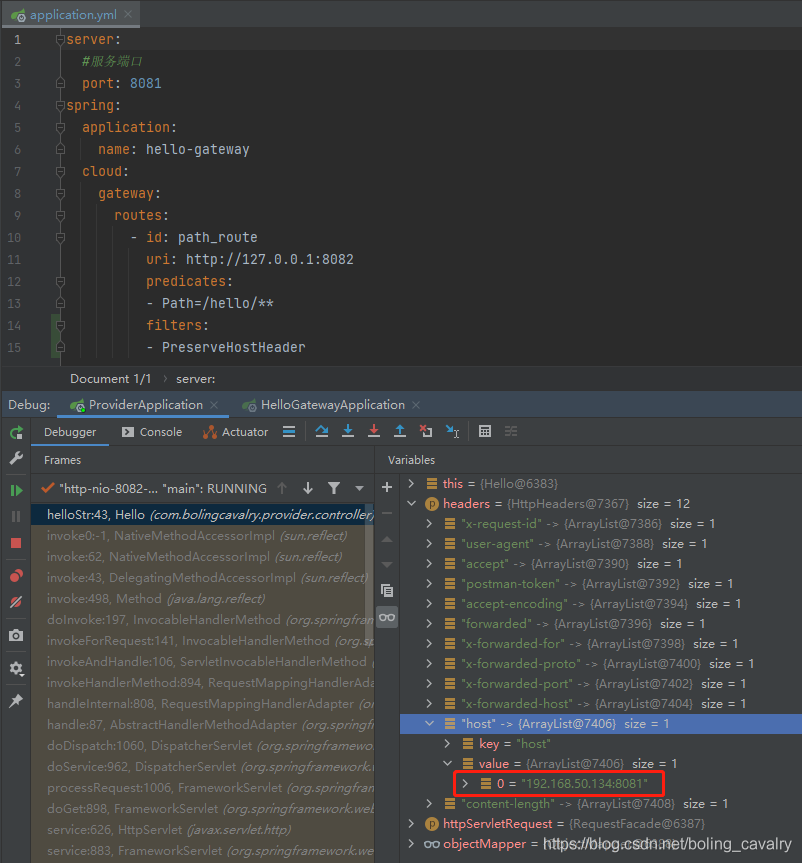
PreserveHostHeader在转发请求到服务提供者的时候,会保留host信息(否则就只能由HTTP client来决定了)
先看不使用PreserveHostHeader的效果,如下图,服务提供者收到的请求header中的host就是网关配置的信息:
- 加上PreserveHostHeader试试,如下图红框,是真正的host信息:
RequestRateLimiter
- RequestRateLimiter用于限流,涉及内容较多,就放在单独的章节深入研究吧
RedirectTo
- RedirectTo的功能简单直白:跳转到指定位置,下面的配置中,uri字段明显是一个无效的地址,但请求还是会被RedirectTo转发到指定位置去:
server:

  #服务端口

  port: 8081

spring:

  application:

    name: hello-gateway

  cloud:

    gateway:

      routes:

        - id: path_route

          uri: http://127.1.1.1:11111

          predicates:

          - Path=/hello/**

          filters:

          - RedirectTo=302, http://127.0.0.1:8082/hello/str
RemoveRequestHeader
RemoveRequestHeader很好理解,删除请求header中的指定值
下面的配置会删除请求header中的foo:
server:

  #服务端口

  port: 8081

spring:

  application:

    name: hello-gateway

  cloud:

    gateway:

      routes:

        - id: path_route

          uri: http://127.0.0.1:8082

          predicates:

          - Path=/hello/**

          filters:

          - RemoveRequestHeader=foo
RemoveResponseHeader
RemoveResponseHeader删除响应header中的指定值
下面的配置会删除响应header中的foo:
server:

  #服务端口

  port: 8081

spring:

  application:

    name: hello-gateway

  cloud:

    gateway:

      routes:

        - id: path_route

          uri: http://127.0.0.1:8082

          predicates:

          - Path=/hello/**

          filters:

          - RemoveResponseHeader=foo
RemoveRequestParameter
RemoveRequestParameter 删除请求参数中的指定参数
下面的配置会删除请求参数中的foo:
server:

  #服务端口

  port: 8081

spring:

  application:

    name: hello-gateway

  cloud:

    gateway:

      routes:

        - id: path_route

          uri: http://127.0.0.1:8082

          predicates:

          - Path=/hello/**

          filters:

          - RemoveRequestParameter=foo1
RewritePath
RewritePath非常实用,将请求参数中的路径做变换
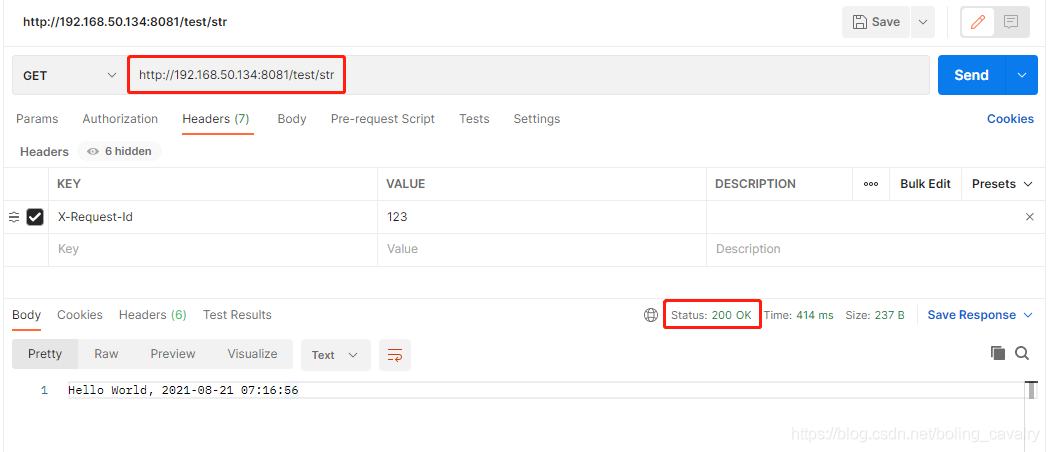
下面的配置会将/test/str转成/hello/str:
server:

  #服务端口

  port: 8081

spring:

  application:

    name: hello-gateway

  cloud:

    gateway:

      routes:

        - id: path_route

          uri: http://127.0.0.1:8082

          predicates:

          - Path=/test/**

          filters:

          - RewritePath=/test/?(?<segment>.*), /hello/$\{segment}
- 请求如下,可见path中的test会被网关修改成hello,变成正确的请求路径:
RewriteLocationResponseHeader
RewriteLocationResponseHeader用于改写response中的location信息
配置如下,一共是四个参数:stripVersionMode、locationHeaderName、hostValue、protocolsRegex
例如请求是api.example.com/some/object/name,response的location是object-service.prod.example.net/v2/some/object/id,最终会被下面的filter改写为api.example.com/some/object/id
spring:

  cloud:

    gateway:

      routes:

      - id: rewritelocationresponseheader_route

        uri: http://example.org

        filters:

        - RewriteLocationResponseHeader=AS_IN_REQUEST, Location, ,
- stripVersionMode的策略一共三种:
NEVER_STRIP:不执行
AS_IN_REQUEST :原始请求没有vesion,就执行
ALWAYS_STRIP :固定执行
Location用于替换host:port部分,如果没有就是用Request中的host
protocolsRegex用于匹配协议,如果匹配不上,name过滤器啥都不做
RewriteResponseHeader
RewriteResponseHeader很好理解:修改响应header,参数有三个:header的key,匹配value的正则表达式,修改value的结果
下面的配置表示修改响应header中X-Response-Red这个key的value,找到password=xxx的内容,改成password=***
server:

  #服务端口

  port: 8081

spring:

  application:

    name: hello-gateway

  cloud:

    gateway:

      routes:

        - id: path_route

          uri: http://127.0.0.1:8082

          predicates:

          - Path=/test/**

          filters:

          - RewriteResponseHeader=X-Response-Red, , password=[^&]+, password=***
SecureHeaders
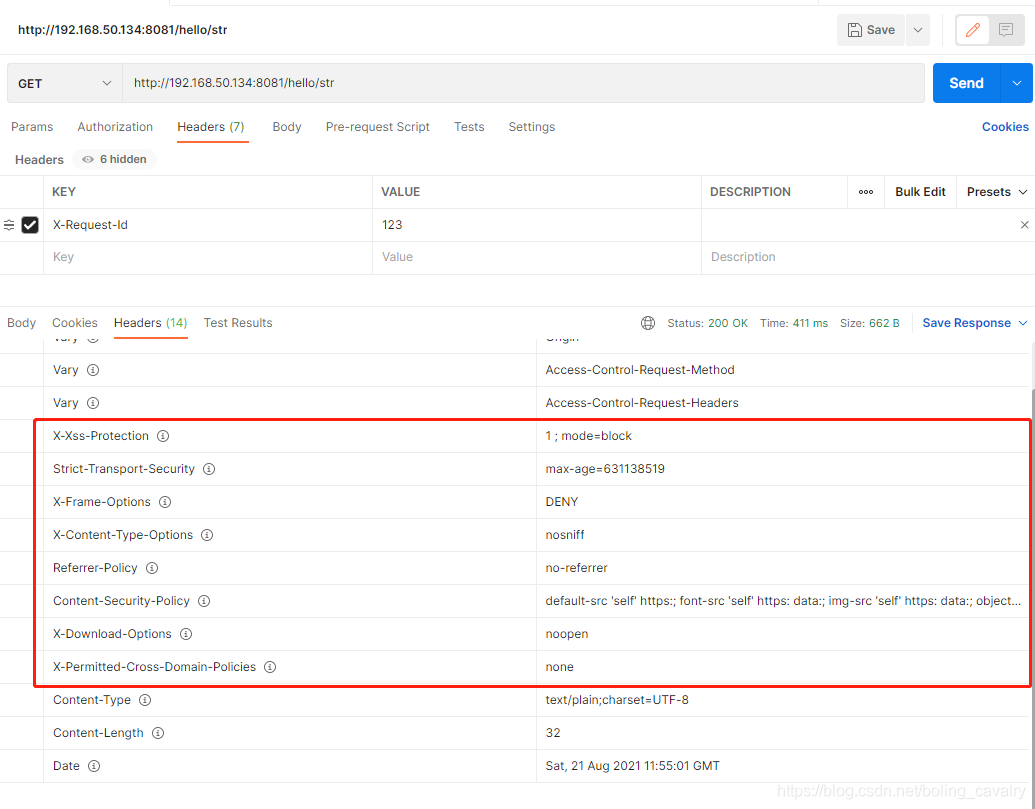
- SecureHeaders会在响应的header中添加很多和安全相关的内容,配置如下:
server:

  #服务端口

  port: 8081

spring:

  application:

    name: hello-gateway

  cloud:

    gateway:

      routes:

        - id: path_route

          uri: http://127.0.0.1:8082

          predicates:

          - Path=/hello/**

          filters:

          - SecureHeaders
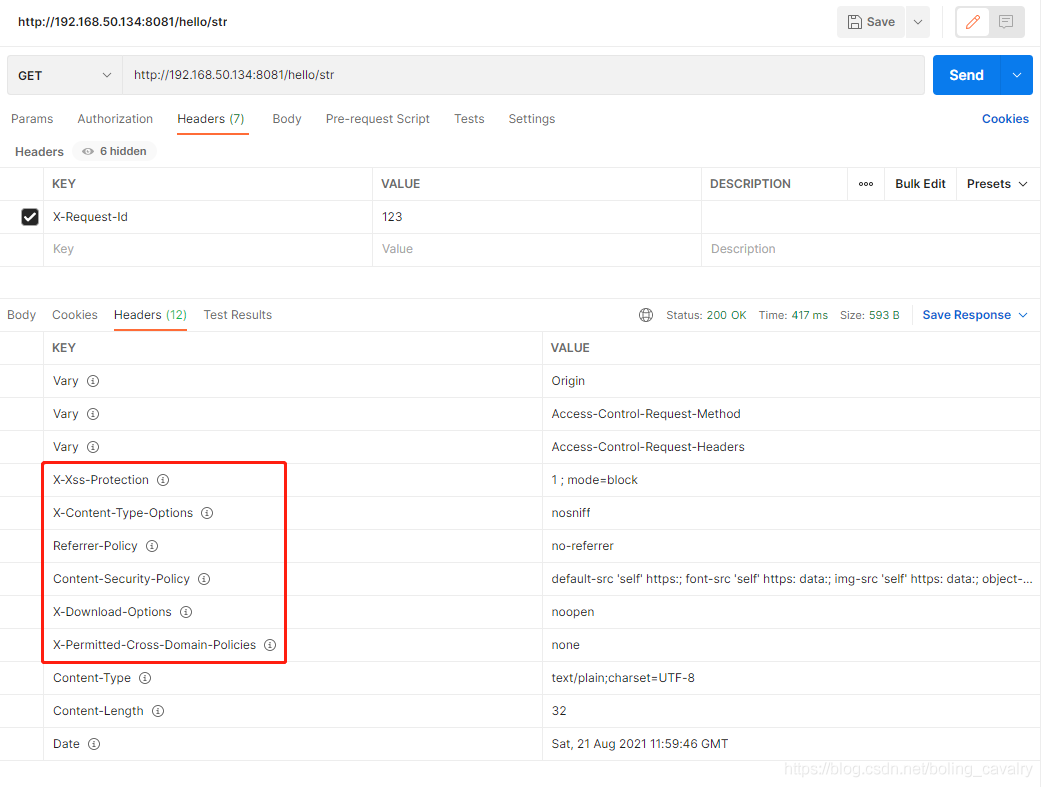
- 响应如下,可见header中添加了很多信息:
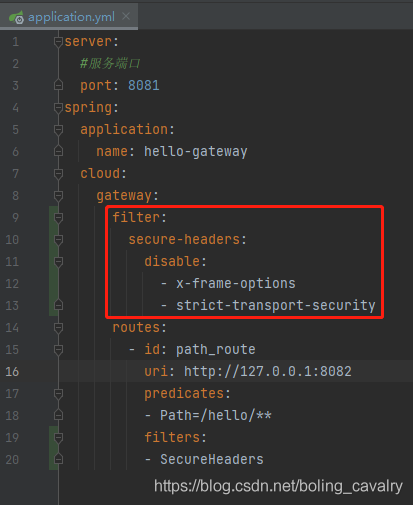
- 如果不想返回上图中的某些内容,可以在配置文件中关闭掉,如下图红框,x-frame-options和strict-transport-security两项被设置为不返回了:
- 再试试,得到如下响应,可见x-frame-options和strict-transport-security都没有返回:
SetPath
- SetPath配合predicates使用,下面的配置会将请求/test/str改成/hello/str,可见这个segment是在predicates中赋值的,然后再filters中拿来用:
server:

  #服务端口

  port: 8081

spring:

  application:

    name: hello-gateway

  cloud:

    gateway:

      filter:

        secure-headers:

          disable:

            - x-frame-options

            - strict-transport-security

      routes:

        - id: path_route

          uri: http://127.0.0.1:8082

          predicates:

            - Path=/test/{segment}

          filters:

            - SetPath=/hello/{segment}
SetRequestHeader
- SetRequestHeader顾名思义,就是改写请求的header,将指定key改为指定value,如果该key不存在就创建:
server:

  #服务端口

  port: 8081

spring:

  application:

    name: hello-gateway

  cloud:

    gateway:

      filter:

        secure-headers:

          disable:

            - x-frame-options

            - strict-transport-security

      routes:

        - id: path_route

          uri: http://127.0.0.1:8082

          predicates:

            - Path=/hello/**

          filters:

            - SetRequestHeader=X-Request-Red, Blue
- 和SetPath类似,SetRequestHeader也可以和predicates配合,在predicates中定义的变量可以用在SetRequestHeader中,如下所示,当请求是/hello/str的时候,header中X-Request-Red的值就是Blue-str:
server:

  #服务端口

  port: 8081

spring:

  application:

    name: hello-gateway

  cloud:

    gateway:

      filter:

        secure-headers:

          disable:

            - x-frame-options

            - strict-transport-security

      routes:

        - id: path_route

          uri: http://127.0.0.1:8082

          predicates:

            - Path=/hello/{segment}

          filters:

            - SetRequestHeader=X-Request-Red, Blue-{segment}
SetResponseHeader
- SetResponseHeader顾名思义,就是改写响应的header,将指定key改为指定value,如果该key不存在就创建:
server:

  #服务端口

  port: 8081

spring:

  application:

    name: hello-gateway

  cloud:

    gateway:

      filter:

        secure-headers:

          disable:

            - x-frame-options

            - strict-transport-security

      routes:

        - id: path_route

          uri: http://127.0.0.1:8082

          predicates:

            - Path=/hello/**

          filters:

            - SetResponseHeader=X-Request-Red, Blue
SetStatus
- SetStatus很好理解:控制返回code,下面的设置会返回500:
server:

  #服务端口

  port: 8081

spring:

  application:

    name: hello-gateway

  cloud:

    gateway:

      routes:

        - id: path_route

          uri: http://127.0.0.1:8082

          predicates:

            - Path=/hello/**

          filters:

            - SetStatus=500
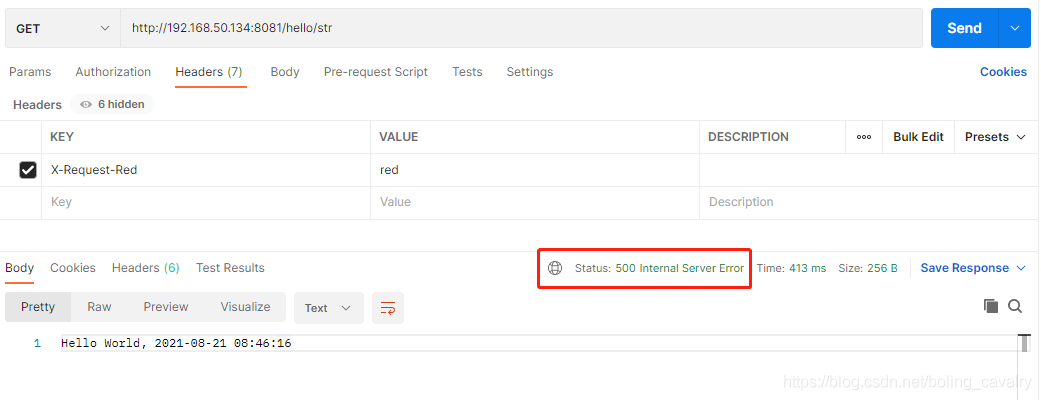
- 测试效果如下图,服务提供者的内容会正常返回,但是返回码已经被改为500了:
- 如果您想用SetStatus修改返回码,同时又不想丢掉真实的返回码,可以增加如下配置,这样真实的返回码就被放在名为original-status-header-name的key中了:
server:

  #服务端口

  port: 8081

spring:

  application:

    name: hello-gateway

  cloud:

    gateway:

      set-status:

        original-status-header-name: aaabbbccc

      routes:

        - id: path_route

          uri: http://127.0.0.1:8082

          predicates:

            - Path=/hello/**

          filters:

            - SetStatus=500
StripPrefix
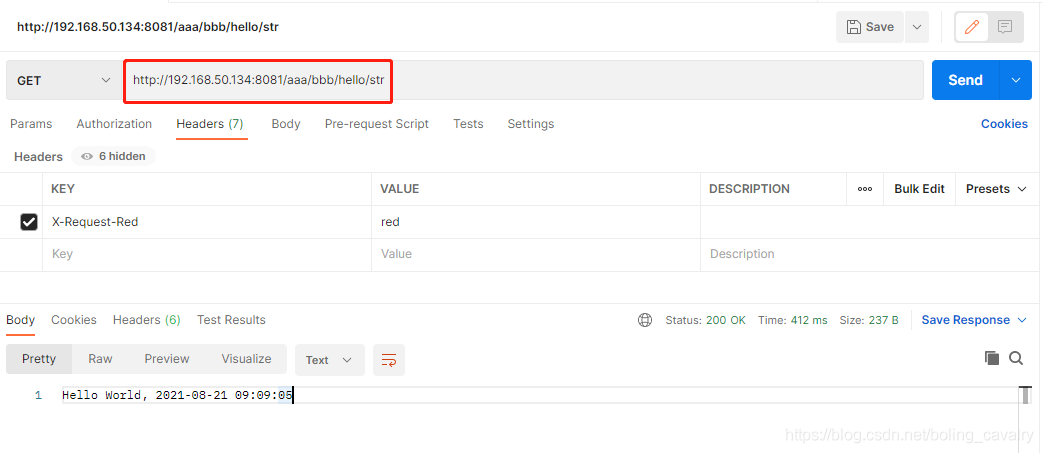
- StripPrefix是个很常用的filter,例如请求是/aaa/bbb/hello/str,我们要想将其转为/hello/str,用StripPrefix=2即可,前面两级path都被删掉了:
server:

  #服务端口

  port: 8081

spring:

  application:

    name: hello-gateway

  cloud:

    gateway:

      set-status:

        original-status-header-name: aaabbbccc

      routes:

        - id: path_route

          uri: http://127.0.0.1:8082

          predicates:

            - Path=/aaa/**

          filters:

            - StripPrefix=2
- 如下图,响应正常:
Retry
- 顾名思义,Retry就是重试,需要以下参数配合使用:
- retries:重试次数
- statuses:遇到什么样的返回状态才重试,取值参考:org.springframework.http.HttpStatus
- methods:那些类型的方法会才重试(GET、POST等),取值参考:org.springframework.http.HttpMethod
- series:遇到什么样的series值才重试,取值参考:org.springframework.http.HttpStatus.Series
- exceptions:遇到什么样的异常才重试
- backoff:重试策略,由多个参数构成,例如firstBackoff
- 参考配置如下:
spring:

  cloud:

    gateway:

      routes:

      - id: retry_test

        uri: http://localhost:8080/flakey

        predicates:

        - Host=*.retry.com

        filters:

        - name: Retry

          args:

            retries: 3

            statuses: BAD_GATEWAY

            methods: GET,POST

            backoff:

              firstBackoff: 10ms

              maxBackoff: 50ms

              factor: 2

              basedOnPreviousValue: false
RequestSize
- RequestSize也很常用:控制请求大小,可以使用KB或者MB等单位,超过这个大小就会返回413错误(Payload Too Large),
spring:

  cloud:

    gateway:

      routes:

      - id: request_size_route

        uri: http://localhost:8080/upload

        predicates:

        - Path=/upload

        filters:

        - name: RequestSize

          args:

            maxSize: 5000000
- 注意,如果没有设置RequestSize,Spring Cloud Gateway默认的上限是5MB
SetRequestHostHeader
SetRequestHostHeader会修改请求header中的host值
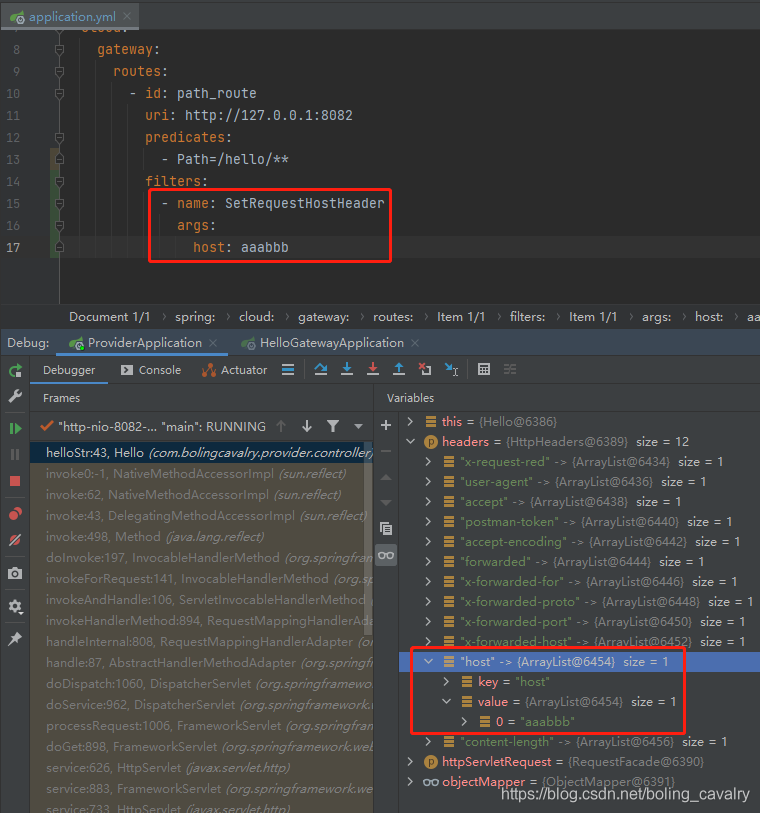
下面的配置,会将请求header中的host改为aaabbb
server:

  #服务端口

  port: 8081

spring:

  application:

    name: hello-gateway

  cloud:

    gateway:

      routes:

        - id: path_route

          uri: http://127.0.0.1:8082

          predicates:

            - Path=/hello/**

          filters:

        - name: SetRequestHostHeader

        args:

          host: aaabbb
- 在服务提供者的代码中打断点,如下图,可见host已经被改为aaabbb
ModifyRequestBody
- ModifyRequestBody用于修改请求的body内容,这里官方推荐用代码来配置,如下所示,请求body中原本是字符串,结果被改成了Hello对象的实例:
@Bean

public RouteLocator routes(RouteLocatorBuilder builder) {

    return builder.routes()

        .route("rewrite_request_obj", r -> r.host("*.rewriterequestobj.org")

            .filters(f -> f.prefixPath("/httpbin")

                .modifyRequestBody(String.class, Hello.class, MediaType.APPLICATION_JSON_VALUE,

                    (exchange, s) -> return Mono.just(new Hello(s.toUpperCase())))).uri(uri))

        .build();

}

static class Hello {

    String message;

    public Hello() { }

    public Hello(String message) {

        this.message = message;

    }

    public String getMessage() {

        return message;

    }

    public void setMessage(String message) {

        this.message = message;

    }

}
ModifyResponseBody
- ModifyResponseBody与前面的ModifyRequestBody类似,官方建议用代码实现,下面的代码作用是将响应body的内容改为全部大写:
@Bean

public RouteLocator routes(RouteLocatorBuilder builder) {

    return builder.routes()

        .route("rewrite_response_upper", r -> r.host("*.rewriteresponseupper.org")

            .filters(f -> f.prefixPath("/httpbin")

                .modifyResponseBody(String.class, String.class,

                    (exchange, s) -> Mono.just(s.toUpperCase()))).uri(uri))

        .build();

}
TokenRelay
- 在使用第三方鉴权的时候,如OAuth2,用TokenRelay可以将第三方的token转发到服务提供者那里去:
spring:

  cloud:

    gateway:

      routes:

      - id: resource

        uri: http://localhost:9000

        predicates:

        - Path=/resource

        filters:

        - TokenRelay=
- 记得还要添加jar包依赖org.springframework.boot:spring-boot-starter-oauth2-client
设置全局filter
- 前面的例子中,所有filter都放在路由策略中,配合predicates一起使用的,如果您想配置全局生效的filter,可以在配置文件中做以下设置,下面的配置表示AddResponseHeader和PrefixPath会处理所有请求,和路由设置无关:
spring:

  cloud:

    gateway:

      default-filters:

      - AddResponseHeader=X-Response-Default-Red, Default-Blue

      - PrefixPath=/httpbin
- 至此,大部分内置过滤器咱们已经了解了,有几个略微复杂的留待后面的章节深入学习
你不孤单,欣宸原创一路相伴
欢迎关注公众号:程序员欣宸
微信搜索「程序员欣宸」,我是欣宸,期待与您一同畅游Java世界...
https://github.com/zq2599/blog_demos
Spring Cloud Gateway实战之五:内置filter的更多相关文章
- Spring Cloud Gateway实战之四:内置predicate小结
欢迎访问我的GitHub https://github.com/zq2599/blog_demos 内容:所有原创文章分类汇总及配套源码,涉及Java.Docker.Kubernetes.DevOPS ...
- Spring Cloud Gateway实战之一:初探
欢迎访问我的GitHub 这里分类和汇总了欣宸的全部原创(含配套源码):https://github.com/zq2599/blog_demos 关于<Spring Cloud Gateway实 ...
- Spring Cloud Gateway实战之三:动态路由
欢迎访问我的GitHub https://github.com/zq2599/blog_demos 内容:所有原创文章分类汇总及配套源码,涉及Java.Docker.Kubernetes.DevOPS ...
- Spring Cloud Gateway实战之二:更多路由配置方式
欢迎访问我的GitHub https://github.com/zq2599/blog_demos 内容:所有原创文章分类汇总及配套源码,涉及Java.Docker.Kubernetes.DevOPS ...
- spring cloud gateway之filter篇
转载请标明出处: https://www.fangzhipeng.com 本文出自方志朋的博客 在上一篇文章详细的介绍了Gateway的Predict,Predict决定了请求由哪一个路由处理,在路由 ...
- 看完就会的Spring Cloud Gateway
在前面几节,我给大家介绍了当一个系统拆分成微服务后,会产生的问题与解决方案:服务如何发现与管理(Nacos注册中心实战),服务与服务如何通信(Ribbon, Feign实战) 今天我们就来聊一聊另一个 ...
- spring cloud gateway 之限流篇
转载请标明出处: https://www.fangzhipeng.com 本文出自方志朋的博客 在高并发的系统中,往往需要在系统中做限流,一方面是为了防止大量的请求使服务器过载,导致服务不可用,另一方 ...
- 微服务网关 Spring Cloud Gateway
1. 为什么是Spring Cloud Gateway 一句话,Spring Cloud已经放弃Netflix Zuul了.现在Spring Cloud中引用的还是Zuul 1.x版本,而这个版本是 ...
- Spring Cloud gateway 网关服务二 断言、过滤器
微服务当前这么火爆的程度,如果不能学会一种微服务框架技术.怎么能升职加薪,增加简历的筹码?spring cloud 和 Dubbo 需要单独学习.说没有时间?没有精力?要学俩个框架?而Spring C ...
随机推荐
- python-docx 页面设置
初识word文档-节-的概念 编辑一篇word文档,往往首先从页面设置开始,从下图可以看出,页面设置常操作的有页边距.纸张方向.纸张大小4个,而在word中是以节(section)来分大的块,每一节的 ...
- Bert文本分类实践(一):实现一个简单的分类模型
写在前面 文本分类是nlp中一个非常重要的任务,也是非常适合入坑nlp的第一个完整项目.虽然文本分类看似简单,但里面的门道好多好多,作者水平有限,只能将平时用到的方法和trick在此做个记录和分享,希 ...
- Django对表单进行增删改查
查 首先在url中写好路径 其次在后面参数的views里写函数类xxxxxxx的基本逻辑 定义一个函数xxxxxxx,继承request,注意这个request对数据库操作结果都会存放在request ...
- app定位工具介绍
一.元素获取工具WEditor使用 1.安装WEditor:pip3 install weditor 2.启动WEditor:python3 -m weditor Android : ...
- DRF的action装饰器
1.action装饰器 Django默认的路由分发规则决定了视图函数只能以get.post等请求方式命名,如果想要使用自定义的方式命名,我们可以使用action去映射请求方法名与自定义方法 view. ...
- exe图标消失的解决方案
步骤 win + r组合键打开运行窗口 输入cmd,回车 在终端窗口右键粘贴即可 taskkill /im explorer.exe /f cd /d %userprofile%\appdata\lo ...
- 高效动画实现原理-Jetpack Compose 初探索
一.简介 Jetpack Compose是Google推出的用于构建原生界面的新Android 工具包,它可简化并加快 Android上的界面开发.Jetpack Compose是一个声明式的UI框架 ...
- 盘点一下Redis中常用的Java客户端,或者咱们手写一个?
Java中那些Redis的客户端 前面我们的所有操作都是基于redis-cli来完成的,那么我们要在Java中操作Redis,怎么做呢?首先我们先来了解一下Redis Serialization Pr ...
- 【Spring】Spring重要类层次图
- 【UE4 C++ 基础知识】<9> Interface 接口
概述 简单的说,接口提供一组公共的方法,不同的对象中继承这些方法后可以有不同的具体实现. 任何使用接口的类都必须实现这些接口. 实现解耦 解决多继承的问题 蓝图使用 使用方法 三种调用方法的区别 调用 ...