
ASP.NET Core:WebAppCoreApi
| ylbtech-ASP.NET Core:WebAppCoreApi |
| 1.返回顶部 |

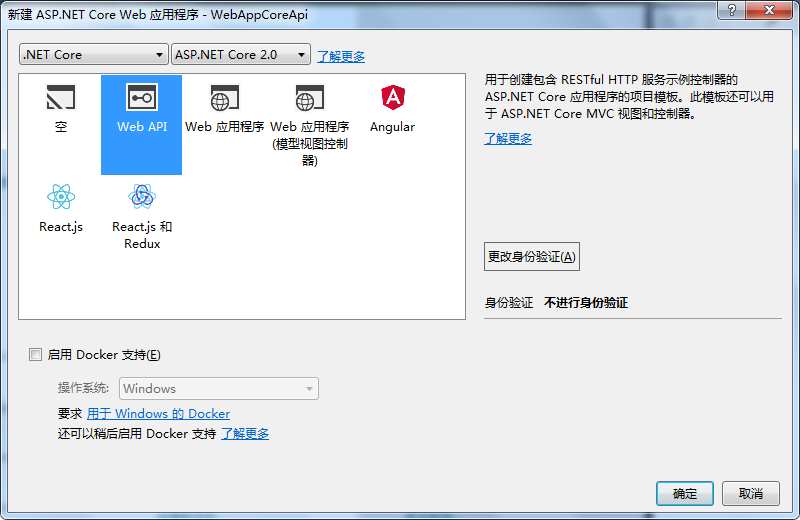
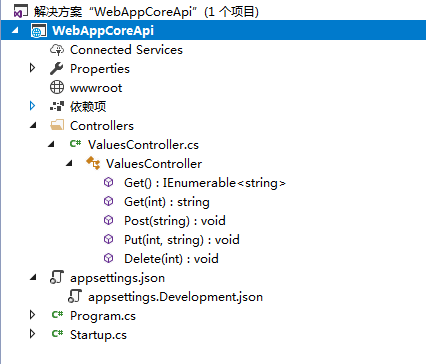 |
| 2. Controllers返回顶部 |
using System;

using System.Collections.Generic;

using System.Linq;

using System.Threading.Tasks;

using Microsoft.AspNetCore.Mvc;

namespace WebAppCoreApi.Controllers

{

    [Route("api/[controller]")]

    public class ValuesController : Controller

    {

        // GET api/values

        [HttpGet]

        public IEnumerable<string> Get()

        {

            return new string[] { "value1", "value2" };

        }

        // GET api/values/5

        [HttpGet("{id}")]

        public string Get(int id)

        {

            return "value";

        }

        // POST api/values

        [HttpPost]

        public void Post([FromBody]string value)

        {

        }

        // PUT api/values/5

        [HttpPut("{id}")]

        public void Put(int id, [FromBody]string value)

        {

        }

        // DELETE api/values/5

        [HttpDelete("{id}")]

        public void Delete(int id)

        {

        }

    }

}
| 3.返回顶部 |
using System;

using System.Collections.Generic;

using System.IO;

using System.Linq;

using System.Threading.Tasks;

using Microsoft.AspNetCore;

using Microsoft.AspNetCore.Hosting;

using Microsoft.Extensions.Configuration;

using Microsoft.Extensions.Logging;

namespace WebAppCoreApi

{

    public class Program

    {

        public static void Main(string[] args)

        {

            BuildWebHost(args).Run();

        }

        public static IWebHost BuildWebHost(string[] args) =>

            WebHost.CreateDefaultBuilder(args)

                .UseStartup<Startup>()

                .Build();

    }

}
using System;

using System.Collections.Generic;

using System.Linq;

using System.Threading.Tasks;

using Microsoft.AspNetCore.Builder;

using Microsoft.AspNetCore.Hosting;

using Microsoft.Extensions.Configuration;

using Microsoft.Extensions.DependencyInjection;

using Microsoft.Extensions.Logging;

using Microsoft.Extensions.Options;

namespace WebAppCoreApi

{

    public class Startup

    {

        public Startup(IConfiguration configuration)

        {

            Configuration = configuration;

        }

        public IConfiguration Configuration { get; }

        // This method gets called by the runtime. Use this method to add services to the container.

        public void ConfigureServices(IServiceCollection services)

        {

            services.AddMvc();

        }

        // This method gets called by the runtime. Use this method to configure the HTTP request pipeline.

        public void Configure(IApplicationBuilder app, IHostingEnvironment env)

        {

            if (env.IsDevelopment())

            {

                app.UseDeveloperExceptionPage();

            }

            app.UseMvc();

        }

    }

}
| 4.返回顶部 |
| 5.返回顶部 |
| 6.返回顶部 |
 |
作者:ylbtech 出处:http://ylbtech.cnblogs.com/ 本文版权归作者和博客园共有,欢迎转载,但未经作者同意必须保留此段声明,且在文章页面明显位置给出原文连接,否则保留追究法律责任的权利。 |
ASP.NET Core:WebAppCoreApi的更多相关文章
- ASP.NET Core:部署项目到Ubuntu Server
概述 基于上一篇成功安装Ubuntu Server 16.10的基础上,接下来继续我们ASP.NET Core项目的部署之旅! 只是对于这些年整天和Windows打交道的我,初次使用Linux确实有点 ...
- 实战Asp.Net Core:DI生命周期
title: 实战Asp.Net Core:DI生命周期 date: 2018-11-30 21:54:52 --- 1.前言 Asp.Net Core 默认支持 DI(依赖注入) 软件设计模式,那使 ...
- 初识ASP.NET CORE:二、优劣
Which one is right for me? ASP.NET is a mature web platform that provides all the services that you ...
- 初识ASP.NET CORE:一、HTTP pipeline
完整的http请求在asp.net framework中的处理流程: Asp.Net HttpRequest--> HTTP.exe--> inetinfo.exe(w3wp.exe)-& ...
- ASP.NET Core:CMD命令行+记事本 创建Console程序和Web Application
今天看了Scott关于ASP.NET Core的介绍视频,发现用命令行一步一步新建项目.添加Package.Restore.Build.Run 执行的实现方式,更让容易让我们了解.NET Core的运 ...
- ASP.NET Core:使用Dapper和SwaggerUI来丰富你的系统框架
一.概述 1.用VS2017创建如下图的几个.NET Standard类库,默认版本为1.4,你可以通过项目属性进行修改,最高支持到1.6,大概五月份左右会更新至2.0,API会翻倍,很期待! 排名分 ...
- 实战Asp.Net Core:部署应用
1.前言 某一刻,你已经把 .Net Core 的程序写好了.接下来,还可以做什么呢?那就是部署了. 作为一名开发工程师,如果不会部署自己开发的应用,那么这也是不完整的.接下来,我们就来说说,如何部署 ...
- ASP.NET Core:WebAppCoreReact
ylbtech-ASP.NET Core:WebAppCoreReact 1.返回顶部 1. 2. 3. 4. 5. 6. 7. 2. wwwroot 返回顶部 3. Clie ...
- ASP.NET Core:WebAppCoreRESTful
ylbtech-ASP.NET Core:WebAppCoreRESTFul 1.返回顶部 1. 2. 3. 4. 2. Controllers返回顶部 1.HomeControlle ...
随机推荐
- VMware 虚拟机下载链接
VMware 14 链接: https://pan.baidu.com/s/1mBeyX2Z6hGpbFc8_UC-sEw 提取码: 462t 密钥:AA510-2DF1Q-H882Q-XFPQE-Q ...
- SSM框架笔记
配置 Project结构 SpringMVC启用 Spring MVC配置 Spring自己主动扫描 getBean的方法 SpringMVC与Struts2的差别 Log4j 拦截器与过滤器 文件U ...
- 应用程序中的server错误,没有名称为“ServiceBehavior”的服务行为
应用程序中的server错误,没有名称为"ServiceBehavior"的服务行为 今天在阅读"创建和使用Web服务"的相关内容,在浏览器中查 ...
- SqlServer 数据恢复
首先看看微软官方的给出的建议(摘自:http://technet.microsoft.com/zh-cn/library/ms189272.aspx): 在从完整恢复模式或大容量日志恢复模式切换前,请 ...
- POJ1811_Prime Test【Miller Rabin素数測试】【Pollar Rho整数分解】
Prime Test Time Limit: 6000MS Memory Limit: 65536K Total Submissions: 29193 Accepted: 7392 Case Time ...
- SQL数据库 更改数据类型
向表中添加数据 alter table 表名 add 列名 类型 更改表中列的数据类型 alter table 表名 alter column 列名 类型 删除表中的指定列 alter table 表 ...
- 【转载】“菜”鸟理解.NET Framework(CLI,CLS,CTS,CLR,FCL,BCL)
既然要学.NET,就要先认识认识她,我不喜欢大段大段文字的东西,自己通过理解,画个图,来看看.NET的沉鱼落雁,闭月羞花之容. 最下层蓝色部分是.NET Framework的基础,也是所有应用软件的基 ...
- getElementByID,getElementsByName,getElementsByTagName
<input type="checkbox" name="hobby" id="hobby1"> 音乐 <input ty ...
- 【健康生活】Google、百度之间的选择
没有什么技术性的分析,仅仅是个人吐槽而已. 一般人遇到问题就会说一句"百度一下",说实话,百度在中国推广的真的非常不错,可谓是家喻户晓,搜索个八卦新闻,小文章,小电影什么的的确非常 ...
- forEach、for-in与for-of的区别
forEach.for-in与for-of的区别 forEach介绍 objArr.forEach(function (value) { console.log(value); }); foreach ...