
ASP.NET Core:WebAppCoreApi
| ylbtech-ASP.NET Core:WebAppCoreApi |
| 1.返回顶部 |

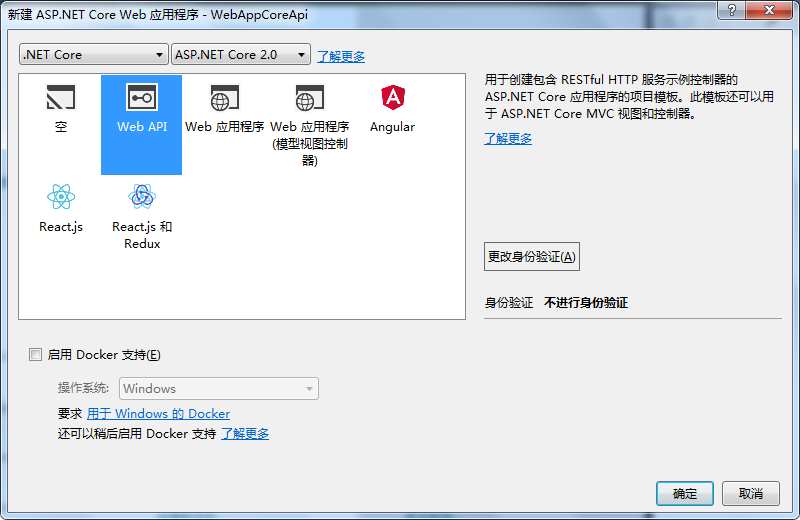
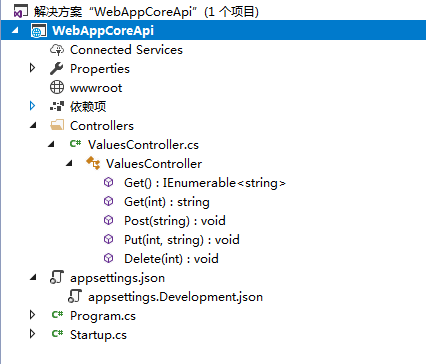 |
| 2. Controllers返回顶部 |
using System;

using System.Collections.Generic;

using System.Linq;

using System.Threading.Tasks;

using Microsoft.AspNetCore.Mvc;

namespace WebAppCoreApi.Controllers

{

    [Route("api/[controller]")]

    public class ValuesController : Controller

    {

        // GET api/values

        [HttpGet]

        public IEnumerable<string> Get()

        {

            return new string[] { "value1", "value2" };

        }

        // GET api/values/5

        [HttpGet("{id}")]

        public string Get(int id)

        {

            return "value";

        }

        // POST api/values

        [HttpPost]

        public void Post([FromBody]string value)

        {

        }

        // PUT api/values/5

        [HttpPut("{id}")]

        public void Put(int id, [FromBody]string value)

        {

        }

        // DELETE api/values/5

        [HttpDelete("{id}")]

        public void Delete(int id)

        {

        }

    }

}
| 3.返回顶部 |
using System;

using System.Collections.Generic;

using System.IO;

using System.Linq;

using System.Threading.Tasks;

using Microsoft.AspNetCore;

using Microsoft.AspNetCore.Hosting;

using Microsoft.Extensions.Configuration;

using Microsoft.Extensions.Logging;

namespace WebAppCoreApi

{

    public class Program

    {

        public static void Main(string[] args)

        {

            BuildWebHost(args).Run();

        }

        public static IWebHost BuildWebHost(string[] args) =>

            WebHost.CreateDefaultBuilder(args)

                .UseStartup<Startup>()

                .Build();

    }

}
using System;

using System.Collections.Generic;

using System.Linq;

using System.Threading.Tasks;

using Microsoft.AspNetCore.Builder;

using Microsoft.AspNetCore.Hosting;

using Microsoft.Extensions.Configuration;

using Microsoft.Extensions.DependencyInjection;

using Microsoft.Extensions.Logging;

using Microsoft.Extensions.Options;

namespace WebAppCoreApi

{

    public class Startup

    {

        public Startup(IConfiguration configuration)

        {

            Configuration = configuration;

        }

        public IConfiguration Configuration { get; }

        // This method gets called by the runtime. Use this method to add services to the container.

        public void ConfigureServices(IServiceCollection services)

        {

            services.AddMvc();

        }

        // This method gets called by the runtime. Use this method to configure the HTTP request pipeline.

        public void Configure(IApplicationBuilder app, IHostingEnvironment env)

        {

            if (env.IsDevelopment())

            {

                app.UseDeveloperExceptionPage();

            }

            app.UseMvc();

        }

    }

}
| 4.返回顶部 |
| 5.返回顶部 |
| 6.返回顶部 |
 |
作者:ylbtech 出处:http://ylbtech.cnblogs.com/ 本文版权归作者和博客园共有,欢迎转载,但未经作者同意必须保留此段声明,且在文章页面明显位置给出原文连接,否则保留追究法律责任的权利。 |
ASP.NET Core:WebAppCoreApi的更多相关文章
- ASP.NET Core:部署项目到Ubuntu Server
概述 基于上一篇成功安装Ubuntu Server 16.10的基础上,接下来继续我们ASP.NET Core项目的部署之旅! 只是对于这些年整天和Windows打交道的我,初次使用Linux确实有点 ...
- 实战Asp.Net Core:DI生命周期
title: 实战Asp.Net Core:DI生命周期 date: 2018-11-30 21:54:52 --- 1.前言 Asp.Net Core 默认支持 DI(依赖注入) 软件设计模式,那使 ...
- 初识ASP.NET CORE:二、优劣
Which one is right for me? ASP.NET is a mature web platform that provides all the services that you ...
- 初识ASP.NET CORE:一、HTTP pipeline
完整的http请求在asp.net framework中的处理流程: Asp.Net HttpRequest--> HTTP.exe--> inetinfo.exe(w3wp.exe)-& ...
- ASP.NET Core:CMD命令行+记事本 创建Console程序和Web Application
今天看了Scott关于ASP.NET Core的介绍视频,发现用命令行一步一步新建项目.添加Package.Restore.Build.Run 执行的实现方式,更让容易让我们了解.NET Core的运 ...
- ASP.NET Core:使用Dapper和SwaggerUI来丰富你的系统框架
一.概述 1.用VS2017创建如下图的几个.NET Standard类库,默认版本为1.4,你可以通过项目属性进行修改,最高支持到1.6,大概五月份左右会更新至2.0,API会翻倍,很期待! 排名分 ...
- 实战Asp.Net Core:部署应用
1.前言 某一刻,你已经把 .Net Core 的程序写好了.接下来,还可以做什么呢?那就是部署了. 作为一名开发工程师,如果不会部署自己开发的应用,那么这也是不完整的.接下来,我们就来说说,如何部署 ...
- ASP.NET Core:WebAppCoreReact
ylbtech-ASP.NET Core:WebAppCoreReact 1.返回顶部 1. 2. 3. 4. 5. 6. 7. 2. wwwroot 返回顶部 3. Clie ...
- ASP.NET Core:WebAppCoreRESTful
ylbtech-ASP.NET Core:WebAppCoreRESTFul 1.返回顶部 1. 2. 3. 4. 2. Controllers返回顶部 1.HomeControlle ...
随机推荐
- [NOIP2012T3]开车旅行
题目描述 NOIP 2012 提高组 题3小 A 和小 B 决定利用假期外出旅行,他们将想去的城市从 1 到 N 编号,且编号较小的城市在编号较大的城市的西边,已知各个城市的海拔高度互不相同,记城市 ...
- spark再总结
1.Spark是什么? UCBerkeley AMPlab所开源的类HadoopMapReduce的通用的并行计算框架. dfsSpark基于mapreduce算法实现的分布式计算,拥有HadoopM ...
- docker日志输出文件大小设置以及文件个数限制
问题描述: 今天有同事运行了一个docker容器,不多时就导致宿主机硬盘直接撑爆,消耗了120G,发生的很是突然. 问题排查: 后续查阅资料,发现是因为docker中的某个进程一直在持续输出,而这些输 ...
- 【转】Spring框架深入理解
参考这篇文章: http://www.ibm.com/developerworks/cn/java/j-lo-spring-principle/ Spring内部分为Beans, Context 和 ...
- Linux Shell高级技巧
Linux Shell高级技巧(一) http://www.cnblogs.com/stephen-liu74/archive/2011/12/22/2271167.html一.将输入信息转换为大写字 ...
- socket 网络编程高速入门(一)教你编写基于UDP/TCP的服务(client)通信
由于UNIX和Win的socket大同小异,为了方便和大众化,这里先介绍Winsock编程. socket 网络编程的难点在入门的时候就是对基本函数的了解和使用,由于这些函数的结构往往比較复杂,參数大 ...
- [unity3d]unity平台的预处理
在开发中,特别是unity的跨平台中,我们常常会在各个平台游走,如安卓版,苹果版,PC版.......在此不同的平台上,有可能我们须要做不同的操作.然而我们就能够用unity的自带的平台宏定义方式来做 ...
- 浅谈MySQL压缩协议细节--从源码层面
压缩协议属于mysql通讯协议的一部分,要启用压缩协议传输功能,前提条件客户端和服务端都必须要支持zlib算法,那么,现在有个问题,假如服务端已经默认开启压缩功能,那原生客户端在连接的时候要如何才可启 ...
- Screen 状态栏配置
http://havee.me/linux/2010-08/screen-status-bar.html Screen 状态栏配置 GNU 的 screen 是一个很好的工具.如果需要经常或者大量的登 ...
- return和exit
return从当前函数返回而exit结束正在运行的程序 示例: [wangml@iZwz976helaylvgqok97prZ testForC]$ ./exit.test q [wangml@iZw ...