
微软的分布式应用框架 Dapr Helloworld
Dapr HelloWorld
Dapr
Distributed Application Runtime. An event-driven, portable runtime for building microservices on cloud and edge.
分布式应用运行时、事件驱动、为云和边缘构建微服务提供便携化运行时。
我现在也不是很懂。
dapr/dapr
Dapr is a portable, serverless, event-driven runtime that makes it easy for developers to build resilient, stateless and stateful microservices that run on the cloud and edge and embraces the diversity of languages and developer frameworks.
Dapr codifies the best practices for building microservice applications into open, independent, building blocks that enable you to build portable applications with the language and framework of your choice. Each building block is independent and you can use one, some, or all of them in your application.
比上面的介绍多了 stateless or stateful 的标签。学《计算理论》的时候接触过一些状态机。
”状态是万恶之源“
注意提到了多语言和多开发者框架,我认为这是他选择的通过通信共享信息,即 HTTP 和 GRPC 支持多语言等特性。微软想通过这个设定一个构建微服务应用的规则。从根本上确立你开发的每一个应用的独立性。
下面进行一个 QuickStart
环境
- Install Docker(微服务已经离不开容器化了)
- Install Dapr
- Node.js version 8 or greater(这个 Helloworld 是 node 应用)
On MacOS
Install the latest darwin Dapr CLI to /usr/local/bin
curl -fsSL https://raw.githubusercontent.com/dapr/cli/master/install/install.sh | /bin/bash
有条件可以加速
执行初始化(会启动 docker 容器)
$ dapr init

⌛  Making the jump to hyperspace...

Downloading binaries and setting up components

✅  Success! Dapr is up and running

$ docker ps

CONTAINER ID        IMAGE                COMMAND                  CREATED             STATUS              PORTS                        NAMES

b3a5600e672f        redis                "docker-entrypoint.s…"   44 hours ago        Up 44 hours         0.0.0.0:6379->6379/tcp       xenodochial_hofstadter

e5010ba0c33f        daprio/dapr          "./placement"            44 hours ago        Up 44 hours         0.0.0.0:50005->50005/tcp     dapr_placement
HelloWorld
Application Architecture
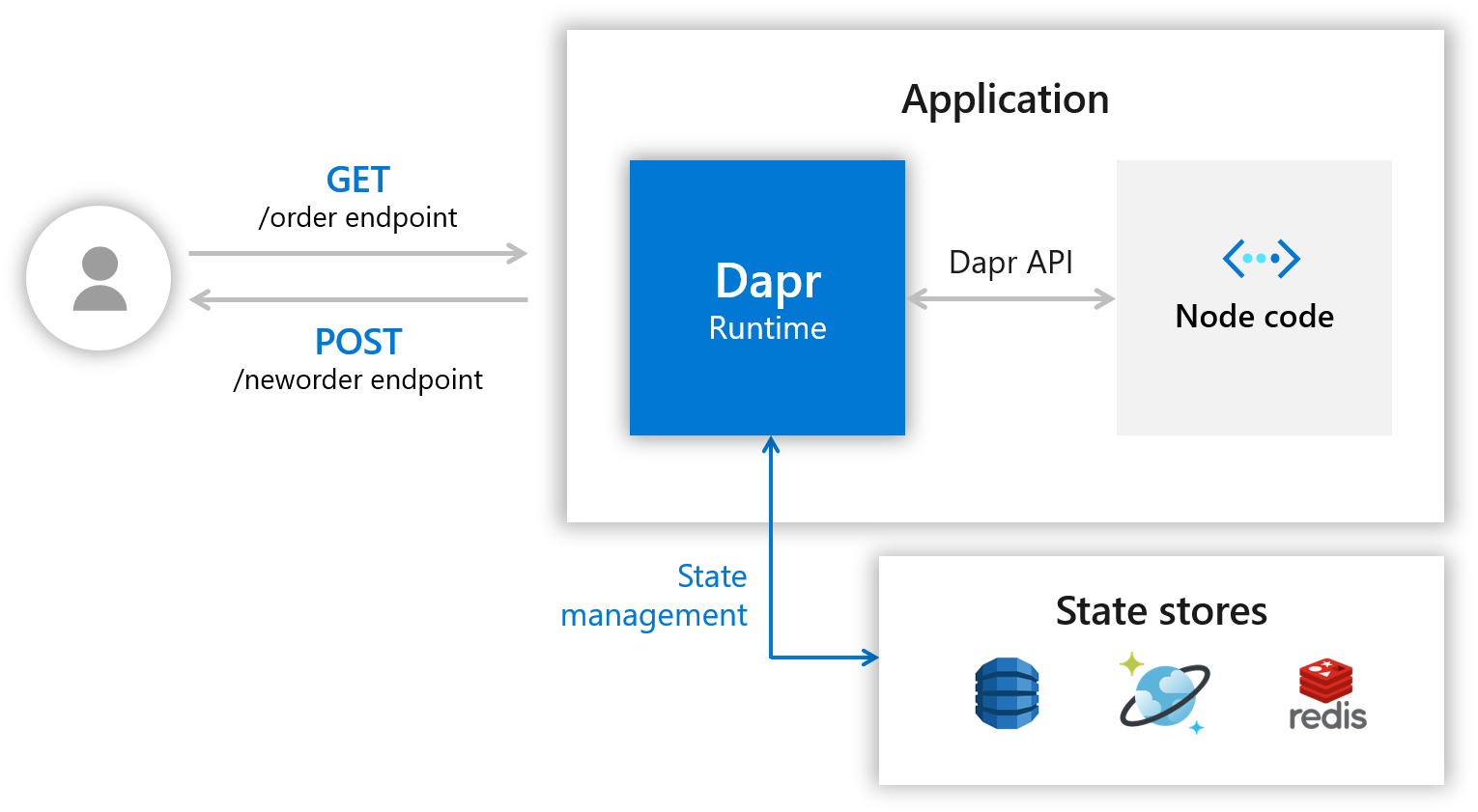
能够看到暴露两个 endpoint 是 HTTP 访问,一个创建一个查询。
主要看我们使用 Dapr 的交互。在图中它作为 Runtime
- 提供 Dapr API 给多语言调用。
- 提供 状态管理 By state stores
Download Code
下载并进入相应文件夹
git clone https://github.com/dapr/samples.git

cd samples/1.hello-world
Cat app.js
// $ cat app.js

// ------------------------------------------------------------

// Copyright (c) Microsoft Corporation.

// Licensed under the MIT License.

// ------------------------------------------------------------

const express = require('express');

const bodyParser = require('body-parser');

require('isomorphic-fetch');

const app = express();

app.use(bodyParser.json());

const daprPort = process.env.DAPR_HTTP_PORT || 3500;

const stateUrl = `http://localhost:${daprPort}/v1.0/state`;

const port = 3000;

app.get('/order', (_req, res) => {

    fetch(`${stateUrl}/order`)

        .then((response) => {

            return response.json();

        }).then((orders) => {

            res.send(orders);

        });

});

app.post('/neworder', (req, res) => {

    const data = req.body.data;

    const orderId = data.orderId;

    console.log("Got a new order! Order ID: " + orderId);

    const state = [{

        key: "order",

        value: data

    }];

    fetch(stateUrl, {

        method: "POST",

        body: JSON.stringify(state),

        headers: {

            "Content-Type": "application/json"

        }

    }).then((response) => {

        console.log((response.ok) ? "Successfully persisted state" : "Failed to persist state");

    });

    res.status(200).send();

});

app.listen(port, () => console.log(`Node App listening on port ${port}!`));
这是一些路由和 handlers
注意 14-16 行
const daprPort = process.env.DAPR_HTTP_PORT || 3500;

const stateUrl = `http://localhost:${daprPort}/v1.0/state`;

const port = 3000;
3500 是 Dapr 的环境端口,如果你安装时有改动,需要考虑。stateurl 就是 Dapr 提供的 URL 了
Handlers
/neworder
app.post('/neworder', (req, res) => {

    const data = req.body.data;

    const orderId = data.orderId;

    console.log("Got a new order! Order ID: " + orderId);

    const state = [{

        key: "order",

        value: data

    }];

    fetch(stateUrl, {

        method: "POST",

        body: JSON.stringify(state),

        headers: {

            "Content-Type": "application/json"

        }

    }).then((response) => {

        console.log((response.ok) ? "Successfully persisted state" : "Failed to persist state");

    });

    res.status(200).send();

});
这里重点是状态存储,即将 state 通过 stateurl 存储在 Dapr 中。
/order
我们并不是直接通过 res.json 作为 Response 来进行已经持久化的数据的使用,而是通过暴露一个 GET endpoint 通过访问它来验证持久化是否成功。
app.get('/order', (_req, res) => {

    fetch(`${stateUrl}/order`)

        .then((response) => {

            return response.json();

        }).then((orders) => {

            res.send(orders);

        });

});
现在我们通过状态转移在 Dapr 里实现了 stateless,同样我们也可以在加上一个 local cache 并通过一个新的 endpoint 访问来使 Node application 变成 stateful
Dapr Run Node.js App
npm install:通过当前目录下的package.json, 会安装express和body-parser,在 app.js 7-8行我们可以看到这两项。dapr run --app-id mynode --app-port 3000 --port 3500 node app.js
$ dapr run --app-id mynode --app-port 3000 --port 3500 node app.js

ℹ️  Starting Dapr with id mynode. HTTP Port: 3500. gRPC Port: 55099

✅  You're up and running! Both Dapr and your app logs will appear here.
应该是有后台运行的 CLI 命令,这里是前台打印的日志
== DAPR == time="2019-11-06T10:37:41+08:00" level=info msg="starting Dapr Runtime -- version 0.1.0 -- commit 4358565-dirty"

== DAPR == time="2019-11-06T10:37:41+08:00" level=info msg="log level set to: info"

== DAPR == time="2019-11-06T10:37:41+08:00" level=info msg="standalone mode configured"

== DAPR == time="2019-11-06T10:37:41+08:00" level=info msg="dapr id: mynode"

== DAPR == time="2019-11-06T10:37:41+08:00" level=info msg="loaded component messagebus (pubsub.redis)"

== DAPR == time="2019-11-06T10:37:41+08:00" level=info msg="loaded component statestore (state.redis)"

== DAPR == time="2019-11-06T10:37:41+08:00" level=info msg="application protocol: http. waiting on port 3000"

== APP == Node App listening on port 3000!

== DAPR == time="2019-11-06T10:37:42+08:00" level=info msg="application discovered on port 3000"

== DAPR == 2019/11/06 10:37:42 redis: connecting to localhost:6379

== DAPR == 2019/11/06 10:37:42 redis: connected to localhost:6379 (localAddr: [::1]:55130, remAddr: [::1]:6379)

== DAPR == time="2019-11-06T10:37:42+08:00" level=info msg="actor runtime started. actor idle timeout: 1h0m0s. actor scan interval: 30s"

== DAPR == time="2019-11-06T10:37:42+08:00" level=info msg="actors: starting connection attempt to placement service at localhost:50005"

== DAPR == time="2019-11-06T10:37:42+08:00" level=info msg="http server is running on port 3500"

== DAPR == time="2019-11-06T10:37:42+08:00" level=info msg="gRPC server is running on port 55099"

== DAPR == time="2019-11-06T10:37:42+08:00" level=info msg="local service entry announced"

== DAPR == time="2019-11-06T10:37:42+08:00" level=info msg="dapr initialized. Status: Running. Init Elapsed 945.8297490000001ms"

== DAPR == time="2019-11-06T10:37:42+08:00" level=info msg="actors: established connection to placement service at localhost:50005"

== DAPR == time="2019-11-06T10:37:42+08:00" level=info msg="actors: placement order received: lock"

== DAPR == time="2019-11-06T10:37:42+08:00" level=info msg="actors: placement order received: update"

== DAPR == time="2019-11-06T10:37:42+08:00" level=info msg="actors: placement tables updated"

== DAPR == time="2019-11-06T10:37:42+08:00" level=info msg="actors: placement order received: unlock"
⚠️:注意到 Node App 在指定的 3000 端口运行,同时还有状态存储的 redis 在 6379 端口运行
Post and Get
接下来注意,文中的端口是 app.js 里默认的 3500
Post
Curl
curl -XPOST -d @sample.json http://localhost:3500/v1.0/invoke/mynode/method/neworder
Vscode
如果你用 vscode ,使用这个插件 Rest Client Plugin
然后打开目录下的 sample.http , 可以看到 send request 的选项
sample.http
POST http://localhost:3500/v1.0/invoke/mynode/method/neworder

{

  "data": {

    "orderId": "42"

  }

}
Postman
如图: http://localhost:3500/v1.0/invoke/mynode/method/neworder 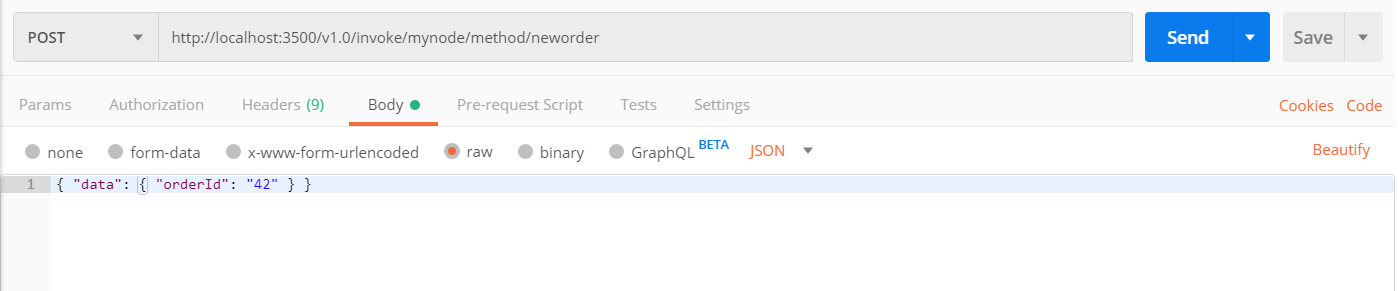
Result Update
你可以在你启动的终端中看到新的日志
== APP == Got a new order! Order ID: 42

== APP == Successfully persisted state
Get
Curl
curl http://localhost:3500/v1.0/invoke/mynode/method/order
Vscode
GET http://localhost:3500/v1.0/invoke/mynode/method/order
Postman
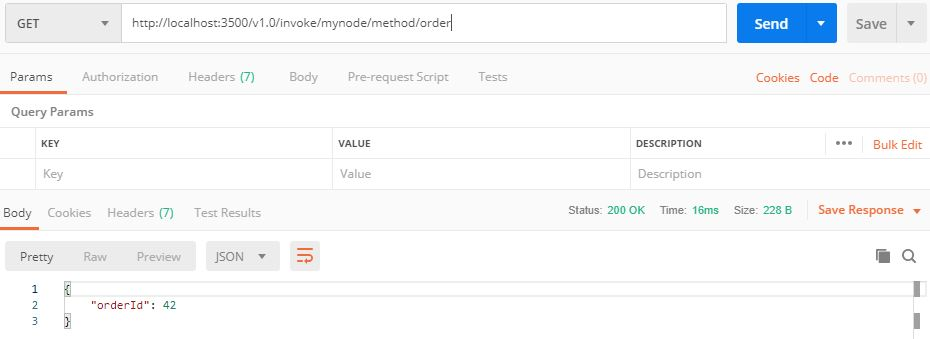
Terminate
ctrl + c 或者 dapr stop --app-id mynode
^C

ℹ️  terminated signal received: shutting down

✅  Exited Dapr successfully

✅  Exited App successfully
Feature
- 具有可插入提供程序和至少一次语义的事件驱动的Pub-Sub系统
- 使用可插入提供程序的输入和输出绑定
- 具有可插拔数据存储的状态管理
- 一致的服务到服务发现和调用
- 选择加入状态模型:强大/最终一致性,首次写入/最后写入获胜
- 跨平台虚拟演员
- 限速
- 使用OpenTelemetry的内置分布式跟踪
- 使用专用的Operator和CRD在Kubernetes上本地运行
- 通过HTTP和gRPC支持所有编程语言
- 来自Azure,AWS,GCP的多云,开放式组件(绑定,发布-订阅,状态)
- 作为过程或容器化在任何地方运行
- 轻量级(58MB二进制,4MB物理内存)
- 作为辅助工具运行-无需特殊的SDK或库
- 专用的CLI-易于调试的开发人员友好体验
- Java,Dotnet,Go,Javascript和Python的客户端
Refer
- https://github.com/dapr/dapr
- https://github.com/dapr/docs/blob/master/getting-started/environment-setup.md#environment-setup
- https://github.com/dapr/docs/tree/master/howto
- https://github.com/dapr/samples
- https://github.com/dapr/samples/tree/master/1.hello-world
微软的分布式应用框架 Dapr Helloworld的更多相关文章
- 微软的分布式应用框架 Dapr
微服务架构已成为构建云原生应用程序的标准,微服务架构提供了令人信服的好处,包括可伸缩性,松散的服务耦合和独立部署,但是这种方法的成本很高,需要了解和熟练掌握分布式系统.为了使用所有开发人员能够使用任何 ...
- 微软分布式云计算框架Orleans(2):容灾与集群(1)
在上一篇:微软分布式云计算框架Orleans(1):Hello World,我们大概了解了Orleans如何运用,当然上一篇的例子可以说是简单且无效的,因为用了Orleans不可能只写一个Hello ...
- 阿里巴巴的分布式应用框架-dubbo负载均衡策略--- 一致哈希算法
dubbo是阿里巴巴公司开发的一个开源分布式应用框架,基于服务的发布者和订阅者,服务者启动服务向注册中心发布自己的服务:消费者(订阅者)启动服务器向注册中心订阅所需要的服务.注册中心将订阅的服务注册列 ...
- 微软的权限框架Asp.Net Identity
Asp.Net Identity 深度解析 之 注册登录的扩展 关于权限每个系统都有自己的解决方案,今天我们来讨论一下微软的权限框架Asp.Net Identity ,介绍如下 http://w ...
- 使用Strust2框架写HelloWorld
使用Strust2框架写HelloWorld 一.创建JavaWeb项目 二.搭建Stust2 FrameWork开发环境 三步完成Struts2 FrameWork开发环境的搭建 1.加入搭建Str ...
- 跟着刚哥学习Spring框架--创建HelloWorld项目(一)
1.Spring框架简介 Spring是一个开源框架,Spring是在2003年兴起的一个轻量级的开源框架,由Rod johnson创建.主要对JavaBean的生命周期进行管理的轻量级框架,Spri ...
- 解析分布式应用框架Ray架构源码
摘要:Ray的定位是分布式应用框架,主要目标是使能分布式应用的开发和运行. Ray是UC Berkeley大学 RISE lab(前AMP lab) 2017年12月 开源的新一代分布式应用框架(刚发 ...
- 动手写一个简单的Web框架(HelloWorld的实现)
动手写一个简单的Web框架(HelloWorld的实现) 关于python的wsgi问题可以看这篇博客 我就不具体阐述了,简单来说,wsgi标准需要我们提供一个可以被调用的python程序,可以实函数 ...
- MassTransit | .NET 分布式应用框架
引言 A free, open-source distributed application framework for .NET. 一个免费.开源的.NET 分布式应用框架. -- MassTran ...
随机推荐
- Flask基础(10)-->http的无状态协议解决办法一(客户端cookie)
http的无状态协议 http是一种无状态协议,浏览器请求服务器时无状态的 什么是无状态? 无状态:指的是一次用户请求时,浏览器.服务器无法知道之前这个用户做过什么,每次请求都是一次新的请求. 无状态 ...
- Actor 模型中的通信模式
在 Actor 模型中所有的 Actor 之间有且只有一种通信模式,那就是 tell 的方式,也就是 fire and forget 的方式.但是在实际的开发过程中工程师们逐渐总结出了一些常用的通信模 ...
- vue2.0项目记住密码和用户名实例
的今天突来兴致,试了一下将用户名和密码存在cookie和localStorage里如何实现:从代码难易程度来讲,果断选择了将用户名和密码存在localStorage里面.当然菜鸟上这么说的,楼下. 也 ...
- 面试题解析|ACL权限控制机制
ACL(Access Control List)访问控制列表 包括三个方面: 一.权限模式(Scheme) 1.IP:从 IP 地址粒度进行权限控制 2.Digest:最常用,用类似于 usernam ...
- vue-cli 脚手架安装
1.安装node;选择适合自己系统的文件,下载一路next , a安装成功后,打开运行输入cmd 进入命令行: 在命令行工具中输入 npm -v 检查版本号 如果出现 则安装成功:(npm为node ...
- Mac OS Catalina 如何删除自带的应用
在新推送的系统升级过后,(博主系统是Mac OS Mojave 10.14)我们会发现,之前我们删除的令人讨厌的Mac自带应用又回来了,如果我们还按照之前百度的方式删除的话,参考: https://w ...
- RocketMQ消息队列部署与可视化界面安装
MQ安装部署 最新版本下载:http://rocketmq.apache.org/release_notes 修改配置 vi conf/broker.conf 添加brokerIP1 brokerIP ...
- 【源码解析】凭什么?spring boot 一个 jar 就能开发 web 项目
问题 为什么开发web项目,spring-boot-starter-web 一个jar就搞定了?这个jar做了什么? 通过 spring-boot 工程可以看到所有开箱即用的的引导模块 spring- ...
- 树莓派(4B)Linux + .Net Core嵌入式-初始化环境(一)
一.树莓派简单介绍 二.软&件准备 硬件:树莓派4B主机.电源线.TF卡&TF读卡器.PC 软件:win32diskimager(用于烧系统到TF卡).Xshell或Windows T ...
- Redis 的底层数据结构(整数集合)
当一个集合中只包含整数,并且元素的个数不是很多的话,redis 会用整数集合作为底层存储,它的一个优点就是可以节省很多内存,虽然字典结构的效率很高,但是它的实现结构相对复杂并且会分配较多的内存空间. ...