
SpringCloud实践引入注册中心+配置中心
随着服务数量的增多,尤其是多数项目涉及jni本地方法的调用,所需参数配置较多,同时内存溢出等维护问题时常发生.鉴于此,原tomcat集群的使用已难满足需求,而微服务的思想契合当前项目实践,特在服务端构建起高可用eureka_server注册中心集群/config_server配置中心集群,完成对应用和git配置文件的管理.同时考虑到服务器集群并发清洗数据的必要性,构建起了ribbon+zuul负载均衡集群(后续完成)并在实践中效果显著.整体而言,微服务的引用改善了项目开发和日常维护/迭代过程纷乱的现状.特整理注册中心和配置中心构建过程博客如下:
一 . 环境一览:
- 开发系统:Ubuntu 16.04 生产/测试系统:Cent OS 6
- 版本: SpringBoot 1.5.19 + SpringCloud Edgware.SR5 (idea构建自动匹配) + JDK 1.8
二 . 注册中心:
1.构建maven父工程 (便于开发环境项目管理),默认即可.
2.新建注册中心模块
new Module -> Spring Initializr --- Module SDK: 1.8 + Initializr Service URL - Default
-> Project Metadata:完成Group + Artifact + Version + Package的配置
-> Dependencies:
-> SpringBoot - 1.5.19
-> Cloud Discovery - Eureka Server
-> Finish
构建过程基于 IDEA新建Maven模块流程
3.启动类配置:
新增 @EnableEurekaServer 注解即可.
@EnableEurekaServer

@SpringBootApplication

public class RosettaEurekaServer1Application {

    public static void main( String[] args ) {

        SpringApplication.run(RosettaEurekaServer1Application.class,args);

    }

}
4.应用配置:
注意:此处构建为 eureka_server 集群 , 故而开发对自身的注册(单实例设置为false即可),同时默认注册中心为另一实例路径,具体配置如下:
server:

  port:

eureka:

  client:

    register-with-eureka: true # Eureka Server向自己注册

    fetch-registry: true

    service-url:

      defaultZone:

        http://127.0.0.1:8762/eureka

  server:

    enable-self-preservation: false

    wait-time-in-ms-when-sync-empty:

spring:

  application:

    name: resetta_eureka_server

  jackson:

    time-zone: GMT+
5.同上,构建另一eureka注册中心实例
结合4,配置如下 ( 注意: 实例名相同 ):
server:

  port:

eureka:

  client:

    register-with-eureka: true

    fetch-registry: true

    service-url:

      defaultZone:

        http://127.0.0.1:8761/eureka

  server:

    enable-self-preservation: false

    wait-time-in-ms-when-sync-empty:

spring:

  application:

    name: resetta_eureka_server

  jackson:

    time-zone: GMT+
6.构建 eureka_client 测试
1) 新建 eureka_client 模块:
同 二 - 2 , 只在 pom依赖环节改动如下:
Dependencies:
-> Spring Boot - 1.5.19
-> Cloud Discovery - Eureka Discovery
Finish
2) 启动类配置:
新增 @EnableDiscoveryClient 注解
@EnableDiscoveryClient

@SpringBootApplication

public class EurekaClientTestApplication {

    public static void main(String[] args) {

        SpringApplication.run(EurekaClientTestApplication.class, args);

    }

}
3) 应用配置:
注意:因由多个注册中心,故在配置时指定多个实例,具体如下:
eureka:

  client:

    service-url:

      defaultZone: http://127.0.0.1:8761/eureka, http://127.0.0.1:8762/eureka

server:

  port:

spring:

  application:

    name: eureka_client

  cloud:

    config:

      allow-override: true

      override-system-properties: false

# 在eureka集群中,需注意关闭安全组件

management:

  security:

    enabled: false
7.依次启动注册中心/测试实例
注:idea有一好用的实例启动视图 - RunDashbord . 如果实例启动未加载至该视图 , 可做以下修改
a. 找到项目根目录下 .idea - workspace.xml 配置文件
b. 找到文件夹下的 RunDashboard 组件, 设置 配置类型( configurationTypes )为 ( SpringBootApplicationConfigurationType )
c. 最终该组件配置如下:
<component name="RunDashboard">

    <option name="configurationTypes">

      <set>

        <option value="SpringBootApplicationConfigurationType" />

      </set>

    </option>

    <option name="ruleStates">

      <list>

        <RuleState>

          <option name="name" value="ConfigurationTypeDashboardGroupingRule" />

        </RuleState>

        <RuleState>

          <option name="name" value="StatusDashboardGroupingRule" />

        </RuleState>

      </list>

    </option>

</component>
d.Run Dashboard 视图启动效果如下:
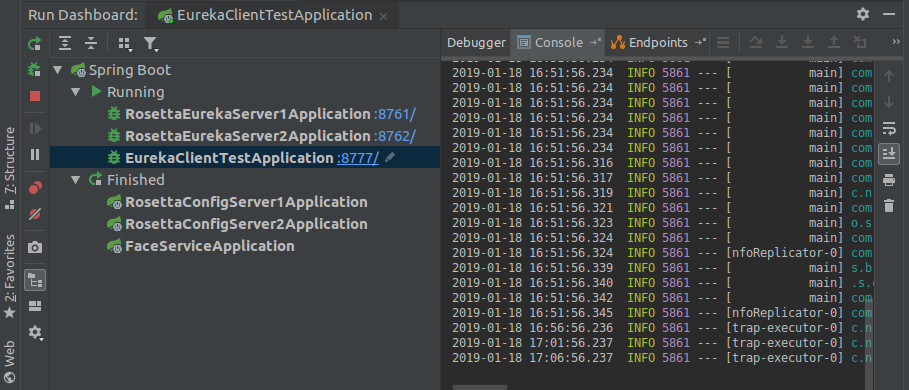
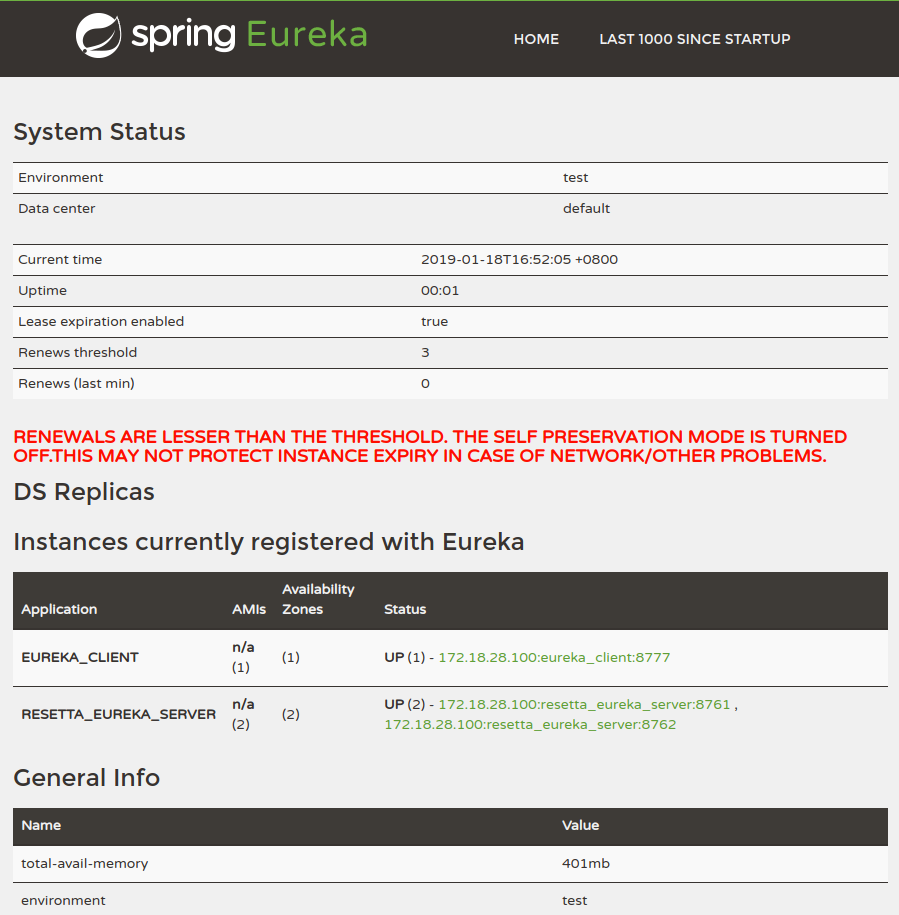
项目启动完毕后,进入 localhost:8761 / localhost:8762 查看各实例运行状态,截图如下:
三 . 配置中心
配置中心的构建,有些分歧,这里暂提供行之有效的终版也是简略版.
1. 基于 二 中 maven 父工程 , 新建配置中心 模块
同 二 - 2 , 只在 pom依赖环节改动如下:
Dependencies:
-> Spring Boot - 1.5.19
-> Cloud Config - Config Server
-> Cloud Discovery - Eureka Discovery
2. 启动类配置
新增 @EnableConfigServer / @EnableEurekaClient 注解 :
@EnableEurekaClient

@EnableConfigServer

@SpringBootApplication

public class RosettaConfigServer1Application {

    public static void main(String[] args) {

        SpringApplication.run(RosettaConfigServer1Application.class, args);

    }

}
3. 应用配置
eureka:

  client:

    service-url:

      defaultZone: http://172.18.28.100:8761/eureka, http://172.18.28.100:8762/eureka

server:

  port:

spring:

  application:

    name: rosetta_config_server

  cloud:

    config:

      server:

        git:

          uri: git@*.*.*.*:~/git/rosetta_cloud_config.git # 管理配置文件git服务器端路径

          search-paths: test # 对应的配置文件路径

          username: git

          password:

      label: master # 分支
4. 构建配置中心另一实例
同 3 , 除 端口不同
5. 启动测试 , 及 git服务端配置文件命名规约
Configuration Server 端点与配置文件的映射规则如下:
/{applicaiton}/{profile}[/{label}]

/{appllication}-{profile}.yml

/{label}/{application}-{profile}.yml

/{application}-{profile}.properties

/{label}/{application}-{profile}.properties
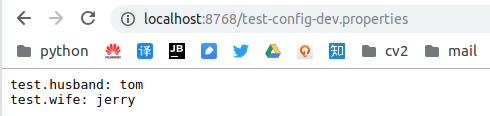
启动配置中心实例,根据上述规约测试配置信息如下:
6. Config Client 的使用
1) 根据 二 中 maven 父工程 , 新建配置客户端 模块:
pom依赖方面, 因需要时常刷新配置,故需采用 config client 结合 actuator的 /refresh的使用方式.依赖如下:
Dependencies:
Spring Boot - 1.5.19
Cloud Config - Config Client
Cloud Discovery - Eureka Discovery
Ops - Actuator
2) 启动类配置:
此处只需保留 @EnableEurekaClient 即可
3) 启动配置:
application.yml
management.security.enabled 置为 false , 免去调用/refresh时的权限验证
eureka:

  client:

    service-url:

      defaultZone: http://172.18.28.100:8761/eureka, http://172.18.28.100:8762/eureka

spring:

  application:

    name: test-config

server:

  port:

management:

  security:

    enabled: false
bootstrap.yml
spring:

  cloud:

    config:

      fail-fast: true

      label: master

      profile: dev

      discovery:

        enabled: true

        service-id: rosetta_config_server
4). 配置文件类:
@Component

@ConfigurationProperties(prefix = "test")

@RefreshScope

public class PersonConfigRemote {

    private String husband;

    private String wife;

    public String getHusband() {

        return husband;

    }

    public void setHusband(String husband) {

        this.husband = husband;

    }

    public String getWife() {

        return wife;

    }

    public void setWife(String wife) {

        this.wife = wife;

    }

}
5) 接口测试:
@RestController

@RequestMapping("/test")

public class TestConfig {

    @Autowired

    private PersonConfigRemote personConfigRemote;

    @GetMapping

    public String test(){

        return personConfigRemote.getHusband() + " --- " + personConfigRemote.getWife();

    }

}
6) 配置信息刷新
Spring提供了@ConfigurationProperties注解,可以将配置属性映射到一个JavaBean , 而且 Actuator 导出 /refresh 服务 , 每当调用这个服务的时候,被@ConfigurationProperties标注的Bean就会刷新属性值 .
注 : /refresh 为 POST 请求.
7) 测试
7. 追加
关于 Spring Cloud Bus + rabbit mq
新增pom:
<dependency>

            <groupId>org.springframework.cloud</groupId>

            <artifactId>spring-cloud-starter-bus-amqp</artifactId>

</dependency>
应用配置如下:
spring:

  application:

    name: rosetta_config_server

  cloud:

    bus:

      trace:

        enabled: true # 开启cloud bus的跟踪

  rabbitmq:

    host: 127.0.0.1

    port:

    username: guest

    password: guest

management:

  security:

    enabled: false
rabbit mq 安装使用 :
docker -> rabbit mq
docker pull rabbitmq:-management

docker run -d --hostname localhost --name myrabbit -p : -p : rabbitmq:-management

参数说明:

-d 后台进程运行

hostname RabbitMQ主机名称

name 容器名称

-p port:port 本地端口:容器端口

-p : http访问端口

-p : amqp访问端口
注:映射2个端口:15672是Web管理界面的端口;5672是MQ访问的端口。
实际应用中,调用 Config Client实例的 /bus/refresh 端点 , 注意 : POST 请求
SpringCloud实践引入注册中心+配置中心的更多相关文章
- springcloud 入门 8 (config配置中心)
Spring Cloud Config: 配置中心为了方便服务配置文件统一管理,实时更新,所以需要分布式配置中心组件,它就是Spring Cloud Config. 在分布式系统中,由于服务数量巨多, ...
- CoSky 高性能 服务注册/发现 & 配置中心
CoSky 基于 Redis 的服务治理平台(服务注册/发现 & 配置中心) Consul + Sky = CoSky CoSky 是一个轻量级.低成本的服务注册.服务发现. 配置服务 SDK ...
- 使用Alibaba的Nacos做为SpringCloud的注册和配置中心,并结合Sentinel+Nocos动态进行限流熔断
最近在学习阿里的Nacos组件以及Sentinel组件,折腾出了一个小demo. Git地址:https://github.com/yangzhilong/nacos-client 有兴趣的小伙伴可以 ...
- SpringCloud(6)分布式配置中心Spring Cloud Config
1.Spring Cloud Config 简介 在分布式系统中,由于服务数量巨多,为了方便服务配置文件统一管理,实时更新,所以需要分布式配置中心组件.在Spring Cloud中,有分布式配置中心组 ...
- SpringCloud基于消息总线的配置中心
@https://www.cnblogs.com/ityouknow/p/6931958.html Spring Cloud Bus Spring cloud bus通过轻量消息代理连接各个分布的节点 ...
- 微服务SpringCloud之Spring Cloud Config配置中心Git
微服务以单个接口为颗粒度,一个接口可能就是一个项目,如果每个项目都包含一个配置文件,一个系统可能有几十或上百个小项目组成,那配置文件也会有好多,对后续修改维护也是比较麻烦,就和前面的服务注册一样,服务 ...
- 微服务SpringCloud之Spring Cloud Config配置中心服务化
在前面两篇Spring Cloud Config配置中心的博客中都是需要指定配置服务的地址url:spring.cloud.config.uri,客户端都是直接调用配置中心的server端来获取配置文 ...
- 白话SpringCloud | 第八章:分布式配置中心的服务化及动态刷新
前言 上一章节,简单介绍了分布式配置中心Spring Cloud Config的使用.同时,我们也遗漏了一些问题,比如如何配置实时生效,当服务端地址变更或者集群部署时,如何指定服务端地址?回想,在服务 ...
- 微服务SpringCloud之Spring Cloud Config配置中心SVN
在回来的路上看到一个个的都抱着花,吃了一路的狗粮,原本想着去旁边的工业园里跑跑步呢,想想还是算了,人家过七夕,俺们过巴西.上一博客学习了Spring Cloud Config使用git作为配置中心,本 ...
随机推荐
- 【20190328】CSS-transform-origin(变形原点)解析
因为搜遍网上也没有一篇文章把transform-origin讲得很清楚的,所以自己总结了一下 transform-origin是变形原点,也就是该元素围绕着那个点变形或旋转,该属性只有在设置了tran ...
- Registrator中文文档
目录 快速入门 概述 准备 运行Registrator 运行Redis 下一步 运行参考 运行Registrator Docker选项 Registrator选项 Consul ACL令牌 注册URI ...
- 章节九、1-Selenium环境配置
一.Selenium环境安装配置,这里使用Selenium WebDriver 3.6.0 1.下载Selenium WebDriver (点击后网站响应比较慢,需要多等等) 2.打开该网址后点击“d ...
- 常用SMTP地址
1.QQ邮箱(mail.qq.com) POP3服务器地址:pop.qq.com(端口:110) SMTP服务器地址:smtp.qq.com(端口:25) 2.搜狐邮箱(sohu.com): POP3 ...
- ASP.NET Zero--解决方案结构(层)
解决方案结构(层) 创建和下载项目后,您将具有如下所示的解决方案结构: 解决方案有8个项目: Core项目包含域层类(如 实体 和 域服务). Application项目包含应用程序逻辑(如应用程序服 ...
- Nagle 算法
1. Nagel算法 TCP/IP协议中,无论发送多少数据,总是要在数据前面加上协议头,同时,对方接收到数据,也需要发送ACK表示确认.为了尽可能的利用网络带宽,TCP总是希望尽可能的发 ...
- C#与SQL Server数据库连接
using System; using System.Collections.Generic; using System.Linq; using System.Text; using System.T ...
- 我的博客即将入驻“云栖社区”,诚邀技术同仁一同入驻。
我的博客即将入驻"云栖社区",诚邀技术同仁一同入驻. 博客搬家邀请码NXLZV
- Python 函数初识 (1)
一.今日主要内容 认识函数 函数:对功能或者动作的封装(定义) 语法: def 函数名字(形参) 函数体 函数的调用格式:函数名(实参) 函数的返回值 关键字:return 终止函数的运行 1.函数内 ...
- TortoiseGit之配置密钥
TortoiseGit 使用扩展名为ppk的密钥,而不是ssh-keygen生成的rsa密钥.使用命令ssh-keygen -C "邮箱地址" -t rsa产生的密钥在Tortoi ...