
[iOS UI进阶 - 3.2] 手势识别器UIGestureRecognizer
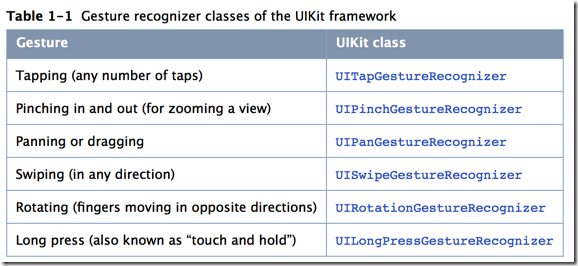
 - (void) testTap {

     // 创建手势识别器

     UITapGestureRecognizer *tapRec = [[UITapGestureRecognizer alloc] initWithTarget:self action:@selector(tapRun:)];

     tapRec.numberOfTapsRequired = ; // 触发需要点击的次数

     tapRec.numberOfTouchesRequired = ; // 触发需要同时点击的点数目

     // 配置手势识别器到控件

     [self.hvwView addGestureRecognizer: tapRec];

 }

 /** tap手势的事件处理方法 */

 - (void) tapRun:(UITapGestureRecognizer *) tapRec {

     NSLog(@"tapRun");

 }
 - (void) testLongPress {

     UILongPressGestureRecognizer *longRec = [[UILongPressGestureRecognizer alloc] initWithTarget:self action:@selector(longPressRun:)];

     longRec.minimumPressDuration = ; // 长按生效时间

     longRec.allowableMovement = ; // 长按允许移动范围,单位:px

     [self.hvwView addGestureRecognizer:longRec];

 }
 typedef enum {

    UISwipeGestureRecognizerDirectionRight =  << ,

    UISwipeGestureRecognizerDirectionLeft  =  << ,

    UISwipeGestureRecognizerDirectionUp    =  << ,

    UISwipeGestureRecognizerDirectionDown  =  <<

 } UISwipeGestureRecognizerDirection;
 - (void) testSwipe {

     UISwipeGestureRecognizer *swipeRec = [[UISwipeGestureRecognizer alloc] initWithTarget:self action:@selector(swipeRun:)];

     swipeRec.direction = UISwipeGestureRecognizerDirectionRight; // 轻扫的方向

     [self.hvwView addGestureRecognizer:swipeRec];

 }
 - (void) testPinch {

     UIPinchGestureRecognizer *rec = [[UIPinchGestureRecognizer alloc] initWithTarget:self action:@selector(pinchRun:)];

     [self.hvwView addGestureRecognizer:rec];

 }

 - (void) pinchRun:(UIPinchGestureRecognizer *) rec {

     rec.view.transform = CGAffineTransformScale(rec.view.transform, rec.scale, rec.scale);

     // 一定要复位!!!不然按住捏合会不断叠加倍数

     rec.scale = ;

 }

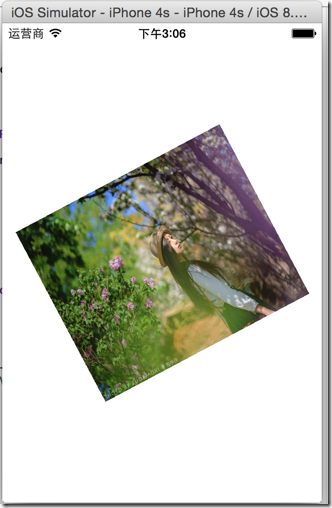
 - (void) testRotation {

     UIRotationGestureRecognizer *rotationRec = [[UIRotationGestureRecognizer alloc] initWithTarget:self action:@selector(rotationRun:)];

     [self.hvwView addGestureRecognizer:rotationRec];

 }

 - (void) rotationRun:(UIRotationGestureRecognizer *) rec {

     rec.view.transform = CGAffineTransformRotate(rec.view.transform, rec.rotation);

     // 一定要复位!!!不然会在按住旋转的时候会不断叠加rotation

     rec.rotation = ;

 }
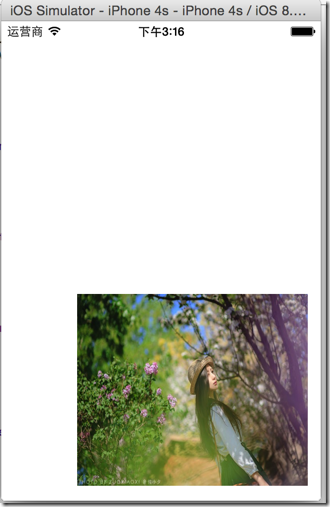
 - (void) testPan {

     UIPanGestureRecognizer *rec = [[UIPanGestureRecognizer alloc] initWithTarget:self action:@selector(panRun:)];

     [self.hvwView addGestureRecognizer:rec];

 }

 - (void) panRun:(UIPanGestureRecognizer *) rec {

     // 取得拖曳距离

     CGPoint movedDistance = [rec translationInView:rec.view];

     CGPoint viewCenter = rec.view.center;

     viewCenter.x += movedDistance.x;

     viewCenter.y += movedDistance.y;

     rec.view.center = viewCenter;

     // 复位拖曳距离

     [rec setTranslation:CGPointZero inView:rec.view];

 }
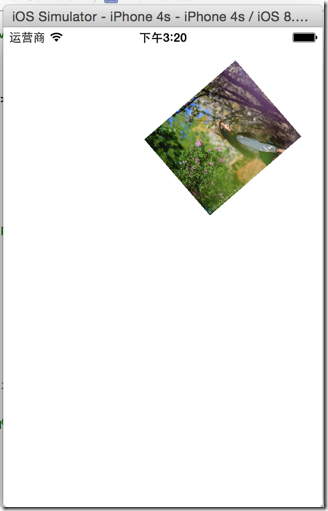
@interface ViewController () <UIGestureRecognizerDelegate>
rec.delegate = self;
 - (BOOL)gestureRecognizer:(UIGestureRecognizer *)gestureRecognizer shouldRecognizeSimultaneouslyWithGestureRecognizer:(UIGestureRecognizer *)otherGestureRecognizer {

     // 任何两种手势识别器都能同时使用

     return YES;

 }
 //

 //  ViewController.m

 //  GestureRecognizerTest

 //

 //  Created by hellovoidworld on 15/1/13.

 //  Copyright (c) 2015年 hellovoidworld. All rights reserved.

 //

 #import "ViewController.h"

 @interface ViewController () <UIGestureRecognizerDelegate>

 @property (weak, nonatomic) IBOutlet UIView *hvwView;

 @end

 @implementation ViewController

 - (void)viewDidLoad {

     [super viewDidLoad];

     // Do any additional setup after loading the view, typically from a nib.

 //    [self testTap];

 //    [self testLongPress];

 //    [self testSwipe];

     [self testRotation];

     [self testPinch];

     [self testPan];

 }

 - (void) testTap {

     // 创建手势识别器

     UITapGestureRecognizer *tapRec = [[UITapGestureRecognizer alloc] initWithTarget:self action:@selector(tapRun:)];

     tapRec.numberOfTapsRequired = ; // 触发需要点击的次数

     tapRec.numberOfTouchesRequired = ; // 触发需要同时点击的点数目

     // 配置手势识别器到控件

     [self.hvwView addGestureRecognizer: tapRec];

 }

 /** tap手势的事件处理方法 */

 - (void) tapRun:(UITapGestureRecognizer *) tapRec {

     NSLog(@"tapRun");

 }

 - (void) testLongPress {

     UILongPressGestureRecognizer *longRec = [[UILongPressGestureRecognizer alloc] initWithTarget:self action:@selector(longPressRun:)];

     longRec.minimumPressDuration = ; // 长按生效时间

     longRec.allowableMovement = ; // 长按允许移动范围,单位:px

     [self.hvwView addGestureRecognizer:longRec];

 }

 - (void) longPressRun:(UILongPressGestureRecognizer *) rec {

     NSLog(@"longPress");

 }

 - (void) testSwipe {

     UISwipeGestureRecognizer *swipeRec = [[UISwipeGestureRecognizer alloc] initWithTarget:self action:@selector(swipeRun:)];

     swipeRec.direction = UISwipeGestureRecognizerDirectionRight; // 轻扫的方向

     [self.hvwView addGestureRecognizer:swipeRec];

 }

 - (void) swipeRun:(UISwipeGestureRecognizer *) rec {

     NSLog(@"swipe");

 }

 - (void) testRotation {

     UIRotationGestureRecognizer *rotationRec = [[UIRotationGestureRecognizer alloc] initWithTarget:self action:@selector(rotationRun:)];

     rotationRec.delegate = self;

     [self.hvwView addGestureRecognizer:rotationRec];

 }

 - (void) rotationRun:(UIRotationGestureRecognizer *) rec {

     rec.view.transform = CGAffineTransformRotate(self.hvwView.transform, rec.rotation);

     // 一定要复位!!!不然会在按住旋转的时候会不断叠加rotation

     rec.rotation = ;

 }

 - (void) testPinch {

     UIPinchGestureRecognizer *rec = [[UIPinchGestureRecognizer alloc] initWithTarget:self action:@selector(pinchRun:)];

     rec.delegate = self;

     [self.hvwView addGestureRecognizer:rec];

 }

 - (void) pinchRun:(UIPinchGestureRecognizer *) rec {

     rec.view.transform = CGAffineTransformScale(rec.view.transform, rec.scale, rec.scale);

     // 一定要复位!!!不然按住捏合会不断叠加倍数

     rec.scale = ;

 }

 - (void) testPan {

     UIPanGestureRecognizer *rec = [[UIPanGestureRecognizer alloc] initWithTarget:self action:@selector(panRun:)];

     rec.delegate = self;

     [self.hvwView addGestureRecognizer:rec];

 }

 - (void) panRun:(UIPanGestureRecognizer *) rec {

     // 取得拖曳距离

     CGPoint movedDistance = [rec translationInView:rec.view];

     CGPoint viewCenter = rec.view.center;

     viewCenter.x += movedDistance.x;

     viewCenter.y += movedDistance.y;

     rec.view.center = viewCenter;

     // 复位拖曳距离

     [rec setTranslation:CGPointZero inView:rec.view];

 }

 - (void)didReceiveMemoryWarning {

     [super didReceiveMemoryWarning];

     // Dispose of any resources that can be recreated.

 }

 - (BOOL)gestureRecognizer:(UIGestureRecognizer *)gestureRecognizer shouldRecognizeSimultaneouslyWithGestureRecognizer:(UIGestureRecognizer *)otherGestureRecognizer {

     // 任何两种手势识别器都能同时使用

     return YES;

 }

 @end
[iOS UI进阶 - 3.2] 手势识别器UIGestureRecognizer的更多相关文章
- iOS UI进阶-6.0 手势
给每个页面添加手势,只需要统一设置不是根控制器的页面,都增加手势.需要自定义导航控制器 1.继承代理 @interface BSNavigationController ()<UIGesture ...
- [iOS UI进阶 - 5.0] 手势解锁Demo
A.需求 1.九宫格手势解锁 2.使用了绘图和手势事件 code source: https://github.com/hellovoidworld/GestureUnlockDemo B ...
- [iOS UI进阶 - 3.1] 触摸事件的传递
A.事件的产生和传递 发生触摸事件后,系统会将该事件加入到一个由UIApplication管理的事件队列中UIApplication会从事件队列中取出最前面的事件,并将事件分发下去以便处理,通常,先发 ...
- [iOS UI进阶 - 0] Quiartz2D
A.简介 1. 需要掌握的 drawRect:方法的使用 常见图形的绘制:线条.多边形.圆 绘图状态的设置:文字颜色.线宽等 图形上下文状态的保存与恢复 图形上下文栈 1.基本图形绘制* 线段(线宽. ...
- [iOS UI进阶 - 3.0] 触摸事件的基本处理
A.需要掌握和练习的 1.介绍事件类型2.通过按钮的事件处理引出view的事件处理3.响应者对象 --> UIResponder --> UIView4.view的拖拽* 实现触摸方法,打 ...
- iOS UI进阶-1.0 Quartz2D
概述 Quartz 2D是一个二维绘图引擎,同时支持iOS和Mac系统.Quartz 2D能完成的工作: 绘制图形 : 线条\三角形\矩形\圆\弧等 绘制文字 绘制\生成图片(图像) 读取\生成PDF ...
- [iOS UI进阶 - 6.1] 核心动画CoreAnimation
A.基本知识 1.概念 Core Animation是一组非常强大的动画处理API,使用它能做出非常炫丽的动画效果,而且往往是事半功倍,使用它需要先添加QuartzCore.framework和引入对 ...
- [iOS UI进阶 - 6.0] CALayer
A.基本知识 1.需要掌握的 CALayer的基本属性 CALayer和UIView的关系 position和anchorPoint的作用 2.概念 在iOS中,你能看得见摸得着的东西基本上都是U ...
- [iOS UI进阶 - 2.3] 彩票Demo v1.3
A.需求 真机调试 "关于”模块 存储开关状态 打电话.发短信 应用评分 打开其他应用 cell 在iOS6 和 iOS7的适配 block的循环引用 屏幕适配 code source: ...
随机推荐
- 函数xdes_calc_descriptor_page
根据偏移量计算出第几个xdes page 0 %16328 = 0 64% 16328 = 64 128 % 16328 = 128 192 % 16328 = 192 /************** ...
- UVA 11090 Going in Cycle!! 环平均权值(bellman-ford,spfa,二分)
题意: 给定一个n个点m条边的带权有向图,求平均权值最小的回路的平均权值? 思路: 首先,图中得有环的存在才有解,其次再解决这个最小平均权值为多少.一般这种就是二分猜平均权值了,因为环在哪也难以找出来 ...
- datatables 参数详解(转)
//@translator codepiano //@blog codepiano //@email codepiano.li@gmail.com //尝试着翻译了一下,难免有错误的地方,欢迎发邮件告 ...
- 《C++ Primer 4th》读书笔记 第5章-表达式
原创文章,转载请注明出处: http://www.cnblogs.com/DayByDay/p/3912114.html
- Spring学习之AOP
Spring-AOP(Aspect-orented programming) 在业务流程中插入与业务无关的逻辑,这样的逻辑称为Cross-cutting concerns,将Crossing-cutt ...
- Oracle RAC OCR 的管理与维护
OCR相当于Windows的注册表.对于Windows而言,所有的软件信息,用户,配置,安全等等统统都放到注册表里边.而集群呢,同样如此,所有和集群相关的资源,配置,节点,RAC数据库统统都放在这个仓 ...
- winform实现自动更新并动态调用form实现
winform实现自动更新并动态调用form实现 标签: winform作业dllbytenull服务器 2008-08-04 17:36 1102人阅读 评论(0) 收藏 举报 分类: c#200 ...
- CMake实践(2)
一,本期目标: [~@localhost t2]$ cat README this is README├── CMakeLists.txt├── COPYRIGHT├── doc│ └── hel ...
- android改变字体的颜色的三种方法
写文字在Android模拟器中的方法 法一: main.xml配置文件: <TextView android:id="@+id/tv" android:layout_widt ...
- C# Read/Write another Process' Memory z
http://www.codeproject.com/Articles/670373/Csharp-Read-Write-another-Process-Memory This article aim ...