
Lab2 Report
1、安装SeleniumIDE插件
a)安装Firefox 17.0 - 56.*版本的firefox,下载地址为:http://ftp.mozilla.org/pub/firefox/releases/ ;
b)在firefox-->菜单-->附加组件的搜索栏中输入“selenium IDE”;
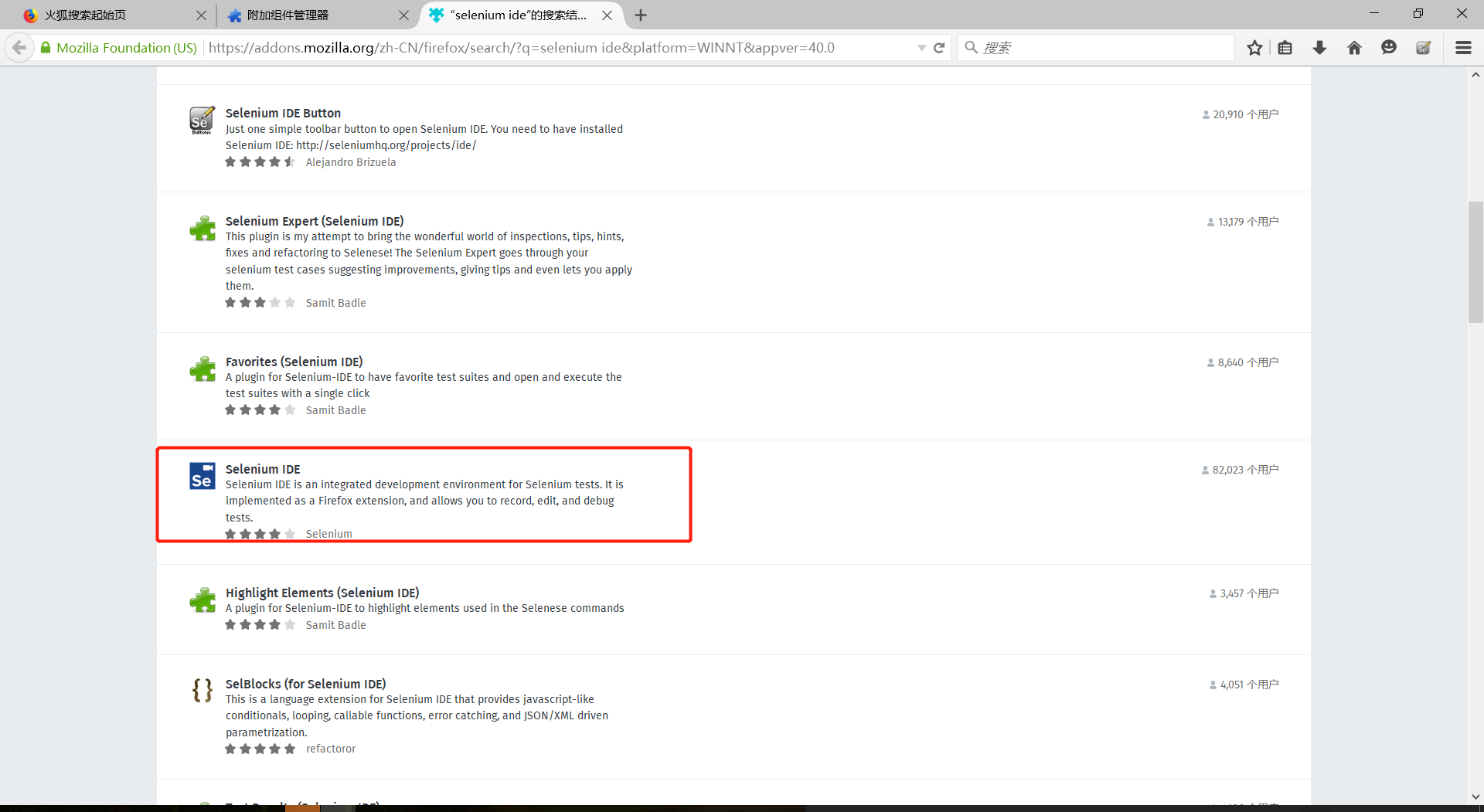
c)在搜索结果中找到如图所示的插件,单击之;
d)在页面中找到如图所示的超链接,单击之;

e)如图所示找到2.9版本,添加至firefox;

f)重启,安装完成。
2、学会使用SeleniumIDE录制脚本和导出脚本
a)在firefox中启动selenium ide;
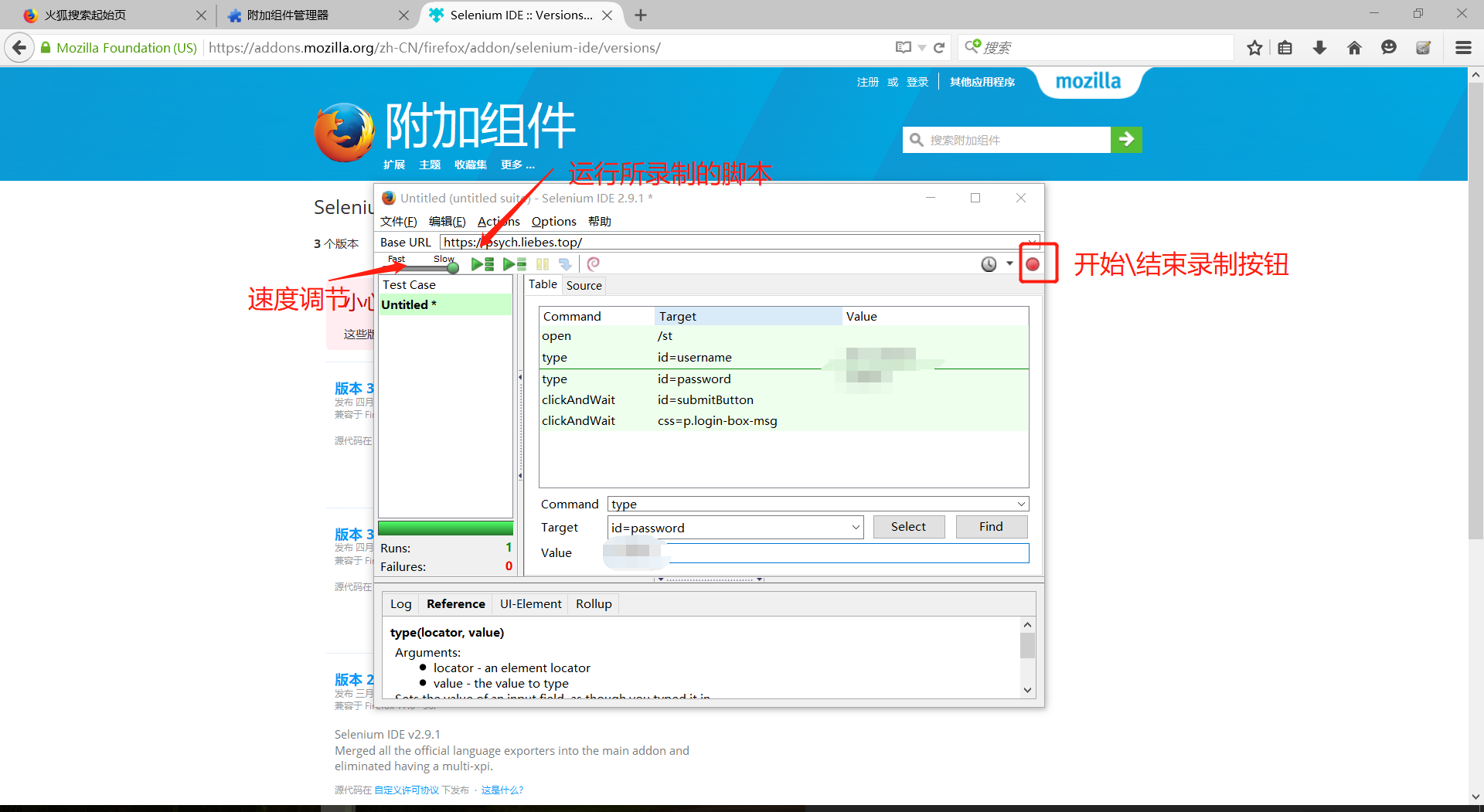
b)如图所示进行操作;
3、编写Selenium Java WebDriver程序,测试input.xlsx表格中的学号和git地址的对应关系是否正确。
a)关键源代码:
 package cn.tju.selenium;

 import java.io.BufferedWriter;

 import java.io.File;

 import java.io.FileInputStream;

 import java.io.FileWriter;

 import java.util.regex.Pattern;

 import java.util.concurrent.TimeUnit;

 import org.apache.poi.xssf.usermodel.XSSFSheet;

 import org.apache.poi.xssf.usermodel.XSSFWorkbook;

 import org.junit.*;

 import static org.junit.Assert.*;

 import static org.hamcrest.CoreMatchers.*;

 import org.openqa.selenium.*;

 import org.openqa.selenium.firefox.FirefoxDriver;

 import org.openqa.selenium.support.ui.Select;

 public class Script {

     private WebDriver driver;

     private String baseUrl;

     private boolean acceptNextAlert = true;

     private StringBuffer verificationErrors = new StringBuffer();

     @Before

     public void setUp() throws Exception {

         driver = new FirefoxDriver();

         baseUrl = "https://psych.liebes.top/";

         driver.manage().timeouts().implicitlyWait(30, TimeUnit.SECONDS);

     }

     @Test

     public void testScript() throws Exception {

         try {

             /* 写入Txt文件 */

             File writename = new File("output.txt"); // 相对路径,如果没有则要建立一个新的output。txt文件

             writename.createNewFile(); // 创建新文件

             BufferedWriter out = new BufferedWriter(new FileWriter(writename));

             out.write("   学号                  原URL                                excel表中URL\r\n");

             out.flush(); // 把缓存区内容压入文件

             // 指定excel的路径

             File src = new File("input.xlsx");

             // 加载文件

             FileInputStream fis = new FileInputStream(src);

             // 加载workbook

             @SuppressWarnings("resource")

             XSSFWorkbook wb = new XSSFWorkbook(fis);

             // 加载sheet,这里我们只有一个sheet,默认是sheet1

             XSSFSheet sh1 = wb.getSheetAt(0);

             for (int i = 0; i < sh1.getPhysicalNumberOfRows(); i++) {

                 driver.get(baseUrl + "/st");

                 driver.findElement(By.id("username")).clear();

                 driver.findElement(By.id("username")).sendKeys(

                         sh1.getRow(i).getCell(0).getStringCellValue());

                 driver.findElement(By.id("password")).clear();

                 driver.findElement(By.id("password")).sendKeys(

                         sh1.getRow(i).getCell(0).getStringCellValue()

                                 .substring(4));

                 driver.findElement(By.id("submitButton")).click();

                 if (sh1.getRow(i)

                         .getCell(1)

                         .getStringCellValue()

                         .trim()

                         .equals(driver

                                 .findElement(By.cssSelector("p.login-box-msg"))

                                 .getText().trim())) {

                     System.out.println("Success-"

                             + sh1.getRow(i).getCell(0).getStringCellValue());

                 } else {

                     System.out.println("Failed-"

                             + sh1.getRow(i).getCell(0).getStringCellValue());

                     out.write(sh1.getRow(i).getCell(0).getStringCellValue()

                             + "     "

                             + String.format(

                                     "%-40s",

                                     driver.findElement(

                                             By.cssSelector("p.login-box-msg"))

                                             .getText())

                             + String.format("%-40s", sh1.getRow(i).getCell(1)

                                     .getStringCellValue()) + "\r\n"); // \r\n即为换行

                     out.flush(); // 把缓存区内容压入文件

                 }

             }

             out.close(); // 最后记得关闭文件

         } catch (Exception e) {

             System.out.println(e.getMessage());

         }

     }

     @After

     public void tearDown() throws Exception {

         driver.quit();

         String verificationErrorString = verificationErrors.toString();

         if (!"".equals(verificationErrorString)) {

             fail(verificationErrorString);

         }

     }

     private boolean isElementPresent(By by) {

         try {

             driver.findElement(by);

             return true;

         } catch (NoSuchElementException e) {

             return false;

         }

     }

     private boolean isAlertPresent() {

         try {

             driver.switchTo().alert();

             return true;

         } catch (NoAlertPresentException e) {

             return false;

         }

     }

     private String closeAlertAndGetItsText() {

         try {

             Alert alert = driver.switchTo().alert();

             String alertText = alert.getText();

             if (acceptNextAlert) {

                 alert.accept();

             } else {

                 alert.dismiss();

             }

             return alertText;

         } finally {

             acceptNextAlert = true;

         }

     }

 }
b)git项目地址:https://github.com/lvjunsetup/SowareTestLab2
c)实验结果:

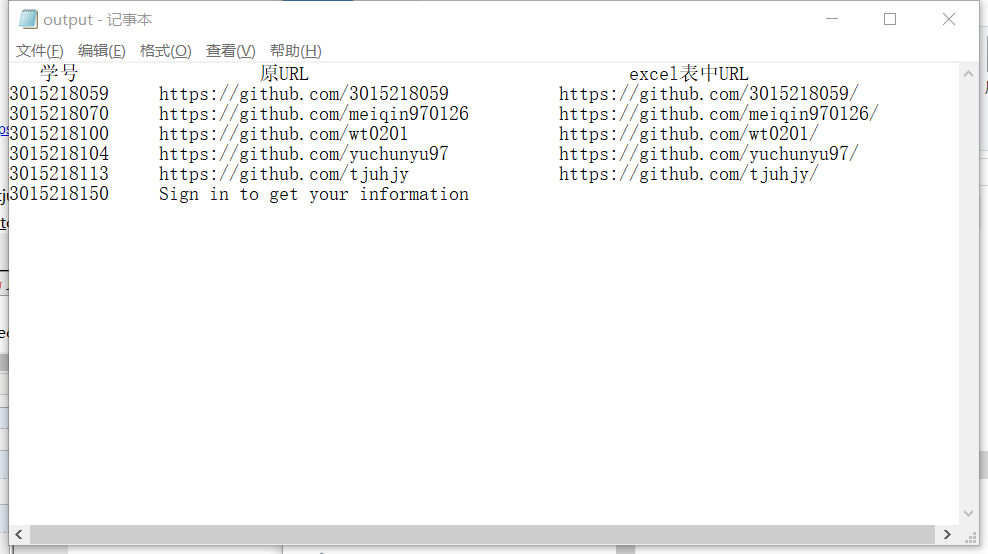
d)所有不匹配的结果:
附: 所需依赖的jar包下载地址: https://pan.baidu.com/s/1XNsWpGKSqDKs-zvFnQvFkg
项目依赖jar包结构图:

Lab2 Report的更多相关文章
- 2.ASP.NET MVC 中使用Crystal Report水晶报表
上一篇,介绍了怎么导出Excel文件,这篇文章介绍在ASP.NET MVC中使用水晶报表. 项目源码下载:https://github.com/caofangsheng93/CrystalReport ...
- Monthly Income Report – August 2016
原文链接:https://marcoschwartz.com/monthly-income-report-august-2016/ Every month, I publish a report of ...
- Step by step Install a Local Report Server and Remote Report Server Database
原创地址:http://www.cnblogs.com/jfzhu/p/4012097.html 转载请注明出处 前面的文章<Step by step SQL Server 2012的安装 &g ...
- Session for SSRS Report of Microsoft Dynamics AX
Session for SSRS Report of Microsoft Dynamics AX 版权声明:本文为博主原创文章,未经博主允许不得转载. Contract •A data contrac ...
- Report processing of Microsoft Dynamic AX
Report processing of Microsoft Dynamic AX 版权声明:本文为博主原创文章,未经博主允许不得转载. The implementation of a general ...
- Utility3:Understand Dashboard Report
To see data in the SQL Server Utility dashboard, select the top node in the Utility Explorer tree - ...
- PowerDesigner导出Report通用报表
PowerDesigner导出Report通用报表 通用模板下载地址:http://pan.baidu.com/s/1c0NDphm
- SQL Server 2012 The report server cannot open a connection to the report server database
案例环境: 操作系统版本: Windows Server 2012 R2 Standard 数据库版本 : SQL SERVER 2012 SP2 案例介绍: 今天进入一台新安装的SQL ...
- SQL Server 2008 R2 升级到 Service Pack 3后Report Builder启动不了
一同事将测试服务器从SQL Server 2008 R2 SP2升级到了SQL Server 2008 R2 SP3后发现Report Service的报表编辑时启动不了Report Builder, ...
随机推荐
- 连接池中的maxIdle,MaxActive,maxWait参数
连接池中的maxIdle,MaxActive,maxWait参数 线程池 name:表示你的连接池的名称也就是你要访问连接池的地址 auth:是连接池管理权属性,Container表示容器管理 typ ...
- postgreSQL 之 Privilege & grant & revoke(未完待续)
When an object is created, it is assigned an owner. The owner is normally the role that executed the ...
- pod install报错 [!] Error installing......
今天pod install出现这个错误: 解决办法: 多试几次就好了,也不知道之前几次都失败.....希望知道的可以留言告诉我哟!!!
- 使用XCode7打包动态库(Framework)
iOS中的静态库和动态库 概念 静态库(Static Library)以 .a 为后缀,它是你的源码的实现.m文件编译而成的二进制文件集合,需要配合上暴漏的.h文件使用,它在引用链接时拷贝至可执行文件 ...
- nginx rewrite正则子组最多匹配到$9
nginx rewrite正则匹配()匹配子组最多匹配到$9,就是从$0到$9 当需要匹配更多子组时,可通过变量来实现 if ($uri ~ ^/forum-15/sortid-74/(.*?)(la ...
- 新式类__new__()方法
概述 __new__() 是在新式类中新出现的方法,在 Python 中类实例化时,__new__()方法用在 __init__() 启动之前,决定是否要使用该 __init__() 方法,因为__n ...
- Sprint Retrospective - 回顾的重要性
在Scrum中,每个Sprint结束的时候会有两个会议(Sprint Review/Demo和Sprint Retrospective回顾).这两个会议是对过去的一个Sprint的一个总结,其中Rev ...
- 初识MyBatis之HelloWorld
1.先下载MyBatis相关Jar包. 2. 创建数据库和表 CREATE TABLE tbl_employee( id ) PRIMARY KEY AUTO_INCREMENT, last_name ...
- VS开发】C中调用C++文件中定义的function函数
[VS开发]C中调用C++文件中定义的function函数 标签(空格分隔): [VS开发] 声明:引用请注明出处http://blog.csdn.net/lg1259156776/ 精要一揽 C调用 ...
- 飞腾PC机器与奔腾G645的PC机器以及E5-2630V4虚拟机内存性能简单对比
1. 对比工具 sysbench 2. 对比命令 sysbench --test=memory --memory-total-size=12G --num-threads= run 3 安装方式 #u ...