
WinForm 自定义控件 - RooF
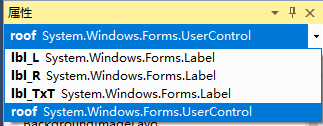
由3个标签组成
直接代码
    public partial class Roof : UserControl

    {

        public Roof()

        {

            InitializeComponent();

        }

        private string text = "";//中间文字

        private float valueL = 0.00f;//默认值0.00

        private float valueR = 0.00f;

        private bool _isChecked = false;//是否选中

        private int roofId = ;

        /// <summary>

        /// RoofId可用于作为唯一标识

        /// </summary>

        [Description("RoofId可用于作为唯一标识"), Category("自定义")]

        public int RoofId

        {

            get

            {

                return this.roofId;

            }

            set

            {

                this.roofId = value;

            }

        }

        /// <summary>

        /// 显示内容

        /// </summary>

        [Description("显示内容"), Category("自定义")]

        public string ShowText

        {

            get

            {

                return this.text;

            }

            set

            {

                this.text = value;

                lbl_TxT.Text = value;

            }

        }

        /// <summary>

        /// 左边值

        /// </summary>

        [Description("左边值"), Category("自定义")]

        public float ValueL

        {

            get

            {

                return this.valueL;

            }

            set

            {

                this.valueL = value;

                lbl_L.Text = value.ToString();

            }

        }

        /// <summary>

        /// 右边值

        /// </summary>

        [Description("右边值"), Category("自定义")]

        public float ValueR

        {

            get

            {

                return this.valueR;

            }

            set

            {

                this.valueR = value;

                lbl_R.Text = value.ToString();

            }

        }

        /// <summary>

        /// 是否选中

        /// </summary>

        [Description("是否选中"), Category("自定义")]

        public bool IsChecked

        {

            get

            {

                return this._isChecked;

            }

            set

            {

                this._isChecked = value;

                if (value) { lbl_TxT.BorderStyle = BorderStyle.FixedSingle; } else { lbl_TxT.BorderStyle = BorderStyle.None; }

            }

        }

        private void lbl_TxT_Click(object sender, EventArgs e)

        {

            if (_isChecked)

            {

                lbl_TxT.BorderStyle = BorderStyle.None;

                _isChecked = false;

            }

            else

            {

                lbl_TxT.BorderStyle = BorderStyle.FixedSingle;

                _isChecked = true;

            }

        }

        #region 定位各个控件位置

        private void roof_SizeChanged(object sender, EventArgs e)

        {

            AutoPosition();

        }

        private void AutoPosition()

        {

            var roofHeight = this.Height;

            var roofWidth = this.Width;

            lbl_L.Width = roofWidth / ;

            lbl_R.Width = roofWidth / ;

            lbl_TxT.Width = roofWidth / ;

            lbl_L.Height = roofHeight - ;

            lbl_R.Height = roofHeight - ;

            lbl_TxT.Height = roofHeight - ;

            //lbl_TxT.BackColor = Color.BlueViolet;

            //lbl_R.BackColor = Color.Red;

            //lbl_L.BackColor = Color.Blue;

            this.lbl_L.Location = new System.Drawing.Point(, roofHeight /  - lbl_L.Height / );

            this.lbl_R.Location = new System.Drawing.Point(roofWidth - lbl_R.Width, roofHeight /  - lbl_R.Height / );

            this.lbl_TxT.Location = new System.Drawing.Point(roofWidth / , roofHeight /  - lbl_TxT.Height / );

        }

        #endregion

        /// <summary>

        /// 控件加载出来

        /// </summary>

        /// <param name="sender"></param>

        /// <param name="e"></param>

        private void roof_Load(object sender, EventArgs e)

        {

            lbl_R.Text = valueR.ToString();

            lbl_L.Text = valueL.ToString();

            //默认背景颜色

            this.BackColor = System.Drawing.Color.FromArgb(, , );

            AutoPosition();

        }

    }
Roof.cs
    partial class Roof

    {

        /// <summary>

        /// 必需的设计器变量。

        /// </summary>

        private System.ComponentModel.IContainer components = null;

        /// <summary>

        /// 清理所有正在使用的资源。

        /// </summary>

        /// <param name="disposing">如果应释放托管资源,为 true;否则为 false。</param>

        protected override void Dispose(bool disposing)

        {

            if (disposing && (components != null))

            {

                components.Dispose();

            }

            base.Dispose(disposing);

        }

        #region 组件设计器生成的代码

        /// <summary>

        /// 设计器支持所需的方法 - 不要修改

        /// 使用代码编辑器修改此方法的内容。

        /// </summary>

        private void InitializeComponent()

        {

            this.lbl_L = new System.Windows.Forms.Label();

            this.lbl_R = new System.Windows.Forms.Label();

            this.lbl_TxT = new System.Windows.Forms.Label();

            this.SuspendLayout();

            //

            // lbl_L

            //

            this.lbl_L.BackColor = System.Drawing.Color.Transparent;

            this.lbl_L.Font = new System.Drawing.Font("Microsoft Sans Serif", 12.25F);

            this.lbl_L.Location = new System.Drawing.Point(, );

            this.lbl_L.Name = "lbl_L";

            this.lbl_L.Size = new System.Drawing.Size(, );

            this.lbl_L.TabIndex = ;

            this.lbl_L.Text = "50.00";

            this.lbl_L.TextAlign = System.Drawing.ContentAlignment.MiddleCenter;

            this.lbl_L.Click += new System.EventHandler(this.lbl_TxT_Click);

            //

            // lbl_R

            //

            this.lbl_R.Font = new System.Drawing.Font("Microsoft Sans Serif", 12.25F);

            this.lbl_R.Location = new System.Drawing.Point(, );

            this.lbl_R.Name = "lbl_R";

            this.lbl_R.Size = new System.Drawing.Size(, );

            this.lbl_R.TabIndex = ;

            this.lbl_R.Text = "51.00";

            this.lbl_R.TextAlign = System.Drawing.ContentAlignment.MiddleCenter;

            this.lbl_R.Click += new System.EventHandler(this.lbl_TxT_Click);

            //

            // lbl_TxT

            //

            this.lbl_TxT.BackColor = System.Drawing.Color.Transparent;

            this.lbl_TxT.Font = new System.Drawing.Font("Microsoft Sans Serif", 10.25F);

            this.lbl_TxT.Location = new System.Drawing.Point(, );

            this.lbl_TxT.Name = "lbl_TxT";

            this.lbl_TxT.Size = new System.Drawing.Size(, );

            this.lbl_TxT.TabIndex = ;

            this.lbl_TxT.TextAlign = System.Drawing.ContentAlignment.MiddleCenter;

            this.lbl_TxT.Click += new System.EventHandler(this.lbl_TxT_Click);

            //

            // roof

            //

            this.AutoScaleDimensions = new System.Drawing.SizeF(6F, 13F);

            this.AutoScaleMode = System.Windows.Forms.AutoScaleMode.Font;

            this.Controls.Add(this.lbl_TxT);

            this.Controls.Add(this.lbl_R);

            this.Controls.Add(this.lbl_L);

            this.Name = "roof";

            this.Size = new System.Drawing.Size(, );

            this.Load += new System.EventHandler(this.roof_Load);

            this.SizeChanged += new System.EventHandler(this.roof_SizeChanged);

            this.ResumeLayout(false);

        }

        #endregion

        private System.Windows.Forms.Label lbl_L;

        private System.Windows.Forms.Label lbl_R;

        private System.Windows.Forms.Label lbl_TxT;

    }
roof.Designer.cs
效果图

WinForm 自定义控件 - RooF的更多相关文章
- C# winform 自定义控件
近来因为项目的问题,开始研究winform自定义控件,这篇主要是将自定义控件的属性在属性编辑器中可编辑,如果你对自定义控件比较了解的,就不用继续往下看了 首先,我创建了一个类UserButton,继承 ...
- C#winform自定义控件模拟设计时界面鼠标移动和调节大小、选中效果
要想玩转Winform自定义控件需要对GDI+非常熟悉,对常用的控件有一些了解,好选择合适的基类控件来简化. 要点说明及代码 1)定义接口: using System; using System.Wi ...
- Winform自定义控件实例
本文转自http://www.cnblogs.com/hahacjh/archive/2010/04/29/1724125.html 写在前面: .Net已经成为许多软件公司的选择,而.Net自定义W ...
- winform 自定义控件:半透明Loading控件
winform 自定义控件:半透明Loading控件 by wgscd date:2015-05-05 效果: using System;using System.Drawing;using Sys ...
- c#Winform自定义控件-目录
前提 入行已经7,8年了,一直想做一套漂亮点的自定义控件,于是就有了本系列文章. 开源地址:https://gitee.com/kwwwvagaa/net_winform_custom_control ...
- (二)c#Winform自定义控件-按钮
前提 入行已经7,8年了,一直想做一套漂亮点的自定义控件,于是就有了本系列文章. 开源地址:https://gitee.com/kwwwvagaa/net_winform_custom_control ...
- (三)c#Winform自定义控件-有图标的按钮
前提 入行已经7,8年了,一直想做一套漂亮点的自定义控件,于是就有了本系列文章. 开源地址:https://gitee.com/kwwwvagaa/net_winform_custom_control ...
- (四)c#Winform自定义控件-选择按钮组
前提 入行已经7,8年了,一直想做一套漂亮点的自定义控件,于是就有了本系列文章. 开源地址:https://gitee.com/kwwwvagaa/net_winform_custom_control ...
- (七)c#Winform自定义控件-进度条
前提 入行已经7,8年了,一直想做一套漂亮点的自定义控件,于是就有了本系列文章. 开源地址:https://gitee.com/kwwwvagaa/net_winform_custom_control ...
随机推荐
- 领扣(LeetCode)对称二叉树 个人题解
给定一个二叉树,检查它是否是镜像对称的. 例如,二叉树 [1,2,2,3,4,4,3] 是对称的. 1 / \ 2 2 / \ / \ 3 4 4 3 但是下面这个 [1,2,2,null,3,nul ...
- python接口自动化--Excel
1.操作步骤: (1)安装python官方Excel库-->xlrd (2)获取Excel文件位置并读取 (3)读取sheet (4)读取指定rows和cols内容 2.示例代码 # -*- c ...
- docker中部署项目时遇到的问题
容器和宿主机时间不同步问题? 将本地时间复制到docker容器内的etc文件夹下即可 docker cp /etc/localtime scrapy_8:/etc/ 启动crontab错误? 报错: ...
- GitHub上优秀的开源项目(转载)
转载出处:https://github.com/Trinea/android-open-project 第一部分 个性化控件(View) 主要介绍那些不错个性化的 View,包括 ListView.A ...
- html基础——表格练习
最终样式 步骤分析: 标题和报名时间为一块 表格为一块 由图可知,可创建一个七行八列的列表存储数据 首先设置边框的样式,边框 大小,这里是黑色不好看可以设置为天空蓝 可选矿使用<input ty ...
- 记一个bootloader的cache问题
问题背景 最近往一个armv7板子的bootloader中移植了解压算法,移植本身还比较顺利,但移植完了发现,功能是正常的,但效率大打折扣.解压同样的数据,耗时大约是uboot的10倍. 初步定位 从 ...
- Spring Boot通过ImportBeanDefinitionRegistrar动态注入Bean
在阅读Spring Boot源码时,看到Spring Boot中大量使用ImportBeanDefinitionRegistrar来实现Bean的动态注入.它是Spring中一个强大的扩展接口.本篇文 ...
- react修改端口
react修改端口 在react官网根据文档安装好项目之后,发现新项目没有了scripst文件夹 之前版本是在scripts文件夹中的starts.js中修改 新版本修改port发现移入到了依赖里面 ...
- PAT(甲级)2018年冬季考试
1152 Google Recruitment 思路:判断素数 #include<bits/stdc++.h> using namespace std; const int maxn = ...
- 使用 SecureRandom 产生随机数采坑记录
公众号「码海」欢迎关注 背景 我们的项目工程里经常在每个函数需要用到 Random 的地方定义一下 Random 变量(如下) public void doSomethingCommon() { Ra ...