
windows内存debug技巧
A) c++ memory/heap corrupt debug 技巧
1. catch first exception
2. data breakpoint
VC tell us some address is corrupt when free some pointer
Check which pointer it is
Set break point when malloc the pointer
Set data breakpoint at the corrupt address after the pointer is malloc
VC will break at the place which corrupts memory
3. application verifier heap check 功能
4.
B) c++ memory leakage
注:需要管理员权限(gflags需要),能上网(会自动下载symbols)
主要有几个需求
一是dump leakage,可以用1,3实现
二是显示leakage的call stack,可以用1,2实现
而2的用法是比较两次快照,1可以在程序退出时做
1. windbg
set _NT_SYMBOL_PATH=SRV*C:\MyLocalSymbols*http://msdl.microsoft.com/download/symbols
run gflags to enable the stack trace of the program
start the program
start windbg and attach to the program
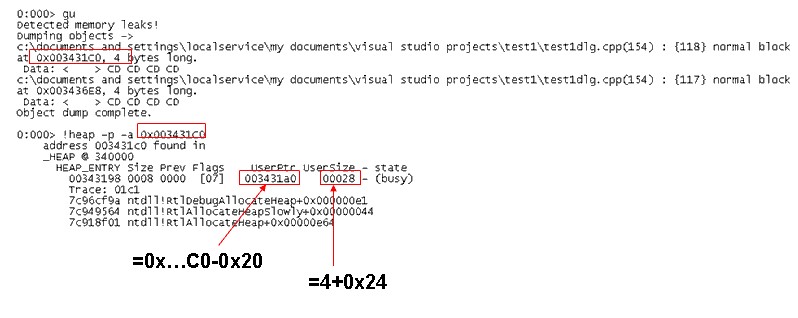
bm wineagle!_CrtDumpMemoryLeaks
make the program leak memory
exit program
the program will break into windbg
step out by gu command
!heap -p -a <ADDR> where ADDR is the dumped leakage address
2. umdh
set _NT_SYMBOL_PATH=SRV*C:\MyLocalSymbols*http://msdl.microsoft.com/download/symbols
Gflags to enable OS log stack trace
restart the debugee program
-1- umdh.exe -pn:application_name.exe -f:FirstDump.txt
-2- ... exercise the application
-3- umdh.exe -pn:application_name.exe -f:SecondDump.txt
-4- umdh.exe FirstDump.txt SecondDump.txt -f:Result.txt
Compares allocations from the two dumps.
3. vc crt lib dump leakage
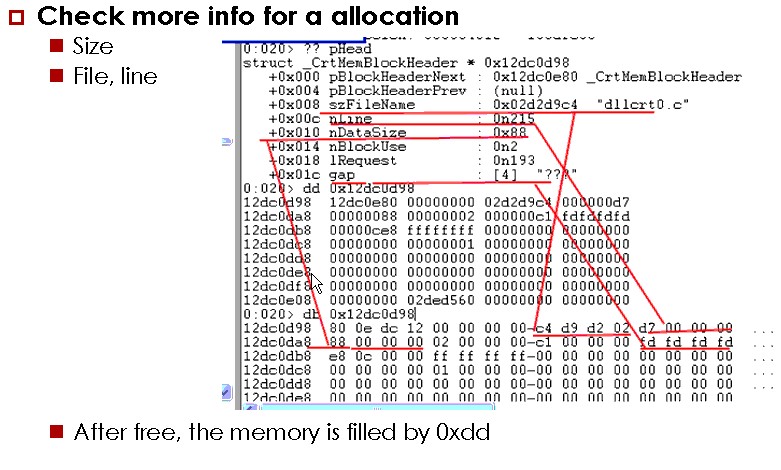
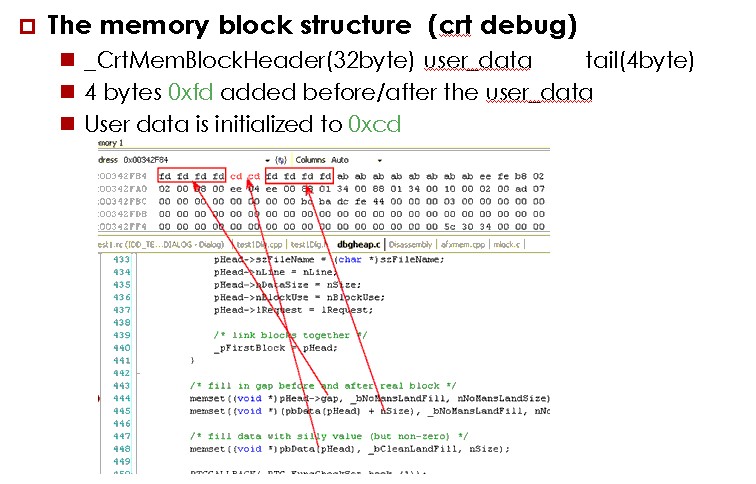
C) crt内存结构
Crt: _CrtSetDbgFlag, _CrtCheckMemory
D)关于gflags的heap类型
Gflags:
Full-page heap: placing a non-accessible page at the end of the allocation
Normal page heap: It checks fill patterns when a heap block is freed
Advantage: reduces memory consumption
Disadvantage
E) windbg extension
http://www.codeproject.com/Articles/6522/Debug-Tutorial-Part-4-Writing-WINDBG-Extensions
http://www.haogongju.net/art/1428822
??Debugging Tools for Windows, ?%programfiles%\ Debugging Tools for Windows (x86)\sdk????.
??:
Sdk\inc: ?????
??Dump???Callstack,??windbg???????
Sdk\lib:?????,dbghelp.lib,dbgeng.lib,engextcpp.lib,??????????
??Dump???Callstack,??windbg???????
Sdk\samples: samples(???????)
??Dump???Callstack,??windbg???????
Sdk\help:????
F)
Windows Performance Analyzer
http://msdn.microsoft.com/en-us/library/windows/desktop/ff190971%28v=vs.85%29.aspx
Write a debugger
http://social.msdn.microsoft.com/Forums/en-US/netfxbcl/thread/90770a1c-7f83-4f81-864f-e64f3e17d02b
You can use mdbg as a model for a debugger implementation, it comes with source code and you will find a lot of references about it . Depending on the type of debugging you want to do there are two APIs you can use: - for native applications you should use the native debugging API :爃ttp://msdn.microsoft.com/en-us/library/ms679304(VS.85).aspx
- for managed applications the managed debugging API :爃ttp://msdn.microsoft.com/en-us/library/ms404520.aspx
Both come with samples, for example this (http://msdn.microsoft.com/en-us/library/ms679288(VS.85).aspx) is an example of building a basic debugger using the native API. I also recommend Mike Stall's debugging blog爃ttp://blogs.msdn.com/jmstall/default.aspx.
Creating a Basic Debugger
http://msdn.microsoft.com/en-us/library/ms679288%28VS.85%29.aspx
Sample code for PDB 2 XML tool
http://blogs.msdn.com/b/jmstall/archive/2005/08/25/sample-pdb2xml.aspx
Tool to get snapshot of managed callstacks
http://blogs.msdn.com/b/jmstall/archive/2005/11/28/snapshot.aspx
windows内存debug技巧的更多相关文章
- gdb调试的艺术——Debug技巧
调试的艺术——Debug技巧总结 (本文从写好的wiki里粘出来的,格式稍乱不影响阅读) 用Q+编号代表问题,A+编号代表答案.用这种方式组织.如无特别说明,这些技巧都是针对Visual Studio ...
- 玩转Windows服务系列——Windows服务小技巧
伴随着研究Windows服务,逐渐掌握了一些小技巧,现在与大家分享一下. 将Windows服务转变为控制台程序 由于默认的Windows服务程序,编译后为Win32的窗口程序.我们在程序启动或运行过程 ...
- 玩转Windows服务系列——Windows服务小技巧
原文:玩转Windows服务系列——Windows服务小技巧 伴随着研究Windows服务,逐渐掌握了一些小技巧,现在与大家分享一下. 将Windows服务转变为控制台程序 由于默认的Windows服 ...
- Windows服务小技巧
Windows服务小技巧 阅读目录 开始 将Windows服务转变为控制台程序 注册服务为自动启动服务 注册服务时设置服务的依赖关系 添加自定义命令行参数 自定义命令行参数演示 系列链接 伴随着研究W ...
- 全面介绍Windows内存管理机制及C++内存分配实例(四):内存映射文件
本文背景: 在编程中,很多Windows或C++的内存函数不知道有什么区别,更别谈有效使用:根本的原因是,没有清楚的理解操作系统的内存管理机制,本文企图通过简单的总结描述,结合实例来阐明这个机制. 本 ...
- 全面介绍Windows内存管理机制及C++内存分配实例
转自:http://blog.csdn.net/yeming81/article/details/2046193 本文基本上是windows via c/c++上的内容,笔记做得不错.. 本文背景: ...
- 第13章 Windows内存体系结构
13.1 Windows的虚拟地址空间安排 13.1.1虚拟地址空间的分区(即虚拟地址空间布局) 进程的地址空间划分 分区 x86 32位 Windows 3GB用户模式下的x86 32位Window ...
- Windows内存管理和linux内存管理
windows内存管理 windows 内存管理方式主要分为:页式管理,段式管理,段页式管理. 页式管理的基本原理是将各进程的虚拟空间划分为若干个长度相等的页:页式管理把内存空间按照页的大小划分成片或 ...
- windows内存映射学习及帮助类实现
本文通过创建文件内存映射类,学习windows内存映射相关知识:创建内存映射文件后,可以按照内存操作方式操作文件:支持32位程序处理超过4G大小的文件. 感谢http://blog.csdn.net/ ...
随机推荐
- OpenCV中的新函数connectedComponentsWithStats使用
主要内容:对比新旧函数,用于过滤原始图像中轮廓分析后较小的区域,留下较大区域. 关键字 :connectedComponentsWithStats 在以前,常用的方法是"是先调用 cv ...
- ActiveMQ(1) -- 入门案例
- jvm 内存调整
top查看java占用的内存比较多 top - :: up days, :, user, load average: 0.03, 0.05, 0.05 Tasks: total, running, s ...
- POJ 1122 FDNY to the Rescue!(最短路+路径输出)
http://poj.org/problem?id=1122 题意:给出地图并且给出终点和多个起点,输出从各个起点到终点的路径和时间. 思路: 因为有多个起点,所以这里反向建图,这样就相当于把终点变成 ...
- 用 SQL 对关系型数据库进行查询
前面几节中,我们已经掌握了如何向 SQLite 数据库中写入数据.这一节,我们将学习如何根据需求对数据库进行查询,进而从中获取数据.接下来的例子中会使用 data/datasets.sqlite(之前 ...
- [原][译][osgearth]样式表style中参数总结(OE官方文档翻译)
几何Geometry 高度Altitude 挤压Extrusion 图标Icon 模型Model 渲染Render 皮肤Skin 文本Text 覆盖Coverage 提示: 在SDK中,样式表的命名空 ...
- JQuery中width和JS中JS中关于clientWidth offsetWidth scrollWidth 等的含义
JQuery中: width()方法用于获得元素宽度: innerWidth()方法用于获得包括内边界(padding)的元素宽度: outerWidth()方法用于获得包括内边界(padding)和 ...
- TitanX Server安装Caffe
服务器是Ubuntu Server 16.04,可以ssh和vnc连接. 安装caffe步骤 1. 安装anaconda2:这里不能用3,不知什么原因,cmake错误,无法生成pycaffe 2. 安 ...
- cocos creator开发微信小游戏记录
先用cocoscreator实现游戏逻辑 在cocoscreator项目里可以调用微信小游戏api 在cocos里面判断小游戏的运行环境 if (cc.sys.platform === cc.sys. ...
- Git创建仓库的方法(github翻译)
…通过命令行创建一个新的仓库 echo "# GitTest" >> README.md # 船舰一个说明文件,说明内容是 "# GitTest" ...