
springSecurity安全框架
一、是什么
是一种基于 Spring AOP 和 Servlet 过滤器的安全框架,对访问权限进行控制
二、作用
1.认证
用户名和密码认证,核对是否正确
2.授权
若正确,给予登录用户对应的访问权限
3.攻击防护
三、注意事项
1.登录页面提交用户名、密码表单路径必须是 /login

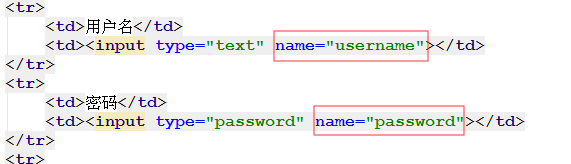
2.登录页面用户名和密码输入框中name属性值 必须叫做username 和 password
四、文件配置(简单的demo)
1.引入resources-->spring-security.xml
<?xml version="1.0" encoding="UTF-8"?>
<beans:beans xmlns="http://www.springframework.org/schema/security"
             xmlns:beans="http://www.springframework.org/schema/beans" xmlns:xsi="http://www.w3.org/2001/XMLSchema-instance"
             xsi:schemaLocation="http://www.springframework.org/schema/beans http://www.springframework.org/schema/beans/spring-beans.xsd
http://www.springframework.org/schema/security http://www.springframework.org/schema/security/spring-security.xsd">

    <!--以下页面不拦截 -->
    <http pattern="/login.html" security="none"></http>
    <http pattern="/login_error.html" security="none"></http>

    <!--页面拦截规则 -->
    <http use-expressions="false">
        <!--拦截所有的路径   只有用户ROLE_USER权限才可以放行-->
        <intercept-url pattern="/**" access="ROLE_USER" />
         <!--login-page :指定登录的页面   default-target-url指定登录成功后  访问的页面   authentication-failure-url:指定登录失败的页面-->
        <form-login login-page="/login.html" default-target-url="/index.html" authentication-failure-url="/login_error.html"/>

        <csrf disabled="true"/>
    </http>

<!--认证管理器-->
    <authentication-manager>
        <authentication-provider>
            <user-service>
               <user name="admin" password="123456" authorities="ROLE_USER"/>
            </user-service>
        </authentication-provider>
    </authentication-manager>
</beans:beans>
2.pm.xml核心
<dependency>
  <groupId>org.springframework.security</groupId>
  <artifactId>spring-security-web</artifactId>
  <version>4.1.0.RELEASE</version>
</dependency>
<dependency>
  <groupId>org.springframework.security</groupId>
  <artifactId>spring-security-config</artifactId>
  <version>4.1.0.RELEASE</version>
</dependency>
3.在web.xml配置过滤器
<?xml version="1.0" encoding="UTF-8"?>
<web-app xmlns:xsi="http://www.w3.org/2001/XMLSchema-instance"
         xmlns="http://java.sun.com/xml/ns/javaee"
         xsi:schemaLocation="http://java.sun.com/xml/ns/javaee http://java.sun.com/xml/ns/javaee/web-app_2_5.xsd"
         version="2.5">
  <context-param>
    <param-name>contextConfigLocation</param-name>
    <param-value>classpath:spring-security.xml</param-value>
  </context-param>
  <listener>
    <listener-class>
      org.springframework.web.context.ContextLoaderListener
    </listener-class>
  </listener>
  <filter>
    <filter-name>springSecurityFilterChain</filter-name>
    <filter-class>org.springframework.web.filter.DelegatingFilterProxy</filter-class>
  </filter>
  <filter-mapping>
    <filter-name>springSecurityFilterChain</filter-name>
    <url-pattern>/*</url-pattern>
  </filter-mapping>
</web-app>
五、将springSecurity引入项目中
UserDetailServiceImpl :
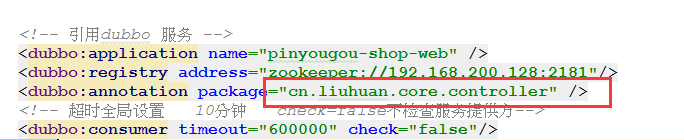
  由于在springmvc.xml中,引入dubbo时是指向的controller,无法识别service中的@Autowired,且dubbo注解引入必须指向class的上一层
  所以应该使用构造set的方法导入SellerService
public class UserDetailServiceImpl implements UserDetailsService {
    private SellerService sellerService;
    //构造set方法
    public void setSellerService(SellerService sellerService){
        this.sellerService=sellerService;
    }

    @Override
    public UserDetails loadUserByUsername(String username) throws UsernameNotFoundException {
        //权限的集合
        ArrayList<GrantedAuthority> autList = new ArrayList<>();
        //具有什么样的权限
        autList.add(new SimpleGrantedAuthority("ROLE_SELLER"));
        //1判断用户名是否为空
        if(username==null){
            return null;
        }
        //2根据用户名到数据库查询对应的对象
        if(username!=null){
            //3如果查 不到返回null
            Seller seller = sellerService.findOne(username);
            //4如果用户对象查到了 判断审核是否通过 如果未通过 返回null
            if(seller.getName()!=null&&"1".equals(seller.getStatus())){
                //5返回user对象
                return new User(seller.getName(),seller.getPassword(),autList);
            }
        }
        return null;
    }
}
resources-->spring-security.xml
<?xml version="1.0" encoding="UTF-8"?>
<beans:beans
      xmlns="http://www.springframework.org/schema/security"
      xmlns:beans="http://www.springframework.org/schema/beans"
      xmlns:xsi="http://www.w3.org/2001/XMLSchema-instance"
      xmlns:dubbo="http://code.alibabatech.com/schema/dubbo"

      xsi:schemaLocation="http://www.springframework.org/schema/beans http://www.springframework.org/schema/beans/spring-beans.xsd
                  http://code.alibabatech.com/schema/dubbo http://code.alibabatech.com/schema/dubbo/dubbo.xsd
                  http://www.springframework.org/schema/security http://www.springframework.org/schema/security/spring-security.xsd">

   <http pattern="/*.html" security="none"/>
   <http pattern="/css/**" security="none"/>
   <http pattern="/img/**" security="none"/>
   <http pattern="/js/**" security="none"/>
   <http pattern="/plugins/**" security="none"/>
   <http pattern="/seller/add.do" security="none"/>

   <!-- use-expressions:设置是否启动SpEL表达式,默认值是true。 -->
   <http use-expressions="false">
      <!--
         配置SpringSecurity的拦截路径(拦截规则)
         * pattern:配置拦截规则。   /* 代表的是根路径下的所有资源(不包含子路径) /**代表的是根路径下所有的资源(包含子路径)
         * access:设置角色  角色命名 ROLE_角色名称  如:  ROLE_USER
      -->
      <intercept-url pattern="/**" access="ROLE_SELLER"/>

      <!--
      开启表单验证
         username-parameter="username"
         password-parameter="password"
         login-page       :登录页面名称  以  / 开始
         default-target-url :登录成功后跳转的页面
         login-processing-url:提交的路径的设置 默认值"/login" 可以修改
      -->
      <form-login login-page="/shoplogin.html" default-target-url="/admin/index.html" always-use-default-target="true"
                  authentication-failure-url="/shoplogin.html"/>

      <!-- 不使用csrf的校验 -->
      <csrf disabled="true"/>

      <!-- 配置框架页面不拦截 -->
      <headers>
         <frame-options policy="SAMEORIGIN"/>
      </headers>

      <!-- 注销的配置 -->
      <logout logout-url="/logout" logout-success-url="/shoplogin.html" />
   </http>

   <!-- 配置认证管理器 -->
   <authentication-manager>
      <!-- 认证的提供者 -->
      <authentication-provider user-service-ref="userDetailService">

         <!--密码加密-->
         <!--<password-encoder ref="passwordEncoder"></password-encoder>-->

      </authentication-provider>
   </authentication-manager>

   <!-- 引用dubbo 服务 -->
   <dubbo:application name="pinyougou-shop-web" />
   <dubbo:registry address="zookeeper://192.168.200.128:2181"/>
   <dubbo:reference id="sellerService"  interface="cn.liuhuan.core.service.SellerService" >
   </dubbo:reference>

   <!-- 配置自定义的认证类 -->
   <beans:bean id="userDetailService" class="cn.liuhuan.core.service.UserDetailServiceImpl">
      <beans:property name="sellerService" ref="sellerService"></beans:property>
   </beans:bean>

   <beans:bean id="passwordEncoder" class="org.springframework.security.crypto.bcrypt.BCryptPasswordEncoder"/>
</beans:beans>
springSecurity安全框架的更多相关文章
- spring中的springSecurity安全框架的环境搭建
首先在web.xml文件中配置监听器和过滤器 <!--监听器 加载安全框架的核心配置文件到spring容器中--> <context-param> <param-name ...
- springSecurity安全框架的学习和原理解读
最近在公司的项目中使用了spring security框架,所以有机会来学习一下,公司的项目是使用springboot搭建 springBoot版本1.59 spring security 版本4.2 ...
- 【JavaWeb】Spring+SpringMVC+MyBatis+SpringSecurity+EhCache+JCaptcha 完整Web基础框架(四)
SpringSecurity(1) 其实啊,这部分我是最不想写的,因为最麻烦的也是这部分,真的是非常非常的麻烦.关于SpringSecurity的配置,让我折腾了好半天,网上的配置方式一大把,但总有一 ...
- SpringBoot+SpringSecurity+Thymeleaf认证失败返回错误信息踩坑记录
Spring boot +Spring Security + Thymeleaf认证失败返回错误信息踩坑记录 步入8102年,现在企业开发追求快速,Springboot以多种优秀特性引领潮流,在众多使 ...
- 【使用篇二】SpringBoot集成SpringSecurity(22)
SpringSecurity是专门针对基于Spring项目的安全框架,充分利用了依赖注入和AOP来实现安全管控.在很多大型企业级系统中权限是最核心的部分,一个系统的好与坏全都在于权限管控是否灵活,是否 ...
- SpringBoot--- 使用SpringSecurity进行授权认证
SpringBoot--- 使用SpringSecurity进行授权认证 前言 在未接触 SpringSecurity .Shiro 等安全认证框架之前,如果有页面权限需求需要满足,通常可以用拦截器, ...
- Spring Security 整合freemaker 实现简单登录和角色控制
Spring Security 整合freemaker 实现简单登录和角色控制 写这篇文章是因为我做了一个电商网站项目,近期刚加上权限控制.整个过程很简单,在此给大家梳理一下,也算是自己对知识 ...
- Saiku登录源码追踪.(十三)
Saiku登录源码追踪呀~ >>首先我们需要debug跟踪saiku登录执行的源码信息 saiku源码的debug方式上一篇博客已有说明,这里简单介绍一下 在saiku启动脚本中添加如下命 ...
- Access is denied (user is anonymous); redirecting to authentication entry point
Access is denied (user is anonymous); redirecting to authentication entry point org.springframework. ...
随机推荐
- 【命令汇总】nmap 使用教程
日期:2019-07-03 21:23:39 更新: 作者:Bay0net 介绍:汇总一下笔记里面的 nmap 使用方式 0x01. 基本信息 Nmap: the Network Mapper - F ...
- Selenium学习之==>Css Selector使用方法
一.什么是Css Selector Css Selector定位实际就是HTML的Css选择器的标签定位 工具 Css Selector的练习建议大家安装火狐浏览器后,下载插件,FireFinder ...
- 【Linux 应用编程】进程管理 - 进程间通信IPC之共享内存 mmap
IPC(InterProcess Communication,进程间通信)是进程中的重要概念.Linux 进程之间常用的通信方式有: 文件:简单,低效,需要代码控制同步 管道:使用简单,默认阻塞 匿名 ...
- iOS客户端使用教程
使用须知 支持 ios9.0 以上系统,兼容 iphone.ipad.ipod 等设备. 电脑上用 PP 助手安装 Shadowrocket Mac电脑上用PP助手安装Shadowrocket 下 ...
- 一图看懂python对excel的读写
- Cocos2d-X网络编程(1) 网络基本概念
网络模型 OSI层模型.TCP/IP的层模型如下所示. TCP/IP各层对应的协议如下所示. 通过初步的了解,我知道: IP协议:对应于网络层,是网络层的协议, TCP协议:对应于传输层,是传输层的协 ...
- Chapter03 第二节 const限定符的使用
3.2 const限定符 const的作用:替代#define作为有类型检查的常量来使用.他的值被初始化后就固定了,成为一个只读变量,不能更改.(推荐使用特殊的命名规范来区分常量和非常量). cons ...
- fragment嵌套子fragment
场景: 需求是在expandablelistview的item长按会弹出一个对话框,对话框顶部一个选项卡,下面是fragment作相应的切换.对话框是用DialogFragment实现的. 问题: j ...
- KMP字符串匹配 模板 洛谷 P3375
KMP字符串匹配 模板 洛谷 P3375 题意 如题,给出两个字符串s1和s2,其中s2为s1的子串,求出s2在s1中所有出现的位置. 为了减少骗分的情况,接下来还要输出子串的前缀数组next.(如果 ...
- Paper Reading_Computer Architecture
最近(以及预感接下来的一年)会读很多很多的paper......不如开个帖子记录一下读paper心得 Computer Architecture Last level cache (llc) perf ...