
深入刨析tomcat 之---第14篇 对应19章,使用manager管理 web应用
writedby 张艳涛
第19章讲的是管理程序,当一个tomcat启动的时候,能通过远程浏览器能访问tomcat,启动web应用,关闭web应用,查看web应用
怎么实现的呢?
在webapp 文件夹下有一个manager.xml,这是一个web应用 对应的应用路径在 :: tomcat安装目录\server\webapps\manager
那么当启动tomcat 的时候,输入路径 http://localhost:8080/manager/list 会让你填写账号密码,这个值在../conf/comcat-user.xml文件下
<?xml version='1.0' encoding='utf-8'?>

<tomcat-users>

  <role rolename="tomcat"/>

  <role rolename="role1"/>

  <role rolename="manager"/>

  <role rolename="admin"/>

  <user username="tomcat" password="tomcat" roles="tomcat"/>

  <user username="role1" password="tomcat" roles="role1"/>

  <user username="both" password="tomcat" roles="tomcat,role1"/>

  <user username="admin" password="password" roles="admin,manager"/>

</tomcat-users>
上文是tomcat那本书上的,可以看到manger 有对应的密码账号,比如 填入最后一个就行
但是直接下载的tomcat就没有配置
<?xml version='1.0' encoding='utf-8'?>

<tomcat-users>

  <role rolename="role1"/>

  <role rolename="tomcat"/>

  <user username="role1" password="tomcat" roles="role1"/>

  <user username="tomcat" password="tomcat" roles="tomcat"/>

  <user username="both" password="tomcat" roles="tomcat,role1"/>

</tomcat-users>
会提示正
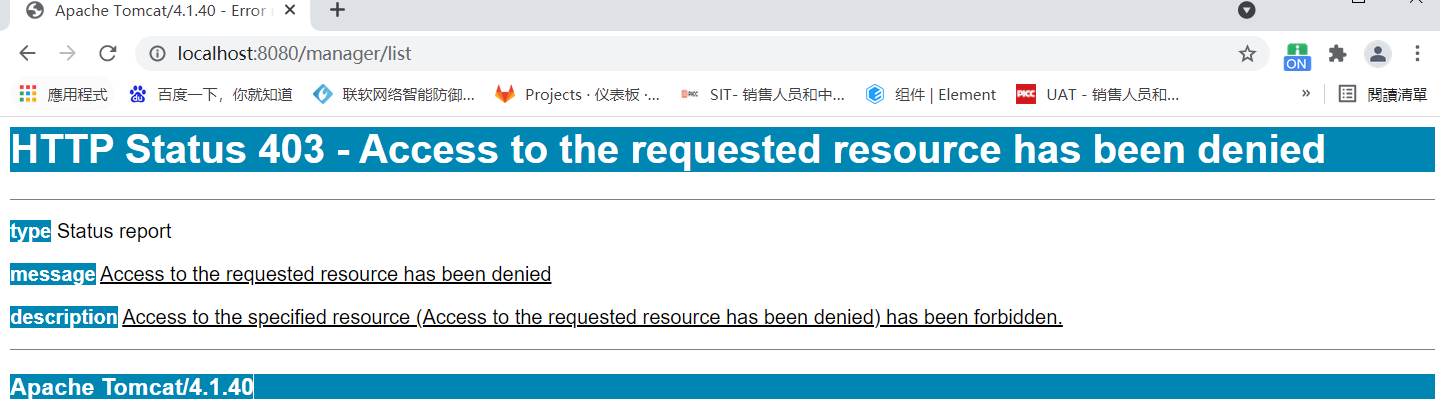
那么输入 http://localhost:8080/manager/list 会出现
OK - Listed applications for virtual host localhost

/:running:0:D:\wksp_study\designbook\webapps\ROOT

/tomcat-docs:running:0:D:\wksp_study\designbook\webapps\tomcat-docs

/webdav:running:0:D:\wksp_study\designbook\webapps\webdav

/admin:running:0:../server/webapps/admin

/app1:running:0:D:\wksp_study\designbook\webapps\app1

/manager:running:0:../server/webapps/manager
说明一个应用的状态,默认都启动了那么可以关闭一个应用
输入
http://localhost:8080/manager/stop?path=/admin
会有回复
OK - Stopped application at context path /admin
启动一个应用
http://localhost:8080/manager/start?path=/admin
回复
OK - Started application at context path /admin
顺便说下BASIC认证,我们
一. BASIC认证概述
在HTTP协议进行通信的过程中,HTTP协议定义了基本认证过程以允许HTTP服务器对WEB浏览器进行用户身份证的方法,当一个客户端向HTTP服务 器进行数据请求时,如果客户端未被认证,则HTTP服务器将通过基本认证过程对客户端的用户名及密码进行验证,以决定用户是否合法。客户端在接收到HTTP服务器的身份认证要求后,会提示用户输入用户名及密码,然后将用户名及密码以BASE64加密,加密后的密文将附加于请求信息中, 如当用户名为anjuta,密码为:123456时,客户端将用户名和密码用“:”合并,并将合并后的字符串用BASE64加密为密文,并于每次请求数据 时,将密文附加于请求头(Request Header)中。HTTP服务器在每次收到请求包后,根据协议取得客户端附加的用户信息(BASE64加密的用户名和密码),解开请求包,对用户名及密码进行验证,如果用 户名及密码正确,则根据客户端请求,返回客户端所需要的数据;否则,返回错误代码或重新要求客户端提供用户名及密码。
二. BASIC认证的过程
1. 客户端向服务器请求数据,请求的内容可能是一个网页或者是一个其它的MIME类型,此时,假设客户端尚未被验证,则客户端提供如下请求至服务器:
Get /index.html HTTP/1.0
Host:www.google.com
2. 服务器向客户端发送验证请求代码401,服务器返回的数据大抵如下:
HTTP/1.0 401 Unauthorised
Server: SokEvo/1.0
WWW-Authenticate: Basic realm=“google.com”
Content-Type: text/html
Content-Length: xxx
3. 当符合http1.0或1.1规范的客户端(如IE,FIREFOX)收到401返回值时,将自动弹出一个登录窗口,要求用户输入用户名和密码。
4. 用户输入用户名和密码后,将用户名及密码以BASE64加密方式加密,并将密文放入前一条请求信息中,则客户端发送的第一条请求信息则变成如下内容:
Get /index.html HTTP/1.0
Host:www.google.com
Authorization: Basic xxxxxxxxxxxxxxxxxxxxxxxxxxxx
注:xxxx…表示加密后的用户名及密码。
5. 服务器收到上述请求信息后,将Authorization字段后的用户信息取出、解密,将解密后的用户名及密码与用户数据库进行比较验证,如用户名及密码正确,服务器则根据请求,将所请求资源发送给客户端:
三. BASIC认证的缺点
HTTP基本认证的目标是提供简单的用户验证功能,其认证过程简单明了,适合于对安全性要求不高的系统或设备中,如大家所用路由器的配置页面的认证,几乎 都采取了这种方式。其缺点是没有灵活可靠的认证策略,如无法提供域(domain或realm)认证功能,另外,BASE64的加密强度非常低,
tomcat是怎么实现basic认证的呢?
  <!-- Define a Security Constraint on this Application -->

  <security-constraint>

    <web-resource-collection>

      <web-resource-name>HTMLManger and Manager command</web-resource-name>

      <url-pattern>/html/*</url-pattern>

      <url-pattern>/list</url-pattern>

      <url-pattern>/sessions</url-pattern>

      <url-pattern>/start</url-pattern>

      <url-pattern>/stop</url-pattern>

      <url-pattern>/install</url-pattern>

      <url-pattern>/remove</url-pattern>

      <url-pattern>/deploy</url-pattern>

      <url-pattern>/undeploy</url-pattern>

      <url-pattern>/reload</url-pattern>

      <url-pattern>/serverinfo</url-pattern>

      <url-pattern>/roles</url-pattern>

      <url-pattern>/resources</url-pattern>

    </web-resource-collection>

    <auth-constraint>

       <!-- NOTE:  This role is not present in the default users file -->

       <role-name>manager</role-name>

    </auth-constraint>

  </security-constraint>

  <!-- Define the Login Configuration for this Application -->

  <login-config>

    <auth-method>BASIC</auth-method>

    <realm-name>Tomcat Manager Application</realm-name>

  </login-config>

  <!-- Security roles referenced by this web application -->

  <security-role>

    <description>

      The role that is required to log in to the Manager Application

    </description>

    <role-name>manager</role-name>

  </security-role>
这个basic认证发类为AuthenticatorBase extends ValveBase
其中实现的invoke方法为
    public void invoke(Request request, Response response,

                       ValveContext context)

        throws IOException, ServletException {

        // If this is not an HTTP request, do nothing

        if (!(request instanceof HttpRequest) ||

            !(response instanceof HttpResponse)) {

            context.invokeNext(request, response);

            return;

        }

        if (!(request.getRequest() instanceof HttpServletRequest) ||

            !(response.getResponse() instanceof HttpServletResponse)) {

            context.invokeNext(request, response);

            return;

        }

        HttpRequest hrequest = (HttpRequest) request;

        HttpResponse hresponse = (HttpResponse) response;

        if (debug >= 1)

            log("Security checking request " +

                ((HttpServletRequest) request.getRequest()).getMethod() + " " +

                ((HttpServletRequest) request.getRequest()).getRequestURI());

        LoginConfig config = this.context.getLoginConfig();

        // Have we got a cached authenticated Principal to record?

        if (cache) {

            Principal principal =

                ((HttpServletRequest) request.getRequest()).getUserPrincipal();

            if (principal == null) {

                Session session = getSession(hrequest);

                if (session != null) {

                    principal = session.getPrincipal();

                    if (principal != null) {

                        if (debug >= 1)

                            log("We have cached auth type " +

                                session.getAuthType() +

                                " for principal " +

                                session.getPrincipal());

                        hrequest.setAuthType(session.getAuthType());

                        hrequest.setUserPrincipal(principal);

                    }

                }

            }

        }

        // Special handling for form-based logins to deal with the case

        // where the login form (and therefore the "j_security_check" URI

        // to which it submits) might be outside the secured area

        String contextPath = this.context.getPath();

        String requestURI = hrequest.getDecodedRequestURI();

        if (requestURI.startsWith(contextPath) &&

            requestURI.endsWith(Constants.FORM_ACTION)) {

            if (!authenticate(hrequest, hresponse, config)) {

                if (debug >= 1)

                    log(" Failed authenticate() test");

                return;

            }

        }

        // Is this request URI subject to a security constraint?

        SecurityConstraint constraint = findConstraint(hrequest);

        if ((constraint == null) /* &&

            (!Constants.FORM_METHOD.equals(config.getAuthMethod())) */ ) {

            if (debug >= 1)

                log(" Not subject to any constraint");

            context.invokeNext(request, response);

            return;

        }

        if ((debug >= 1) && (constraint != null))

            log(" Subject to constraint " + constraint);

        // Make sure that constrained resources are not cached by web proxies

        // or browsers as caching can provide a security hole

        if (!(((HttpServletRequest) hrequest.getRequest()).isSecure())) {

            HttpServletResponse sresponse =

                (HttpServletResponse) response.getResponse();

            sresponse.setHeader("Pragma", "No-cache");

            sresponse.setHeader("Cache-Control", "no-cache");

            sresponse.setDateHeader("Expires", 1);

        }

        // Enforce any user data constraint for this security constraint

        if (debug >= 1)

            log(" Calling checkUserData()");

        if (!checkUserData(hrequest, hresponse, constraint)) {

            if (debug >= 1)

                log(" Failed checkUserData() test");

            // ASSERT: Authenticator already set the appropriate

            // HTTP status code, so we do not have to do anything special

            return;

        }

        // Authenticate based upon the specified login configuration

        if (constraint.getAuthConstraint()) {

            if (debug >= 1)

                log(" Calling authenticate()");

            if (!authenticate(hrequest, hresponse, config)) {

                if (debug >= 1)

                    log(" Failed authenticate() test");

                // ASSERT: Authenticator already set the appropriate

                // HTTP status code, so we do not have to do anything special

                return;

            }

        }

        // Perform access control based on the specified role(s)

        if (constraint.getAuthConstraint()) {

            if (debug >= 1)

                log(" Calling accessControl()");

            if (!accessControl(hrequest, hresponse, constraint)) {

                if (debug >= 1)

                    log(" Failed accessControl() test");

                // ASSERT: AccessControl method has already set the appropriate

                // HTTP status code, so we do not have to do anything special

                return;

            }

        }

        // Any and all specified constraints have been satisfied

        if (debug >= 1)

            log(" Successfully passed all security constraints");

        context.invokeNext(request, response);

    }
注意这个阀门的特殊性,别的阀门都是在调用basic 阀门之后才调用 附加阀门,而认证阀门如果不满足条件,直接返回不会调用后续的阀门,也不会调用的基本阀门来调用servlet方法
深入刨析tomcat 之---第14篇 对应19章,使用manager管理 web应用的更多相关文章
- 深入刨析tomcat 之---第15篇 对应20章, myAdmin案例代码
writedby 张艳涛 有没有和我一样做到第20章的?今天基本结束了本书的阅读.最后一个案例没有demo,那我写了一回,如果有需要的可以在本地试试 路径 D:\wksp_study\designbo ...
- 深入刨析tomcat 之---第8篇 how tomcat works 第11章 11.9应用程序,自定义Filter,及注册
writed by 张艳涛, 标签:全网独一份, 自定义一个Filter 起因:在学习深入刨析tomcat的学习中,第11章,说了调用过滤链的原理,但没有给出实例来,自己经过分析,给出来了一个Filt ...
- 深入刨析tomcat 之---第2篇,解决第3章bug 页面不显示内容http://localhost:8080/servlet/ModernServlet?userName=zhangyantao&password=1234
writedby 张艳涛7月2日, 在学习第4张的过程中,发现了前一篇文章写的是关于1,2张的bug不用设置response响应头,需要在servlet的service()方法里面写是错误想 serv ...
- 深入刨析tomcat 之---第11篇 how tomcat works( 第15章 ) 如何解析web.xml 文件
writedby 张艳涛 记得当年是学习jsp的时候,写过web.xml中的标签.在之后的springmvc中也是有关于配置mvc 过滤器 和dispatchServlet的标签,之前是看不懂呢!看到 ...
- 深入刨析tomcat 之---第12篇 how tomcat works( 第17章 ) 解析catalina.bat 梳理启动流程
我们如何启动tomcat呢? 答案是双击startup.bat文件,这个文件在bin目录下 @echo off 不显示批处理命令 rem Licensed to the Apache Softw ...
- 深入刨析tomcat 之---第23篇 聊一下web容器的filter配置和defaultservet
writedby 张艳涛,在一个webapp应用程序内如何配置filter? <?xml version="1.0" encoding="ISO-8859-1&qu ...
- 深入刨析tomcat 之---第21篇 tomcat 对jsp页面支持的实现原理
writedby 张艳涛 web技术,以前的动态网页技术多是jsp页面,比如点击一个菜单目录,直接访问了一个LRJSDetailInput.jsp页面,这个页面 有<html><bo ...
- 深入刨析tomcat 之---第13篇 tomcat的三种部署方法
writedby 张艳涛 一般我们都知道将web 应用打成war包,放到tomcat的webapp目录下,就是部署了,这是部署方法1 第2种部署方法我们也知道,就是讲web应用的文件夹拷贝到webap ...
- 深入刨析tomcat 之---第10篇 how tomcat works 第13章,Response 发送错误信息 sendError
writedby 张艳涛 在浏览器中发送一个错误应用url 那么tomcat是如何发送错误的呢? 基本上是发送http 的response协议,分为两部分一部分是response设置头信息, 那么先分 ...
随机推荐
- 带你了解Java的序列化与反序列化
什么是序列化 序列化:将 Java 对象转换成字节流的过程. 什么是反序列化 反序列化:将字节流转换成 Java 对象的过程. 序列化的实现 当 Java 对象需要在网络上传输 或者 持久化存储到文件 ...
- kafka基础知识梳理
一.Kafka的基本概念 关键字: 分布式发布订阅消息系统:分布式的,分区的消息服务 Kafka是一种高吞吐量的分布式发布订阅消息系统,使用Scala编写. 对于熟悉JMS(Java Message ...
- 【题解】codeforces 467C George and Job dp
题目描述 新款手机 iTone6 近期上市,George 很想买一只.不幸地,George 没有足够的钱,所以 George 打算当一名程序猿去打工.现在George遇到了一个问题. 给出一组有 n ...
- noip2008 总结
noip 2008题解 笨小猴 原题 笨小猴的词汇量很小,所以每次做英语选择题的时候都很头疼.但是他找到了一种方法,经试验证明,用这种方法去选择选项的时候选对的几率非常大!这种方法的具体描述如下:假设 ...
- 如何设置Python环境变量
大家好,我是Yivies.相信很多python的初学者们在进行一顿下一步下一步的安装之后,在windows command命令行输入python的时候会出现这样的情况: 可我们希望它是这样子的: 其实 ...
- WEB 三维引擎在高精地图数据生产的探索和实践
1. 前言 高精地图(High Definition Map)作为自动驾驶安全性不可或缺的一部分,能有效强化自动驾驶的感知能力和决策能力,提升自动驾驶的等级.对于自动驾驶来说,高精地图主要是给机器用的 ...
- To_Heart—题解——AT2165
这是一篇解题报告 首先,看到标签,考虑二分答案. 我们二分答案(即塔顶的值),把大于或等于这个值的变为1,否则变为0. 很容易发现,如果塔顶的答案是1,那么就说明值可以更大,否则相反. 复制一波样例 ...
- 最大子序和:暴力->递归->动规->线段树
题目描述 给定一个整数数组 nums ,找到一个具有最大和的连续子数组(子数组最少包含一个元素),返回其最大和. LeetCode:53. 最大子序和 题解 显而易见的暴力解法 最容易想到的便是暴力穷 ...
- Python上下文管理器你学会了吗?
什么是上下文管理器 对于像文件操作.连接数据库等资源管理的操作,我们必须在使用完之后进行释放,不然就容易造成资源泄露.为了解决这个问题,Python的解决方式便是上下文管理器.上下文管理器能够帮助你 ...
- Redis:Java链接redis单节点千万级别数据 写入,读取 性能测试
本文是对Redis 单节点,针对不同的数据类型,做插入行测试. 数据总条数为:10058624 环境说明: Redis 未做任何优化, 单节点 (服务器上, 内存64G) ...