
HBase应用

几个column family比较合适呢
几个column family比较合适呢
Table Schema的设计
RowKey的设计一
RowKey的设计二
RowKey的设计三
import java.util.ArrayList;

import java.util.List;

import java.util.concurrent.atomic.AtomicInteger;

public class KeySalter {

    private AtomicInteger index = new AtomicInteger(0);

    private String[] prefixes = {"a", "b", "c", "d"};

    public String getRowKey(String originalKey) {

        StringBuilder sb = new StringBuilder(prefixes[index.incrementAndGet() % 4]);

        sb.append("-").append(originalKey);

        return sb.toString();

    }

    public List<String> getAllRowKeys(String originalKey) {

        List<String> allKeys = new ArrayList<>();

        for (String prefix : prefixes) {

            StringBuilder sb = new StringBuilder(prefix);

            sb.append("-").append(originalKey);

            allKeys.add(sb.toString());

        }

        //a-boo0001

        //b-boo0001

        //c-boo0001

        //d-boo0001

        return allKeys;

    }

}
import org.apache.hadoop.conf.Configuration;

import org.apache.hadoop.hbase.HBaseConfiguration;

import org.apache.hadoop.hbase.TableName;

import org.apache.hadoop.hbase.client.Connection;

import org.apache.hadoop.hbase.client.ConnectionFactory;

import org.apache.hadoop.hbase.client.Put;

import org.apache.hadoop.hbase.client.Table;

import org.apache.hadoop.hbase.util.Bytes;

import java.io.IOException;

import java.util.ArrayList;

import java.util.Arrays;

import java.util.List;

public class SaltingTest {

    public static void main(String[] args) throws IOException {

        Configuration config = HBaseConfiguration.create();

        try (Connection connection = ConnectionFactory.createConnection(config);

             Table table = connection.getTable(TableName.valueOf("test_salt"))) {

            KeySalter keySalter = new KeySalter();

            List<String> rowkeys = Arrays.asList("boo0001", "boo0002", "boo0003", "boo0004");

            List<Put> puts = new ArrayList<>();

            for (String key : rowkeys) {

                Put put = new Put(Bytes.toBytes(keySalter.getRowKey(key)));

                put.addColumn(Bytes.toBytes("f"), null, Bytes.toBytes("value" + key));

                puts.add(put);

            }

            table.put(puts);

        }

    }

}
import org.apache.hadoop.conf.Configuration;

import org.apache.hadoop.hbase.HBaseConfiguration;

import org.apache.hadoop.hbase.TableName;

import org.apache.hadoop.hbase.client.*;

import org.apache.hadoop.hbase.util.Bytes;

import java.io.IOException;

import java.util.ArrayList;

import java.util.Arrays;

import java.util.List;

public class SaltingGetter {

    public static void main(String[] args) throws IOException {

        Configuration config = HBaseConfiguration.create();

        try (Connection connection = ConnectionFactory.createConnection(config);

             Table table = connection.getTable(TableName.valueOf("test_salt"))) {

            KeySalter keySalter = new KeySalter();

            List<String> allKeys = keySalter.getAllRowKeys("boo0001");    //读取boo001

            List<Get> gets = new ArrayList<>();

            for (String key : allKeys) {

                Get get = new Get(Bytes.toBytes(key));

                gets.add(get);

            }

            Result[] results = table.get(gets);

            for (Result result : results) {

                if (result != null) {

                    //do something

                }

            }

        }

    }

}
RowKey的设计三
import org.apache.hadoop.hbase.util.MD5Hash;

public class KeyHasher {

    public static String getRowKey(String originalKey) {

        return MD5Hash.getMD5AsHex(originalKey.getBytes());

    }

}
package com.twq.hbase.rowkey.hash;

import org.apache.hadoop.conf.Configuration;

import org.apache.hadoop.hbase.HBaseConfiguration;

import org.apache.hadoop.hbase.TableName;

import org.apache.hadoop.hbase.client.Connection;

import org.apache.hadoop.hbase.client.ConnectionFactory;

import org.apache.hadoop.hbase.client.Put;

import org.apache.hadoop.hbase.client.Table;

import org.apache.hadoop.hbase.util.Bytes;

import java.io.IOException;

import java.util.ArrayList;

import java.util.Arrays;

import java.util.List;

public class HashingTest {

    public static void main(String[] args) throws IOException {

        Configuration config = HBaseConfiguration.create();

        try (Connection connection = ConnectionFactory.createConnection(config);

             Table table = connection.getTable(TableName.valueOf("test_hash"))) {

            List<String> rowkeys = Arrays.asList("boo0001", "boo0002", "boo0003", "boo0004");

            List<Put> puts = new ArrayList<>();

            for (String key : rowkeys) {

                Put put = new Put(Bytes.toBytes(KeyHasher.getRowKey(key)));

                put.addColumn(Bytes.toBytes("f"), null, Bytes.toBytes("value" + key));

                puts.add(put);

            }

            table.put(puts);

        }

    }

}
import com.twq.hbase.rowkey.salt.KeySalter;

import org.apache.hadoop.conf.Configuration;

import org.apache.hadoop.hbase.Cell;

import org.apache.hadoop.hbase.CellUtil;

import org.apache.hadoop.hbase.HBaseConfiguration;

import org.apache.hadoop.hbase.TableName;

import org.apache.hadoop.hbase.client.*;

import org.apache.hadoop.hbase.util.Bytes;

import java.io.IOException;

import java.util.ArrayList;

import java.util.List;

public class HashingGetter {

    public static void main(String[] args) throws IOException {

        Configuration config = HBaseConfiguration.create();

        try (Connection connection = ConnectionFactory.createConnection(config);

             Table table = connection.getTable(TableName.valueOf("test_hash"))) {

            Get get = new Get(Bytes.toBytes(KeyHasher.getRowKey("boo0001")));

            Result results = table.get(get);

            // process result...

            for (Cell cell : results.listCells()) {

                System.out.println(Bytes.toString(CellUtil.cloneRow(cell)) + "===> " +

                        Bytes.toString(CellUtil.cloneFamily(cell)) + ":" +

                        Bytes.toString(CellUtil.cloneQualifier(cell)) + "{" +

                        Bytes.toString(CellUtil.cloneValue(cell)) + "}");

            }

        }

    }

}
RowKey的设计三
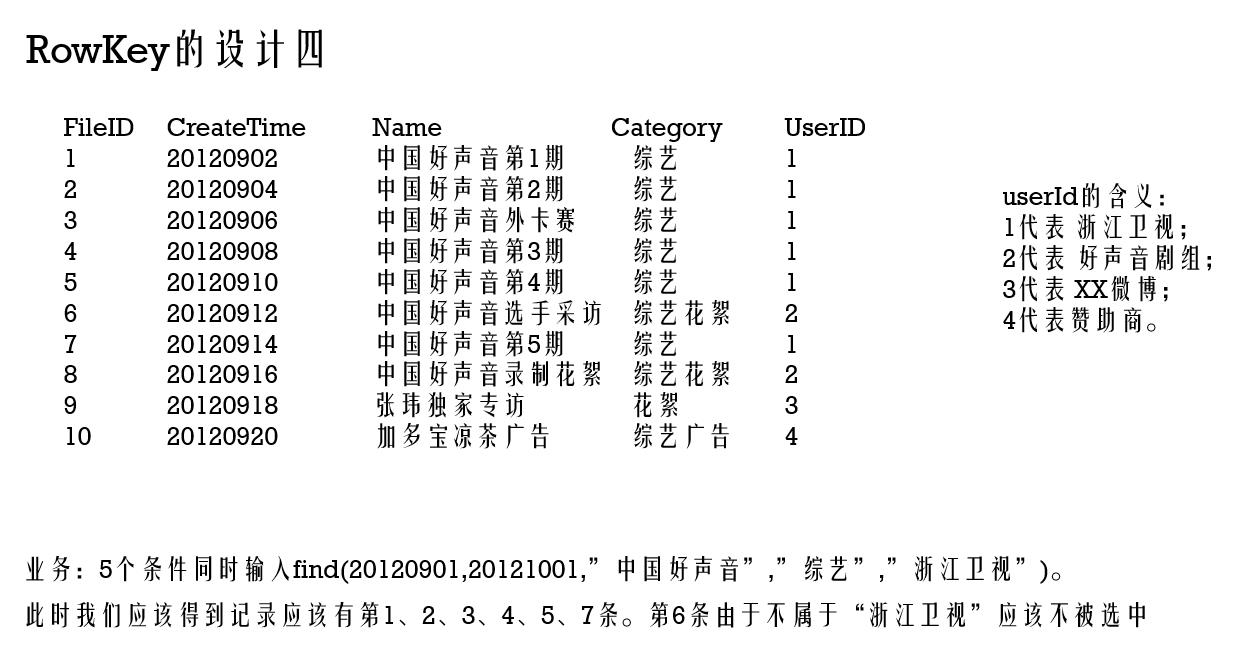
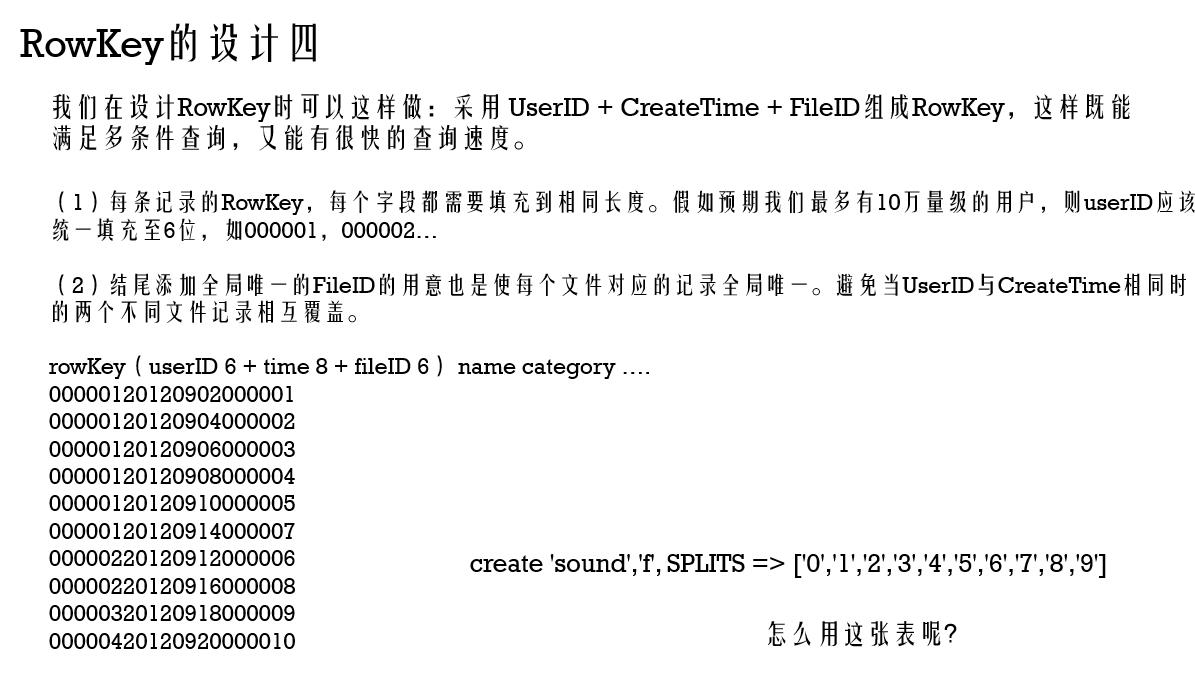
import org.apache.hadoop.conf.Configuration;

import org.apache.hadoop.fs.Path;

import org.apache.hadoop.hbase.Cell;

import org.apache.hadoop.hbase.CellUtil;

import org.apache.hadoop.hbase.HBaseConfiguration;

import org.apache.hadoop.hbase.TableName;

import org.apache.hadoop.hbase.client.*;

import org.apache.hadoop.hbase.filter.*;

import org.apache.hadoop.hbase.util.Bytes;

import java.io.IOException;

public class DataFilter {

    public static void main(String[] args) throws IOException {

        Configuration config = HBaseConfiguration.create();

        //Add any necessary configuration files (hbase-site.xml, core-site.xml)

        config.addResource(new Path("src/main/resources/hbase-site.xml"));

        config.addResource(new Path("src/main/resources/core-site.xml"));

        try(Connection connection = ConnectionFactory.createConnection(config)) {

            Table table = connection.getTable(TableName.valueOf("sound"));

            Scan scan = new Scan();

            scan.setStartRow(Bytes.toBytes("00000120120901"));

            scan.setStopRow(Bytes.toBytes("00000120121001"));

            SingleColumnValueFilter nameFilter = new SingleColumnValueFilter(Bytes.toBytes("f"), Bytes.toBytes("n"),

                    CompareFilter.CompareOp.EQUAL, new SubstringComparator("中国好声音"));

            SingleColumnValueFilter categoryFilter = new SingleColumnValueFilter(Bytes.toBytes("f"), Bytes.toBytes("c"),

                    CompareFilter.CompareOp.EQUAL, new SubstringComparator("综艺"));

            FilterList filterList = new FilterList(FilterList.Operator.MUST_PASS_ALL);

            filterList.addFilter(nameFilter);

            filterList.addFilter(categoryFilter);

            scan.setFilter(filterList);

            ResultScanner rs = table.getScanner(scan);

            try {

                for (Result r = rs.next(); r != null; r = rs.next()) {

                    // process result...

                    for (Cell cell : r.listCells()) {

                        System.out.println(Bytes.toString(CellUtil.cloneRow(cell)) + "===> " +

                                Bytes.toString(CellUtil.cloneFamily(cell)) + ":" +

                                Bytes.toString(CellUtil.cloneQualifier(cell)) + "{" +

                                Bytes.toString(CellUtil.cloneValue(cell)) + "}");

                    }

                }

            } finally {

                rs.close();  // always close the ResultScanner!

            }

        }

    }

}
import org.apache.hadoop.conf.Configuration;

import org.apache.hadoop.fs.Path;

import org.apache.hadoop.hbase.HBaseConfiguration;

import org.apache.hadoop.hbase.TableName;

import org.apache.hadoop.hbase.client.Connection;

import org.apache.hadoop.hbase.client.ConnectionFactory;

import org.apache.hadoop.hbase.client.Put;

import org.apache.hadoop.hbase.client.Table;

import org.apache.hadoop.hbase.util.Bytes;

import java.io.BufferedReader;

import java.io.IOException;

import java.io.InputStream;

import java.io.InputStreamReader;

import java.util.ArrayList;

import java.util.List;

/**

 * create 'sound',

 */

public class DataPrepare {

    public static void main(String[] args) throws IOException {

        InputStream ins = DataPrepare.class.getClassLoader().getResourceAsStream("sound.txt");

        BufferedReader br = new BufferedReader(new InputStreamReader(ins));

        List<SoundInfo> soundInfos = new ArrayList<>();

        String line = null;

        while ((line = br.readLine()) != null) {

            SoundInfo soundInfo = new SoundInfo();

            String[] arr = line.split("\\|");

            String rowkey = format(arr[4], 6) + arr[1] + format(arr[0], 6);

            soundInfo.setRowkey(rowkey);

            soundInfo.setName(arr[2]);

            soundInfo.setCategory(arr[3]);

            soundInfos.add(soundInfo);

        }

        Configuration config = HBaseConfiguration.create();

        //Add any necessary configuration files (hbase-site.xml, core-site.xml)

        config.addResource(new Path("src/main/resources/hbase-site.xml"));

        config.addResource(new Path("src/main/resources/core-site.xml"));

        try (Connection connection = ConnectionFactory.createConnection(config)) {

            Table table = connection.getTable(TableName.valueOf("sound"));

            List<Put> puts = new ArrayList<>();

            for (SoundInfo soundInfo : soundInfos) {

                Put put = new Put(Bytes.toBytes(soundInfo.getRowkey()));

                put.addColumn(Bytes.toBytes("f"), Bytes.toBytes("n"), Bytes.toBytes(soundInfo.getName()));

                put.addColumn(Bytes.toBytes("f"), Bytes.toBytes("c"), Bytes.toBytes(soundInfo.getCategory()));

                puts.add(put);

            }

            table.put(puts);

        }

    }

    public static String format(String str, int num) {

        return String.format("%0" + num + "d", Integer.parseInt(str));

    }

}
HBase应用的更多相关文章
- Mapreduce的文件和hbase共同输入
Mapreduce的文件和hbase共同输入 package duogemap; import java.io.IOException; import org.apache.hadoop.co ...
- Redis/HBase/Tair比较
KV系统对比表 对比维度 Redis Redis Cluster Medis Hbase Tair 访问模式 支持Value大小 理论上不超过1GB(建议不超过1MB) 理论上可配置(默认配置1 ...
- Hbase的伪分布式安装
Hbase安装模式介绍 单机模式 1> Hbase不使用HDFS,仅使用本地文件系统 2> ZooKeeper与Hbase运行在同一个JVM中 分布式模式– 伪分布式模式1> 所有进 ...
- Spark踩坑记——数据库(Hbase+Mysql)
[TOC] 前言 在使用Spark Streaming的过程中对于计算产生结果的进行持久化时,我们往往需要操作数据库,去统计或者改变一些值.最近一个实时消费者处理任务,在使用spark streami ...
- Spark读写Hbase的二种方式对比
作者:Syn良子 出处:http://www.cnblogs.com/cssdongl 转载请注明出处 一.传统方式 这种方式就是常用的TableInputFormat和TableOutputForm ...
- 深入学习HBase架构原理
HBase定义 HBase 是一个高可靠.高性能.面向列.可伸缩的分布式存储系统,利用Hbase技术可在廉价PC Server上搭建 大规模结构化存储集群. HBase 是Google Bigtabl ...
- hbase协处理器编码实例
Observer协处理器通常在一个特定的事件(诸如Get或Put)之前或之后发生,相当于RDBMS中的触发器.Endpoint协处理器则类似于RDBMS中的存储过程,因为它可以让你在RegionSer ...
- hbase集群安装与部署
1.相关环境 centos7 hadoop2.6.5 zookeeper3.4.9 jdk1.8 hbase1.2.4 本篇文章仅涉及hbase集群的搭建,关于hadoop与zookeeper的相关部 ...
- 从零自学Hadoop(22):HBase协处理器
阅读目录 序 介绍 Observer操作 示例下载 系列索引 本文版权归mephisto和博客园共有,欢迎转载,但须保留此段声明,并给出原文链接,谢谢合作. 文章是哥(mephisto)写的,Sour ...
- Hbase安装和错误
集群规划情况: djt1 active Hmaster djt2 standby Hmaster djt3 HRegionServer 搭建步骤: 第一步:配置conf/regionservers d ...
随机推荐
- 嵌入式02 STM32 实验09 独立/窗口看门狗
一.独立看门狗和窗口看门狗 看门狗:单片机系统在外界的干扰下会出现程序跑飞的现象导致死循环,或者崩溃,看门狗电路就是为了避免这种情况的发生,看门狗的作用就是在一定的事件内(通过计数器实现)若没有收到喂 ...
- python3 安装 pyinstaller 时报错的解决办法
如上图所示,在安装的过程中发现是所关联的一个 future模块安装失败,庵后我有单独安装了一下这个future,发现还是失败 然后在网上寻找解决办法,最后找到了这个指令,pip install fut ...
- Flutter 增加三方库卡在flutter package get 的解决办法
修改 pubspec.yaml 文件增加第三方库之后,AndroidStudio 像往常一样提示 需要 package get. 然后一直卡在 Running "flutter packag ...
- 【题解】Luogu P5304 [GXOI/GZOI2019]旅行者
原题传送门 题意:给你k个点,让你求两两最短路之间的最小值 我们考虑二进制拆分,使得每两个点都有机会分在不同的组\((A:0,B:1)\)中,从源点\(S\)向\(A/B\)中的点连边权为0的边,从\ ...
- Unity - LayerMask简析
本文简述了LayerMask的定义,后通过项目实战充分解析 LayerMask中的GetMask.LayerToName.NameToLayer 等函数的使用方法及其注意事项. 项目地址:3D坦克大战 ...
- 没有足够的内存继续执行程序(mscorlib)
原文:https://blog.csdn.net/yao940622/article/details/79690953 问题描述: 在Microsoft SQL Server Management S ...
- MVC运行机制[转]
原:http://www.cnblogs.com/jyan/archive/2012/06/29/2569566.html#3122335 ASP.NET是一种建立动态Web应用程序的技术.它是.NE ...
- 混沌理论(Chaos theory)和非线性系统
混沌理论(Chaos theory)是关于非线性系统在一定参数条件下展现分岔(bifurcation).周期运动与非周期运动相互纠缠,以至于通向某种非周期有序运动的理论.在耗散系统和保守系统中,混沌运 ...
- Linux的巡检命令
# uname -a # 查看内核/操作系统/CPU信息# head -n 1 /etc/issue # 查看操作系统版本# cat /proc/cpuinfo # 查看CPU信息# hostname ...
- JavaScript原型链以及Object,Function之间的关系
JavaScript里任何东西都是对象,任何一个对象内部都有另一个对象叫__proto__,即原型,它可以包含任何东西让对象继承.当然__proto__本身也是一个对象,它自己也有自己的__proto ...