
python 爬虫实例(四)
环境:
OS:Window10
python:3.7
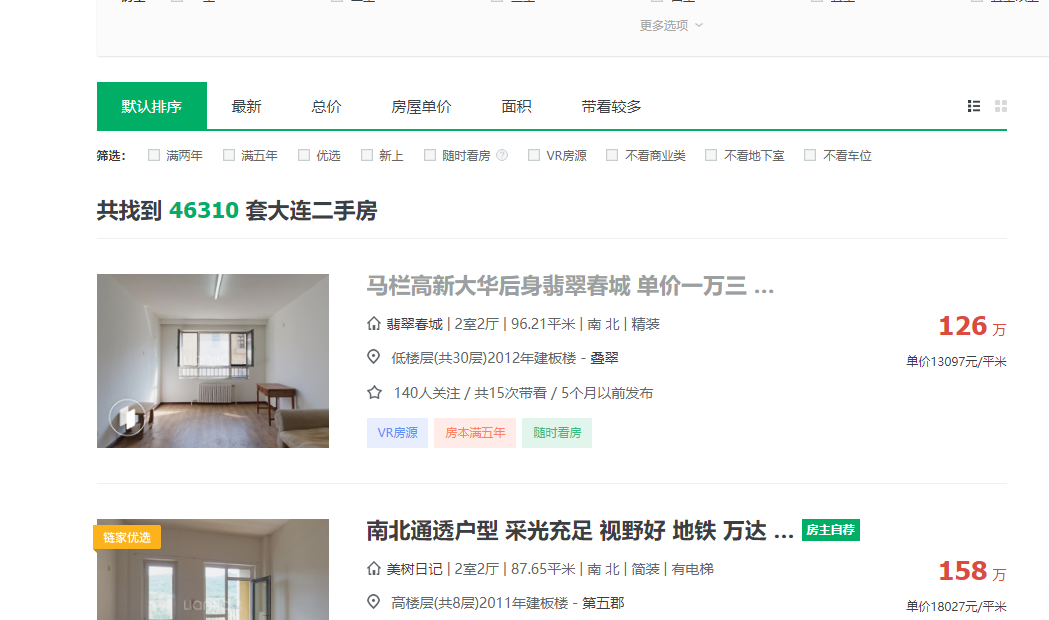
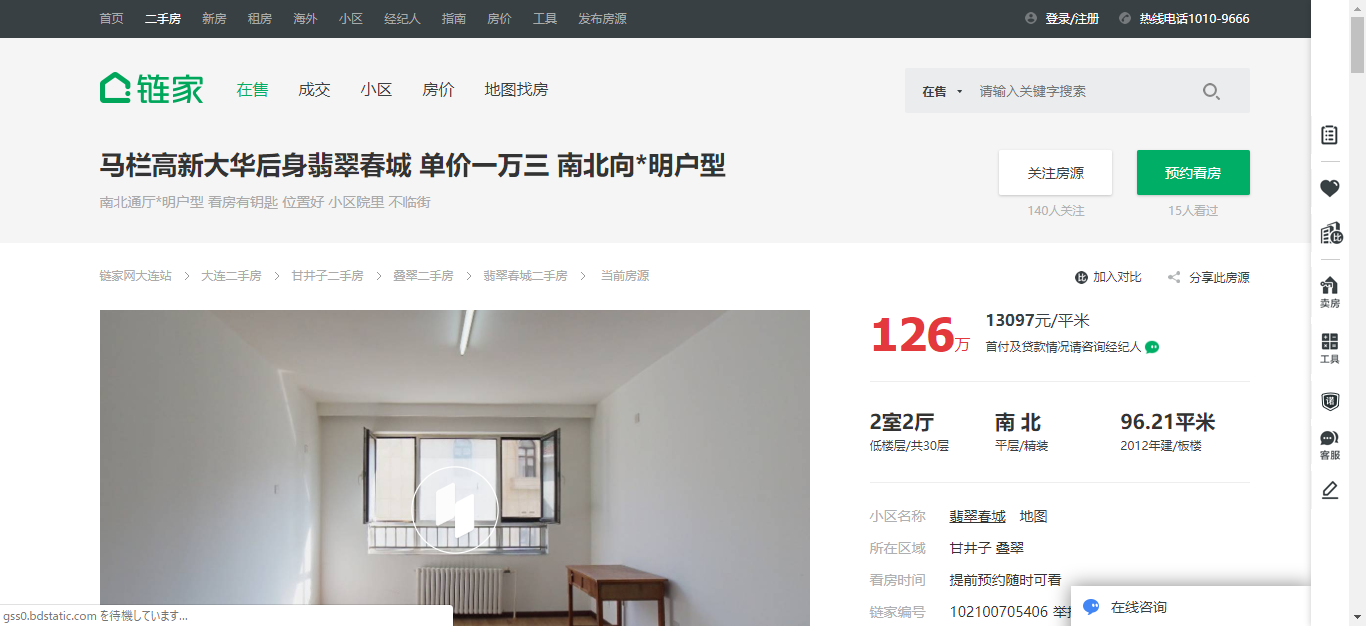
爬取链家地产上面的数据,两个画面上的数据的爬取
效果,下面的两个网页中的数据取出来
代码
import datetime

import threading

import requests

from bs4 import BeautifulSoup

class LianjiaHouseInfo:

    '''

        初期化变量的值

    '''

    def __init__(self):

        # 定义自己要爬取的URL

        self.url = "https://dl.lianjia.com/ershoufang/pg{0}"

        self.path = r"C:\pythonProject\Lianjia_House"

        self.headers = {

            "User-Agent": "Mozilla/5.0 (Windows NT 10.0; Win64; x64) AppleWebKit/537.36 (KHTML, like Gecko) Chrome/71.0.3578.98 Safari/537.36"}

    '''

        访问URL

    '''

    def request(self, param):

        # 如果不加的话可能会出现403的错误,所以尽量的都加上header,模仿网页来访问

        req = requests.get(param, headers=self.headers)

        # req.raise_for_status()

        # req.encoding = req.apparent_encoding

        return req.text

    '''

        page設定

    '''

    def all_pages(self, pageCn):

        dataListA = []

        for i in range(1, pageCn+1):

            if pageCn == 1:

                dataListA = dataListA + self.getData(self.url[0:self.url.find("pg")])

            else:

                url = self.url.format(i)

                dataListA = dataListA + self.getData(url)

        # self.dataOrganize(dataListA)

    '''

       数据取得

    '''

    def getData(self, url):

        dataList = []

        thread_lock.acquire()

        req = self.request(url)

        # driver = webdriver.Chrome()

        # driver.get(self.url)

        # iframe_html = driver.page_source

        # driver.close()

        # print(iframe_html)

        soup = BeautifulSoup(req, 'lxml')

        countHouse = soup.find(class_="total fl").find("span")

        print("共找到 ", countHouse.string, " 套大连二手房")

        sell_all = soup.find(class_="sellListContent").find_all("li")

        for sell in sell_all:

            title = sell.find(class_="title")

            if title is not None:

                print("------------------------概要--------------------------------------------")

                title = title.find("a")

                print("title:", title.string)

                housInfo = sell.find(class_="houseInfo").get_text()

                print("houseInfo:", housInfo)

                positionInfo = sell.find(class_="positionInfo").get_text()

                print("positionInfo:", positionInfo)

                followInfo = sell.find(class_="followInfo").get_text()

                print("followInfo:", followInfo)

                print("------------------------詳細信息--------------------------------------------")

                url_detail = title["href"]

                req_detail = self.request(url_detail)

                soup_detail = BeautifulSoup(req_detail, "lxml")

                total = soup_detail.find(class_="total")

                unit = soup_detail.find(class_="unit").get_text()

                dataList.append(total.string+unit)

                print("总价:", total.string, unit)

                unitPriceValue = soup_detail.find(class_="unitPriceValue").get_text()

                dataList.append(unitPriceValue)

                print("单价:", unitPriceValue)

                room_mainInfo = soup_detail.find(class_="room").find(class_="mainInfo").get_text()

                dataList.append(room_mainInfo)

                print("户型:", room_mainInfo)

                type_mainInfo = soup_detail.find(class_="type").find(class_="mainInfo").get_text()

                dataList.append(type_mainInfo)

                print("朝向:", type_mainInfo)

                area_mainInfo = soup_detail.find(class_="area").find(class_="mainInfo").get_text()

                dataList.append(area_mainInfo)

                print("面积:", area_mainInfo)

            else:

                print("広告です")

        thread_lock.release()

        return dataList

    #

    # def dataOrganize(self, dataList):

    #

    #     data2 = pd.DataFrame(dataList)

    #     data2.to_csv(r'C:\Users\peiqiang\Desktop\lagoujob.csv', header=False, index=False, mode='a+')

    #     data3 = pd.read_csv(r'C:\Users\peiqiang\Desktop\lagoujob.csv', encoding='gbk')

thread_lock = threading.BoundedSemaphore(value=100)

house_Info = LianjiaHouseInfo()

startTime = datetime.datetime.now()

house_Info.all_pages(1)

endTime = datetime.datetime.now()

print("実行時間:", (endTime - startTime).seconds)
运行之后的效果

python 爬虫实例(四)的更多相关文章
- Python爬虫实例:爬取B站《工作细胞》短评——异步加载信息的爬取
很多网页的信息都是通过异步加载的,本文就举例讨论下此类网页的抓取. <工作细胞>最近比较火,bilibili 上目前的短评已经有17000多条. 先看分析下页面 右边 li 标签中的就是短 ...
- Python爬虫实例:爬取猫眼电影——破解字体反爬
字体反爬 字体反爬也就是自定义字体反爬,通过调用自定义的字体文件来渲染网页中的文字,而网页中的文字不再是文字,而是相应的字体编码,通过复制或者简单的采集是无法采集到编码后的文字内容的. 现在貌似不少网 ...
- Python爬虫实例:爬取豆瓣Top250
入门第一个爬虫一般都是爬这个,实在是太简单.用了 requests 和 bs4 库. 1.检查网页元素,提取所需要的信息并保存.这个用 bs4 就可以,前面的文章中已经有详细的用法阐述. 2.找到下一 ...
- Python爬虫实战四之抓取淘宝MM照片
原文:Python爬虫实战四之抓取淘宝MM照片其实还有好多,大家可以看 Python爬虫学习系列教程 福利啊福利,本次为大家带来的项目是抓取淘宝MM照片并保存起来,大家有没有很激动呢? 本篇目标 1. ...
- Python爬虫进阶四之PySpider的用法
审时度势 PySpider 是一个我个人认为非常方便并且功能强大的爬虫框架,支持多线程爬取.JS动态解析,提供了可操作界面.出错重试.定时爬取等等的功能,使用非常人性化. 本篇内容通过跟我做一个好玩的 ...
- Python爬虫入门四之Urllib库的高级用法
1.设置Headers 有些网站不会同意程序直接用上面的方式进行访问,如果识别有问题,那么站点根本不会响应,所以为了完全模拟浏览器的工作,我们需要设置一些Headers 的属性. 首先,打开我们的浏览 ...
- 转 Python爬虫入门四之Urllib库的高级用法
静觅 » Python爬虫入门四之Urllib库的高级用法 1.设置Headers 有些网站不会同意程序直接用上面的方式进行访问,如果识别有问题,那么站点根本不会响应,所以为了完全模拟浏览器的工作,我 ...
- Python 爬虫实例
下面是我写的一个简单爬虫实例 1.定义函数读取html网页的源代码 2.从源代码通过正则表达式挑选出自己需要获取的内容 3.序列中的htm依次写到d盘 #!/usr/bin/python import ...
- shell及Python爬虫实例展示
1.shell爬虫实例: [root@db01 ~]# vim pa.sh #!/bin/bash www_link=http://www.cnblogs.com/clsn/default.html? ...
- python爬虫实例——爬取歌单
学习自<<从零开始学python网络爬虫>> 爬取酷狗歌单,保存入csv文件 直接上源代码:(含注释) import requests #用于请求网页获取网页数据 from b ...
随机推荐
- 交互设计算法基础(2) - Selection Sort
int[] selection_sort(int[] arr) { int i, j, min, temp, len=arr.length; for (i=0; i<len-1; i++) { ...
- 通过 frp 实现群晖的 drive 远端同步
通过 frp 实现 drive 同步 其实其他的也类似, 只是指定 tcp 的端口不一致就可以. frp 实现的外网端口映射"肥肠"方便. 也推广下 frp 的地址 frp-git ...
- 教你用WordPress搭建个人博客
1. 购买VPS,推荐几个供应商: 国外的有:搬瓦工 VirMach vps.net vultr.com 等等 国内的有:阿里云 腾讯云 等等 2. 注册域名:阿里云 腾讯云 3. 下载安装PuTTy ...
- Pytest权威教程02-Pytest 使用及调用方法
目录 Pytest 使用及调用方法 使用python -m pytest调用pytest 可能出现的执行退出code 获取版本路径.命令行选项及环境变量相关帮助 第1(N)次失败后停止测试 指定及选择 ...
- MySQL七种join理论
1. 内连接 select * from A inner join B where A.key=B.key; 2. 左连接 select * from A left join B on A.key=B ...
- 对okhttp参数的一些思考
背景 项目中使用OkHttp访问三方服务 参数 创建okhttp客户端类的时候需要设置一些参数,有些可能是坑,仅供参考: client = new OkHttpClient.Builder() .di ...
- Open vSwitch系列实验(二):Open vSwitch的GRE隧道实验网络
一.实验目的 了解GRE协议及原理 理解 Open vSwitch如何配置GRE隧道 二.实验原理 Open vSwitch创建GRE原理很简单,就是把对GRE头和外部IP头的一些操作从原来的代码中抽 ...
- 【转】php7+IIS 配置环境(windows环境)
继php7+apache2.4 配置环境(window环境)后,由于B2C项目准备上线:特此小编在阿里云上搭建PHP7环境,为此特写上搭建过程希望正处于搭建php7+IIS(windows环境)中的朋 ...
- Qt Creater-特殊注释TODO,FIXME
简述 TODO: + 说明: 如果代码中有该标识,说明在标识处有功能代码待编写,待实现的功能在说明中会简略说明. FIXME: + 说明: 如果代码中有该标识,说明标识处代码需要修正,甚至代码是错误的 ...
- linux网卡参数NM_CONTROLLED【转】
安装操作系统时,自动生成的网卡配置文件,/etc/sysconfig/network-scripts/ifcfg-eth0里面有如下的参数:NM_CONTROLLED=yes说明 Network ma ...