
29-THREE.JS 根据公式画形状
<!DOCTYPE html>

<html>

<head>

    <title></title>

    <script src="https://cdn.bootcss.com/three.js/r67/three.js"></script>

    <script src="https://cdn.bootcss.com/stats.js/r10/Stats.min.js"></script>

    <script type="text/javascript" src="https://cdn.bootcss.com/dat-gui/0.7.3/dat.gui.js"></script>

    <style>

        body {

            margin: 0;

            overflow: hidden;

        }

    </style>

</head>

<body>

<div id="Stats-output">

</div>

<div id="WebGL-output">

</div>

<script type="text/javascript">

    // 初始化

    function init() {

        var stats = initStats();

        // 创建一个场景

        var scene = new THREE.Scene();

        // 创建一个相机

        var camera = new THREE.PerspectiveCamera(45, window.innerWidth / window.innerHeight, 0.1, 1000);

        // 创建一个渲染器

        var webGLRenderer = new THREE.WebGLRenderer();

        webGLRenderer.setClearColor(new THREE.Color(0xEEEEEE, 1.0));

        webGLRenderer.setSize(window.innerWidth, window.innerHeight);

        webGLRenderer.shadowMapEnabled = true;

        var shape = createMesh(new THREE.ShapeGeometry(drawShape()));

        // 把形状添加到场景中去

        scene.add(shape);

        // 设置相机的场景

        camera.position.x = -30;

        camera.position.y = 70;

        camera.position.z = 70;

        camera.lookAt(new THREE.Vector3(10, 0, 0));

        // 添加聚光灯

        var spotLight = new THREE.SpotLight(0xffffff);

        spotLight.position.set(-40, 60, -10);

        scene.add(spotLight);

        // 把渲染之后的结果放到DOM元素中去

        document.getElementById("WebGL-output").appendChild(webGLRenderer.domElement);

        var step = 0;

        var controls = new function () {

            this.asGeom = function () {

                // remove the old plane

                scene.remove(shape);

                // create a new one

                shape = createMesh(new THREE.ShapeGeometry(drawShape()));

                // add it to the scene.

                scene.add(shape);

            };

            this.asPoints = function () {

                // remove the old plane

                scene.remove(shape);

                // create a new one

                shape = createLine(drawShape(), false);

                // add it to the scene.

                scene.add(shape);

            };

            this.asSpacedPoints = function () {

                // remove the old plane

                scene.remove(shape);

                // create a new one

                shape = createLine(drawShape(), true);

                // add it to the scene.

                scene.add(shape);

            };

        };

        var gui = new dat.GUI();

        gui.add(controls, 'asGeom');

        gui.add(controls, 'asPoints');

        gui.add(controls, 'asSpacedPoints');

        render();

        function drawShape() {

            // create a basic shape

            var shape = new THREE.Shape();

            // startpoint

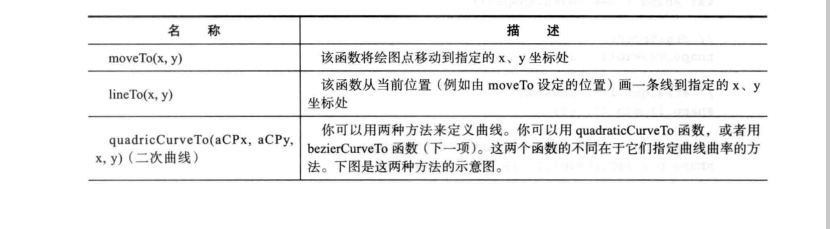
            shape.moveTo(10, 10);

            // straight line upwards

            shape.lineTo(10, 40);

            // the top of the figure, curve to the right

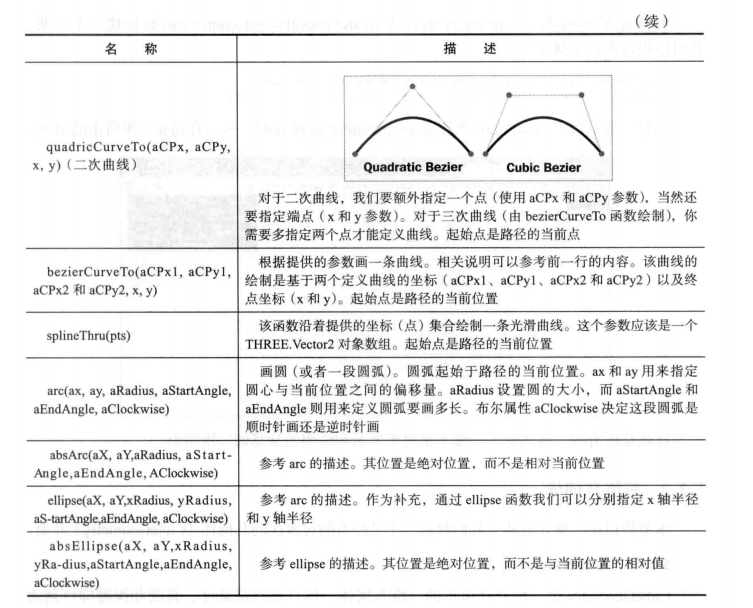
            shape.bezierCurveTo(15, 25, 25, 25, 30, 40);

            // spline back down

            shape.splineThru(

                    [new THREE.Vector2(32, 30),

                        new THREE.Vector2(28, 20),

                        new THREE.Vector2(30, 10),

                    ]);

            // curve at the bottom

            shape.quadraticCurveTo(20, 15, 10, 10);

            // add 'eye' hole one

            var hole1 = new THREE.Path();

            hole1.absellipse(16, 24, 2, 3, 0, Math.PI * 2, true);

            shape.holes.push(hole1);

            // add 'eye hole 2'

            var hole2 = new THREE.Path();

            hole2.absellipse(23, 24, 2, 3, 0, Math.PI * 2, true);

            shape.holes.push(hole2);

            // add 'mouth'

            var hole3 = new THREE.Path();

            hole3.absarc(20, 16, 2, 0, Math.PI, true);

            shape.holes.push(hole3);

            // return the shape

            return shape;

        }

        function createMesh(geom) {

            // assign two materials

            var meshMaterial = new THREE.MeshNormalMaterial();

            meshMaterial.side = THREE.DoubleSide;

            var wireFrameMat = new THREE.MeshBasicMaterial();

            wireFrameMat.wireframe = true;

            // create a multimaterial

            var mesh = THREE.SceneUtils.createMultiMaterialObject(geom, [meshMaterial, wireFrameMat]);

            return mesh;

        }

        function createLine(shape, spaced) {

            console.log(shape);

            if (!spaced) {

                var mesh = new THREE.Line(shape.createPointsGeometry(10), new THREE.LineBasicMaterial({

                    color: 0xff3333,

                    linewidth: 2

                }));

                return mesh;

            } else {

                var mesh = new THREE.Line(shape.createSpacedPointsGeometry(3), new THREE.LineBasicMaterial({

                    color: 0xff3333,

                    linewidth: 2

                }));

                return mesh;

            }

        }

        function render() {

            stats.update();

            shape.rotation.y = step += 0.01;

            // render using requestAnimationFrame

            requestAnimationFrame(render);

            webGLRenderer.render(scene, camera);

        }

        function initStats() {

            var stats = new Stats();

            stats.setMode(0); // 0: fps, 1: ms

            // Align top-left

            stats.domElement.style.position = 'absolute';

            stats.domElement.style.left = '0px';

            stats.domElement.style.top = '0px';

            document.getElementById("Stats-output").appendChild(stats.domElement);

            return stats;

        }

    }

    window.onload = init;

</script>

</body>

</html>
29-THREE.JS 根据公式画形状的更多相关文章
- react项目中canvas之画形状(圆形,椭圆形,方形)
组件DrawShape.jsx如下: import React, { Component } from 'react' // import ClassNames from 'classnames' i ...
- 参考bootstrap中的popover.js的css画消息弹框
前段时间小颖的大学同学给小颖发了一张截图,图片类似下面这张图: 小颖当时大概的给她说了下,其实小颖也不知道上面那个三角形怎么画嘻嘻,给她说了DOM结构,具体的css让她自己百度,今天小颖自己参考boo ...
- 交互式数据可视化-D3.js(四)形状生成器
使用JavaScript和D3.js实现数据可视化 形状生成器 线段生成器 var linePath = d3.line() - 使用默认的设置构造一个 line 生成器. linePath.x() ...
- 教你用开源 JS 库快速画出 GitHub 章鱼猫
本文作者:HelloGitHub-kalifun 在上一篇文章我们介绍了 Zdog 如何使用,接下来这篇文章我将带领各位利用 Zdog 画出一个 GitHub 章鱼猫(和官方的还是有些差别的). Zd ...
- (转)第04节:Fabric.js用路径画不规则图形
在Canvas上画方形.圆形.三角形都是很容易的,只要调用fabric对应的方法就可以了,但这些都是规则的图形,如果你想画一个不规则的图形,这时候你可以用fabric.js提供的路径绘图方法.所谓路径 ...
- D3.js 用层画条形图
<!DOCTYPE html> <html> <head> <meta charset="utf-8"> <title> ...
- 4种方法生成二维码 (js 控制canvas 画出 二维码)
随着网络的迅速发展 发展 发展,二维码的应用将会越来越多.同时很多只是很平凡的二维码,请拿起你的手 把这个二维码 设计起来吧.下面分享了几个非常好的二维码设计. 二维码原理: 二维条码/二维码可以分 ...
- JS动画公式
// 效果: // Linear:无缓动效果 // Quadratic:二次方的缓动(t^2) // Cubic:三次方的缓动(t^3) // Quartic:四次方的缓动(t^4) // Quint ...
- html5 js canvas中画星星的函数
function drawStar(cxt, x, y, outerR, innerR, rot) { cxt.beginPath(); ; i < ; i++) { cxt.lineTo(Ma ...
随机推荐
- Linux学习笔记(6)磁盘分区(LVM)
1.逻辑管理技术LVM的概念 1.1 LVM ,逻辑卷管理,以便扩展管理盘符. PV:物理卷 VG:卷组 LV:逻辑卷 PE(physical Extend):物理扩展(默认4M),就是我们逻辑卷管理 ...
- 004-Set 和 Map 数据结构
原文地址:http://es6.ruanyifeng.com/#docs/set-map 1.Set ES6 提供了新的数据结构 Set.它类似于数组,但是成员的值都是唯一的,没有重复的值. Set ...
- mysql 关于join的总结
本文地址:http://www.cnblogs.com/qiaoyihang/p/6401280.html mysql不支持Full join,不过可以通过UNION 关键字来合并 LEFT JOIN ...
- [笔记] Android NDK 开发笔记
学习下Android NDK的开发,做些笔记记录下. [笔记] Windows下使用Android Studio 创建缺省工程 [笔记] Windows下使用Android Studio开发NDK的最 ...
- Codeforces Round #397 by Kaspersky Lab and Barcelona Bootcamp (Div. 1 + Div. 2 combined) B - Code obfuscation
地址:http://codeforces.com/contest/765/problem/B 题目: B. Code obfuscation time limit per test 2 seconds ...
- 关于myeclipse+tomcat+struct2的热部署问题
今天满心欢喜的打开电脑来写程序,却不曾想到它竟然给我搞事情,前几天刚学的struct2热部署竟然不好用了.每次改java文件都要重新部署好麻烦,最后花了了好长时间才解决,必须在这里总结一下: (1)s ...
- java字节码理解-入门
前记:作为一名JAVA Developer,每次打开Eclipse,查找一个没有源码的类时,都会看到一个这样的画面: 大意是:这个jar文件,没有附带源码.紧接着后面的就看不懂了,很好奇下面的一部分是 ...
- datagrid 编辑
spark:DataGrid编辑状态进入需要在选中一行高亮状态之后,再次点击该单元格,这样,相信非常符合开发人员的控制手法及大众使用习惯,这,是一点非常好的改良. 同时,它取缔了itemEditEnd ...
- Wyx20162314 2016-2017-2 《程序设计与数据结构》课程总结
20162314 2016-2017-2 <程序设计与数据结构>课程总结 一.每周作业.结对编程博客的链接汇总 预备作业一01 20162314:专业的期许.浅谈师生关系.对未来学习任务的 ...
- shell-一些有趣的使用
1. 对字符串进行MD5加密 echo test |md5sum|awk '{print $1}' 字符串数量很多时可以这样做: echo test |md5sum|awk '{print $1}' ...