
iOS 的UINavigationController详解与使用添加UIBarButtonItem
转发自:http://blog.csdn.net/totogo2010/article/details/7681879
1、UINavigationController导航控制器如何使用
UINavigationController可以翻译为导航控制器,在iOS里经常用到。
我们看看它的如何使用:
下面的图显示了导航控制器的流程。最左侧是根视图,当用户点击其中的General项时 ,General视图会滑入屏幕;当用户继续点击Auto-Lock项时,Auto-Lock视图将滑入屏幕。相应地,在对象管理上,导航控制器使用了导航堆栈。根视图控制器在堆栈最底层,接下来入栈的是General视图控制器和Auto-Lock视图控制器。可以调用pushViewControllerAnimated:方法将视图控制器推入栈顶,也可以调用popViewControllerAnimated:方法将视图控制器弹出堆栈。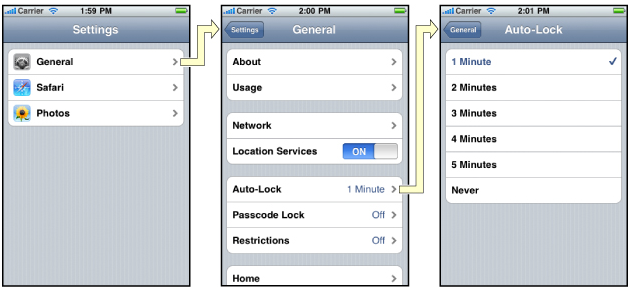
上图来自苹果官网。
2、UINavigationController的结构组成
看下图,UINavigationController有Navigation bar ,Navigation View ,Navigation toobar等组成。

现在我们建立一个例子,看看如何使用UINavigationController
3、新建一个项目
命名为UINavigationControllerDemo,为了更好理解UINavigationController,我们选择Empty Application模板
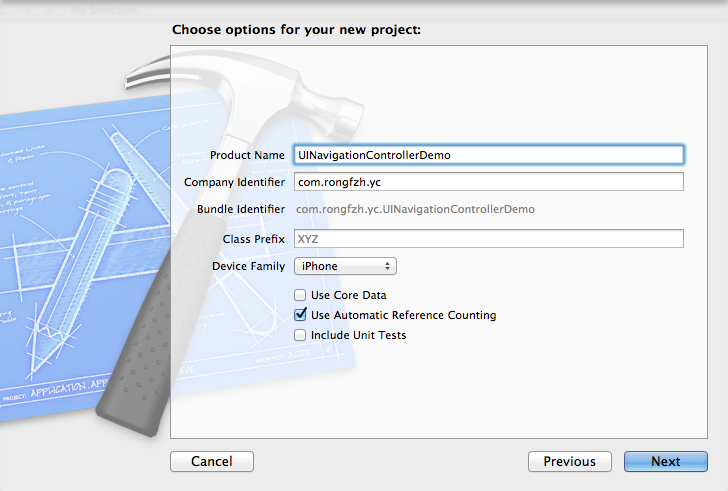
4、创建一个View Controller,命名为RootViewController:依次选择File——New——New File,默认勾上With XIB for user interface.
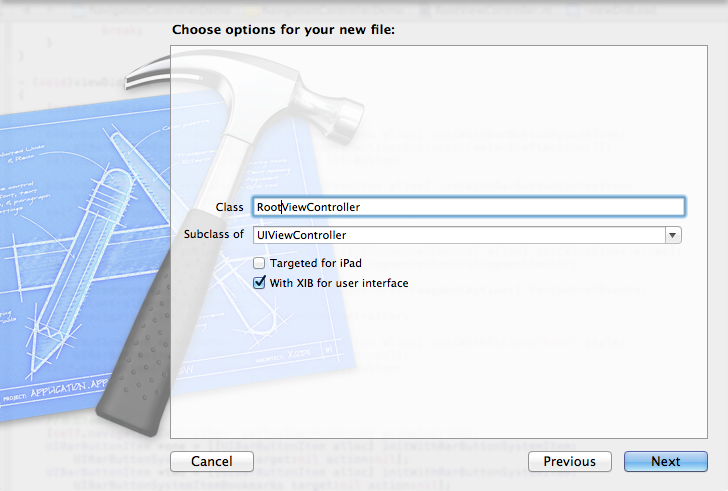
选择正确位置创建完成,这时项目里多了三个文件,分别是RootViewController.h RootViewController.m RootViewController.xib文件。
打开RootViewController.xib,添加一个按钮控件,按钮Button改成 :Goto SecondView,为跳转做准备
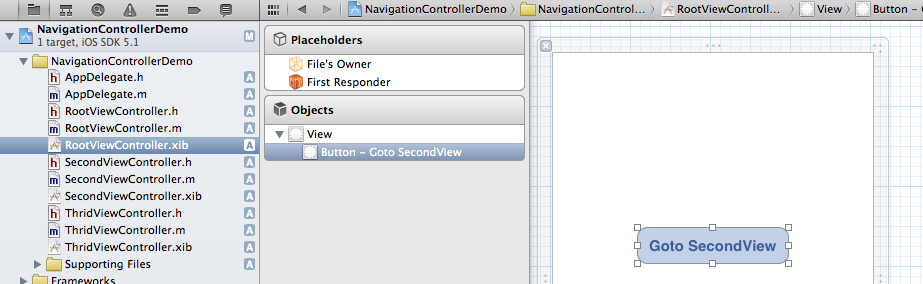
5、打开AppDelegate.h,向其中添加属性:
@property (strong, nonatomic) UINavigationController *navController;
添加后AppDelegate.h文件代码如下:
#import <UIKit/UIKit.h>

@class ViewController;

@interface AppDelegate : UIResponder <UIApplicationDelegate>

@property (strong, nonatomic) UIWindow *window;

@property (strong, nonatomic) ViewController *viewController;

@property (strong, nonatomic) UINavigationController *navController;

@end
6、在AppDelegate.m 文件的didFinishLaunchingWithOptions方法中创建添加navController,RootViewController视图。
- (BOOL)application:(UIApplication *)application didFinishLaunchingWithOptions:(NSDictionary *)launchOptions

{

    self.window = [[UIWindow alloc] initWithFrame:[[UIScreen mainScreen] bounds]];

    RootViewController *rootView = [[RootViewController alloc] init];

    rootView.title = @"Root View";

    self.navController = [[UINavigationController alloc] init];

    [self.navController pushViewController:rootView animated:YES];

    [self.window addSubview:self.navController.view];

    [self.window makeKeyAndVisible];

    return YES;

}
给rootView的titie命名为 Root View,好识别View直接的切换关系。用pushViewController把rootView加入到navController的视图栈中。
7、现在Root视图添加完成
看看效果:
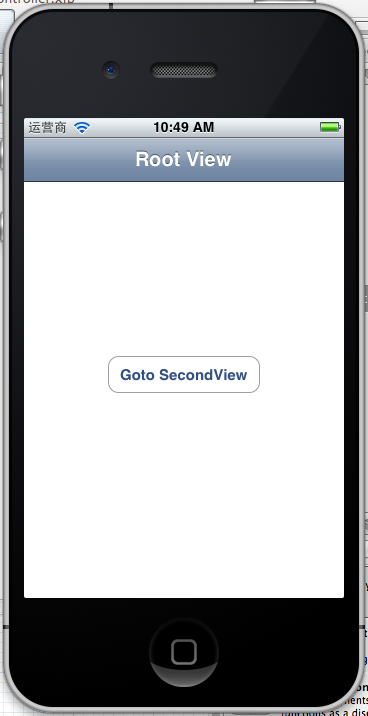 '
'
现在还没有Navigation bar 。只有title。
8、添加UIBarButtonItem
bar ButtonItem分左右UIBarButtonItem。我们把左右的都添加上去。
在RootViewController.m中添加代码如下:
- (void)viewDidLoad

{

    [super viewDidLoad];

    UIBarButtonItem *leftButton = [[UIBarButtonItem alloc] initWithBarButtonSystemItem:UIBarButtonSystemItemAction target:self action:@selector(selectLeftAction:)];

    self.navigationItem.leftBarButtonItem = leftButton;

    UIBarButtonItem *rightButton = [[UIBarButtonItem alloc] initWithBarButtonSystemItem:UIBarButtonSystemItemAdd  target:self action:@selector(selectRightAction:)];

    self.navigationItem.rightBarButtonItem = rightButton;
}
这样添加了UIBarButtonItem了,效果如下:

这里重点介绍下
UIBarButtonItem *leftButton = [[UIBarButtonItemalloc]initWithBarButtonSystemItem:UIBarButtonSystemItemActiontarget:selfaction:@selector(selectLeftAction:)];
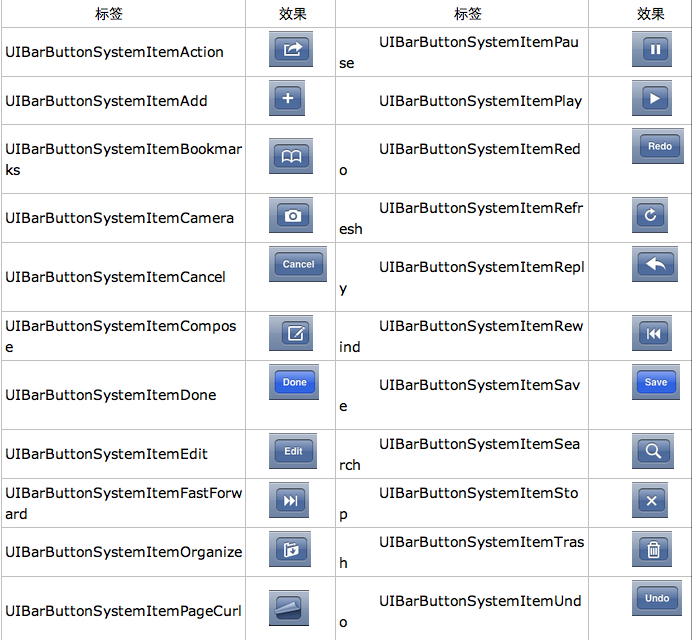
UIBarButtonSystemItemAction的风格,这是系统自带的按钮风格,看下图,你不用一个个试验,你也知道想用那个item,如下图:
9、响应UIBarButtonItem的事件的实现
我们在 action:@selector(selectLeftAction:);
action添加了selectLeftAction和selectRightAction
在RootViewController.m文件中添加代码实现:
-(void)selectLeftAction:(id)sender

{

    UIAlertView *alter = [[UIAlertView alloc] initWithTitle:@"提示" message:@"你点击了导航栏左按钮" delegate:self  cancelButtonTitle:@"确定" otherButtonTitles:nil, nil];

    [alter show];

}

-(void)selectRightAction:(id)sender

{

    UIAlertView *alter = [[UIAlertView alloc] initWithTitle:@"提示" message:@"你点击了导航栏右按钮" delegate:self  cancelButtonTitle:@"确定" otherButtonTitles:nil, nil];

    [alter show];

}
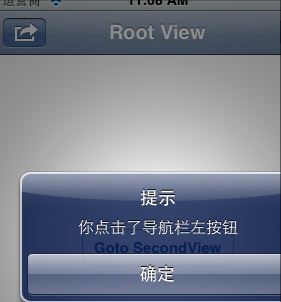
这样在点击左右的UIBarButtonItem时,弹出提示:
iOS 的UINavigationController详解与使用添加UIBarButtonItem的更多相关文章
- iOS学习之UINavigationController详解与使用(一)添加UIBarButtonItem
http://blog.csdn.net/totogo2010/article/details/7681879 1.UINavigationController导航控制器如何使用 UINavigati ...
- [转]iOS学习之UINavigationController详解与使用(三)ToolBar
转载地址:http://blog.csdn.net/totogo2010/article/details/7682641 iOS学习之UINavigationController详解与使用(二)页面切 ...
- [转]iOS学习之UINavigationController详解与使用(二)页面切换和segmentedController
转载地址:http://blog.csdn.net/totogo2010/article/details/7682433 iOS学习之UINavigationController详解与使用(一)添加U ...
- iOS学习之UINavigationController详解与使用(三)ToolBar
1.显示Toolbar 在RootViewController.m的- (void)viewDidLoad方法中添加代码,这样Toobar就显示出来了. [cpp] view plaincopy [ ...
- iOS学习之UINavigationController详解与使用(二)页面切换和segmentedController
iOS学习之UINavigationController详解与使用(一)添加UIBarButtonItem是上篇,我们接着讲UINavigationController的重要作用,页面的管理和切换. ...
- UINavigationController详解一(转)UIBarButtonItem
本文出自:http://www.cnblogs.com/smileEvday/archive/2012/05/14/2495153.html 特别感谢. 1.UINavigationControlle ...
- iOS应用开发详解
<iOS应用开发详解> 基本信息 作者: 郭宏志 出版社:电子工业出版社 ISBN:9787121207075 上架时间:2013-6-28 出版日期:2013 年7月 开本:16开 ...
- 转载]IOS LBS功能详解[0](获取经纬度)[1](获取当前地理位置文本 )
原文地址:IOS LBS功能详解[0](获取经纬度)[1](获取当前地理位置文本作者:佐佐木小次郎 因为最近项目上要用有关LBS的功能.于是我便做一下预研. 一般说来LBS功能一般分为两块:一块是地理 ...
- iOS中-Qutarz2D详解及使用
在iOS中Qutarz2D 详解及使用 (一)初识 介绍 Quartz 2D是二维绘图引擎. 能完成的工作有: 绘制图形 : 线条\三角形\矩形\圆\弧等 绘制文字 绘制\生成图片(图像) 读取\生成 ...
随机推荐
- Zabbix Api的使用
API使用 zabbix官网文档:https://www.zabbix.com/documentation/2.2/manual/api, Zabbix API是基于JSON-RPC 2.0规格,具体 ...
- Android 内存分析工具 MAT(Memory Analyzer Tool)
如果使用DDMS确实发现了我们的程序中存在内存泄漏,那又如何定位到具体出现问题的代码片段,最终找到问题所在呢?如果从头到尾的分析代码逻辑,那肯定 会把人逼疯,特别是在维护别人写的代码的时候.这里介绍一 ...
- css3 颜色记
css3 颜色 opacity 使元素呈现出半透明效果. opacity:alphavalue || inherit alphavalue:默认值为1,可以取0~1任意浮点数.取值为1时,元素完全不透 ...
- Ajax中解析Json的两种方法详解
eval(); //此方法不推荐 JSON.parse(); //推荐方法 一.两种方法的区别 我们先初始化一个json格式的对象: var jsonDate = '{ "name&qu ...
- Android Timer用法
Android考虑到线程安全问题,不允许在线程中执行UI线程,在Android中,有一个类:android.os.Handler,这个可以实现各处线程间的消息传递.先看段代码,这个实例化了一个Hand ...
- 分享:在微信公众平台做HTML5游戏经验谈(转载与http://software.intel.com/zh-cn/blogs/2013/04/03/html5)
分享:在微信公众平台做HTML5游戏经验谈 Dawei Cheng 程大伟... 于 星期三, 03/04/2013 - 03:19 提交 最近微信公众游戏平台讨论得如火如荼,大有HTML5游戏即将引 ...
- 【leetcode】365. Water and Jug Problem
题目描述: You are given two jugs with capacities x and y litres. There is an infinite amount of water su ...
- 关于IE8以上 不引人css 症状
不知道各位有没有体验过 这样的状况 在同一个文件夹中 <!DOCTYPE html> <html> <head> <meta charset="u ...
- 公交CPU卡原理
现在的公交卡已经开始逐步的采用IC卡(CPU卡?什么东东?),而且在国家交通部的推动下,开始了全国范围内的互联互通.以后,手里只用拿着一张卡,就可以走遍全国,而且如果支持在线充值的话,基本上就不用在车 ...
- 暑假集训(4)第二弹 -----递推(hdu2254)
题意概括:上次小A在你的帮助下成功炼成贤者法阵的第一部分——三角分隔,现在他准备绘制法阵的第二部分——莫测矩形. 而他又遇到了一个问题,他不知道不同矩形到底有多少个. 秉持帮人帮到底,送佛送到西的基本 ...