
学习ASP.NET Core Blazor编程系列二十六——登录(5)
九、模拟登录
登录的本质原理同网页应用是一样的,一般的流程是:
用户打开登页--》输入账号密码后提交表单--》服务端验证成功后生成cookie信息写入浏览器--》之后用户访问页面时浏览器会带上此cookie信息作为用户标识--》服务端解析此cookie信息就能识别这个用户了。
在webapi出现之后,出现了JWT这样的认证方式,原理大同小异,相同的是, 认证信息都是保存在请求头中传递的,不同是JWT中的认证信息需要编码写入请求头之后再发送请求,不像浏览器,发送请求时会自动带上cookie信息,不需要编码。
Blazor中的登录流程可以分成几下几个步骤:
- 启用验证
- 制作自定义AuthenticationStateProvider
- 修改App.razor
- 使用AuthorizeView和进行登录验证和角色授权
自定义AuthenticationStateProvider
首先来理解一下什么是AuthenticationStateProvider。AuthenticationStateProvider是一个抽象类,由Microsoft.AspNetCore.Components.Authorization类库提供,主要用来提供当前用户的认证状态信息。既然是抽象类,我们需要自定义一个它的子类,由于是模拟登录,进行登录流程的验证,因此我们先来做一个测试的Provider来试试。
1. 在Visual Studio 2022的解决方案资源管理器中,在项目名称“BlazorAppDemo”上单击鼠标右键,在弹出菜单中选择“添加—>新建文件夹”,并将之命名为“Auth”。如下图。
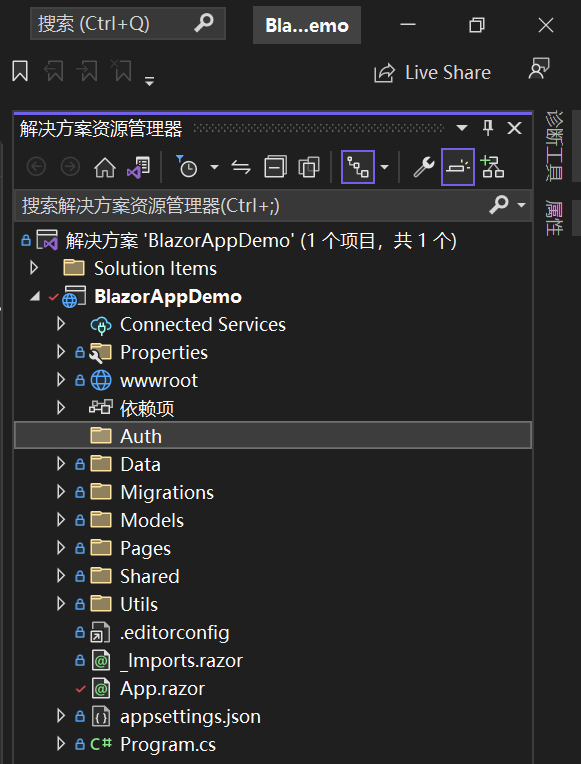
2. 在Visual Studio 2022的解决方案资源管理器中,鼠标左键选中“Auth”文件夹,右键单击,在弹出菜单中选择“添加—>类”,并将类命名为“ImitateAuthStateProvider”。 AuthStateProvider类的最核心方法是 Task<AuthenticationState> GetAuthenticationStateAsync()。基于最简单的登录机制,我们的扩展提供程序如下。具体代码如下:
using BlazorAppDemo.Models;

using Microsoft.AspNetCore.Components.Authorization;

using System.Security.Claims;

namespace BlazorAppDemo.Auth

{

    public class ImitateAuthStateProvider : AuthenticationStateProvider

    {

        bool isLogin = false;

        public override Task<AuthenticationState> GetAuthenticationStateAsync()

        {

            if (isLogin)

            {

                var claims = new List<Claim>()

            {

                new Claim(ClaimTypes.Name,"user"),

                new Claim(ClaimTypes.Role, "admin")

            };

                var anonymous = new ClaimsIdentity(claims, "testAuthType");

                return Task.FromResult(new AuthenticationState(new ClaimsPrincipal(anonymous)));

            }

            else

            {

            var anonymous = new ClaimsIdentity();

            return Task.FromResult(new AuthenticationState(new ClaimsPrincipal(anonymous)));

        }

        }

        public void Login(UserInfo request)

        {

            if (request.UserName == "user" && request.Password == "111111")

                isLogin = true;

            NotifyAuthenticationStateChanged(GetAuthenticationStateAsync());

        }

    }

}
ImitateAuthStateProvider继承AuthenticationStateProvider,并重写GetAuthenticationStateAsync方法。
- var anonymous = new ClaimsIdentity();:我们现在进行模拟登录,先做一个匿名的使用者,所以ClaimsIdentity的构造方法中不传参数。
- 返回AuthenticationState。
- 我们给ClaimsIdentity一个List<Claim>属性,其中有使用者的名字和角色,表示我们已登录成功。
3. 在Visual Studio 2022的解决方案资源管理器中,使用鼠标双击在文本编辑器中打开Program.cs文件,使用
builder.Services.AddScoped<ImitateAuthStateProvider>();

builder.Services.AddScoped<AuthenticationStateProvider>(implementationFactory =>

implementationFactory.GetRequiredService<ImitateAuthStateProvider>());
;这二行代码使用DI方式注入ImitateAuthStateProvider。具体代码如下:
using BlazorAppDemo.Data;

using BlazorAppDemo.Models;

using Microsoft.AspNetCore.Components;

using Microsoft.AspNetCore.Components.Web;

using Microsoft.Extensions.Configuration;

using Microsoft.EntityFrameworkCore;

using Microsoft.Extensions.Hosting;

using Microsoft.AspNetCore.Components.Authorization;

using BlazorAppDemo.Auth;

var builder = WebApplication.CreateBuilder(args);

// Add services to the container.

builder.Services.AddRazorPages();

builder.Services.AddServerSideBlazor();

builder.Services.AddSingleton<WeatherForecastService>();

System.Console.WriteLine(ConfigHelper.Configuration["ConnectionStrings:BookContext"]);

builder.Services.AddDbContextFactory<BookContext>(opt =>

    opt.UseSqlServer(ConfigHelper.Configuration["ConnectionStrings:BookContext"]));

//builder.Services.AddScoped<AuthenticationStateProvider, ImitateAuthStateProvider>();

builder.Services.AddScoped<ImitateAuthStateProvider>();

builder.Services.AddScoped<AuthenticationStateProvider>(implementationFactory =>

implementationFactory.GetRequiredService<ImitateAuthStateProvider>());

var app = builder.Build();

// Configure the HTTP request pipeline.

if (!app.Environment.IsDevelopment())

{

    app.UseExceptionHandler("/Error");

    // The default HSTS value is 30 days. You may want to change this for production scenarios, see https://aka.ms/aspnetcore-hsts.

    app.UseHsts();

}

using (var scope = app.Services.CreateScope())

{

    var services = scope.ServiceProvider;

    try

    {

        Console.WriteLine("数据库开始初始化。");

        var context = services.GetRequiredService<BookContext>();

        // requires using Microsoft.EntityFrameworkCore;

        context.Database.Migrate();

        // Requires using RazorPagesMovie.Models;

        SeedData.Initialize(services);

        Console.WriteLine("数据库初始化结束。");

    }

    catch (Exception ex)

    {

        var logger = services.GetRequiredService<ILogger<Program>>();

        logger.LogError(ex, "数据库数据初始化错误.");

    }

}

app.UseHttpsRedirection();

app.UseStaticFiles();

app.UseRouting();

app.MapBlazorHub();

app.MapFallbackToPage("/_Host");

app.Run();
修改App.razor
现在我们已经完成了登录认证的Provider了,接下來要做的事情,就是让我们的页面上的组件,可以获取登录信息,来决定是登录用户是否已经授权。这一步请参数之前的“七、修改路由与启动页面”。
修改Login.razor页面进行登录
在Visual Studio 2022的文本编辑器中打开Login.razor组件文件,我们将鼠标定位到@code中的SubmitHandler方法 ,写上我们登录成功的代码。具体代码如下:
@page "/Login"

@using BlazorAppDemo.Auth;

@using BlazorAppDemo.Models

@using BlazorAppDemo.Utils

@layout LoginLayout

@inject NavigationManager NavigationManager

@inject ImitateAuthStateProvider AuthStateProvider;

<div class="card align-items-center">

    <div class="card-body my-2">

        <h3>Login</h3>

        <hr />

        <EditForm  Model="loginModel" OnValidSubmit="SubmitHandler" OnInvalidSubmit="InvalidHandler">

            <DataAnnotationsValidator />

            <div class="form-group">

                <label for="userName">  @HtmlHelper.GetDisplayName(loginModel ,m=> m.UserName)</label>

                <InputText @bind-Value="loginModel.UserName" class="form-control" id="userName" />

                <ValidationMessage For="()=>loginModel.UserName" />

            </div>

            <div class="form-group">

                <label for="pwd"> @HtmlHelper.GetDisplayName(loginModel ,m=> m.Password)</label>

                <InputPassword @bind-Value="loginModel.Password" class="form-control" id="pwd" />

                <ValidationMessage For="()=>loginModel.Password" />

            </div>

            <span class="form-control-plaintext"></span>

            <div class="form-group row">

                <div class="col-sm-10">

            <button class="btn btn-primary">登录</button>

                </div>

            </div>

        </EditForm>

    </div>

</div>

@code {

    private UserInfo loginModel = new UserInfo();

    bool isAuthLoading = false;

    private void SubmitHandler()

    {

        Console.WriteLine($"用户名:{loginModel.UserName} ,密码:{loginModel.Password}");

         isAuthLoading = true;

    try {

         AuthStateProvider.Login(new UserInfo() {

                    UserName = loginModel.UserName,

                    Password =loginModel.Password

        });

            NavigationManager.NavigateTo("/Index");

    } catch (Exception ex) {

         Console.WriteLine(ex.Message);

    } finally {

        isAuthLoading = false;

    }

    }

    private void InvalidHandler()

    {

        Console.WriteLine($"用户名: {loginModel.UserName} ,密码:{loginModel.Password}");

    }

}
登录并显示当前用户
1.在Visual Studio 2022的文本编辑器中打开MainLayout.razor组件文件,在AuthorizeView中显示当前登录用户,具体代码如下:
2.在Visual Studio 2022的菜单栏上,找到“调试-->开始调试”或是按F5键,Visual Studio 2022会生成BlazorAppDemo应用程序,浏览器中会Login登录页面。
@using BlazorAppDemo.Pages

@inherits LayoutComponentBase

<PageTitle>BlazorAppDemo</PageTitle>

<div class="page">

    <div class="sidebar">

        <NavMenu />

    </div>

    <main>

        <AuthorizeView>

            <Authorized>

              <div class="top-row px-4">

            <a href="https://docs.microsoft.com/aspnet/" target="_blank">About</a>

            <p>

       你好, @context.User.Identity.Name!

      </p>

        </div>

        <article class="content px-4">

                    @Body

        </article>

            </Authorized>

            <NotAuthorized>

                <div style="margin: 120px 0; width:100%; text-align: center; color: red;">

                    <span style="font-size:20px">检测到登录超时,请重新<a href="/login" style="text-decoration:underline">登录</a>!

</span>

                </div>

                <RedirectToLogin></RedirectToLogin>

            </NotAuthorized>

        </AuthorizeView>

    </main>

</div>
3.我们在用户名输入框中输入用户名,在密码输入框中输入密码,点击“登录”按钮,进行模拟登录。我们进入了系统。如下图。 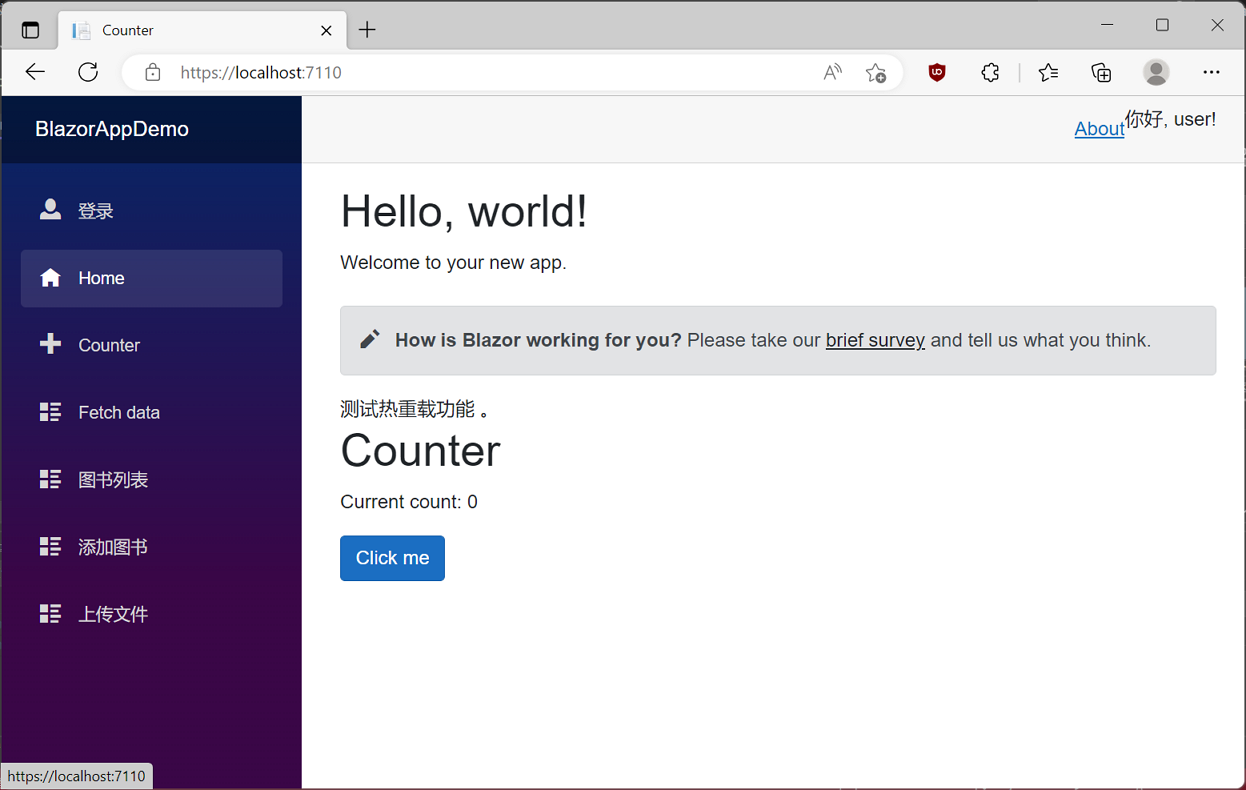
到此为止,我们已经实现了Blazor的登录认证流程,接下来我们要来实现通过jwt进行登录。
学习ASP.NET Core Blazor编程系列二十六——登录(5)的更多相关文章
- 学习ASP.NET Core Blazor编程系列二十二——登录(1)
学习ASP.NET Core Blazor编程系列文章之目录 学习ASP.NET Core Blazor编程系列一--综述 学习ASP.NET Core Blazor编程系列二--第一个Blazor应 ...
- 学习ASP.NET Core Blazor编程系列二十——文件上传(完)
学习ASP.NET Core Blazor编程系列文章之目录 学习ASP.NET Core Blazor编程系列一--综述 学习ASP.NET Core Blazor编程系列二--第一个Blazor应 ...
- 学习ASP.NET Core Blazor编程系列二十一——数据刷新
学习ASP.NET Core Blazor编程系列文章之目录 学习ASP.NET Core Blazor编程系列一--综述 学习ASP.NET Core Blazor编程系列二--第一个Blazor应 ...
- 学习ASP.NET Core Blazor编程系列二十三——登录(2)
学习ASP.NET Core Blazor编程系列文章之目录 学习ASP.NET Core Blazor编程系列一--综述 学习ASP.NET Core Blazor编程系列二--第一个Blazor应 ...
- 学习ASP.NET Core Blazor编程系列二十三——登录(3)
学习ASP.NET Core Blazor编程系列文章之目录 学习ASP.NET Core Blazor编程系列一--综述 学习ASP.NET Core Blazor编程系列二--第一个Blazor应 ...
- 学习ASP.NET Core Blazor编程系列二——第一个Blazor应用程序(中)
学习ASP.NET Core Blazor编程系列一--综述 学习ASP.NET Core Blazor编程系列二--第一个Blazor应用程序(上) 四.创建一个Blazor应用程序 1. 第一种创 ...
- 学习ASP.NET Core Blazor编程系列二——第一个Blazor应用程序(下)
学习ASP.NET Core Blazor编程系列一--综述 学习ASP.NET Core Blazor编程系列二--第一个Blazor应用程序(上) 学习ASP.NET Core Blazor编程系 ...
- 学习ASP.NET Core Blazor编程系列二——第一个Blazor应用程序(完)
学习ASP.NET Core Blazor编程系列一--综述 学习ASP.NET Core Blazor编程系列二--第一个Blazor应用程序(上) 学习ASP.NET Core Blazor编程系 ...
- 学习ASP.NET Core Blazor编程系列二——第一个Blazor应用程序(上)
学习ASP.NET Core Blazor编程系列一--综述 一.概述 Blazor 是一个生成交互式客户端 Web UI 的框架: 使用 C# 代替 JavaScript 来创建信息丰富的交互式 U ...
- 022年9月12日 学习ASP.NET Core Blazor编程系列三——实体
学习ASP.NET Core Blazor编程系列一--综述 学习ASP.NET Core Blazor编程系列二--第一个Blazor应用程序(上) 学习ASP.NET Core Blazor编程系 ...
随机推荐
- 微信公众号调试经常报access_token is invalid or not latest rid
是因为我没有使用中控服务器,所以服务器上使用同一个appid和secret获取了access_token 调试的时候再重新获取了一个新的access_token,所以导致微信服务器发放了新的acces ...
- js文字无限循环向上滚动
html代码 <div id="scroll"> <div id="con1"> <p style="color: re ...
- 24V转5V降压芯片,24V转3.3V的稳压芯片,中文规格书
一般说明PW2312 是一个高频,同步,整流,降压,开关模式转换器内部功率 MOSFET.它提供了一个非常紧凑的解决方案,以实现 1.5A 的峰值输出电流在广泛的输入电源范围内,具有优良的负载和线路调 ...
- python2和python3的区别(1)
1.python2和python3的解释器的默认编码不同 python2解释器的编码默认用的是 ascii python3解释器的编码默认用的 utf-8 2.python2和python3输入的表示 ...
- 【ubuntu】解决无法打开终端:gnome-terminal找不到路径问题
因为之前安装pyton的时候把电脑本身的python路径给改了,所以出现了这样的问题:图形化启动系统自带终端时,报错找不到gnome-terminal的路径 后来找到解决方法: 先桌面右键-终端(E) ...
- Spring学习笔记 - 第二章 - 注解开发、配置管理第三方Bean、注解管理第三方Bean、Spring 整合 MyBatis 和 Junit 案例
Spring 学习笔记全系列传送门: Spring学习笔记 - 第一章 - IoC(控制反转).IoC容器.Bean的实例化与生命周期.DI(依赖注入) [本章]Spring学习笔记 - 第二章 - ...
- STM32按键控制LED亮灭的代码
led.c #include "led.h" void LED_Config(void) { GPIO_InitTypeDef GPIO_InitStruct; RCC_APB2P ...
- 一文速览 Dubbo 3.0
本文将带你快速了解 Dubbo3 的设计背景.总体架构与核心特性.与典型用户如阿里巴巴 HSF2 的关系等.也可以通过如下部分了解更多: 小白用户,快速浏览 Dubbo3 核心特性: 下一代通信协议 ...
- STL map容器常用API
map容器:键值和实值是分开的,排序规则按照键值排序 #define _CRT_SECURE_NO_WARNINGS #include<iostream> #include<map& ...
- 数论专项复习(一)扩展欧几里得算法(exgcd)
简介 扩展欧几里得算法(简称扩欧,exgcd),用来求下列方程的一组解: \[ax+by=(a,b) \] 算法介绍 1. 裴蜀定理 裴蜀定理(Bézout's lemma):若 \(a\in \ma ...