
SSM demo :投票系统
框架:
Spring
SpringMVC
MyBatis
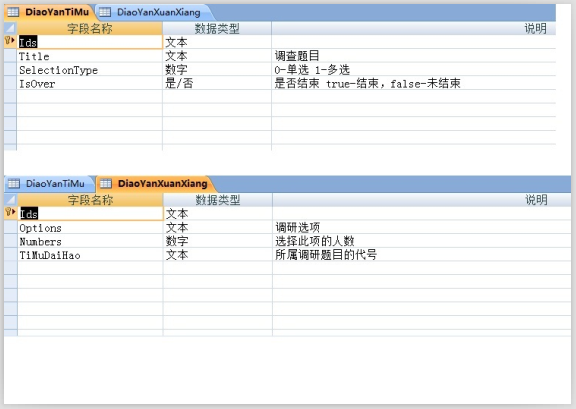
题目:
投票系统
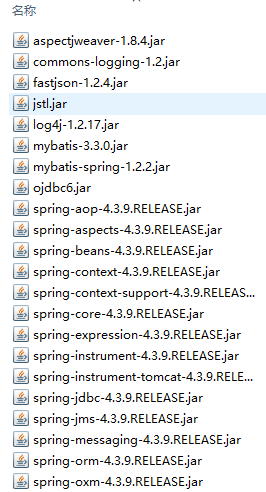
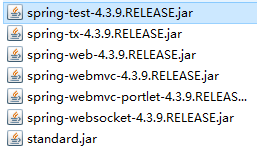
导包:
1, spring
2, MyBatis
3, mybatis-spring
4, fastjson
5, aspectweaver----AspectJ框架
6, log4j-----打印日志信息
7, ojdbc6.jar
8, jstl.jar, standard.jar----标准标签库
9, commons-logging-1.2.jar
10,……
建立包结构
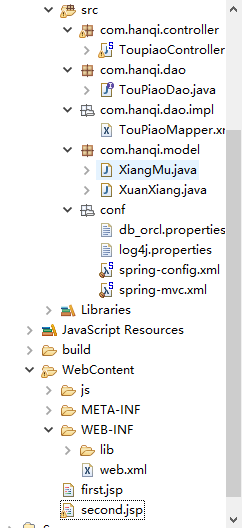
配置web.xml,spring-mvc.xml,spring-all.xml
 <?xml version="1.0" encoding="UTF-8"?>

 <web-app xmlns:xsi="http://www.w3.org/2001/XMLSchema-instance" xmlns="http://java.sun.com/xml/ns/javaee" xsi:schemaLocation="http://java.sun.com/xml/ns/javaee http://java.sun.com/xml/ns/javaee/web-app_3_0.xsd" id="WebApp_ID" version="3.0">

     <!-- 告诉web容器log4j的属性文件所在位置 -->

     <context-param>

         <param-name>log4jConfigLocation</param-name>

         <param-value>classpath:conf/log4j.properties</param-value>

     </context-param>

     <listener>

         <listener-class>org.springframework.web.util.Log4jConfigListener</listener-class>

     </listener>

     <!-- spring框架提供的字符编码过滤器 -->

     <filter>

         <filter-name>characterEncodingFilter</filter-name>

         <filter-class>org.springframework.web.filter.CharacterEncodingFilter</filter-class>

         <init-param>

             <param-name>encoding</param-name>

             <param-value>UTF-8</param-value>

         </init-param>

         <init-param>

             <param-name>forceEncoding</param-name>

             <param-value>true</param-value>

         </init-param>

     </filter>

     <filter-mapping>

         <filter-name>characterEncodingFilter</filter-name>

         <url-pattern>/*</url-pattern>

     </filter-mapping>

     <!-- 加载spring配置文件 -->

     <context-param>

         <param-name>contextConfigLocation</param-name>

         <param-value>classpath:conf/spring-config.xml</param-value>

     </context-param>

     <listener>

         <listener-class>org.springframework.web.context.ContextLoaderListener</listener-class>

     </listener>

     <!-- 加载springmvc配置文件 -->

     <servlet>

         <servlet-name>springDispatcherServlet</servlet-name>

         <servlet-class>org.springframework.web.servlet.DispatcherServlet</servlet-class>

         <init-param>

             <param-name>contextConfigLocation</param-name>

             <param-value>classpath:conf/spring-mvc.xml</param-value>

         </init-param>

         <load-on-startup>1</load-on-startup>

     </servlet>

     <servlet-mapping>

         <servlet-name>springDispatcherServlet</servlet-name>

         <url-pattern>*.do</url-pattern>

     </servlet-mapping>

 </web-app>
 <?xml version="1.0" encoding="UTF-8"?>

 <beans xmlns="http://www.springframework.org/schema/beans"

     xmlns:xsi="http://www.w3.org/2001/XMLSchema-instance"

     xmlns:context="http://www.springframework.org/schema/context"

     xmlns:mvc="http://www.springframework.org/schema/mvc"

     xmlns:p="http://www.springframework.org/schema/p"

     xsi:schemaLocation="http://www.springframework.org/schema/mvc http://www.springframework.org/schema/mvc/spring-mvc-4.3.xsd

         http://www.springframework.org/schema/beans http://www.springframework.org/schema/beans/spring-beans-3.2.xsd

         http://www.springframework.org/schema/context http://www.springframework.org/schema/context/spring-context-4.3.xsd">

 <!-- 引入数据库信息的属性文件 -->

     <context:property-placeholder location="classpath:conf/db_orcl.properties" />

     <!-- 配置扫描器 -->

     <context:component-scan base-package="com.hanqi.dao.impl" />

     <!-- 配置数据源 -->

     <bean id="dataSource" class="org.springframework.jdbc.datasource.DriverManagerDataSource">

         <property name="username" value="${jdbc.username}"></property>

         <property name="password" value="${jdbc.password}"></property>

         <property name="driverClassName" value="${jdbc.driverClassName}"></property>

         <property name="url" value="${jdbc.url}"></property>

     </bean>

     <!-- 配置Mybatis核心对象 SessionFactory -->

     <bean id="sqlSessionFactory" class="org.mybatis.spring.SqlSessionFactoryBean">

         <!-- mybatis中使用的别名 -->

         <property name="typeAliasesPackage" value="com.hanqi.model"></property>

         <!-- 注入数据源属性 -->

         <property name="dataSource" ref="dataSource"></property>

         <!-- Mybatis需要的映射文件 -->

         <property name="mapperLocations" value="classpath:com/hanqi/dao/impl/*Mapper.xml"></property>

     </bean>

     <!-- mybatis所有的映射接口 -->

     <bean class="org.mybatis.spring.mapper.MapperScannerConfigurer">

         <property name="basePackage" value="com.hanqi.dao"></property>

         <property name="sqlSessionFactoryBeanName" value="sqlSessionFactory"></property>

     </bean>

 </beans>
 <?xml version="1.0" encoding="UTF-8"?>

 <beans xmlns="http://www.springframework.org/schema/beans"

     xmlns:xsi="http://www.w3.org/2001/XMLSchema-instance" xmlns:context="http://www.springframework.org/schema/context"

     xmlns:mvc="http://www.springframework.org/schema/mvc" xmlns:p="http://www.springframework.org/schema/p"

     xsi:schemaLocation="http://www.springframework.org/schema/mvc http://www.springframework.org/schema/mvc/spring-mvc-4.3.xsd

         http://www.springframework.org/schema/beans http://www.springframework.org/schema/beans/spring-beans.xsd

         http://www.springframework.org/schema/context http://www.springframework.org/schema/context/spring-context-4.3.xsd">

     <!-- 配置扫描器 -->

     <context:component-scan base-package="com.hanqi.controller" />

     <!-- 配置视图解析器 -->

     <bean

         class="org.springframework.web.servlet.view.InternalResourceViewResolver"

         p:prefix="/" p:suffix=".jsp"></bean>

     <!-- 开启mvc注解驱动 -->

     <mvc:annotation-driven>

         <!-- springMVC有一个默认的json格式的转换器, 是基于Jackson.jar, 但实际开发当中, fastjson -->

         <mvc:message-converters register-defaults="false">

             <bean class="com.alibaba.fastjson.support.spring.FastJsonHttpMessageConverter">

                 <!-- 配置支持的媒体类型 -->

                 <property name="supportedMediaTypes">

                     <list>

                         <!-- 顺序不能写反, 否则会出现下载提示 -->

                         <value>text/html; charset=utf-8</value>

                         <value>application/json; charset=utf-8</value>

                     </list>

                 </property>

             </bean>

         </mvc:message-converters>

     </mvc:annotation-driven>

 </beans>
包结构文件:
model层---实体类:
 package com.hanqi.model;

 public class XiangMu {

     private String ids;

     private String title;

     private String selectiontype;

     private String isover;

     public XiangMu(String ids, String title, String selectiontype, String isover) {

         super();

         this.ids = ids;

         this.title = title;

         this.selectiontype = selectiontype;

         this.isover = isover;

     }

     public XiangMu() {

         super();

         // TODO Auto-generated constructor stub

     }

     public String getIds() {

         return ids;

     }

     public void setIds(String ids) {

         this.ids = ids;

     }

     public String getTitle() {

         return title;

     }

     public void setTitle(String title) {

         this.title = title;

     }

     public String getSelectiontype() {

         return selectiontype;

     }

     public void setSelectiontype(String selectiontype) {

         this.selectiontype = selectiontype;

     }

     public String getIsover() {

         return isover;

     }

     public void setIsover(String isover) {

         this.isover = isover;

     }

     @Override

     public String toString() {

         return "XiangMu [ids=" + ids + ", title=" + title + ", selectiontype=" + selectiontype + ", isover=" + isover

                 + "]";

     }

 }
 package com.hanqi.model;

 public class XuanXiang {

     private String ids;

     private String options;

     private Integer numbers;

     private String timudaihao;

     private String baifenb;

     public XuanXiang() {

         super();

         // TODO Auto-generated constructor stub

     }

     public XuanXiang(String ids, String options, Integer numbers, String timudaihao) {

         super();

         this.ids = ids;

         this.options = options;

         this.numbers = numbers;

         this.timudaihao = timudaihao;

     }

     public String getBaifenb() {

         return baifenb;

     }

     public void setBaifenb(String baifenb) {

         this.baifenb = baifenb;

     }

     public String getIds() {

         return ids;

     }

     public void setIds(String ids) {

         this.ids = ids;

     }

     public String getOptions() {

         return options;

     }

     public void setOptions(String options) {

         this.options = options;

     }

     public Integer getNumbers() {

         return numbers;

     }

     public void setNumbers(Integer numbers) {

         this.numbers = numbers;

     }

     public String getTimudaihao() {

         return timudaihao;

     }

     public void setTimudaihao(String timudaihao) {

         this.timudaihao = timudaihao;

     }

     @Override

     public String toString() {

         return "XuanXiang [ids=" + ids + ", options=" + options + ", numbers=" + numbers + ", xiangmuid=" + timudaihao

                 + "]";

     }

 }
dao层---接口:
 package com.hanqi.dao;

 import java.util.List;

 import com.hanqi.model.XiangMu;

 import com.hanqi.model.XuanXiang;

 public interface TouPiaoDao {

     List<XiangMu> selectAllXiangMu();

     List<XuanXiang> selectAllXuanXiang();

     int updatexuanxiang(String xuanxiang,int i);

     int selectXuanXiang(String xuanxiang);

 }
dao层---实现方法:
 <?xml version="1.0" encoding="UTF-8" ?>

 <!DOCTYPE mapper

   PUBLIC "-//mybatis.org//DTD Mapper 3.0//EN"

   "http://mybatis.org/dtd/mybatis-3-mapper.dtd">

 <mapper namespace="com.hanqi.dao.TouPiaoDao">

     <select id="selectAllXiangMu" resultType="XiangMu">

         select t.* from DIAOYANTIMU  t where t.ids=101

     </select>

     <select id="selectAllXuanXiang" resultType="XuanXiang" parameterType="String">

         select t.* from DIAOYANXUANXIANG  t where t.timudaihao=101

     </select>

     <select id="selectXuanXiang" resultType="Integer">

         select t.numbers from DIAOYANXUANXIANG  t where t.options=#{xuanxiang}

     </select>

     <update id="updatexuanxiang">

         update DIAOYANXUANXIANG t set t.numbers=#{param2} where t.options=#{param1}

     </update>

 </mapper>
controller层---控制器:
 package com.hanqi.controller;

 import java.text.NumberFormat;

 import java.util.ArrayList;

 import java.util.List;

 import org.springframework.beans.factory.annotation.Autowired;

 import org.springframework.stereotype.Controller;

 import org.springframework.ui.Model;

 import org.springframework.web.bind.annotation.RequestMapping;

 import org.springframework.web.bind.annotation.ResponseBody;

 import org.springframework.web.bind.annotation.SessionAttributes;

 import org.springframework.web.servlet.ModelAndView;

 import com.alibaba.fastjson.JSONObject;

 import com.hanqi.dao.TouPiaoDao;

 import com.hanqi.model.XiangMu;

 import com.hanqi.model.XuanXiang;

 @Controller

 @SessionAttributes("currentUser")

 @RequestMapping("/toupiao")

 public class ToupiaoController {

     @Autowired

     private TouPiaoDao tpDao;

     //@ResponseBody

     @RequestMapping("/selectall")

     public String selectAll(Model model) {

         List<XiangMu> xmlist=tpDao.selectAllXiangMu();

         List<XuanXiang> xxlist=tpDao.selectAllXuanXiang();

         model.addAttribute("xmlist", xmlist);

         model.addAttribute("xxlsit", xxlist);

         return "second";

     }

     @RequestMapping("/calcpiao")

     public String calcPiao(String xuanxiang,Model model) {

         List<XuanXiang> xxlist1=tpDao.selectAllXuanXiang();

         int i=0;

         for(XuanXiang x:xxlist1){

             if(xuanxiang.equals(x.getOptions())){

                 System.out.println("---1----");

                 i=tpDao.selectXuanXiang(xuanxiang);

                 i++;

                 int c=tpDao.updatexuanxiang(xuanxiang,i);

             }

         }

         List<XiangMu> xmlist=tpDao.selectAllXiangMu();

         List<XuanXiang> xxlist=tpDao.selectAllXuanXiang();

         double sum=0;

         for(XuanXiang x:xxlist){

             sum=sum+x.getNumbers();

         }

         NumberFormat nf= NumberFormat.getInstance();  //创建格式化类nf

         nf.setMaximumFractionDigits(2);    //数值2表示保留2位小数

         for(XuanXiang x:xxlist){

             x.setBaifenb(nf.format(

                     (double)x.getNumbers()/sum*100));

         }

         model.addAttribute("xmlist", xmlist);

         model.addAttribute("xxlsit", xxlist);

         model.addAttribute("sum", sum);

         return "second";

     }

 }
前台jsp页面:
 <%@ page language="java" contentType="text/html; charset=UTF-8"

     pageEncoding="UTF-8"%>

 <!DOCTYPE html PUBLIC "-//W3C//DTD HTML 4.01 Transitional//EN" "http://www.w3.org/TR/html4/loose.dtd">

 <html>

 <head>

 <meta http-equiv="Content-Type" content="text/html; charset=UTF-8">

 <title>Insert title here</title>

 <%

     String path=request.getContextPath();

 %>

 </head>

 <body>

     <div  style="text-align: center">

         <div><h1>登錄頁名</h1></div>

         <div style="margin-top: 100px">

             <a href="<%=path %>/toupiao/selectall.do">查看所有投票項目</a><br>

             <a>專業調查</a><br>

             <a>技術調查</a><br>

         </div>

     </div>

 </body>

 </html>
 <%@ page language="java" contentType="text/html; charset=UTF-8"

     pageEncoding="UTF-8"%>

 <%@ taglib uri="http://java.sun.com/jsp/jstl/core" prefix="c"%>

 <!DOCTYPE html PUBLIC "-//W3C//DTD HTML 4.01 Transitional//EN" "http://www.w3.org/TR/html4/loose.dtd">

 <html>

 <head>

 <meta http-equiv="Content-Type" content="text/html; charset=UTF-8">

 <title>Insert title here</title>

 <%

     String path = request.getContextPath();

 %>

 </head>

 <body>

 <table  style="text-align: center">

 <form action="<%=path %>/toupiao/calcpiao.do" method="post">

     <c:forEach var="xiangmu" items="${xmlist }" >

         <tr>

             <td>${xiangmu.title }</td>

             <td>

                  <ul>

                     <c:forEach var="xuanxiang" items="${xxlsit }">

                         <li><input type="radio" name="xuanxiang" value="${xuanxiang.options }"> ${xuanxiang.options }

                             <div style="width: 100px;height:40px"><br>

                                 <div style="width: ${xuanxiang.baifenb}%;height:20px;background: green">

                                 </div>

                             ${xuanxiang.numbers}  ( ${xuanxiang.baifenb}% )

                             </div>

                         </li>

                     </c:forEach>

                 </ul>

             </td>

         </tr>

     </c:forEach>

     <input type="submit" value="提交">

 </form>

 </table>

 </body>

 </html>
效果:
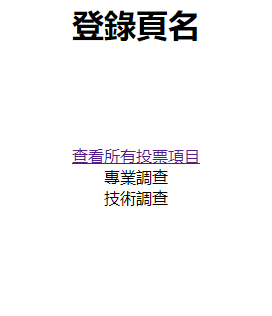
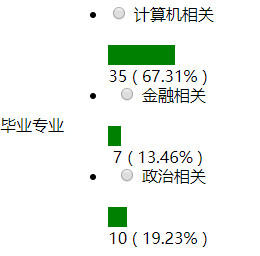
总结:
1.前台传值乱码
从前台表单中传到controller层控制器中的变量,如果不加设置会是乱码
post方式和get方式提交的设置方法不同
这里用的是post方式,方法在spring-mvc.xml中已经设置好
gei方式需要修改xml文件
2.百分比的计算
经过尝试,没有在前台JSP页面中使用EL表达式将百分比计算出来,百度也没有结果,只能进行变量和数字的计算,没有两个变量之间的计算
只能在选项类定义一个百分比的成员变量
3.int型之间的除法结果是无穷大
需要都设置double型
4.取计算结果小数点后几位
     NumberFormat nf= NumberFormat.getInstance();  //创建格式化类

     nf.setMaximumFractionDigits(2);    //数值2表示保留2位小数

     nf.format((double)x.getNumbers()/sum*100));  //结果是字符串
5.多选和单选
这里只写了单选,多选基本上差不多,需要注意传入的是数组,修改一下具体实现的代码
6.Oracle数据库中计算+1
不知道为什么直接在sql语句中计算总是报错,只能计算之后写入
SSM demo :投票系统的更多相关文章
- SSM框架整合项目 :投票系统
框架: Spring SpringMVC MyBatis 题目: 投票系统 导包: 1, spring 2, MyBatis 3, mybatis-spring 4, fastjson 5, aspe ...
- Django快速开发之投票系统
https://docs.djangoproject.com/en/1.8/intro/tutorial01/ 参考官网文档,创建投票系统. ================ Windows 7/1 ...
- 投票系统 & 简易js刷票脚本
早就听说有什么刷票脚本,微博投票等等相关的投票都有某些人去刷票. 试一下吧,兴许自己也会刷票呢?捣鼓了几个小时,终于有所眉目. (1)投票系统 要刷票,就得先有个投票界面. 当然,可以直接去各个投票网 ...
- (转)投票系统,更改ip刷票
前言 相信大家平时肯定会收到朋友发来的链接,打开一看,哦,需要投票.投完票后弹出一个页面(恭喜您,您已经投票成功),再次点击的时候发现,啊哈,您的IP(***.***.***.***)已经投过票了,不 ...
- JavaWeb项目开发案例精粹-第2章投票系统-006view层
1.index.jsp <%@ page language="java" import="java.util.*" pageEncoding=" ...
- Django写的投票系统2(转)
在上一篇中 django实例:创建你的第一个应用投票系统(一) 已经介绍基本的功能,并已经启动服务了.这一节介绍数据库相关的东东. 首页打开mysite/settings.py配置文件, 设置数据库打 ...
- Django写的投票系统1(转)
当然主要是从django的帮助文档里面来的,权当是翻译吧 这个投票系统的主要功能有 1.一个前台页面,可以让用户来投票 2.一个管理员页面,可以用来添加.修改.删除投票 首页第一步要确定你已经安装了D ...
- 投票系统 & js脚本简单刷票
<!DOCTYPE html PUBLIC "-//W3C//DTD XHTML 1.0 Transitional//EN" "http://www.w3.org/ ...
- C语言 投票系统:给定候选人,从键盘输入候选人的名字,统计票数,并输出最终获胜者
投票系统:给定候选人名单,从键盘输入候选人的名字,统计票数,并输出最终获胜者.若投票人输入的名字不在其候选名单上,则该票数无效. //凯鲁嘎吉 - 博客园 http://www.cnblogs.com ...
随机推荐
- extjs grid demo
Ext.onReady(function () { var store = Ext.create('Ext.data.Store', { fields: ['id', 'name', 'account ...
- Elasticsearch Java API 查询
一.查询的时候,需要建立一个SearchRequestBuilder,这里面将给出对于哪一个index或者type进行查询,并且所有的设置都可以在这里面进行实现,例如模糊查询,范围查询,前缀查询等. ...
- (转)使用Excel批量给数据添加单引号和逗号
在使用PLSQL连接oracle数据库处理数据的过程中,常用的操作是通过ID查询出数据,ID需要附上单引号,如果查询的ID为一条或者几条,我们手动添加即可,但是如果是几百条.几千条的话,就需要使用一些 ...
- 2017ACM暑期多校联合训练 - Team 6 1010 HDU 6105 Gameia (博弈)
题目链接 Problem Description Alice and Bob are playing a game called 'Gameia ? Gameia !'. The game goes ...
- 从python入门ruby
1.Ruby的函数可以不使用括号 def h(name) puts "hello #{name}" end h "jack" 2.python可以直接访问实例的 ...
- xshell5破解版下载
http://www.pc6.com/softview/SoftView_507840.html
- jsoup抓取网页报错UnsupportedMimeTypeException
今天在用Jsoup爬虫的时候两次遇到下面错误 Exception in thread "main" org.jsoup.UnsupportedMimeTypeException: ...
- ubuntu之安装pycharm编辑器
pycharm是Java写的,运行需要Java环境. 安装java jdk sudo add-apt-repository ppa:webupd8team/java sudo apt-get upda ...
- Windows上安装Jekyll
Jekyll是什么 jekyll是一个简单的免费的Blog生成工具,是一个静态站点生成器, 它会根据网页源码生成静态文件.它提供了模板.变量.插件等功能,所以实际上可以用来编写整个网站.也可使用基于j ...
- python ORM - sqlalchemy 操作使用
python操作数据库 使用 ORM - sqlalchemy,pymsql 安装: pip install pymsq pip install sqlalchemy 一. '''连接数据库''' ...