
Elasticsearch索引操作
一、索引初始化操作
插件推荐使用head、marvel (收费)
1.1 创建新索引
curl -XPUT 'http://localhost:9200/test' -d '

{

    "settings":{

        "index":{

            "number_of_shards": 5,

            "number_of_replicas": 1

        }

    }

}
'
返回如下内容即为成功:
{

    "acknowledged": true,

    "shards_acknowledged": true,

    "index": "test"

}
number_of_replicas可以替换为:
blocks.read_only : 设为true, 则当前索引只允许读,不允许写或更新;
blocks.read : 设为true , 则禁止读操作;
blocks.write : 设为true , 则禁止写操作;
blocks.metadata : 设为true , 则禁止对metadata操作。
1.2 查询索引的设置信息
curl -XGET 'http://localhost:9200/test/_settings?pretty'
curl -XGET 'http://localhost:9200/test,test2/_settings?pretty'
curl -XGET 'http://localhost:9200/_all/_settings?pretty'
1.3 创建文档
curl -XPUT 'http://localhost:9200/test/book/1' -d '

{

    "title": "ZQW Book",

    "name": {

        "first": "Z",

        "last": "QW"

     },

    "publish_date": "2017-11-20",

    "price": "39.99"

}

'
不设置文档ID
curl -XPOST 'http://localhost:9200/test/book/' -d '

{

    "title": "No ID",

    "name": {

        "first": "Z",

        "last": "QW"

     },

    "publish_date": "2017-11-20",

    "price": "39.99"

}

'
1.4 获取文档
curl -XGET 'http://localhost:9200/test/book/1'
1.5 通过 _source 获取指定字段
curl -XGET localhost:9200/test/book/1?_source=title

curl -XGET localhost:9200/test/book/1?_source=title,price

curl -XGET localhost:9200/test/book/1?_source
1.6 更新文档
curl -XPOST 'http://localhost:9200/test/book/1/_update' -d '

{

  "doc" : {

        "price" : "free"

    }

}

'
1.7 删除文档
curl -XDELETE 'http://localhost:9200/test/book/1'

curl -XDELETE 'http://localhost:9200/test/book'

curl -XDELETE 'http://localhost:9200/test'
1.8 _mget 批量获取
curl -XPOST 'http://localhost:9200/_mget' -d '

#### docs 属组 ####
{

  "docs": [

    {

      "_index": "library",

      "_type": "book",

      "_id": 2

    },

    {

      "_index": "library",

      "_type": "book",

      "_id": 3,
#####只获取指定数据#####
    "_source" : "price"

    },

    {

      "_index": "shop",

      "_type": "apple",

      "_id": 1

    }

  ]

}

'
相同index,type下通过不同ID批量寻找文档
curl -XPOST 'http://localhost:9200/library/book/_mget' -d '

{

    "docs" : [

           {  "_id" : 1  },

           {  "_type" : "book", "_id" : 2  }

    ]

}

#####或者如下#####

{

  "ids": [    0,    1,    2,    3,    4  ]

}
'
1.9 bulk 批量操作
实现多个文档的 create、index、update 或 delete 操作
请求体格式(不能如同常规JSON格式一般美化展示):
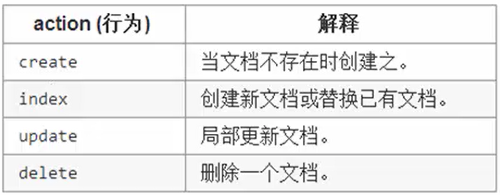
{action:{metadata}}\n
{request body}\n
ex: { "delete" : { "_index" : "test","_type" : "type","_id" : "1" } }
curl -XPOST 'http://localhost:9200/test/type/_bulk' -d '

{ "index": {"_id": 0}}

{ "title" : "test00","exist": "true"}

{ "index": {"_id": 1}}

{ "title" : "test01","exist": "true"}

{ "index": {"_id": 2}}

{ "title" : "test02","exist": "true"}

{ "index": {"_id": 3}}

{ "title" : "test03","exist": "true"}

{ "index": {"_id": 4}}

{ "title" : "test04","exist": "true"}

'
批量操作:
curl -XPOST 'http://localhost:9200/test/type/_bulk?pretty' -d '

{"delete": {"_index": "test","_type": "type","_id" : ""}}

{"create": {"_index": "meta","_type":"mtype","_id":""}}

{"title":"meta_type01","exist":"true"}

{"index":{"_index": "meta","_type":"mtype"}}

{"title":"meta_type02","exist":"true"}

{"update":{"_index":"test","_type":"type","_id":""}}

{"doc":{"exist":"false"}}

'
bulk处理文档大小的最佳值:
- 数据加载在每个节点的RAM里
- 请求的数据超过一定的大小,那bulk的 处理性能就回降低
- 文档数据大小跟数据配置,文档复杂度,以及当前集群的负载有关
2.0 版本控制
- 悲观锁:假定会发生并发冲突,屏蔽一切可能违反数据完整性的操作。(安全)
- 乐观锁:假定不会发生并发冲突,只在提交操作时检查是否违反数据的完整性。
Elasticsearch 内置使用的是乐观锁:
- 内部版本控制:每次修改后,_version自增长
- 外部版本控制:手动修改_version
curl -XPUT 'http://localhost:9200/test/type/3?version=5&version_type=external' -d '

{

"title":""

}

'
Elasticsearch索引操作的更多相关文章
- Elasticsearch 索引操作
一.创建 语法: PUT /索引库名称 { "settings": { "number_of_shards": 分片数量, "number_of_re ...
- ElasticSearch Index操作源码分析
ElasticSearch Index操作源码分析 本文记录ElasticSearch创建索引执行源码流程.从执行流程角度看一下创建索引会涉及到哪些服务(比如AllocationService.Mas ...
- ElasticSearch+Kibana 索引操作( 附源码)
一 前言 ElasticiSearch 简介 ElasticSearch是一个基于Lucene的搜索服务器.它提供了一个分布式多用户能力的全文搜索引擎,基于RESTful web接口.Elastics ...
- ElasticSearch+Kibana 索引操作
ElasticSearch+Kibana 索引操作 一 前言 ElasticiSearch 简介 ElasticSearch是一个基于Lucene的搜索服务器.它提供了一个分布式多用户能力的全文搜索引 ...
- Elasticsearch索引和文档操作
列出所有索引 现在来看看我们的索引 GET /_cat/indices?v 响应 health status index uuid pri rep docs.count docs.deleted st ...
- elasticsearch的索引操作和文档操作总结
参考文档:https://es.xiaoleilu.com/010_Intro/00_README.html 一.索引操作 1.查看当前节点的所有的index 查看当前节点的所有的index [roo ...
- ElasticSearch 基本概念 and 索引操作 and 文档操作 and 批量操作 and 结构化查询 and 过滤查询
基本概念 索引: 类似于MySQL的表.索引的结构为全文搜索作准备,不存储原始的数据. 索引可以做分布式.每一个索引有一个或者多个分片 shard.每一个分片可以有多个副本 replica. 文档: ...
- Elasticsearch索引(company)_Centos下CURL增删改
目录 返回目录:http://www.cnblogs.com/hanyinglong/p/5464604.html 1.Elasticsearch索引说明 a. 通过上面几篇博客已经将Elastics ...
- Elasticsearch-PHP 索引操作(转)
索引操作 本节通过客户端来介绍一下索引API的各种操作.索引操作包含任何管理索引本身(例如,创建索引,删除索引,更改映射等等). 我们通过一些常见的操作的代码片段来介绍,然后在表格中列出剩下的方法.R ...
随机推荐
- 说说mysql的存储引擎,有什么区别?索引的介绍
InnoDB 支持ACID事务,支持事务的四种隔离级别,串行化,可重复读,读已提交,读未提交. 支持行级锁以及外检约束:所以可以支持写并发. 不存储总行数. 逐渐索引采用聚集索引,索引的数据域存储数据 ...
- Eslint常用命令
Eslint常用命令 自动修复(针对整个项目) npm run lint -- --fix 运行如上命令,eslint 会自动修复一些简单的错误. 全局安装 npm install -g eslint ...
- 【JAVA开发】eclipse最新版本Eclipse Neon
这个版本的IDE支持Java.JavaScript.C/C++.PHP和Fortran等多种编程语言: 这个版本首次鼓励用户使用Eclipse Installer来做安装,这是一种由Eclipse O ...
- git 命令 git diff 查看 Git 区域文件的具体改动
查看 Git 区域文件的具体改动 git diff git status 只能让我们知道文件在 Git 区域内的改动状态,但如果我们想查看某个文件内具体改了什么(也可以理解为在不同 Git 区域中的差 ...
- [图像分割] OpenCV 的 GrabCut 函数使用和源码解读
转自 zouxy09 GrabCut 原理参考这里,以下为 GrabCut 源码: ——看别人写的好的代码也很享受,干净利落,有些处理的细节也学习一下. /*M//////////////////// ...
- [转帖]PKI技术原理(收集 整理 归纳)
PKI技术原理(收集 整理 归纳) https://blog.51cto.com/3layer/20430 总结归纳的 灰常好.. 7layer关注8人评论39427人阅读2007-03-14 11: ...
- Spark性能调优:广播大变量broadcast
Spark性能调优:广播大变量broadcast 原文链接:https://blog.csdn.net/leen0304/article/details/78720838 概要 有时在开发过程中,会遇 ...
- SQLite进阶-9.别名
我们可以暂时给表或者列重命名为另一个名字,称为别名,重命名只是临时运行时改变,不会改变数据库中的实际的名字. -- 语法 SELECT column_name AS column_alias_name ...
- Vue学习之vue-cli脚手架下载安装及配置
Vue学习之vue-cli脚手架下载安装及配置:https://www.cnblogs.com/clschao/articles/10650862.html 1. 先下载node.js,下载地址:ht ...
- 201709-3 JSON查询
问题描述 JSON (JavaScript Object Notation) 是一种轻量级的数据交换格式,可以用来描述半结构化的数据.JSON 格式中的基本单元是值 (value),出于简化的目的本题 ...