
Python爬虫爬取搜狐视频电影并存储到mysql数据库
数据获取方式:微信搜索关注【靠谱杨阅读人生】回复【电影】。
整理不易,资源付费,谢谢支持。
代码:
  1 import time

  2 import traceback

  3 import requests

  4 from lxml import etree

  5 import re

  6 from bs4 import BeautifulSoup

  7 from lxml.html.diff import end_tag

  8 import json

  9 import pymysql

 10 #连接数据库  获取游标

 11 def get_conn():

 12     """

 13     :return: 连接,游标

 14     """

 15     # 创建连接

 16     conn = pymysql.connect(host="127.0.0.1",

 17                     user="root",

 18                     password="000429",

 19                     db="movierankings",

 20                     charset="utf8")

 21     # 创建游标

 22     cursor = conn.cursor()  # 执行完毕返回的结果集默认以元组显示

 23     if ((conn != None) & (cursor != None)):

 24         print("数据库连接成功!游标创建成功!")

 25     else:

 26         print("数据库连接失败!")

 27     return conn, cursor

 28 #关闭数据库连接和游标

 29 def close_conn(conn, cursor):

 30     if cursor:

 31         cursor.close()

 32     if conn:

 33         conn.close()

 34     return 1

 35

 36 def get_souhu():

 37     url='https://film.sohu.com/list_0_0_0_2_2_1_60.html?channeled=1200100000'

 38     #最新上架

 39     new_url='https://film.sohu.com/list_0_0_0_2_1_1_60.html?channeled=1200100000'

 40     #本周热播

 41     week_url='https://film.sohu.com/list_0_0_0_2_0_1_60.html?channeled=1200100000'

 42     headers={

 43         'User-Agent':'Mozilla/5.0 (Windows NT 10.0; Win64; x64) AppleWebKit/537.36 (KHTML, like Gecko) Chrome/90.0.4430.212 Safari/537.36'

 44     }

 45

 46     #初始化list

 47     templist=[]

 48     dataRes=[]

 49     #最受好评

 50     for i in range(1,31):

 51         url_1='https://film.sohu.com/list_0_0_0_2_2_'

 52         auto=str(i)

 53         url_2='_60.html?channeled=1200100000'

 54         url=url_1+auto+url_2

 55         response = requests.get(url, headers)

 56         response.encoding = 'utf-8'

 57         page_text = response.text

 58         # etree_ = etree.HTML(page_text)

 59         # 获取所有的li

 60         soup = BeautifulSoup(page_text, 'lxml')

 61         # 标签层级选择

 62         li_list = soup.select('.movie-list>li')

 63         print(len(li_list))

 64         if(len(li_list)==0):

 65             print("最受好评爬取结束!")

 66             if(len(dataRes)!=0):

 67                 return dataRes

 68         for li in li_list:

 69             li_text=str(li)

 70             # print(li_text)

 71             li_soup=BeautifulSoup(li_text,'lxml')

 72             name=li_soup.find('div',class_="v_name_info").text

 73             #添加名字

 74             templist.append(name)

 75             # print(name)

 76             #添加评分

 77             score=li_soup.find('span',class_='v_score').text

 78             #处理评分

 79             score=score[-4:-1]

 80             templist.append(score)

 81             # print(score)

 82             #添加path

 83             path=li_soup.find('a',target="_blank")['href']

 84             templist.append(path)

 85             # print(path)

 86             #添加播放状态

 87             state="VIP"

 88             templist.append(state)

 89             print(templist)

 90             dataRes.append(templist)

 91             templist=[]

 92         print("-------------------------------------------")

 93     # print(len(dataRes))

 94

 95     # #最新上架

 96     #

 97     # templist = []

 98     # for i in range(1,31):

 99     #     url_1='https://film.sohu.com/list_0_0_0_2_1_'

100     #     auto=str(i)

101     #     url_2='_60.html?channeled=1200100000'

102     #     url=url_1+auto+url_2

103     #     response = requests.get(url, headers)

104     #     response.encoding = 'utf-8'

105     #     page_text = response.text

106     #     # etree_ = etree.HTML(page_text)

107     #     # 获取所有的li

108     #     soup = BeautifulSoup(page_text, 'lxml')

109     #     # 标签层级选择

110     #     li_list = soup.select('.movie-list>li')

111     #     print(len(li_list))

112     #     if(len(li_list)==0):

113     #         print("最新上架爬取结束!")

114     #         if(len(dataRes)!=0):

115     #             return dataRes

116     #     for li in li_list:

117     #         li_text=str(li)

118     #         # print(li_text)

119     #         li_soup=BeautifulSoup(li_text,'lxml')

120     #         name=li_soup.find('div',class_="v_name_info").text

121     #         #添加名字

122     #         templist.append(name)

123     #         # print(name)

124     #         #添加评分

125     #         score=li_soup.find('span',class_='v_score').text

126     #         #处理评分

127     #         score=score[-4:-1]

128     #         templist.append(score)

129     #         # print(score)

130     #         #添加path

131     #         path=li_soup.find('a',target="_blank")['href']

132     #         templist.append(path)

133     #         # print(path)

134     #         #添加播放状态

135     #         state="VIP"

136     #         templist.append(state)

137     #         print(templist)

138     #         dataRes.append(templist)

139     #         templist=[]

140     #     print("-------------------------------------------")

141     # # print(len(dataRes))

142     # #本周热播

143     # templist = []

144     # for i in range(1, 31):

145     #     url_1 = 'https://film.sohu.com/list_0_0_0_2_0_'

146     #     auto = str(i)

147     #     url_2 = '_60.html?channeled=1200100000'

148     #     url = url_1 + auto + url_2

149     #     response = requests.get(url, headers)

150     #     response.encoding = 'utf-8'

151     #     page_text = response.text

152     #     # etree_ = etree.HTML(page_text)

153     #     # 获取所有的li

154     #     soup = BeautifulSoup(page_text, 'lxml')

155     #     # 标签层级选择

156     #     li_list = soup.select('.movie-list>li')

157     #     print(len(li_list))

158     #     if (len(li_list) == 0):

159     #         print("本周热播爬取结束!")

160     #         if (len(dataRes) != 0):

161     #             return dataRes

162     #     for li in li_list:

163     #         li_text = str(li)

164     #         # print(li_text)

165     #         li_soup = BeautifulSoup(li_text, 'lxml')

166     #         name = li_soup.find('div', class_="v_name_info").text

167     #         # 添加名字

168     #         templist.append(name)

169     #         # print(name)

170     #         # 添加评分

171     #         score = li_soup.find('span', class_='v_score').text

172     #         # 处理评分

173     #         score = score[-4:-1]

174     #         templist.append(score)

175     #         # print(score)

176     #         # 添加path

177     #         path = li_soup.find('a', target="_blank")['href']

178     #         templist.append(path)

179     #         # print(path)

180     #         # 添加播放状态

181     #         state = "VIP"

182     #         templist.append(state)

183     #         print(templist)

184     #         dataRes.append(templist)

185     #         templist = []

186     #     print("-------------------------------------------")

187     # print(len(dataRes))

188     #list去重

189     # old_list = dataRes

190     # new_list = []

191     # for i in old_list:

192     #     if i not in new_list:

193     #         new_list.append(i)

194     # print(new_list)  # [2, 3, 4, 5, 1]

195     return dataRes

196 #插入数据库

197 def insert_souhu():

198     cursor = None

199     conn = None

200     try:

201         count=0

202         list = get_souhu()

203         print(f"{time.asctime()}开始插入搜狐电影数据")

204         conn, cursor = get_conn()

205         sql = "insert into moviesohu (id,name,score,path,state) values(%s,%s,%s,%s,%s)"

206         for item in list:

207             print(item)

208             count = count + 1

209             #异常捕获,防止数据库主键冲突

210             try:

211                 cursor.execute(sql, [0, item[0], item[1], item[2], item[3] ])

212             except pymysql.err.IntegrityError:

213                 print("重复!跳过!")

214         conn.commit()  # 提交事务 update delete insert操作

215         print(f"{time.asctime()}插入搜狐电影数据完毕")

216     except:

217         traceback.print_exc()

218     finally:

219         close_conn(conn, cursor)

220     return;

221

222 if __name__ == '__main__':

223     # get_iqy()

224     # get_souhu()

225     insert_souhu()
运行截图

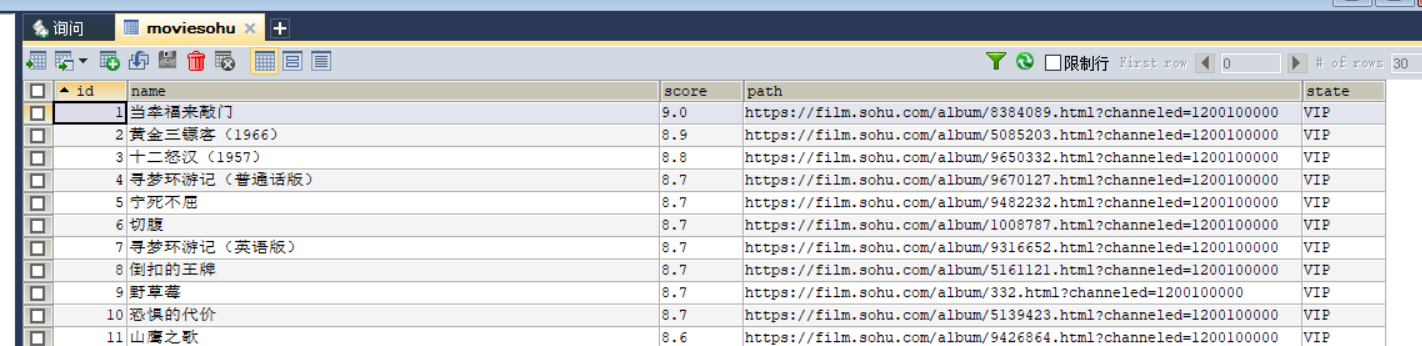
数据库截图
建表语句
1 CREATE TABLE `moviesohu` (

2   `id` INT(11) NOT NULL AUTO_INCREMENT,

3   `name` VARCHAR(45) COLLATE utf8_bin NOT NULL,

4   `score` VARCHAR(45) COLLATE utf8_bin NOT NULL,

5   `path` VARCHAR(100) COLLATE utf8_bin NOT NULL,

6   `state` VARCHAR(10) COLLATE utf8_bin NOT NULL,

7   PRIMARY KEY (`name`),

8   KEY `id` (`id`)

9 ) ENGINE=INNODB AUTO_INCREMENT=1 DEFAULT CHARSET=utf8 COLLATE=utf8_bin;
Python爬虫爬取搜狐视频电影并存储到mysql数据库的更多相关文章
- python爬虫:爬取慕课网视频
前段时间安装了一个慕课网app,发现不用注册就可以在线看其中的视频,就有了想爬取其中的视频,用来在电脑上学习.决定花两天时间用学了一段时间的python做一做.(我的新书<Python爬虫开发与 ...
- Python爬虫 - 爬取百度html代码前200行
Python爬虫 - 爬取百度html代码前200行 - 改进版, 增加了对字符串的.strip()处理 源代码如下: # 改进版, 增加了 .strip()方法的使用 # coding=utf-8 ...
- 用Python爬虫爬取广州大学教务系统的成绩(内网访问)
用Python爬虫爬取广州大学教务系统的成绩(内网访问) 在进行爬取前,首先要了解: 1.什么是CSS选择器? 每一条css样式定义由两部分组成,形式如下: [code] 选择器{样式} [/code ...
- 使用Python爬虫爬取网络美女图片
代码地址如下:http://www.demodashi.com/demo/13500.html 准备工作 安装python3.6 略 安装requests库(用于请求静态页面) pip install ...
- Python爬虫|爬取喜马拉雅音频
"GOOD Python爬虫|爬取喜马拉雅音频 喜马拉雅是知名的专业的音频分享平台,用户规模突破4.8亿,汇集了有声小说,有声读物,儿童睡前故事,相声小品等数亿条音频,成为国内发展最快.规模 ...
- python爬虫爬取内容中,-xa0,-u3000的含义
python爬虫爬取内容中,-xa0,-u3000的含义 - CSDN博客 https://blog.csdn.net/aiwuzhi12/article/details/54866310
- Python爬虫爬取全书网小说,程序源码+程序详细分析
Python爬虫爬取全书网小说教程 第一步:打开谷歌浏览器,搜索全书网,然后再点击你想下载的小说,进入图一页面后点击F12选择Network,如果没有内容按F5刷新一下 点击Network之后出现如下 ...
- python爬虫—爬取英文名以及正则表达式的介绍
python爬虫—爬取英文名以及正则表达式的介绍 爬取英文名: 一. 爬虫模块详细设计 (1)整体思路 对于本次爬取英文名数据的爬虫实现,我的思路是先将A-Z所有英文名的连接爬取出来,保存在一个cs ...
- 一个简单的python爬虫,爬取知乎
一个简单的python爬虫,爬取知乎 主要实现 爬取一个收藏夹 里 所有问题答案下的 图片 文字信息暂未收录,可自行实现,比图片更简单 具体代码里有详细注释,请自行阅读 项目源码: # -*- cod ...
- python爬虫-爬取百度图片
python爬虫-爬取百度图片(转) #!/usr/bin/python# coding=utf-8# 作者 :Y0010026# 创建时间 :2018/12/16 16:16# 文件 :spider ...
随机推荐
- jenkins构建第一个maven项目
1. 项目介绍 spring boot样例github项目. 大家可以访问:https://github.com/mudfish/springbootdemo 2. jenkins中新建maven任务 ...
- 【Android逆向】脱壳项目 frida-dexdump 原理分析
1. 项目代码地址 https://github.com/hluwa/frida-dexdump 2. 核心逻辑为 def dump(self): logger.info("[+] Sear ...
- pikachu sql inject 时间盲注
输入框输入任何消息返回内容都是一样的 那么可以考虑插入sleep函数来观察响应时长来判断是否有注入点 输入 kobe' and sleep(3) # 发现页面缓冲3秒才响应,说明确实是注入点 通过if ...
- 项目实战:Qt+ffmpeg摄像头检测工具
若该文为原创文章,未经允许不得转载原博主博客地址:https://blog.csdn.net/qq21497936原博主博客导航:https://blog.csdn.net/qq21497936/ar ...
- cmake安装及报错解决办法
安装 yum install cmake 报错 centOS8(x86_64 或 aarch64) 系统下 yum或dnf 默认安装的 cmake-3.18.2-11.el8版本,安装后无法使用,出现 ...
- Android Compose开发
目录 好处 入门 Composable 布局 其他组件 列表 verticalScroll 延迟列表 内容内边距 性能 修饰符 偏移量 requiredSize 滚动 添加间距Spacer Butto ...
- 内存管理(二)之别小看了Tagged-Pointer关键时刻起到大作用
本文主要研究Tagged Pointer技术,针对该技术需要解决的问题.以及在实际应用中的价值做一些简单的探讨. 如果你想要更进一步,去挖掘Tagged Pointer是如何实现的,可以参考Frida ...
- 【API Management】使用 APIM Inbound Policy 来修改Content‐Type Header的值
问题描述 在使用APIM提供API服务管理的场景中,遇见了客户端请求时候发送的请求Header中的Content-Type不满足后台服务器的要求,但是在客户端要求客户修改代码难度较高. 所以面对这样的 ...
- 【Azure Redis 缓存】Azure Redis 异常 - 因线程池Busy而产生的Timeout异常问题
问题描述 StackExchange.Redis在使用线程池后,偶尔会出现Timeout awaiting response 或者 No connection is available to serv ...
- 【Azure 应用服务】由Web App“无法连接数据库”而逐步分析到解析内网地址的办法(SQL和Redis开启private endpoint,只能通过内网访问,无法从公网访问的情况下)
问题描述 在Azure上创建的数据库,单独通过SQL的连接工具是可以访问,但在Web App却无法访问,错误信息为: { "timestamp": "2021-05-20 ...