
run a Freight robot (3)
5.Logging In
Once the robot is turned on and the robot is on the network, ssh into the computer of the robot using the default fetch user account:
$ ssh fetch@<robot_name_or_ip>
robot_name_or_ip will be either an IPv4 network address, or a network name, depending on the configuration of your local network. If your computer and network is setup for multicast DNS (mDNS) then you may be able to use fetchXYZ.local as the network name where XYZ will be the serial number of your robot (remove any leading zeros from the serial number).
Default User Account
Each robot ships with a default user account, with username fetch and password robotics. It is recommended to change the password when setting up the robot.
Creating User Accounts
It is recommended that each user create their own account on the robot, especially when developing from source. To create an account on the robot, ssh into the robot as the fetch user, and run the following commands
$ sudo adduser USERNAME

$ sudo usermod -G adm,cdrom,sudo,dip,plugdev,lpadmin,sambashare USERNAME
6. Moving the Base with your Keyboard
Note
You will need a computer with ROS installed to properly communicate with the robot. Please consult the ROS Wiki for more information. We strongly suggest an Ubuntu machine with ROS Indigo installed.
To teleoperate the robot base in simulation, we recommend using the teleop_twist_keyboard.py script from teleop_twist_keyboard package.
$ export ROS_MASTER_URI=http://<robot_name_or_ip>:11311

$ rosrun teleop_twist_keyboard teleop_twist_keyboard.py
Using Software Runstop
To activate the software runstop, publish True to the /enable_software_runstop topic.
Alternately, with the teleop runstop enabled, pressing both of the right trigger buttons (buttons 9 and 11) will activate the software runstop. The software_runstop.py script in fetch_bringup can be modified to change the button(s) for the software runstop.
Once activated, the software runstop can be deactivated by (1) toggling the hardware runstop, or (2) disabling the software runstop by passing False to the /enable_software_runstop topic.
Enable Teleop Software Runstop
Note
In order to edit the robot.launch file, you will need to use a terminal editor (such as nano or vim), or use the -X flag with SSH to use a graphical editor (such as gedit). Additionally, the editor must be launched with sudo. Instructions below use nano.
To enable the software runstop, first SSH into the robot, and then modify the robot drivers launch file to use it.
We need to modify the robot.launch file to pass the correct arg to the software runstop script:
$ sudo nano /etc/ros/indigo/robot.launch
In this file there should be a Software Runstop entry near the end. By default this entry contains an args line, with a value of “-a -b -g”. To add teleop control, add the “-t” flag as well. This section will then look like the below. If your robot is an older one and does not have a Software Runstop entry, you will want to simply copy the block the below.
<!-- Software Runstop -->

<include file="$(find fetch_bringup)/launch/include/runstop.launch.xml">

  <arg name="flags" value="-a -b -g -t" />

</include>
Note that the -a, -b, -g flags correspond to letting the software runstop control the arm, base and gripper breakers, respectively.
Additionally, if completely disabling the software runstop functionality is desired, the above section in robot.launch can be commented out or removed.
Finally, restart the drivers so that our changes take effect:
$ sudo service robot stop && sudo service robot start
7. Visualizing Data
$ export ROS_MASTER_URI=http://<robot_name_or_ip>:11311

$ rosrun rviz rviz
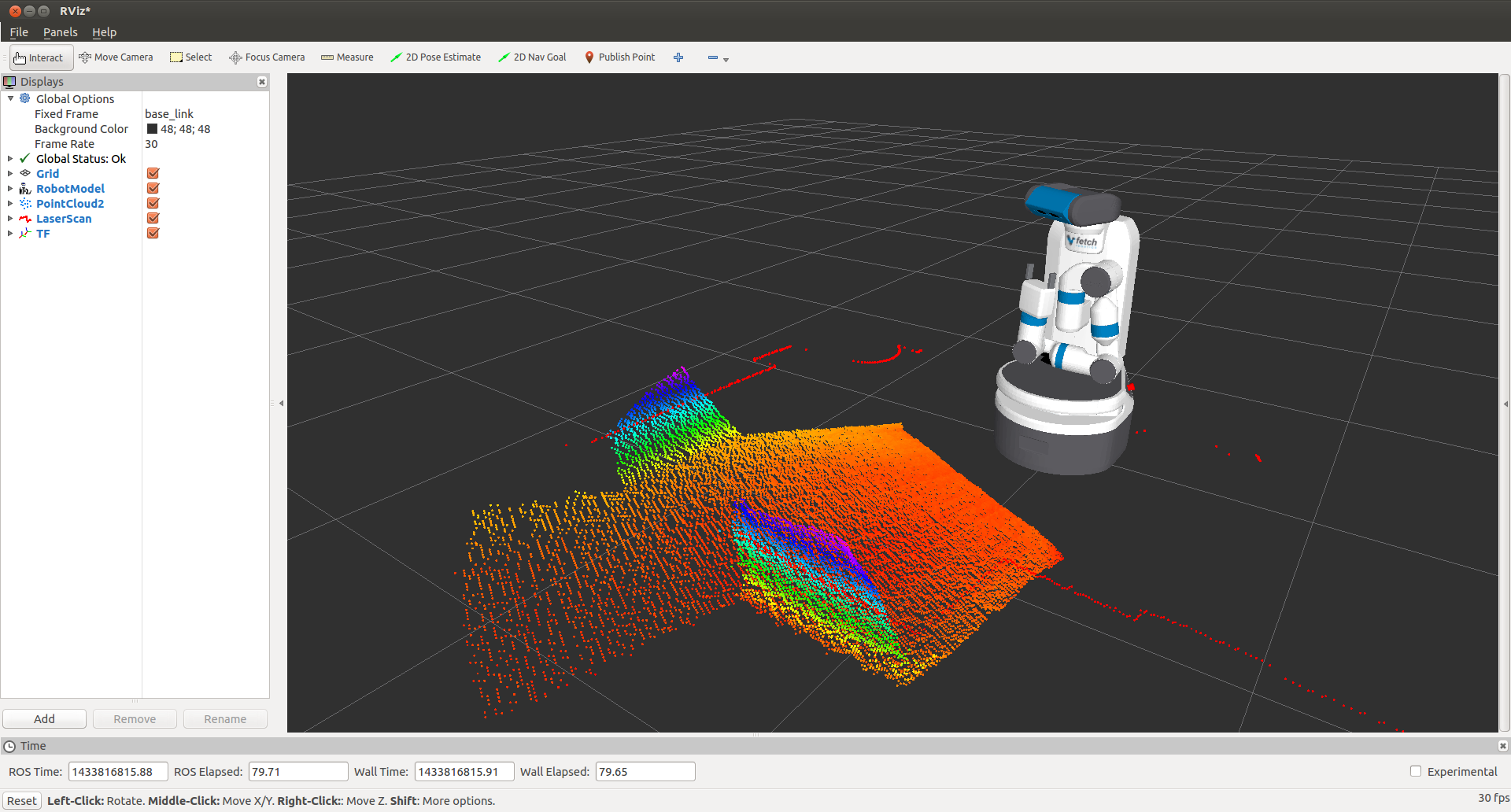
Note
You will need a computer with ROS installed to properly communicate with the robot. Please consult the ROS Wiki for more information. We strongly suggest an Ubuntu machine with ROS Indigo installed.
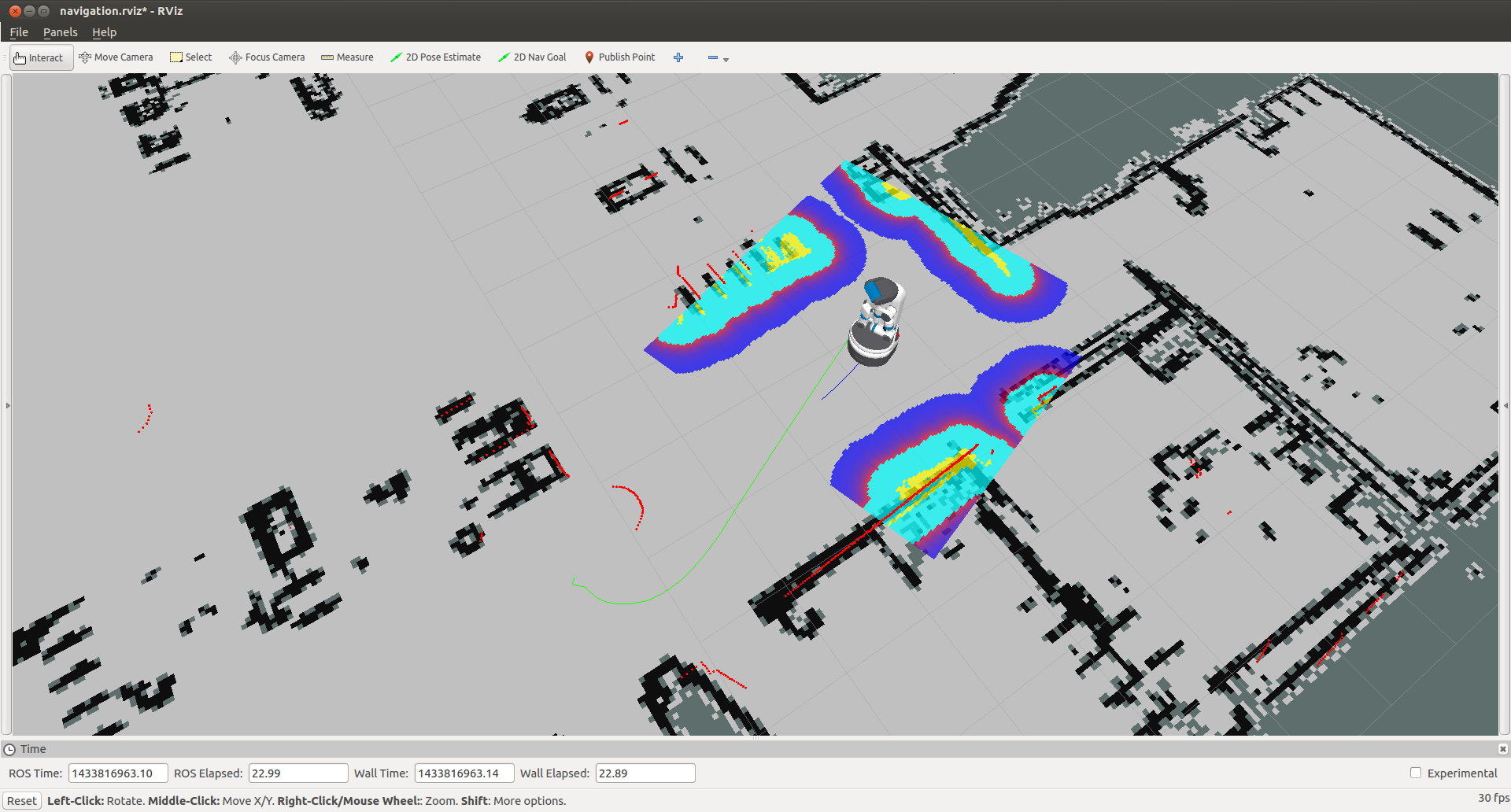
You can now manually set up your RVIZ visualization or re-run RVIZ with a configuration file using the command line. The default .rviz configuration file for Fetch can be loaded using:
$ roscd fetch_navigation/config

$ export ROS_MASTER_URI=http://<robot_name_or_ip>:11311

$ rviz -d navigation.rviz
run a Freight robot (3)的更多相关文章
- run a Freight robot (1)
1. Freight robot The Fetch and Freight Research Edition Robots are indoor laboratory robots. Coordin ...
- run a Freight robot (2)
3. Network Setup Connecting Freight to a Monitor The easiest way to configure the wireless networki ...
- Simulating a Freight robot in Gazebo
Installation Before installing the simulation environment, make sure your desktop is setup with a st ...
- implement "slam_karto" package on a Freight robot
1. login ssh fetch@<robot ip or robot name> 2. set robot master modify .bashrc in robot's com ...
- 几个bat文件(关于robot freamwork安装)
如果安装后 没有这几文件,或者在运行后 提示 文件缺少这个文件 , 就需要手动创建. 一般文件在 :C:\Python27\Scripts 这个目录下 1.pybot.bat文件: @echo o ...
- robot framework + win7 64 上的安装
1.安装 python 2.7 2.cmd 管理模式 python -m pip install --upgrade pip pip install robotframework==3. ...
- Robot Framework(一)入门
1.1简介 Robot Framework是一个基于Python的,可扩展的关键字驱动的测试自动化框架,用于端到端验收测试和验收测试驱动开发(ATDD).它可用于测试分布式异构应用程序,其中验证需要涉 ...
- robotframework笔记19
后处理输出 使用时自动测试 在测试执行报告和日志生成,并使用它 分别允许创建自定义报告和日志以及结合 和合并的结果. 使用Rebot 简介 rebot [options] robot_outputs ...
- robotframework笔记1
机器人框架是一个基于Python的,可扩展的关键字驱动的自动化测试最终到终端的验收测试和验收测试驱动开发(ATDD)框架.它可用于检测分布式异类应用程序,其中,验证要求感人几种技术和接口. 下面列出了 ...
随机推荐
- linux内核中jiffies的回绕问题【转】
本文转载自:http://blog.csdn.net/yuanlulu/article/details/6019862 ======================================== ...
- ActiveMQ 安装异常
解决方式: 1.确认计算机主机名名称没有下划线: 2.如果是win7,停止ICS(运行-->services.msc找到Internet Connection Sharing (ICS)服务,改 ...
- Symfony电子商务
http://zhilihe.com/content/symfony%E7%94%B5%E5%AD%90%E5%95%86%E5%8A%A1%E9%A1%B9%E7%9B%AE%E6%80%BB%E7 ...
- ecshop微信支付(0923更新)商户支付密钥key的生成与设置
ECSHOP 微信支付(0923更新)商户支付密钥key的生成与设置 说明:新版微信支付,用户必须授权登录才能支付.需要商家自己设置商户号支付密钥. 申请微信支付手机版部分时需要填写的配置接口地址: ...
- ECshop中TemplateBeginEditable 和后台编辑讲解
在ecshop的dwt文件里面经常发现有“<!-- TemplateBeginEditable name="doctitle" -->和<!-- #BeginLi ...
- ACM题目————马拦过河卒
题目描述 棋盘上A点有一个过河卒,需要走到目标B点.卒行走的规则:可以向下.或者向右.同时在棋盘上C点有一个对方的马,该马所在的点和所有跳跃一步可达的点称为对方马的控制点.因此称之为“马拦过河卒”. ...
- 周赛-Equidistant String 分类: 比赛 2015-08-08 15:44 6人阅读 评论(0) 收藏
time limit per test 1 second memory limit per test 256 megabytes input standard input output standar ...
- Socket状态变迁图
在一些防火墙或端口管理工具中经常会看到连接状态为CLOSED CLOSE_WITE LAST_ACK等的进程, 虽然状态就那么很少的几个, 而且看字面意思也能猜个大概, 但没做过Socket编程的朋友 ...
- shell脚本判断文件类型
转自:http://www.cnblogs.com/sunyubo/archive/2011/10/17/2282047.html 1. shell判断文件,目录是否存在或者具有权限 2. #!/bi ...
- 数据库 使用DML语句更改数据
使用DML语句更改数据 添加新数据: 插入单行语句: Insert into 表名(列名)values(‘值’); 插入多行:insert into 表名(列名,…..) Values(‘值’,’值’ ...