
SpringBoot 整合 Mybatis-Plus + Mysql
mybatis-plus是mybatis的一款插件,它的主要作用是快速开发,省略mybatis的配置,具体的功能请参照官网。
开发环境:
springboot,maven,mybatis-plus,mysql,jdk1.8,lombok,阿里druid数据源
整合步骤:
1、在pom.xml加入相关配置
2、在resources中添加application.yml,设置mysql相关配置
3、在基类中添加表名和表名中对应的字段名
4、定义mapper接口,继承BaseMapper<T>接口,该接口中封装了Sql
5、在启动类中添加mapper扫描的包
5、调用mapper接口即可
项目架构:
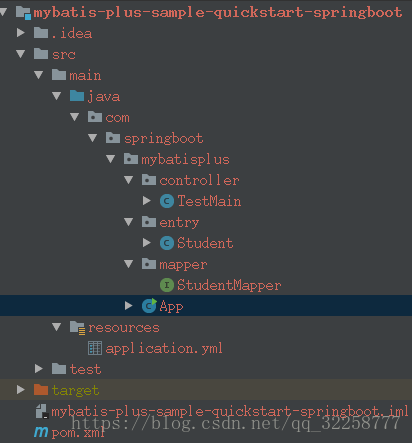
具体步骤代码:
1、在pom.xml加入相关配置
- <!-- spring-boot-starter-parent 和 mybatis-plus-boot-starter 有版本要求-->
- <parent>
- <groupId>org.springframework.boot</groupId>
- <artifactId>spring-boot-starter-parent</artifactId>
- <version>2.0.3.RELEASE</version>
- </parent>
- <dependencies>
- <!-- spring-boot -->
- <dependency>
- <groupId>org.springframework.boot</groupId>
- <artifactId>spring-boot-starter-web</artifactId>
- </dependency>
- <dependency>
- <groupId>org.springframework.boot</groupId>
- <artifactId>spring-boot-starter</artifactId>
- </dependency>
- <dependency>
- <groupId>org.springframework.boot</groupId>
- <artifactId>spring-boot-starter-test</artifactId>
- <scope>test</scope>
- </dependency>
- <!--mybatis-plus自动的维护了mybatis以及mybatis-spring的依赖,
- 在springboot中这三者不能同时的出现,避免版本的冲突,表示:跳进过这个坑-->
- <dependency>
- <groupId>com.baomidou</groupId>
- <artifactId>mybatis-plus-boot-starter</artifactId>
- <version>3.0.1</version>
- </dependency>
- <!-- 引入Druid依赖,阿里巴巴所提供的数据源 -->
- <dependency>
- <groupId>com.alibaba</groupId>
- <artifactId>druid</artifactId>
- <version>1.0.29</version>
- </dependency>
- <!-- 提供mysql驱动 -->
- <dependency>
- <groupId>mysql</groupId>
- <artifactId>mysql-connector-java</artifactId>
- <version>5.1.38</version>
- </dependency>
- <dependency>
- <groupId>org.projectlombok</groupId>
- <artifactId>lombok</artifactId>
- <version>1.16.16</version>
- </dependency>
- </dependencies>
2、在resources中添加application.yml,设置mysql相关配置
- server:
- port: 2525
- # 该配置的名称是固定的,不可以改变,否则将不能自动加载到数据源中
- spring:
- datasource:
- # 使用druid数据源
- type: com.alibaba.druid.pool.DruidDataSource
- driver-class-name: com.mysql.jdbc.Driver
- url: jdbc:mysql://192.168.3.172:3306/poc?allowMultiQueries=true&useUnicode=true&characterEncoding=UTF-8
- username: devuser
- password: dev123
- filters: stat
- maxActive: 20
- initialSize: 1
- maxWait: 60000
- minIdle: 1
- timeBetweenEvictionRunsMillis: 60000
- minEvictableIdleTimeMillis: 300000
- validationQuery: select 1 FROM DUAL
- testWhileIdle: true
- testOnBorrow: false
- testOnReturn: false
- poolPreparedStatements: true
- maxOpenPreparedStatements: 20
3、在基类中添加表名和表名中对应的字段名
- @Data
- @NoArgsConstructor
- @AllArgsConstructor
- @TableName("tb_test_student") //对应表名
- public class Student implements Serializable {
- //对应id,可不填
- @TableId(value = "id")
- private int id;
- //对应字段名,如果属性名和字段名一致,可不填
- @TableField("name")
- private String name;
- private String school;
- private String city;
- //表示表中没有这个字段,如果不加该注释,会抛异常
- @TableField(exist = false)
- private String address;
- }
4、定义mapper接口,继承BaseMapper<T>接口,该接口中封装了Sql
- public interface StudentMapper extends BaseMapper<Student> {
- }
5、在启动类中添加mapper扫描的包
- @SpringBootApplication
- @MapperScan("com.springboot.mybatisplus.mapper")
- public class App {
- public static void main(String[] args) {
- SpringApplication.run(App.class,args);
- }
- }
5、调用mapper接口即可
- @RestController
- @RequestMapping("/mybatisplus")
- public class TestMain {
- @Autowired
- private StudentMapper studentMapper;
- @GetMapping("/list")
- public List<Student> list(){
- List<Student> students = studentMapper.selectList(null);
- return students;
- }
- @GetMapping("/save")
- public String save(){
- Student student = new Student();
- student.setId(2);
- student.setCity("杭州");
- student.setName("马云");
- student.setSchool("杭州师范");
- studentMapper.insert(student);
- return "success";
- }
- }
打印sql:
- mybatis-plus:
- configuration:
- log-impl: org.apache.ibatis.logging.stdout.StdOutImpl
具体的API请参照mybatis-plus官网:http://mp.baomidou.com/guide/
SpringBoot 整合 Mybatis-Plus + Mysql的更多相关文章
- springboot整合mybatis连接mysql数据库出现SQLException异常
在springboot整合mybatis连接数据库的时候,项目中遇到一个SQLException,我检查了properties配置文件,看数据源有没有配错,检查有没有打错字,在数据库中把sql语句查询 ...
- SpringBoot 整合 Mybatis 和 Mysql (详细版)
结构如下 1.引入相关依赖 <!--mysql--><dependency> <groupId>mysql</groupId> <artifact ...
- kotlin + springboot整合mybatis操作mysql数据库及单元测试
项目mybatis操作数据库参考: http://how2j.cn/k/springboot/springboot-mybatis/1649.html?p=78908 junit对controller ...
- SpringBoot 整合 Mybatis + Mysql——XML配置方式
一.介绍 SpringBoot有两种方法与数据库建立连接,一种是集成Mybatis,另一种用JdbcTemplate,本文主要讨论集成Mybatis方式. SpringBoot整合Mybatis也有两 ...
- 学习springboot整合mybatis并编写测试类
报名立减200元.暑假直降6888. 邀请链接:http://www.jnshu.com/login/1/20535344 邀请码:20535344 遇到的问题: 1.原因是在启动类上只有一个@Map ...
- SpringBoot整合Mybatis之项目结构、数据源
已经有好些日子没有总结了,不是变懒了,而是我一直在奋力学习springboot的路上,现在也算是完成了第一阶段的学习,今天给各位总结总结. 之前在网上找过不少关于springboot的教程,都是一些比 ...
- SpringBoot整合Mybatis【非注解版】
接上文:SpringBoot整合Mybatis[注解版] 一.项目创建 新建一个工程 选择Spring Initializr,配置JDK版本 输入项目名 选择构建web项目所需的state ...
- springboot学习随笔(四):Springboot整合mybatis(含generator自动生成代码)
这章我们将通过springboot整合mybatis来操作数据库 以下内容分为两部分,一部分主要介绍generator自动生成代码,生成model.dao层接口.dao接口对应的sql配置文件 第一部 ...
- springboot整合mybatis出现的一些问题
springboot整合mybatis非常非常的简单,简直简单到发指.但是也有一些坑,这里我会详细的指出会遇到什么问题,并且这些配置的作用 整合mybatis,无疑需要mapper文件,实体类,dao ...
- springBoot整合mybatis、jsp 或 HTML
springBoot整合mybatis.jsp Spring Boot的主要优点: 1: 为所有Spring开发者更快的入门: 2: 开箱即用,提供各种默认配置来简化项目配置: 3: 内嵌式容器 ...
随机推荐
- 智汀家庭云-开发指南Golang:设备场景
场景是指通过SA实现设备联动.例如,自动检测今天的天气情况,今天无雨,定时智能音箱播放浇花提醒,并且播报今天的天气情况. 根据自身需求,把多种控制并发的事情编辑成一个场景,并命名,可以通过场景控制很多 ...
- IP多播与NAT地址转化
IP多播 与单播相比,在一对多的通信中,多播可以大大减少网络资源.在互联网上进行多播就叫做IP多播,IP多播所传送的分组需要使用IP多播地址. 如果某台主机想要收到某个特定的多播分组,那么怎样才能是这 ...
- torch的下载及安装
Pytorch官网:https://pytorch.org/ 安装的时候如果选择在官网上下载安装的话下载会很慢,试过梯子也是很慢,此处提供一种快速安装的方法. 1.由于我是window系统,我选择了国 ...
- PHP审计之class_exists与任意实例化漏洞
PHP审计之class_exists与任意实例化漏洞 前言 发现PHP的一些漏洞函数挺有意思,跟着七月火师傅的文章来学习. class_exists函数 函数说明 class_exists:(PHP ...
- 12c slience dbca ORA-27125
问题:12c slience dbca ORA-27125 解决办法:网上大部分方法是把dba组放在内核的,没有效果,可以尝试google找到一位大神的方案,成功解决https://oracle-ad ...
- Java秘诀!Java关系运算符介绍
运算符丰富是 Java 语言的主要特点之一,它提供的运算符数量之多,在高级语言中是少见的. Java 语言中的运算符除了具有优先级之外,还有结合性的特点.当一个表达式中出现多种运算符时,执行的先后顺序 ...
- js 改变this指向的三种方法 bind call apply
先了解下bind call apply 的注意点 bind 需要手动调用 第一个参数 this 要指向的对象,后面是 散列的参数 call 不需要手动调用 第一个参数 this 要指向的对象,后面是 ...
- 洛谷2619/bzoj2654 Tree(凸优化+MST)
bzoj的数据是真的水.. qwq 由于本人还有很多东西不是很理解 qwq 所以这里只写一个正确的做法. 首先,我们会发现,对于你选择白色边的数目,随着数目的上涨,斜率是单调升高的. 那么这时候我们就 ...
- Java:ConcurrentHashMap类小记-2(JDK7)
Java:ConcurrentHashMap类小记-2(JDK7) 对 Java 中的 ConcurrentHashMap类,做一个微不足道的小小小小记,分三篇博客: Java:ConcurrentH ...
- [no code][scrum meeting] Beta 2
例会时间:5月14日11:30,主持者:乔玺华 下次例会时间:5月15日11:30,主持者:肖思炀 一.工作汇报 人员 昨日完成任务 明日要完成的任务 乔玺华 - 开issue,分配时间 黎正宇 - ...