
[转]iOS学习之UINavigationController详解与使用(二)页面切换和segmentedController
转载地址:http://blog.csdn.net/totogo2010/article/details/7682433
iOS学习之UINavigationController详解与使用(一)添加UIBarButtonItem是上篇,我们接着讲UINavigationController的重要作用,页面的管理和切换。
1、RootView 跳到SecondView
首先我们需要新一个View。新建SecondView,按住Command键然后按N,弹出新建页面,我们新建SecondView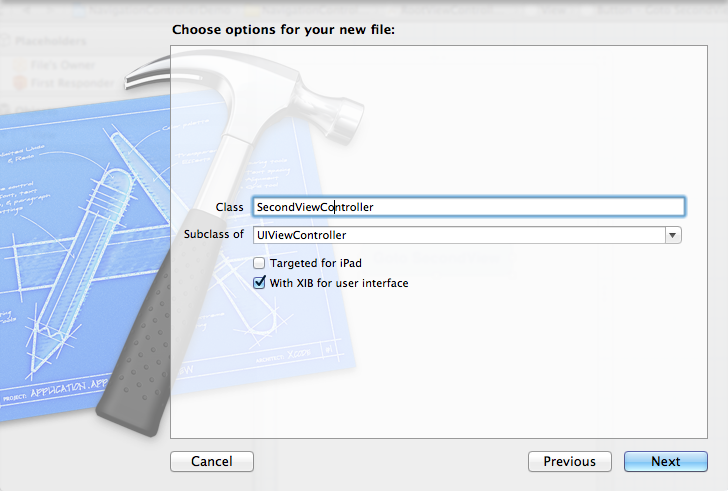
2、为Button 添加点击事件,实现跳转
在RootViewController.xib中和RootViewController.h文件建立连接

在RootViewController.m中实现代码,alloc一个SecondViewController,用pushViewController到navigationController中去,并为
SecondViewController这是title为 secondView.title =@"Second View"; 默认情况下,titie为下个页面返回按钮的名字。
- - (IBAction)gotoSecondView:(id)sender {
- SecondViewController *secondView = [[SecondViewController alloc] init];
- [self.navigationController pushViewController:secondView animated:YES];
- secondView.title = @"Second View";
- }
这是点击GotoSecondView 按钮,出现
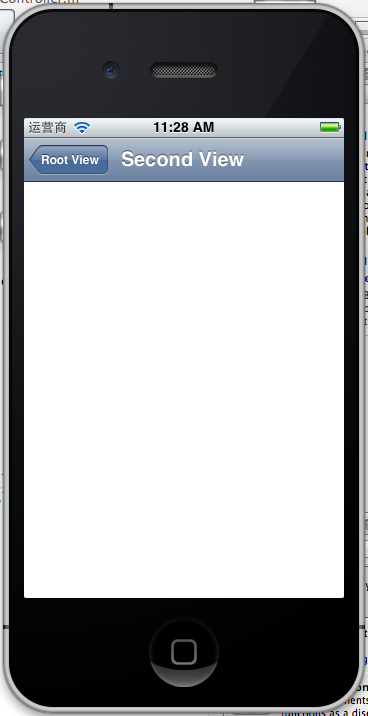
这就是SecondView了。
3、添加segmentedController
在nav bar这样的效果是如何实现的呢?
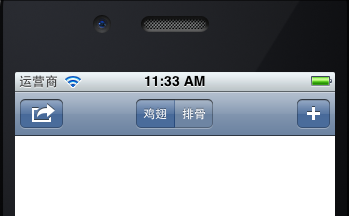
这就是segmentedController。
3.1在RootViewController.m的viewDidLoad添加如下代码:
- NSArray *array = [NSArray arrayWithObjects:@"鸡翅",@"排骨", nil];
- UISegmentedControl *segmentedController = [[UISegmentedControl alloc] initWithItems:array];
- segmentedController.segmentedControlStyle = UISegmentedControlSegmentCenter;
- [segmentedController addTarget:self action:@selector(segmentAction:) forControlEvents:UIControlEventValueChanged];
- self.navigationItem.titleView = segmentedController;
3.2[segmentedController addTarget:selfaction:的实现
- -(void)segmentAction:(id)sender
- {
- switch ([sender selectedSegmentIndex]) {
- case 0:
- {
- UIAlertView *alter = [[UIAlertView alloc] initWithTitle:@"提示" message:@"你点击了鸡翅" delegate:self cancelButtonTitle:@"确定" otherButtonTitles:nil, nil];
- [alter show];
- }
- break;
- case 1:
- {
- UIAlertView *alter = [[UIAlertView alloc] initWithTitle:@"提示" message:@"你点击了排骨" delegate:self cancelButtonTitle:@"确定" otherButtonTitles:nil, nil];
- [alter show];
- }
- break;
- default:
- break;
- }
- }
这样就能响应鸡翅和排骨按钮了
4、自定义backBarButtonItem
左上角的返回上级View的barButtonitem的名字是上级目录的Title,如果title或者适合做button的名字,怎么办呢?我们可以自己定义
代码如下:
- UIBarButtonItem *backButton = [[UIBarButtonItem alloc] initWithTitle:@"根视图" style:UIBarButtonItemStyleDone target:nil action:nil];
- self.navigationItem.backBarBu
效果:

6、自定义title
UINavigationController的title可以用别view替代,比如用UIButton UILable等,下面我用UIButton.
在SecondViewController.m中添加下面如下。
- - (void)viewDidLoad
- {
- [super viewDidLoad];
- UIButton *button = [UIButton buttonWithType: UIButtonTypeRoundedRect];
- [button setTitle: @"自定义title" forState: UIControlStateNormal];
- [button sizeToFit];
- self.navigationItem.titleView = button;}
运行程序,goto secondView,运行效果
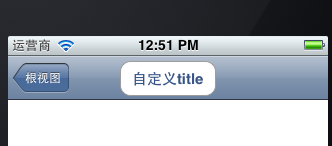
下篇文件讲下Navigation 的Toobar如何显示和如何自己定义。
[转]iOS学习之UINavigationController详解与使用(二)页面切换和segmentedController的更多相关文章
- iOS学习之UINavigationController详解与使用(二)页面切换和segmentedController
iOS学习之UINavigationController详解与使用(一)添加UIBarButtonItem是上篇,我们接着讲UINavigationController的重要作用,页面的管理和切换. ...
- [转]iOS学习之UINavigationController详解与使用(三)ToolBar
转载地址:http://blog.csdn.net/totogo2010/article/details/7682641 iOS学习之UINavigationController详解与使用(二)页面切 ...
- iOS学习之UINavigationController详解与使用(一)添加UIBarButtonItem
http://blog.csdn.net/totogo2010/article/details/7681879 1.UINavigationController导航控制器如何使用 UINavigati ...
- iOS学习之UINavigationController详解与使用(三)ToolBar
1.显示Toolbar 在RootViewController.m的- (void)viewDidLoad方法中添加代码,这样Toobar就显示出来了. [cpp] view plaincopy [ ...
- [转]iOS学习之UINavigationController详解与使用(一)添加UIBarButtonItem
转载地址:http://blog.csdn.net/totogo2010/article/details/7681879 1.UINavigationController导航控制器如何使用 UINav ...
- JavaScript学习笔记-实例详解-类(二)
实例详解-类(二) //===给Object.prototype添加只读\不可枚举\不可配置的属性objectId(function(){ Object.defineProperty(Object ...
- IOS开发之UINavigationController详解
UINavigationController是IOS编程中比较常用的一种容器view controller,很多系统的控件(如UIImagePickerViewController)以及很多有名的AP ...
- [转]iOS学习笔记(2)--Xcode6.1创建仅xib文件无storyboard的hello world应用
转载地址:http://www.mamicode.com/info-detail-514151.html 由于Xcode6之后,默认创建storyboard而非xib文件,而作为初学,了解xib的加载 ...
- UINavigationController详解一(转)UIBarButtonItem
本文出自:http://www.cnblogs.com/smileEvday/archive/2012/05/14/2495153.html 特别感谢. 1.UINavigationControlle ...
随机推荐
- SuSE Apache2 VirtualHost Build
1,linux version:openSuSE 12.1 2,add ServerName to DNS(johv.ts.com ,use the same IP) 3,mkdir /srv/www ...
- 【java开发系列】—— JDK安装
前言 作为一个java开发者,安装JDK是不可避免的,但是配置路径却总是记不住,百度也有很多参考例子.这里仅仅当做以后参考的笔记记录. 说到JDK,就不得不提JRE.他们到底是什么呢? 通常我们进行j ...
- PostgreSQL Replication之第十二章 与Postgres-XC一起工作(3)
12.3 配置一个简单的集群 在本章中,我们要建立一个由三个数据节点组成的集群.一个协调节点,以及管理集群的全局事务管理节点.对于每个组件,我们必须创建一个目录: hs@vm:~/data$ ls - ...
- Leetcode: Evaluate Division
Equations are given in the format A / B = k, where A and B are variables represented as strings, and ...
- JAVA-面向对象-特性
1.封装 1.定义方式 1修饰符class类名 2类名首字母大写 2.类的成员 1属性 成员变量 可以设置默认值 第一个单词首字母小写,后面首字母大写 一般把属性设置成private 提供属性对应的g ...
- JavaScript----插入视频
<!DOCTYPE html PUBLIC "-//W3C//DTD XHTML 1.0 Transitional//EN" "http://www.w3.org/ ...
- SpringMvc项目分析
首先在配置文件中配置一个视图解析器,视图解析器规定了视图解析的规则,即controller处理请求之后,返回给DispatcheServlet一个字符串(也可能是ModelAndView之类的),而D ...
- myeclipse项目里有红色感叹号
myeclipse项目里有红色感叹号 这种情况是因为 .classpath 文件里面配置引用了某个jar,但是实际上你的 lib 里面并没有这个jar 所以才会有红色的提示. 不用拿.classpat ...
- struts局部、全局类型转换器
第01步:编写bean package com.self.bean; import java.util.Date; public class User { private Date birthday ...
- [转]iis7.5+win2008 出现 HTTP Error 503. The service is unavailable.
解决: 应用程序池启动32位应用程序 设置托管管道为集成 (仍然有问题) 试试以下方法: http://phpwind.me/1222.html 楼主 发表于: 2011-11-26 图片: ...