
MyBatis(4)-- 动态SQL
如果使用JDBC或者类似于Hibernate的其他框架,很多时候要根据需要去拼装SQL,这是一个麻烦的事情。因为某些查询需要许多条件。通常使用其他框架需要大量的Java代码进行判断,可读性比较差,而MyBatis提供对SQL语句动态的组装能力,使用XML的几个简单的元素,便能完成动态SQL的功能。大量的判断都可以在MyBatis的映射XML里面配置,以达到许多需要大量代码才能实现的功能,大大减少了代码量,这体现了MyBatis的灵活、高度可配置性和可维护性。
MyBatis的动态SQL包括以下几种元素:
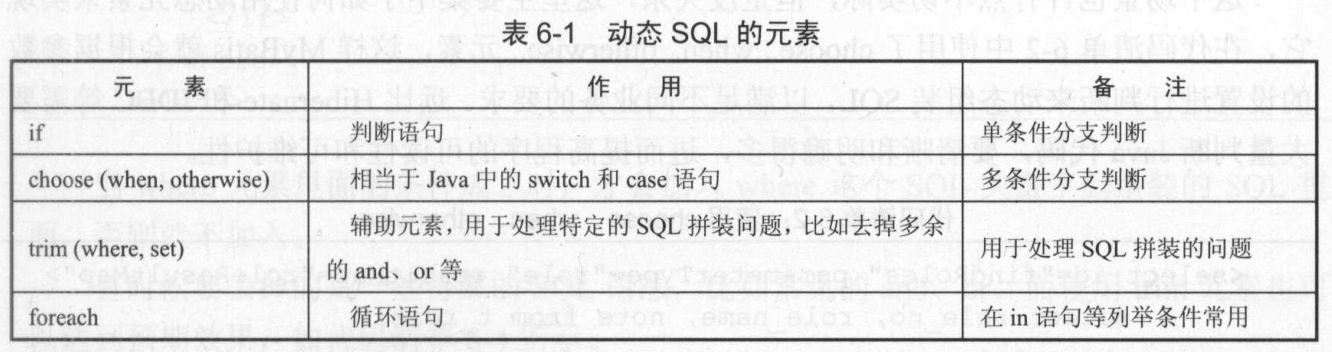
数据库MySQL中表:
mysql> select * from t_role;

+----+-------------+--------+

| id | role_name   | note   |

+----+-------------+--------+

|  1 | role_name_1 | note_1 |

|  2 | role_name_2 | note_2 |

|  3 | role_name_3 | note_3 |

+----+-------------+--------+

3 rows in set (0.00 sec)
1.if元素
if元素是最常见的判断语句,常常与test属性联合使用。
    <select id="findRole1" parameterType="string" resultMap="roleResultMap">

        select role_no, role_name, note from t_role where 1=1

        <if test="roleName != null and roleName !=''">

            and role_name like concat('%', #{roleName}, '%')

        </if>

    </select>
解决如下需求:需要根据角色名称(roleName)去查找角色,但是角色名称是一个选填条件,如果不填写,就不要用它作为条件查询。
当参数roleName传递进映射器时,如果参数不为空,则采取构造对roleName的模糊查询,否则就不要去构造这个条件。
接口:
public List<Role> findRole1(@Param("roleName") String roleName);
测试方法:
    public static void testFindRole1() {

        SqlSession sqlSession = null;

        try {

            sqlSession = SqlSessionFactoryUtils.openSqlSession();

            RoleMapper roleMapper = sqlSession.getMapper(RoleMapper.class);

            List<Role> roleList = roleMapper.findRole1("role_name");

            System.out.println(roleList.size());

        } catch(Exception ex) {

            ex.printStackTrace();

        } finally {

            if (sqlSession != null) {

                sqlSession.close();

            }

        }

    }
日志输出结果:
DEBUG 2018-10-08 21:07:32,127 org.apache.ibatis.transaction.jdbc.JdbcTransaction: Opening JDBC Connection

DEBUG 2018-10-08 21:07:32,375 org.apache.ibatis.datasource.pooled.PooledDataSource: Created connection 1384722895.

DEBUG 2018-10-08 21:07:32,375 org.apache.ibatis.transaction.jdbc.JdbcTransaction: Setting autocommit to false on JDBC Connection [com.mysql.jdbc.JDBC4Connection@528931cf]

DEBUG 2018-10-08 21:07:32,377 org.apache.ibatis.logging.jdbc.BaseJdbcLogger: ==>  Preparing: select id, role_name, note from t_role where 1=1 and role_name like concat('%', ?, '%')

DEBUG 2018-10-08 21:07:32,400 org.apache.ibatis.logging.jdbc.BaseJdbcLogger: ==> Parameters: role_name(String)

DEBUG 2018-10-08 21:07:32,424 org.apache.ibatis.logging.jdbc.BaseJdbcLogger: <==      Total: 3

3

DEBUG 2018-10-08 21:07:32,425 org.apache.ibatis.transaction.jdbc.JdbcTransaction: Resetting autocommit to true on JDBC Connection [com.mysql.jdbc.JDBC4Connection@528931cf]

DEBUG 2018-10-08 21:07:32,425 org.apache.ibatis.transaction.jdbc.JdbcTransaction: Closing JDBC Connection [com.mysql.jdbc.JDBC4Connection@528931cf]

DEBUG 2018-10-08 21:07:32,426 org.apache.ibatis.datasource.pooled.PooledDataSource: Returned connection 1384722895 to pool.
2.choose、when、otherwise元素
    <select id="findRole2" parameterType="role" resultMap="roleResultMap">

        select role_no, role_name, note from t_role

        where 1=1

        <choose>

            <when test="roleNo != null and roleNo !=''">

                AND role_no = #{roleNo}

            </when>

            <when test="roleName != null and roleName !=''">

                AND role_name like concat('%', #{roleName}, '%')

            </when>

            <otherwise>

                AND note is not null

            </otherwise>

        </choose>

    </select>
需求:
- 如果角色编号(roleNo)不为空,则只用角色编号作为条件查询
- 当角色编号为空,而角色名称不为空时,则用角色名称作为条件进行模糊查询
- 当角色编号和角色名称都为空时,则要求角色备注不为空。
接口:
public List<Role> findRole2(Role role);
测试方法:
    public static void testFindRole2() {

        SqlSession sqlSession = null;

        try {

            sqlSession = SqlSessionFactoryUtils.openSqlSession();

            RoleMapper roleMapper = sqlSession.getMapper(RoleMapper.class);

            Role role = new Role();

            role.setRoleNo("role_no_1");

            role.setRoleName("role_name");

            List<Role> roleList = roleMapper.findRole2(role);

            System.out.println(roleList.size());

        } catch(Exception ex) {

            ex.printStackTrace();

        } finally {

            if (sqlSession != null) {

                sqlSession.close();

            }

        }

    }
结果:
DEBUG 2018-10-08 21:07:32,426 org.apache.ibatis.transaction.jdbc.JdbcTransaction: Opening JDBC Connection

DEBUG 2018-10-08 21:07:32,427 org.apache.ibatis.datasource.pooled.PooledDataSource: Checked out connection 1384722895 from pool.

DEBUG 2018-10-08 21:07:32,429 org.apache.ibatis.transaction.jdbc.JdbcTransaction: Setting autocommit to false on JDBC Connection [com.mysql.jdbc.JDBC4Connection@528931cf]

DEBUG 2018-10-08 21:07:32,431 org.apache.ibatis.logging.jdbc.BaseJdbcLogger: ==>  Preparing: select id, role_name, note from t_role where 1=1 AND id = ?

DEBUG 2018-10-08 21:07:32,431 org.apache.ibatis.logging.jdbc.BaseJdbcLogger: ==> Parameters: role_no_1(String)

DEBUG 2018-10-08 21:07:32,432 org.apache.ibatis.logging.jdbc.BaseJdbcLogger: <==      Total: 0

0

DEBUG 2018-10-08 21:07:32,432 org.apache.ibatis.transaction.jdbc.JdbcTransaction: Resetting autocommit to true on JDBC Connection [com.mysql.jdbc.JDBC4Connection@528931cf]

DEBUG 2018-10-08 21:07:32,432 org.apache.ibatis.transaction.jdbc.JdbcTransaction: Closing JDBC Connection [com.mysql.jdbc.JDBC4Connection@528931cf]

DEBUG 2018-10-08 21:07:32,432 org.apache.ibatis.datasource.pooled.PooledDataSource: Returned connection 1384722895 to pool.
3.trim、where、set元素
(1)使用where元素
    <select id="findRole3" parameterType="role" resultMap="roleResultMap">

        select role_no, role_name, note from t_role

        <where>

            <if test="roleName != null and roleName !=''">

                and role_name like concat('%', #{roleName}, '%')

            </if>

            <if test="note != null and note !=''">

                and note like concat('%', #{note}, '%')

            </if>

        </where>

    </select>
对比于上面的choose、when和otherwise元素,使用where元素可以去掉条件“1=1”。当where元素里面的条件成立时,才会加入where这个SQL关键字到组装的SQL里面,否则就不加入。
接口:
public List<Role> findRole3(Role role);
测试方法:
    public static void testFindRole3() {

        SqlSession sqlSession = null;

        try {

            sqlSession = SqlSessionFactoryUtils.openSqlSession();

            RoleMapper roleMapper = sqlSession.getMapper(RoleMapper.class);

            Role role = new Role();

            role.setRoleNo("role_no_1");

            role.setRoleName("role_name");

            List<Role> roleList = roleMapper.findRole3(role);

            System.out.println(roleList.size());

        } catch(Exception ex) {

            ex.printStackTrace();

        } finally {

            if (sqlSession != null) {

                sqlSession.close();

            }

        }

    }
结果:
DEBUG 2018-10-08 21:07:32,433 org.apache.ibatis.transaction.jdbc.JdbcTransaction: Opening JDBC Connection

DEBUG 2018-10-08 21:07:32,433 org.apache.ibatis.datasource.pooled.PooledDataSource: Checked out connection 1384722895 from pool.

DEBUG 2018-10-08 21:07:32,433 org.apache.ibatis.transaction.jdbc.JdbcTransaction: Setting autocommit to false on JDBC Connection [com.mysql.jdbc.JDBC4Connection@528931cf]

DEBUG 2018-10-08 21:07:32,434 org.apache.ibatis.logging.jdbc.BaseJdbcLogger: ==>  Preparing: select id, role_name, note from t_role WHERE role_name like concat('%', ?, '%')

DEBUG 2018-10-08 21:07:32,434 org.apache.ibatis.logging.jdbc.BaseJdbcLogger: ==> Parameters: role_name(String)

DEBUG 2018-10-08 21:07:32,436 org.apache.ibatis.logging.jdbc.BaseJdbcLogger: <==      Total: 3

3

DEBUG 2018-10-08 21:07:32,436 org.apache.ibatis.transaction.jdbc.JdbcTransaction: Resetting autocommit to true on JDBC Connection [com.mysql.jdbc.JDBC4Connection@528931cf]

DEBUG 2018-10-08 21:07:32,436 org.apache.ibatis.transaction.jdbc.JdbcTransaction: Closing JDBC Connection [com.mysql.jdbc.JDBC4Connection@528931cf]

DEBUG 2018-10-08 21:07:32,437 org.apache.ibatis.datasource.pooled.PooledDataSource: Returned connection 1384722895 to pool.
(2)使用trim元素
    <select id="findRole4" parameterType="string" resultMap="roleResultMap">

        select role_no, role_name, note from t_role

        <trim prefix="where" prefixOverrides="and">

            <if test="roleName != null and roleName !=''">

                and role_name like concat('%', #{roleName}, '%')

            </if>

        </trim>

    </select>
trim元素意味着要去掉一些特殊的字符串,prefix代表的是语句的前缀,而prefixOverrides代表的是需要去掉哪种字符串,上面的写法基本与where是等效的。
即如果and成立,就使用where条件;否则,不使用where条件与and条件。
接口:
public List<Role> findRole4(@Param("roleName") String roleName);
测试方法:
    public static void testFindRole4() {

        SqlSession sqlSession = null;

        try {

            sqlSession = SqlSessionFactoryUtils.openSqlSession();

            RoleMapper roleMapper = sqlSession.getMapper(RoleMapper.class);

            List<Role> roleList = roleMapper.findRole4("role_name");

            System.out.println(roleList.size());

        } catch(Exception ex) {

            ex.printStackTrace();

        } finally {

            if (sqlSession != null) {

                sqlSession.close();

            }

        }

    }
结果:
DEBUG 2018-10-08 21:07:32,437 org.apache.ibatis.transaction.jdbc.JdbcTransaction: Opening JDBC Connection

DEBUG 2018-10-08 21:07:32,437 org.apache.ibatis.datasource.pooled.PooledDataSource: Checked out connection 1384722895 from pool.

DEBUG 2018-10-08 21:07:32,439 org.apache.ibatis.transaction.jdbc.JdbcTransaction: Setting autocommit to false on JDBC Connection [com.mysql.jdbc.JDBC4Connection@528931cf]

DEBUG 2018-10-08 21:07:32,439 org.apache.ibatis.logging.jdbc.BaseJdbcLogger: ==>  Preparing: select id, role_name, note from t_role where role_name like concat('%', ?, '%')

DEBUG 2018-10-08 21:07:32,439 org.apache.ibatis.logging.jdbc.BaseJdbcLogger: ==> Parameters: role_name(String)

DEBUG 2018-10-08 21:07:32,440 org.apache.ibatis.logging.jdbc.BaseJdbcLogger: <==      Total: 3

3

DEBUG 2018-10-08 21:07:32,440 org.apache.ibatis.transaction.jdbc.JdbcTransaction: Resetting autocommit to true on JDBC Connection [com.mysql.jdbc.JDBC4Connection@528931cf]

DEBUG 2018-10-08 21:07:32,441 org.apache.ibatis.transaction.jdbc.JdbcTransaction: Closing JDBC Connection [com.mysql.jdbc.JDBC4Connection@528931cf]

DEBUG 2018-10-08 21:07:32,441 org.apache.ibatis.datasource.pooled.PooledDataSource: Returned connection 1384722895 to pool.
(3)使用set元素
    <update id="updateRole" parameterType="role">

        update t_role

        <set>

            <if test="roleName != null and roleName !=''">

                role_name = #{roleName},

            </if>

            <if test="note != null and note != ''">

                note = #{note}

            </if>

        </set>

        where id = #{roleNo}

    </update>
set元素遇到了逗号,它会把对应的逗号去掉。这样当只想更新备注时,只需要传递备注信息和角色编号即可,而不需要再传递角色名称。MyBatis就会根据参数的规则进行动态SQL组装,这样便能满足要求,而避免全部字段更新的问题。
接口:
public int updateRole(Role role);
测试方法:
    public static void testUpdateRole() {

        SqlSession sqlSession = null;

        try {

            sqlSession = SqlSessionFactoryUtils.openSqlSession();

            RoleMapper roleMapper = sqlSession.getMapper(RoleMapper.class);

            Role role = new Role();

            role.setNote("note_1_update");

            role.setRoleName("role_name_1_update");

            role.setRoleNo("role_no_1");

            int result = roleMapper.updateRole(role);

            System.out.println(result);

            sqlSession.commit();

        } catch(Exception ex) {

            sqlSession.rollback();

            ex.printStackTrace();

        } finally {

            if (sqlSession != null) {

                sqlSession.close();

            }

        }

    }
结果:
DEBUG 2018-10-08 21:07:32,449 org.apache.ibatis.transaction.jdbc.JdbcTransaction: Opening JDBC Connection

DEBUG 2018-10-08 21:07:32,449 org.apache.ibatis.datasource.pooled.PooledDataSource: Checked out connection 1384722895 from pool.

DEBUG 2018-10-08 21:07:32,450 org.apache.ibatis.transaction.jdbc.JdbcTransaction: Setting autocommit to false on JDBC Connection [com.mysql.jdbc.JDBC4Connection@528931cf]

DEBUG 2018-10-08 21:07:32,450 org.apache.ibatis.logging.jdbc.BaseJdbcLogger: ==>  Preparing: update t_role SET role_name = ?, note = ? where id = ?

DEBUG 2018-10-08 21:07:32,450 org.apache.ibatis.logging.jdbc.BaseJdbcLogger: ==> Parameters: role_name_1_update(String), note_1_update(String), role_no_1(String)

DEBUG 2018-10-08 21:07:32,451 org.apache.ibatis.logging.jdbc.BaseJdbcLogger: <==    Updates: 0

0

DEBUG 2018-10-08 21:07:32,452 org.apache.ibatis.transaction.jdbc.JdbcTransaction: Committing JDBC Connection [com.mysql.jdbc.JDBC4Connection@528931cf]

DEBUG 2018-10-08 21:07:32,452 org.apache.ibatis.transaction.jdbc.JdbcTransaction: Resetting autocommit to true on JDBC Connection [com.mysql.jdbc.JDBC4Connection@528931cf]

DEBUG 2018-10-08 21:07:32,452 org.apache.ibatis.transaction.jdbc.JdbcTransaction: Closing JDBC Connection [com.mysql.jdbc.JDBC4Connection@528931cf]

DEBUG 2018-10-08 21:07:32,452 org.apache.ibatis.datasource.pooled.PooledDataSource: Returned connection 1384722895 to pool.
4.foreach元素
    <select id="findRoleByNums" resultMap="roleResultMap">

        select id, role_name, note from t_role where id in

        <foreach item="roleNo" index="index" collection="roleNoList"

            open="(" separator="," close=")">

            #{roleNo}

        </foreach>

    </select>
foreach元素是一个循环语句,它的作用是遍历集合,能够很好地支持数组和List、Set接口的集合,对此提供遍历功能。往往用于SQL中的in关键字。
- collection配置的roleNoList是传递进来的参数名称,它可以是一个数组、List、Set等集合
- item配置的是当前元素在集合的位置下标
- index配置的是当前元素在集合的位置下标
- open和close配置的是以什么符号将这些集合元素包装起来
- separator是各个元素的间隔符
接口:
public List<Role> findRoleByNums(@Param("roleNoList") List<String> roleNoList);
测试方法:
    public static void testFindRoleByNums() {

        SqlSession sqlSession = null;

        try {

            sqlSession = SqlSessionFactoryUtils.openSqlSession();

            RoleMapper roleMapper = sqlSession.getMapper(RoleMapper.class);

            List<String> roleNoList = new ArrayList<String>();

            roleNoList.add("role_no_1");

            roleNoList.add("role_no_2");

            roleNoList.add("role_no_3");

            List<Role> roleList = roleMapper.findRoleByNums(roleNoList);

            System.out.println(roleList.size());

        } catch(Exception ex) {

            ex.printStackTrace();

        } finally {

            if (sqlSession != null) {

                sqlSession.close();

            }

        }

    }
结果:
DEBUG 2018-10-08 21:07:32,454 org.apache.ibatis.transaction.jdbc.JdbcTransaction: Opening JDBC Connection

DEBUG 2018-10-08 21:07:32,454 org.apache.ibatis.datasource.pooled.PooledDataSource: Checked out connection 1384722895 from pool.

DEBUG 2018-10-08 21:07:32,455 org.apache.ibatis.transaction.jdbc.JdbcTransaction: Setting autocommit to false on JDBC Connection [com.mysql.jdbc.JDBC4Connection@528931cf]

DEBUG 2018-10-08 21:07:32,455 org.apache.ibatis.logging.jdbc.BaseJdbcLogger: ==>  Preparing: select id, role_name, note from t_role where id in ( ? , ? , ? )

DEBUG 2018-10-08 21:07:32,456 org.apache.ibatis.logging.jdbc.BaseJdbcLogger: ==> Parameters: role_no_1(String), role_no_2(String), role_no_3(String)

DEBUG 2018-10-08 21:07:32,456 org.apache.ibatis.logging.jdbc.BaseJdbcLogger: <==      Total: 0

0

DEBUG 2018-10-08 21:07:32,457 org.apache.ibatis.transaction.jdbc.JdbcTransaction: Resetting autocommit to true on JDBC Connection [com.mysql.jdbc.JDBC4Connection@528931cf]

DEBUG 2018-10-08 21:07:32,457 org.apache.ibatis.transaction.jdbc.JdbcTransaction: Closing JDBC Connection [com.mysql.jdbc.JDBC4Connection@528931cf]

DEBUG 2018-10-08 21:07:32,457 org.apache.ibatis.datasource.pooled.PooledDataSource: Returned connection 1384722895 to pool.
5.用test的属性判断字符串
    <select id="getRoleTest" parameterType="string" resultMap="roleResultMap">

        select id, role_name, note from t_role

        <if test="type == 'Y'.toString()">

            where 1=1

        </if>

    </select>
如果把type=“Y”传递给SQL,就可以发现MyBatis加入了条件where 1=1。
对于字符串的判断,可以通过加入toString()方法进行比较。
接口:
public List<Role> getRoleTest(@Param("type") String type);
测试方法:
    public static void testGetRoleTest() {

        SqlSession sqlSession = null;

        try {

            sqlSession = SqlSessionFactoryUtils.openSqlSession();

            RoleMapper roleMapper = sqlSession.getMapper(RoleMapper.class);

            List<Role> roleList = roleMapper.getRoleTest("Y");

            System.out.println(roleList.size());

        } catch(Exception ex) {

            ex.printStackTrace();

        } finally {

            if (sqlSession != null) {

                sqlSession.close();

            }

        }

    }
结果:
DEBUG 2018-10-08 21:07:32,461 org.apache.ibatis.transaction.jdbc.JdbcTransaction: Opening JDBC Connection

DEBUG 2018-10-08 21:07:32,461 org.apache.ibatis.datasource.pooled.PooledDataSource: Checked out connection 1384722895 from pool.

DEBUG 2018-10-08 21:07:32,461 org.apache.ibatis.transaction.jdbc.JdbcTransaction: Setting autocommit to false on JDBC Connection [com.mysql.jdbc.JDBC4Connection@528931cf]

DEBUG 2018-10-08 21:07:32,462 org.apache.ibatis.logging.jdbc.BaseJdbcLogger: ==>  Preparing: select id, role_name, note from t_role where 1=1

DEBUG 2018-10-08 21:07:32,462 org.apache.ibatis.logging.jdbc.BaseJdbcLogger: ==> Parameters:

DEBUG 2018-10-08 21:07:32,464 org.apache.ibatis.logging.jdbc.BaseJdbcLogger: <==      Total: 3

3

DEBUG 2018-10-08 21:07:32,464 org.apache.ibatis.transaction.jdbc.JdbcTransaction: Resetting autocommit to true on JDBC Connection [com.mysql.jdbc.JDBC4Connection@528931cf]

DEBUG 2018-10-08 21:07:32,464 org.apache.ibatis.transaction.jdbc.JdbcTransaction: Closing JDBC Connection [com.mysql.jdbc.JDBC4Connection@528931cf]

DEBUG 2018-10-08 21:07:32,464 org.apache.ibatis.datasource.pooled.PooledDataSource: Returned connection 1384722895 to pool.
6.bind元素
bind元素的作用是通过OGNL表达式去自定义一个上下文变量,这样更方便使用。
(1)使用bind元素绑定单个参数
    <select id="findRole5" parameterType="string" resultMap="roleResultMap">

        <bind name="pattern" value="'%' + _parameter + '%'" />

        SELECT id, role_name, note FROM t_role

        where role_name like #{pattern}

    </select>
“_parameter”表示传递进来的参数,它和通配符(%)连接后赋给了pattren变量,然后就可以在select语句中使用这个变量进行模糊查询了。
接口:
public List<Role> findRole5(String roleName);
测试方法:
    public static void testFindRole5() {

        SqlSession sqlSession = null;

        try {

            sqlSession = SqlSessionFactoryUtils.openSqlSession();

            RoleMapper roleMapper = sqlSession.getMapper(RoleMapper.class);

            List<Role> roleList = roleMapper.findRole5("role_name");

            System.out.println(roleList.size());

        } catch(Exception ex) {

            ex.printStackTrace();

        } finally {

            if (sqlSession != null) {

                sqlSession.close();

            }

        }

    }
结果:
DEBUG 2018-10-08 21:07:32,443 org.apache.ibatis.transaction.jdbc.JdbcTransaction: Opening JDBC Connection

DEBUG 2018-10-08 21:07:32,444 org.apache.ibatis.datasource.pooled.PooledDataSource: Checked out connection 1384722895 from pool.

DEBUG 2018-10-08 21:07:32,444 org.apache.ibatis.transaction.jdbc.JdbcTransaction: Setting autocommit to false on JDBC Connection [com.mysql.jdbc.JDBC4Connection@528931cf]

DEBUG 2018-10-08 21:07:32,444 org.apache.ibatis.logging.jdbc.BaseJdbcLogger: ==>  Preparing: SELECT id, role_name, note FROM t_role where role_name like ?

DEBUG 2018-10-08 21:07:32,444 org.apache.ibatis.logging.jdbc.BaseJdbcLogger: ==> Parameters: %role_name%(String)

DEBUG 2018-10-08 21:07:32,446 org.apache.ibatis.logging.jdbc.BaseJdbcLogger: <==      Total: 3

3

DEBUG 2018-10-08 21:07:32,446 org.apache.ibatis.transaction.jdbc.JdbcTransaction: Resetting autocommit to true on JDBC Connection [com.mysql.jdbc.JDBC4Connection@528931cf]

DEBUG 2018-10-08 21:07:32,446 org.apache.ibatis.transaction.jdbc.JdbcTransaction: Closing JDBC Connection [com.mysql.jdbc.JDBC4Connection@528931cf]

DEBUG 2018-10-08 21:07:32,446 org.apache.ibatis.datasource.pooled.PooledDataSource: Returned connection 1384722895 to pool.
(2)使用bind元素绑定多个参数
    <select id="findRole6" resultMap="roleResultMap">

        <bind name="pattern_roleName" value="'%' + roleName + '%'" />

        <bind name="pattern_note" value="'%' + note + '%'" />

        SELECT id, role_name, note FROM t_role

        where role_name like

        #{pattern_roleName}

        and note like #{pattern_note}

    </select>
这里绑定了两个新的变量pattern_roleName和pattern_note,然后就可以在SQL的其他地方使用了,如进行模糊查询。
接口:
public List<Role> findRole6(@Param("roleName") String roleName, @Param("note") String note);
测试方法:
    public static void testFindRole6() {

        SqlSession sqlSession = null;

        try {

            sqlSession = SqlSessionFactoryUtils.openSqlSession();

            RoleMapper roleMapper = sqlSession.getMapper(RoleMapper.class);

            List<Role> roleList = roleMapper.findRole6("role_name", "note");

            System.out.println(roleList.size());

        } catch(Exception ex) {

            ex.printStackTrace();

        } finally {

            if (sqlSession != null) {

                sqlSession.close();

            }

        }

    }
结果:
DEBUG 2018-10-08 21:07:32,447 org.apache.ibatis.transaction.jdbc.JdbcTransaction: Opening JDBC Connection

DEBUG 2018-10-08 21:07:32,447 org.apache.ibatis.datasource.pooled.PooledDataSource: Checked out connection 1384722895 from pool.

DEBUG 2018-10-08 21:07:32,447 org.apache.ibatis.transaction.jdbc.JdbcTransaction: Setting autocommit to false on JDBC Connection [com.mysql.jdbc.JDBC4Connection@528931cf]

DEBUG 2018-10-08 21:07:32,447 org.apache.ibatis.logging.jdbc.BaseJdbcLogger: ==>  Preparing: SELECT id, role_name, note FROM t_role where role_name like ? and note like ?

DEBUG 2018-10-08 21:07:32,448 org.apache.ibatis.logging.jdbc.BaseJdbcLogger: ==> Parameters: %role_name%(String), %note%(String)

DEBUG 2018-10-08 21:07:32,448 org.apache.ibatis.logging.jdbc.BaseJdbcLogger: <==      Total: 3

3

DEBUG 2018-10-08 21:07:32,449 org.apache.ibatis.transaction.jdbc.JdbcTransaction: Resetting autocommit to true on JDBC Connection [com.mysql.jdbc.JDBC4Connection@528931cf]

DEBUG 2018-10-08 21:07:32,449 org.apache.ibatis.transaction.jdbc.JdbcTransaction: Closing JDBC Connection [com.mysql.jdbc.JDBC4Connection@528931cf]

DEBUG 2018-10-08 21:07:32,449 org.apache.ibatis.datasource.pooled.PooledDataSource: Returned connection 1384722895 to pool.
MyBatis(4)-- 动态SQL的更多相关文章
- MyBatis的动态SQL详解
MyBatis的动态SQL是基于OGNL表达式的,它可以帮助我们方便的在SQL语句中实现某些逻辑,本文详解mybatis的动态sql,需要的朋友可以参考下 MyBatis 的一个强大的特性之一通常是它 ...
- Mybatis解析动态sql原理分析
前言 废话不多说,直接进入文章. 我们在使用mybatis的时候,会在xml中编写sql语句. 比如这段动态sql代码: <update id="update" parame ...
- mybatis 使用动态SQL
RoleMapper.java public interface RoleMapper { public void add(Role role); public void update(Role ro ...
- MyBatis框架——动态SQL、缓存机制、逆向工程
MyBatis框架--动态SQL.缓存机制.逆向工程 一.Dynamic SQL 为什么需要动态SQL?有时候需要根据实际传入的参数来动态的拼接SQL语句.最常用的就是:where和if标签 1.参考 ...
- 使用Mybatis实现动态SQL(一)
使用Mybatis实现动态SQL 作者 : Stanley 罗昊 [转载请注明出处和署名,谢谢!] 写在前面: *本章节适合有Mybatis基础者观看* 前置讲解 我现在写一个查询全部的 ...
- MyBatis探究-----动态SQL详解
1.if标签 接口中方法:public List<Employee> getEmpsByEmpProperties(Employee employee); XML中:where 1=1必不 ...
- mybatis中的.xml文件总结——mybatis的动态sql
resultMap resultType可以指定pojo将查询结果映射为pojo,但需要pojo的属性名和sql查询的列名一致方可映射成功. 如果sql查询字段名和pojo的属性名不一致,可以通过re ...
- mybatis.5.动态SQL
1.动态SQL,解决关联sql字符串的问题,mybatis的动态sql基于OGNL表达式 if语句,在DeptMapper.xml增加如下语句; <select id="selectB ...
- MyBatis的动态SQL详解-各种标签使用
MyBatis的动态SQL是基于OGNL表达式的,它可以帮助我们方便的在SQL语句中实现某些逻辑. MyBatis中用于实现动态SQL的元素主要有: if choose(when,otherwise) ...
- 利用MyBatis的动态SQL特性抽象统一SQL查询接口
1. SQL查询的统一抽象 MyBatis制动动态SQL的构造,利用动态SQL和自定义的参数Bean抽象,可以将绝大部分SQL查询抽象为一个统一接口,查询参数使用一个自定义bean继承Map,使用映射 ...
随机推荐
- linux下安装pip(centos)
centos系统中自带python2.7.5但是却没有pip工具 直接yum install pip会提示没有这个包 解决方案: 需要先安装扩展源EPEL. EPEL(http://fedorapro ...
- Spring boot 梳理 - SpringBoot中注入ApplicationContext对象的三种方式
直接注入(Autowired) @Configuration public class OAConfig { @Autowired private ApplicationContext applica ...
- Spring Cloud 初认识
Spring Cloud是一个继承了众多开源的框架,其利用了Springboot开发的便利性来实现分布式服务功能,是一套开放.易部署.易维护的分布式开发工具包,而且有成熟的社区且社区活跃度很高.Spr ...
- 死磕 java同步系列之redis分布式锁进化史
问题 (1)redis如何实现分布式锁? (2)redis分布式锁有哪些优点? (3)redis分布式锁有哪些缺点? (4)redis实现分布式锁有没有现成的轮子可以使用? 简介 Redis(全称:R ...
- 基于 HTML5 WebGL 的垃圾分类系统
前言 垃圾分类,一般是指按一定规定或标准将垃圾分类储存.分类投放和分类搬运,从而转变成公共资源的一系列活动的总称.分类的目的是提高垃圾的资源价值和经济价值,力争物尽其用.垃圾在分类储存阶段属于公众的私 ...
- FFmpeg(六) 播放视频之GLSurfaceView显示RGB数据
一.播放视频说明 1.两种方式播放视频 ①shader播放YUV,后面再介绍. ②RGB直接显示数据,简单.性能差,用到FFmpeg的格式转换,没有shader效率高.本文介绍这个方式. 2.GLSu ...
- 六、springboot 简单优雅是实现短信服务
前言 上一篇讲了 springboot 集成邮件服务,接下来让我们一起学习下springboot项目中怎么使用短信服务吧. 项目中的短信服务基本上上都会用到,简单的注册验证码,消息通知等等都会用到.所 ...
- uniapp 用户拒绝授权再次调起授权-语音识别、微信地址、附近地址
小程序重构,采用 uniapp 框架.记录一下踩过的坑.关于用户拒绝再次调起授权,及如何识别语音识别.微信地址.附近地址的处理. 语音识别 组件 语音识别,小程序只有录音功能,若要识别录音文件,常规做 ...
- 一种Cortex-M内核中的精确延时方法
本文介绍一种Cortex-M内核中的精确延时方法 前言 为什么要学习这种延时的方法? 很多时候我们跑操作系统,就一般会占用一个硬件定时器--SysTick,而我们一般操作系统的时钟节拍一般是设置100 ...
- Java通信——获取自己IP
获取自己的IP地址 import java.net.InetAddress; import java.net.UnknownHostException; public class getip { pu ...