
😊SpringBoot 整合 Elasticsearch (超详细).md
SpringBoot 整合 Elasticsearch (超详细)
注意:
1、环境搭建
安装es
为了方便,环境使用Windows
配置
解压后配置
- 找到config目录的
elasticsearch.yml 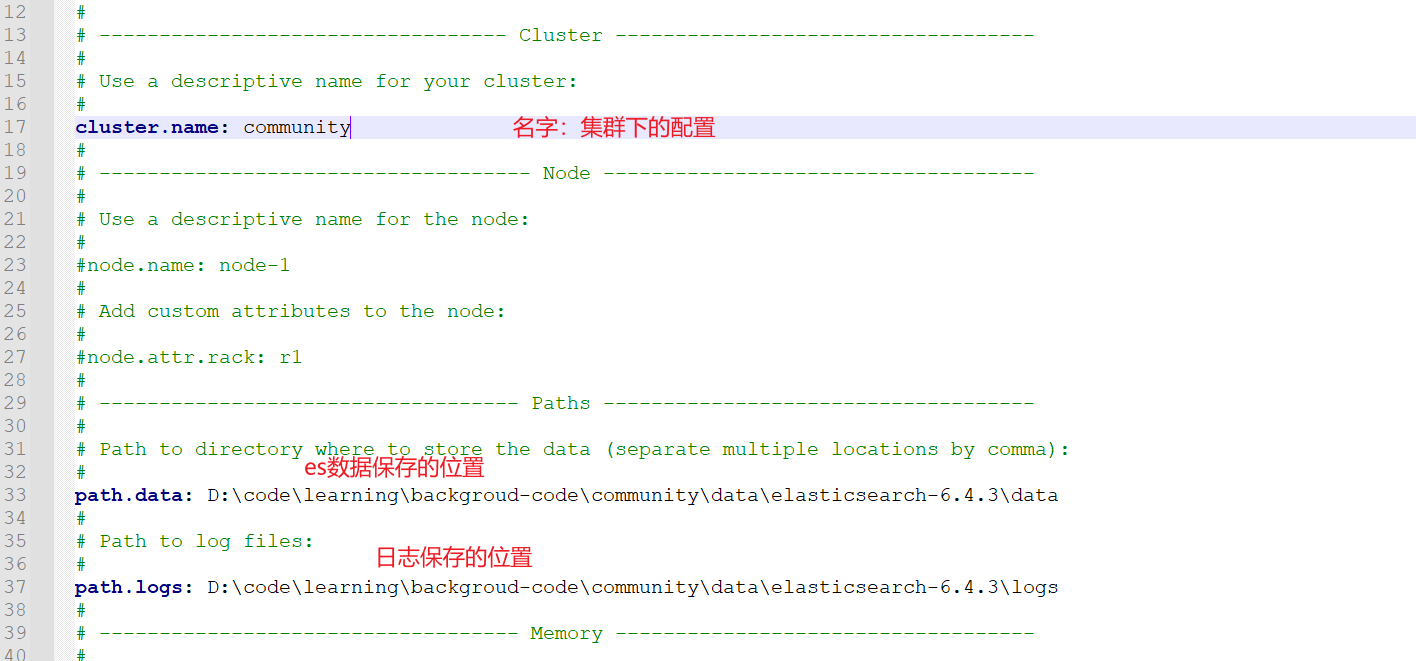
分词器
默认的Es是不支持中文分词的,下载
ik分词器(下载的版本要与Es保持一致)
下图所示,解压后的分词器放在
plugins目录下,ik目录需要自己创建

启动
- 由于我是在
Windows环境下,找到bin目录的elasticsearch.bat双击即可。
命令测试
- 查看健康状态
- curl -X GET “localhost:9200/_cat/health?v“
- 查看所有节点
- curl -X GET “localhost:9200/_cat/nodes?v“
- 新建索引
- curl -X PUT "localhost:9200/test"
- ️ 查看索引
- curl -X GET "localhost:9200/_cat/indices?v"
- 删除索引
- curl -X DELETE "localhost:9200/test"
2、整合 Es
依赖 & 配置
- 我这里使用的是
SpringBoot 2.1.5.RELEASE,根据实际情况选择版本。
		<!--elasticsearch-->

        <dependency>

            <groupId>org.springframework.data</groupId>

            <artifactId>spring-data-elasticsearch</artifactId>

            <version>2.1.6.RELEASE</version>

        </dependency>
yaml配置

properties配置
spring.data.elasticsearch.cluster-name=community

spring.data.elasticsearch.cluster-nodes=127.0.0.1:9300
启动项目:
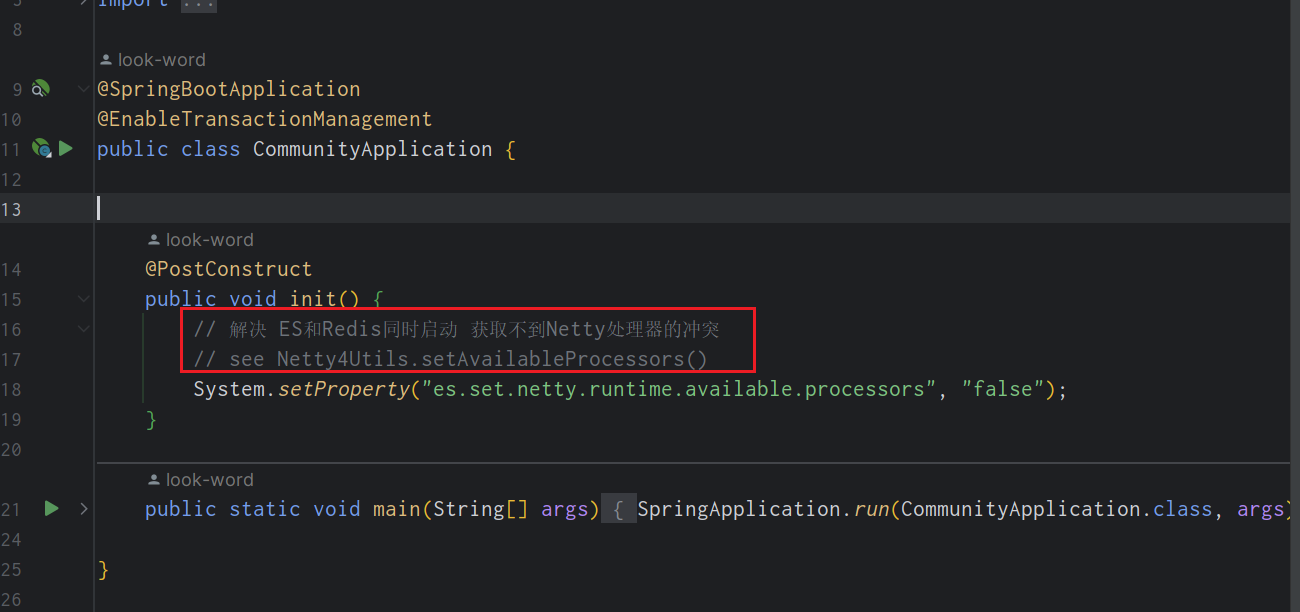
- 不出意外肯定会出意外

- 这个问题是由于Es底层的问题,这里就不展开解释,会提供思路,自行了解
解决办法:
3、使用
SpringBoot 整合 Elasticsearch视频教程
实体类
- 相信之前学过Jpa的同学,对于以下配置很熟悉。
import lombok.Data;

import org.springframework.data.annotation.Id;

import org.springframework.data.elasticsearch.annotations.Document;

import org.springframework.data.elasticsearch.annotations.Field;

import org.springframework.data.elasticsearch.annotations.FieldType;

// 指定Es 索引 类型 分片 备份

@Document(indexName = "discusspost", type = "_doc", shards = 6, replicas = 3)

@Data

public class DiscussPost implements Serializable {

    private static final long serialVersionUID = 114809849189593294L;

    // 标识主键

    @Id

    private Integer id;

    // 对应文档类型

    @Field(type = FieldType.Integer)

    private Integer userId;

    /**

     * type 类型

     * analyzer 存储解析器

     * searchAnalyzer 查询解析器

     */

    @Field(type = FieldType.Text, analyzer = "ik_max_word", searchAnalyzer = "ik_smart")

    private String title;

    @Field(type = FieldType.Text, analyzer = "ik_max_word", searchAnalyzer = "ik_smart")

    private String content;

}
持久层
ElasticsearchRepository里面有许多常用方法
@Repository

public interface DiscussPostRepository extends ElasticsearchRepository<DiscussPost, Integer> {

}
测试代码
- 查询数据层的代码就不展示了,我会在代码中说明
- 时间足够,建议把视频看完
/**

 * @author : look-word

 * 2022-11-03 18:56

 **/

@SpringBootTest

@RunWith(SpringRunner.class)

public class ElasticSearchTest {

    @Resource

    private DiscussPostRepository discussPostRepository;

    @Resource

    private DiscussPostMapper discussPostMapper;

    @Resource

    private ElasticsearchTemplate elasticsearchTemplate;

    @Test

    public void testInsert() {

        // 将查询的结果,同步到Es中

        discussPostRepository.save(discussPostMapper.selectDiscussPostById(241));

    }

    @Test

    public void testInsertAll() {

        // 批量导入 discussPostRepository.saveAll()

        discussPostRepository.saveAll(discussPostMapper.selectDiscussPosts(101, 0, 100));

    }

    /**

     * 测试更新

     */

    @Test

    public void testUpdate() {

        DiscussPost discussPost = discussPostMapper.selectDiscussPostById(241);

        discussPost.setContent("我爱中华人民共和国,我是中国人");

        discussPostRepository.save(discussPost);

    }

    /**

     * 测试修改

     */

    @Test

    public void testDelete() {

        discussPostRepository.deleteById(241);

    }

    /**

     * 测试查询

     */

    @Test

    public void testSelect() {

        // 构造查询条件

        SearchQuery searchQuery = new NativeSearchQueryBuilder()

            	// (查询的值,查询字段1,查询字段1) 匹配title或者title里面是否含有互联网寒冬

                .withQuery(QueryBuilders.multiMatchQuery("互联网寒冬", "title", "title"))

                .withSort(SortBuilders.fieldSort("type").order(SortOrder.DESC)) // 排序

                .withSort(SortBuilders.fieldSort("score").order(SortOrder.DESC))

                .withSort(SortBuilders.fieldSort("createTime").order(SortOrder.DESC))

                .withPageable(PageRequest.of(0, 10)) // 分页

                .withHighlightFields(

                        new HighlightBuilder.Field("title").preTags("<em>").postTags("</em>"),

                        new HighlightBuilder.Field("content").preTags("<em>").postTags("</em>")

                ).build(); //高亮

        Page<DiscussPost> page = discussPostRepository.search(searchQuery);

        page.get().forEach(System.out::println);

    }

    /**

     * 测试查询高亮显示

     */

    @Test

    public void testSelectHighlight() {

        // 构造查询条件

        SearchQuery searchQuery = new NativeSearchQueryBuilder()

                .withQuery(QueryBuilders.multiMatchQuery("互联网寒冬", "title", "content"))

                .withSort(SortBuilders.fieldSort("type").order(SortOrder.DESC)) // 排序

                .withSort(SortBuilders.fieldSort("score").order(SortOrder.DESC))

                .withSort(SortBuilders.fieldSort("createTime").order(SortOrder.DESC))

                .withPageable(PageRequest.of(0, 10)) // 分页

                .withHighlightFields(

                        new HighlightBuilder.Field("title").preTags("<em>").postTags("</em>"),

                        new HighlightBuilder.Field("content").preTags("<em>").postTags("</em>")

                ).build(); //高亮

        Page<DiscussPost> page = elasticsearchTemplate.queryForPage(searchQuery, DiscussPost.class, new SearchResultMapper() {

            @Override

            public <T> AggregatedPage<T> mapResults(SearchResponse response, Class<T> aClass, Pageable pageable) {

                SearchHits hits = response.getHits();

                if (hits.getTotalHits() <= 0) {

                    return null;

                }

                List<DiscussPost> list = new ArrayList<>();

                for (SearchHit hit : hits) {

                    DiscussPost post = new DiscussPost();

                    String id = hit.getSourceAsMap().get("id").toString();

                    post.setId(Integer.parseInt(id));

                    String userId = hit.getSourceAsMap().get("userId").toString();

                    post.setUserId(Integer.parseInt(userId));

                    String title = hit.getSourceAsMap().get("title").toString();

                    post.setTitle(title);

                    String content = hit.getSourceAsMap().get("content").toString();

                    post.setContent(content);

                    String type = hit.getSourceAsMap().get("type").toString();

                    post.setType(Integer.parseInt(type));

                    String status = hit.getSourceAsMap().get("status").toString();

                    post.setStatus(Integer.parseInt(status));

                    String createTime = hit.getSourceAsMap().get("createTime").toString();

                    post.setCreateTime(new Date(Long.parseLong(createTime)));

                    String commentCount = hit.getSourceAsMap().get("commentCount").toString();

                    post.setCommentCount(Integer.parseInt(commentCount));

                    String score = hit.getSourceAsMap().get("score").toString();

                    post.setScore(Double.parseDouble(score));

                    // 处理高亮

                    HighlightField titleField = hit.getHighlightFields().get("title");

                    // 页面有多个高亮字 只显示第一个

                    if (titleField != null) {

                        post.setTitle(titleField.getFragments()[0].toString());

                    }

                    HighlightField contentField = hit.getHighlightFields().get("content");

                    if (contentField != null) {

                        post.setTitle(contentField.getFragments()[0].toString());

                    }

                    list.add(post);

                }

                return new AggregatedPageImpl(list, pageable, hits.getTotalHits(), response.getAggregations(), response.getScrollId(), hits.getMaxScore());

            }

        });

        page.get().forEach(System.out::println);

    }

}
😊SpringBoot 整合 Elasticsearch (超详细).md的更多相关文章
- SpringBoot整合Elasticsearch详细步骤以及代码示例(附源码)
准备工作 环境准备 JAVA版本 java version "1.8.0_121" Java(TM) SE Runtime Environment (build 1.8.0_121 ...
- springboot整合elasticsearch入门例子
springboot整合elasticsearch入门例子 https://blog.csdn.net/tianyaleixiaowu/article/details/72833940 Elastic ...
- SpringBoot整合ElasticSearch实现多版本的兼容
前言 在上一篇学习SpringBoot中,整合了Mybatis.Druid和PageHelper并实现了多数据源的操作.本篇主要是介绍和使用目前最火的搜索引擎ElastiSearch,并和Spring ...
- ElasticSearch(2)---SpringBoot整合ElasticSearch
SpringBoot整合ElasticSearch 一.基于spring-boot-starter-data-elasticsearch整合 开发环境:springboot版本:2.0.1,elast ...
- SpringBoot整合Mybatis完整详细版二:注册、登录、拦截器配置
接着上个章节来,上章节搭建好框架,并且测试也在页面取到数据.接下来实现web端,实现前后端交互,在前台进行注册登录以及后端拦截器配置.实现简单的未登录拦截跳转到登录页面 上一节传送门:SpringBo ...
- SpringBoot整合Mybatis完整详细版
记得刚接触SpringBoot时,大吃一惊,世界上居然还有这么省事的框架,立马感叹:SpringBoot是世界上最好的框架.哈哈! 当初跟着教程练习搭建了一个框架,传送门:spring boot + ...
- Springboot整合elasticsearch以及接口开发
Springboot整合elasticsearch以及接口开发 搭建elasticsearch集群 搭建过程略(我这里用的是elasticsearch5.5.2版本) 写入测试数据 新建索引book( ...
- Springboot整合Elasticsearch报错availableProcessors is already set to [4], rejecting [4]
Springboot整合Elasticsearch报错 今天使用SpringBoot整合Elasticsearch时候,相关的配置完成后,启动项目就报错了. nested exception is j ...
- Springboot整合ElasticSearch进行简单的测试及用Kibana进行查看
一.前言 搜索引擎还是在电商项目.百度.还有技术博客中广泛应用,使用最多的还是ElasticSearch,Solr在大数据量下检索性能不如ElasticSearch.今天和大家一起搭建一下,小编是看完 ...
随机推荐
- [CSP-S 2019 day2 T1] Emiya家今天的饭
题面 题解 不考虑每种食材不超过一半的限制,答案是 减去 1 是去掉一道菜都不做的方案. 显然只可能有一种菜超过一半,于是枚举这种菜,对每个方式做背包即可(记一维状态表示这种菜比别的菜多做了多少份). ...
- KingbaseES R3 集群主库归档失败案例
案例说明: 本案例用于KingbaseES R3集群归档进程归档日志失败的处理,对于一线的生产环境具有 一定的参考意义. 数据库版本: TEST=# select version(); VERSION ...
- 【Shashlik.EventBus】.NET 事件总线,分布式事务最终一致性
[Shashlik.EventBus].NET 事件总线,分布式事务最终一致性 简介 github https://github.com/dotnet-shashlik/shashlik.eventb ...
- 使用pktmon抓包
在Windows上遇到网络问题,需要抓包的时候之前我们会使用netmon和Microsoft Message Analyzer.随着时间的推移,微软已经停止了对Microsoft Message An ...
- STL堆排序&时间复杂度分析
1. 逻辑&时间复杂度分析 pop 和 initialize 的时间复杂度请参考: [DSAAinC++] 大根堆的pop&remove&initialize 将数组初始化为一 ...
- HTTPS安全加固配置最佳实践指南
转载自:https://www.bilibili.com/read/cv16067729?spm_id_from=333.999.0.0 0x02 HTTPS安全加固指南 描述: 当你的网站上了 HT ...
- Containerd 知识点
1.查看安装Containerd的版本 # ctr --version ctr github.com/containerd/containerd v1.6.6 # ctr version Client ...
- DirectPV-----文章内容有待进一步实践完善
GitHub文档地址:https://github.com/minio/directpv DirectPV是用于直连存储的CSI驱动程序.从更简单的意义上讲,它是一个分布式持久卷管理器,而不是像SAN ...
- nginx实现vue的web页面项目集群负载
问题描述 项目是使用前后端分离,前端使用的是vue技术. 想实现的功能是:在前端项目部署的过程中(直接删除项目目录的文件,然后上传新的项目文件),在这个短时间内不能影响用户的使用.所以想到的就是使用n ...
- Fluentd直接传输日志给kafka
官方文档地址:https://docs.fluentd.org/output/kafka td-agent版本自带包含out_kafka2插件,不用再安装了,可以直接使用. 若是使用的是Fluentd ...