
Netty使用Google的ProtoBuf
protobuf是由Google开发的一套对数据结构进行序列化的方法,可用做通信协议,数据存储格式,等等。其特点是不限语言、不限平台、扩展性强
Netty也提供了对Protobuf的天然支持,我们今天就写一个简单的示例,简单地了解一下Netty对Google的protoBuf的支持
我们的示例场景很简单的:客户端发送一个信息,这个信息用Protobuf来做序列化,然后服务器端接收这个信息,解码,读取信息
protobuf与xml,json这样的数据格式一样,都有自己的一套语法,且语法很简单,很容易掌握,xml文件的后缀名是xml,json的后缀名是json,以此类推,那么protobuf的后缀名就是proto
关于proto的基本语法与java的bean很像,详细可以参考官网,可以看下这篇博客:
http://blog.sina.com.cn/s/blog_9b0604b40101qm35.html
现在我们定义一个类似java bean的proto文件,我们定义一个“富人”类,他有多辆车,我们先按照语法,写一个RichMan.proto,如下面的代码清单所示:
- package netty;
- option java_package = "com.lyncc.netty.codec.protobuf.demo";
- option java_outer_classname = "RichManProto";
- message RichMan {
- required int32 id = 1;
- required string name = 2;
- optional string email = 3;
- enum CarType {
- AUDI = 0;
- BENZ = 1;
- LAMBORGHINI = 2;
- DASAUTO = 3;
- }
- message Car {
- required string name = 1;
- optional CarType type = 2 [default = BENZ];
- }
- repeated Car cars = 4;
- }
给出上面代码的一些基本解释:
1)java_package值得是该文件生成的java文件的包路径
2)java_outer_classname值的是生成的class的名称
3)message和enum是它的基本类型,很类似于java的class和枚举
4)required表名这个字段是必须的,option表明这个字段可选,default表明这个字段有默认值
5)repeat表明这个字段可以重复,类似于java中的List,该例子中Car的声明中,就相当于java中的List<Car>
6)每个声明的后面的数字,例如1,2,3, 4等等,同级的声明不能重复
总而言之,这个“类”定义了一个富人,该富人有id,名称,邮箱,而且该富人有多个名车,这些名车的类型有奥迪,奔驰,兰博基尼,大众
好了,到目前为止,proto我们已经定义好了,Google提供了一个类似脚本的工具,可以使我们将proto文件转化成java文件
该文件叫做protoc-2.6.1-win32.zip,可以在很多地方下载到,下载地址:
http://download.csdn.net/detail/linuu/9515171
下载好,新建文件夹,且将加载的exe复制到该文件夹,且将我们刚才写的RichMan.proto复制到该文件夹下:
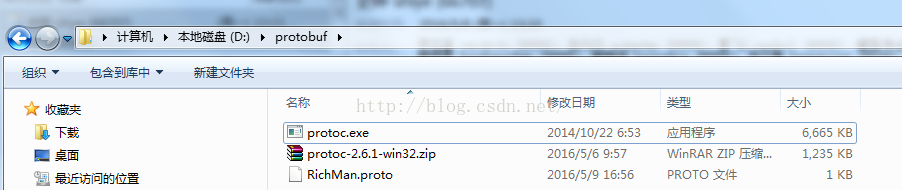
进入命令行,键入:

没有报错的情况下,会在同样的文件夹下生成如下的文件:
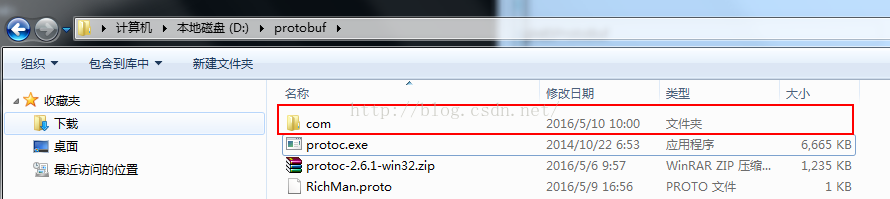
进入com的文件夹,你会发现生成的目录是与你proto中定义的java_package一样:

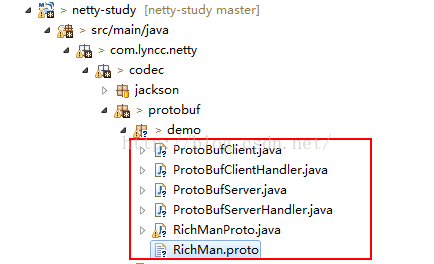
好了,到目前为止,我们已经生成了RichManProto文件了,将其复制到eclipse对应的目录下,整个项目代码的缩略图如下图所示:
添加maven的依赖:
- <dependency>
- <groupId>com.google.protobuf</groupId>
- <artifactId>protobuf-java</artifactId>
- <version>2.6.1</version>
- </dependency>
注意就是版本必须是2.6.1,因为我们用的是protoc-2.6.1的exe去编译的,所以版本必须保持一致,否则有可能会报错
接下来就是一些大家耳熟能详的server,handler,client,bootstrap,废话多不说,上代码:
ProtoBufServer.java
- package com.lyncc.netty.codec.protobuf.demo;
- import io.netty.bootstrap.ServerBootstrap;
- import io.netty.channel.ChannelFuture;
- import io.netty.channel.ChannelInitializer;
- import io.netty.channel.ChannelOption;
- import io.netty.channel.EventLoopGroup;
- import io.netty.channel.nio.NioEventLoopGroup;
- import io.netty.channel.socket.SocketChannel;
- import io.netty.channel.socket.nio.NioServerSocketChannel;
- import io.netty.handler.codec.protobuf.ProtobufDecoder;
- import io.netty.handler.codec.protobuf.ProtobufVarint32FrameDecoder;
- import io.netty.handler.logging.LogLevel;
- import io.netty.handler.logging.LoggingHandler;
- public class ProtoBufServer {
- public void bind(int port) throws Exception {
- // 配置服务端的NIO线程组
- EventLoopGroup bossGroup = new NioEventLoopGroup();
- EventLoopGroup workerGroup = new NioEventLoopGroup();
- try {
- ServerBootstrap b = new ServerBootstrap();
- b.group(bossGroup, workerGroup).channel(NioServerSocketChannel.class).option(ChannelOption.SO_BACKLOG, 100)
- .handler(new LoggingHandler(LogLevel.INFO)).childHandler(new ChannelInitializer<SocketChannel>() {
- @Override
- public void initChannel(SocketChannel ch) {
- ch.pipeline().addLast(new ProtobufVarint32FrameDecoder());
- ch.pipeline().addLast(new ProtobufDecoder(RichManProto.RichMan.getDefaultInstance()));
- ch.pipeline().addLast(new ProtoBufServerHandler());
- }
- });
- // 绑定端口,同步等待成功
- ChannelFuture f = b.bind(port).sync();
- System.out.println("init start");
- // 等待服务端监听端口关闭
- f.channel().closeFuture().sync();
- } finally {
- // 优雅退出,释放线程池资源
- bossGroup.shutdownGracefully();
- workerGroup.shutdownGracefully();
- }
- }
- public static void main(String[] args) throws Exception {
- int port = 8080;
- if (args != null && args.length > 0) {
- try {
- port = Integer.valueOf(args[0]);
- } catch (NumberFormatException e) {
- // 采用默认值
- }
- }
- new ProtoBufServer().bind(port);
- }
- }
可以看见,这个sever的bootstrap与其他的sever很相似,只是channelPipeline中在自定义的handler之前添加了netty对protobuf支持的两个天然的decoder

我没有深究,看名字就知道第一个Decoder是将帧byte数据转化成message,第二步就是将message转化成我们自定义的Rimanproto
自定义的handler很简单,就是打印一下解析的内容:
ProtoBufServerHandler.java
- package com.lyncc.netty.codec.protobuf.demo;
- import io.netty.channel.ChannelHandlerContext;
- import io.netty.channel.ChannelInboundHandlerAdapter;
- import java.util.List;
- import com.lyncc.netty.codec.protobuf.demo.RichManProto.RichMan.Car;
- public class ProtoBufServerHandler extends ChannelInboundHandlerAdapter {
- @Override
- public void channelRead(ChannelHandlerContext ctx, Object msg) throws Exception {
- RichManProto.RichMan req = (RichManProto.RichMan) msg;
- System.out.println(req.getName()+"他有"+req.getCarsCount()+"量车");
- List<Car> lists = req.getCarsList();
- if(null != lists) {
- for(Car car : lists){
- System.out.println(car.getName());
- }
- }
- }
- @Override
- public void exceptionCaught(ChannelHandlerContext ctx, Throwable cause) {
- cause.printStackTrace();
- ctx.close();
- }
- }
客户端代码
ProtoBufClient.java
- package com.lyncc.netty.codec.protobuf.demo;
- import io.netty.bootstrap.Bootstrap;
- import io.netty.channel.ChannelFuture;
- import io.netty.channel.ChannelInitializer;
- import io.netty.channel.ChannelOption;
- import io.netty.channel.EventLoopGroup;
- import io.netty.channel.nio.NioEventLoopGroup;
- import io.netty.channel.socket.SocketChannel;
- import io.netty.channel.socket.nio.NioSocketChannel;
- import io.netty.handler.codec.protobuf.ProtobufEncoder;
- import io.netty.handler.codec.protobuf.ProtobufVarint32LengthFieldPrepender;
- public class ProtoBufClient {
- public void connect(int port, String host) throws Exception {
- // 配置客户端NIO线程组
- EventLoopGroup group = new NioEventLoopGroup();
- try {
- Bootstrap b = new Bootstrap();
- b.group(group).channel(NioSocketChannel.class).option(ChannelOption.TCP_NODELAY, true)
- .handler(new ChannelInitializer<SocketChannel>() {
- @Override
- public void initChannel(SocketChannel ch) throws Exception {
- ch.pipeline().addLast(new ProtobufVarint32LengthFieldPrepender());
- ch.pipeline().addLast(new ProtobufEncoder());
- ch.pipeline().addLast(new ProtoBufClientHandler());
- }
- });
- // 发起异步连接操作
- ChannelFuture f = b.connect(host, port).sync();
- // 当代客户端链路关闭
- f.channel().closeFuture().sync();
- } finally {
- // 优雅退出,释放NIO线程组
- group.shutdownGracefully();
- }
- }
- /**
- * @param args
- * @throws Exception
- */
- public static void main(String[] args) throws Exception {
- int port = 8080;
- if (args != null && args.length > 0) {
- try {
- port = Integer.valueOf(args[0]);
- } catch (NumberFormatException e) {
- // 采用默认值
- }
- }
- new ProtoBufClient().connect(port, "127.0.0.1");
- }
- }
需要注意的是:

在传输之前需要将你的类进行protobuf的序列化,这是两个序列化的编码器
接着看:
ProtoBufClientHandler.java
- package com.lyncc.netty.codec.protobuf.demo;
- import io.netty.channel.ChannelHandlerContext;
- import io.netty.channel.ChannelInboundHandlerAdapter;
- import java.util.ArrayList;
- import java.util.List;
- import com.lyncc.netty.codec.protobuf.demo.RichManProto.RichMan.Car;
- import com.lyncc.netty.codec.protobuf.demo.RichManProto.RichMan.CarType;
- public class ProtoBufClientHandler extends ChannelInboundHandlerAdapter {
- @Override
- public void channelActive(ChannelHandlerContext ctx) {
- System.out.println("=======================================");
- RichManProto.RichMan.Builder builder = RichManProto.RichMan.newBuilder();
- builder.setName("王思聪");
- builder.setId(1);
- builder.setEmail("wsc@163.com");
- List<RichManProto.RichMan.Car> cars = new ArrayList<RichManProto.RichMan.Car>();
- Car car1 = RichManProto.RichMan.Car.newBuilder().setName("上海大众超跑").setType(CarType.DASAUTO).build();
- Car car2 = RichManProto.RichMan.Car.newBuilder().setName("Aventador").setType(CarType.LAMBORGHINI).build();
- Car car3 = RichManProto.RichMan.Car.newBuilder().setName("奔驰SLS级AMG").setType(CarType.BENZ).build();
- cars.add(car1);
- cars.add(car2);
- cars.add(car3);
- builder.addAllCars(cars);
- ctx.writeAndFlush(builder.build());
- }
- @Override
- public void exceptionCaught(ChannelHandlerContext ctx, Throwable cause) {
- cause.printStackTrace();
- ctx.close();
- }
- }
好了,到此为止,所有的代码已经写完毕了,我们运行测试一下:
服务器端启动:

启动客户端后,再看看服务器端的控制台:

好了,到此为止,最简单的demo已经搭建完毕了~
Netty使用Google的ProtoBuf的更多相关文章
- Netty游戏服务器之四protobuf编解码和黏包处理
我们还没讲客户端怎么向服务器发送消息,服务器怎么接受消息. 在讲这个之前我们先要了解一点就是tcp底层存在粘包和拆包的机制,所以我们在进行消息传递的时候要考虑这个问题. 看了netty权威这里处理的办 ...
- google的protobuf简单介绍
google的protobuf是一种轻便高效的结构化数据存储格式,在通信协议和数据存储等领域中使用比较多.protobuf对于结构中的每个成员,会提供set系列函数和get系列函数. 但是,对于使用来 ...
- netty 的 Google protobuf 开发
根据上一篇博文 Google Protobuf 使用 Java 版 netty 集成 protobuf 的方法非常简单.代码如下: server package protobuf.server.imp ...
- Netty学习——Google Protobuf使用方式分析和环境搭建
Google Protobuf使用方式分析 在RPC框架中,Google Protobuf是很常用的一个库,和Apache Thrift 是同款的用于进行序列化的第三方库.原理都是大同小异,无非就是使 ...
- Netty学习——Google Protobuf的初步了解
学习参考的官网: https://developers.google.com/protocol-buffers/docs/javatutorial 简单指南详解:这个文档写的简直是太详细了. 本篇从下 ...
- Netty使用Google Protocol Buffer完成服务器高性能数据传输
一.什么是Google Protocol Buffer(protobuf官方网站) 下面是官网给的解释: Protocol buffers are a language-neutral, platfo ...
- Google的Protobuf协议分析
protobuf和thrift类似,也是一个序列化的协议实现,简称PB(下文出现的PB代表protobuf). Github:https://github.com/google/protobuf 上图 ...
- (原)ubuntu16中简单的使用google的protobuf
转载请注明出处: http://www.cnblogs.com/darkknightzh/p/5804395.html 参考网址: http://www.cnblogs.com/luosongchao ...
- 全图文分析:如何利用Google的protobuf,来思考、设计、实现自己的RPC框架
目录 一.前言 二.RPC 基础概念 1. RPC 是什么? 2. 需要解决什么问题? 3. 有哪些开源实现? 三.protobuf 基本使用 1. 基本知识 2. 使用步骤 四.libevent 1 ...
随机推荐
- [转载][QT][SQL]sql学习记录6_sqlite Autoincrement(自动递增)
转载自:定义以及示例请见 : http://www.runoob.com/sqlite/sqlite-autoincrement.html SQLite Autoincrement(自动递增) SQL ...
- absolute的left和right的妙用
之前做了一个自定义鼠标右键的布局,做的过程中遇到了一个很有趣的问题,之前一直没有注意到. 目标样式如下: 期初并不知道文字内容需要随机,所以写的时候写“死”了. 所有的内容都是按照设计的四个文字走的, ...
- BZOJ5280: [Usaco2018 Open]Milking Order(二分+拓扑)
5280: [Usaco2018 Open]Milking Order Time Limit: 10 Sec Memory Limit: 128 MBSubmit: 123 Solved: 62[ ...
- 原生Ajax使用
Ajax基础 Ajax(Asynchronous JavaScript And XML)概念:通过XMLHttpRequest对象向服务器提出请求并处理响应,进行页面的局部更新. AJAX都有哪些优点 ...
- BZOJ4566 Haoi2016 找相同字符【广义后缀自动机】
Description 给定两个字符串,求出在两个字符串中各取出一个子串使得这两个子串相同的方案数.两个方案不同当且仅当这两 个子串中有一个位置不同. Input 两行,两个字符串s1,s2,长度分别 ...
- IIS项目发布完整流程
第一步: 发布项目 使在IIS上发布是防止源码泄露 第二步: 打开IIS(如果没有就自己安装一个)打开IIS步骤 控制面板>系统安全>管理工具>IIS管理器 填写网站的名称和之前发布 ...
- hbase单机及集群安装配置,整合到hadoop
问题导读:1.配置的是谁的目录conf/hbase-site.xml,如何配置hbase.rootdir2.如何启动hbase?3.如何进入hbase shell?4.ssh如何达到互通?5.不安装N ...
- ubuntu 部署Django
1, 安装python包管理工具easy_install. sudo apt-get install python-setuptools 2,安装Django. sudo easy_install & ...
- WPF绘制简单常用的Path(转)
写代码出身的我们经常需要使用一些简单 但是不是规则图形的Path 但限于美工功底有限 不知道怎么去画 下面我告诉大家一些简单的小技巧 用代码来画Path 个人还是比较喜欢用代码 因为数值控制的更精细 ...
- redis 连接池的一些问题
问题: Could not get a resource from the pool 将配置修改为如下: JedisPoolConfig config =newJedisPoolConfig ...