
Salesforce LWC学习(十四) Continuation进行异步callout获取数据
本篇参考:
https://developer.salesforce.com/docs/component-library/documentation/en/lwc/lwc.apex_continuations
我们在项目中经常遇到会和后台apex进行交互通过SOQL/SOSL去获取数据展示在前台。当然,有些场景下数据是存储在外部系统,需要apex进行callout操作去获取数据展示前端。lwc针对callout操作可以简单的分成几步走,我们这里以
一. Enable Remote Site
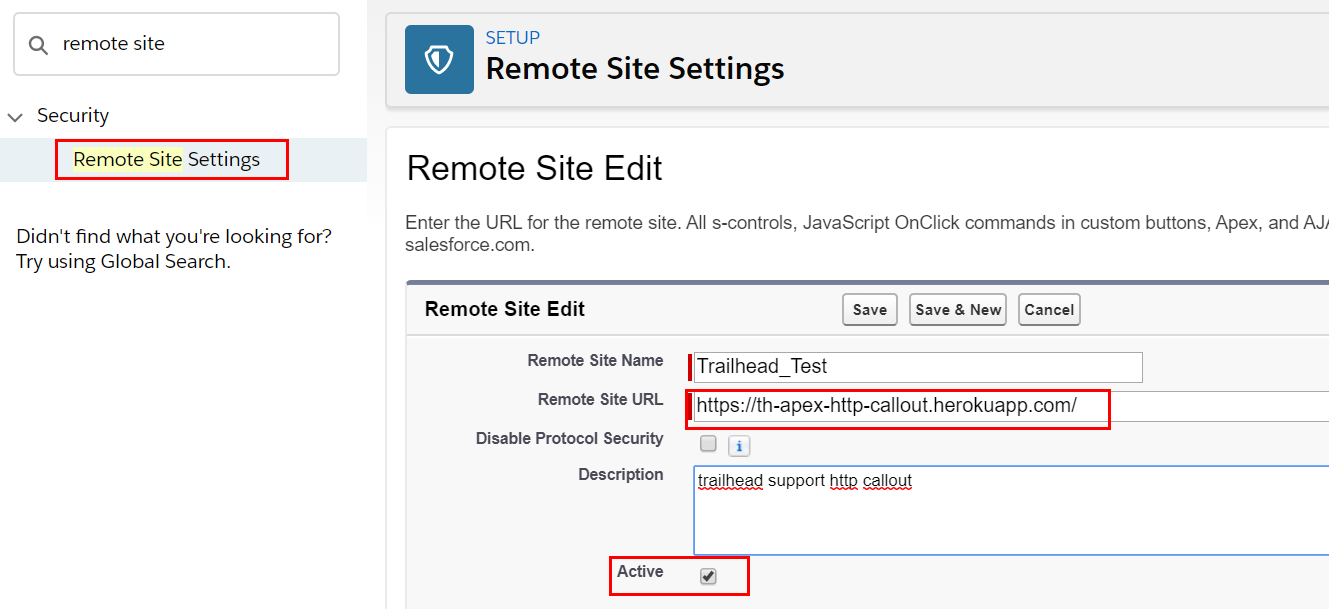
针对外部系统的交互,我们第一步就是要先在salesforce系统中配置Remote Site,才可以访问,否则会报错。我们以https://th-apex-http-callout.herokuapp.com/这个trailhead提供的callout URL作为 remote site 的配置,这个URL返回的值为: {"trailhead":"is awesome."}
二. 前后台构建
我们以前做callout通常通过HttpRequest,然后将设置对应的header, url , body等以后然后Http.sendRequest即可实现外部系统callout交互。在lwc中,我们需要使用 Continuation这个salesforce提供的类进行交互,具体使用和文档可以查看最上方的链接。我们在lwc和apex交互需要设置 @AuraEnabled=true,这个同样需要,在这个基础上,需要设置continuation=true,如果请求数据是固定的,可以也设置cacheable=true从而增加效率,都声明情况下写法如下
@AuraEnabled(continuation=true cacheable=true)
除了这里的小变动,另外的改变就是不用Http.sendRequest方式来构建,而是使用 Continuation方式来构建。Continuation构造函数只有一个参数,用来设置time out时间,以秒为单位。他有几个参数,continuationMethod用来设置访问以后对应的回调函数。timeout用来设置超时时间,最多120秒。state设置用来当callout操作完成并且callback方法执行完成以后的状态值。我们可以用这个状态值来确定当前的callout操作是否执行完成。Continuation有三个常用的方法:
addHttpRequest/getRequests()/getResponse()这三个方法的详情描述自行查看上方的API文档。
ContinuationDemoController类描述如下:声明startRequest方法用来callout指定的service URL,然后将response放在callback函数中进行返回。
public with sharing class ContinuationDemoController {

    // Callout endpoint as a named credential URL

    // or, as shown here, as the long-running service URL

    private static final String LONG_RUNNING_SERVICE_URL =

        'https://th-apex-http-callout.herokuapp.com/';

    // Action method

    @AuraEnabled(continuation=true cacheable=true)

    public static Object startRequest() {

      // Create continuation. Argument is timeout in seconds.

      Continuation con = new Continuation(40);

      // Set callback method

      con.continuationMethod='processResponse';

      // Set state

      con.state='Hello, World!';

      // Create callout request

      HttpRequest req = new HttpRequest();

      req.setMethod('GET');

      req.setEndpoint(LONG_RUNNING_SERVICE_URL);

      // Add callout request to continuation

      con.addHttpRequest(req);

      // Return the continuation

      return con;

    }

    // Callback method

    @AuraEnabled(cacheable=true)

    public static Object processResponse(List<String> labels, Object state) {

      // Get the response by using the unique label

      HttpResponse response = Continuation.getResponse(labels[0]);

      // Set the result variable

      String result = response.getBody();

      return result;

    }

}
continuationCmp.html:用来展示从远程服务器端的内容
<template>

    <div>

        service content: {formattedWireResult}

    </div>

</template>
continuationCmp.js:写法上和访问apex class方法没有任何不同
import { LightningElement,wire } from 'lwc';

import startRequest from '@salesforce/apexContinuation/ContinuationDemoController.startRequest';

export default class ContinuationComponent extends LightningElement {

    // Using wire service

    @wire(startRequest)

    wiredContinuation;

    get formattedWireResult() {

        return JSON.stringify(this.wiredContinuation);

    }

}
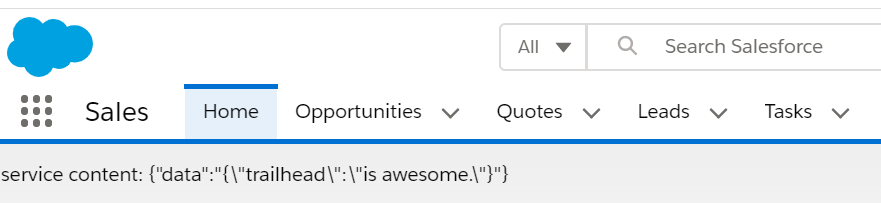
结果:将远程服务器内容转换成JSON字符串
总结:篇中只是简单介绍了Continuation的介绍,还有很多的细节的操作和限制没有在本篇中说出,比如Continuation和DML操作前后关系等限制,相关的limitation等等。篇中有错误的地方欢迎指出,有不懂欢迎留言。
Salesforce LWC学习(十四) Continuation进行异步callout获取数据的更多相关文章
- Salesforce LWC学习(十五) Async 以及 Picklist 公用方法的实现
本篇参考:salesforce 零基础学习(六十二)获取sObject中类型为Picklist的field values(含record type) https://developer.salesfo ...
- Salesforce LWC学习(十六) Validity 在form中的使用浅谈
本篇参考: https://developer.salesforce.com/docs/component-library/bundle/lightning-input/documentation h ...
- Salesforce LWC学习(五) LDS & Wire Service 实现和后台数据交互 & meta xml配置
之前的几节都是基于前台变量进行相关的操作和学习,我们在项目中不可避免的需要获取数据以及进行DML操作.之前的内容中也有提到wire注解,今天就详细的介绍一下对数据进行查询以及DML操作以及Wire S ...
- Salesforce LWC学习(十) 前端处理之 list 处理
本篇参看:https://developer.mozilla.org/zh-CN/docs/Web/JavaScript/Reference/Global_Objects/Array list是我们经 ...
- Salesforce LWC学习(十八) datatable展示 image
本篇参看: https://developer.salesforce.com/docs/component-library/bundle/lightning-datatable/documentati ...
- Salesforce LWC学习(十九) 针对 lightning-input-field的label值重写
本篇参考: https://salesforcediaries.com/2020/02/24/how-to-override-lightning-input-field-label-in-lightn ...
- Salesforce LWC学习(三十) lwc superbadge项目实现
本篇参考:https://trailhead.salesforce.com/content/learn/superbadges/superbadge_lwc_specialist 我们做lwc的学习时 ...
- Salesforce LWC学习(四十) dynamic interaction 浅入浅出
本篇参考: Configure a Component for Dynamic Interactions in the Lightning App Builder - Salesforce Light ...
- Salesforce LWC学习(三十九) lwc下quick action的recordId的问题和解决方案
本篇参考: https://developer.salesforce.com/docs/component-library/bundle/force:hasRecordId/documentation ...
随机推荐
- 遗弃.Forsaken.2015.BluRay.720p.x264.DTS-beAst
◎译 名 遗弃/落日孤影(台)/赎罪◎片 名 Forsaken◎年 代 2015◎产 地 加拿大/法国/美国◎类 别 剧情/西部◎语 言 英语◎上映日期 2015-09-16(多伦多电影节)/2016 ...
- Redis-输入输出缓冲区
一.client list id:客户端连接的唯一标识,这个id是随着Redis的连接自增的,重启Redis后会重置为0addr:客户端连接的ip和端口fd:socket的文件描述符,与lsof命令结 ...
- Excel技巧:如何绘制一份优秀的甘特图(项目管理)
作者:秦路,天善智能特约专家.资深数据分析师,数据化运营专家.擅长结合运营和数据,建立数据化运营体系. 个人公众号:秦路(微信ID:tracykanc) 今天我给大家分享的内容是如何利用Excel绘制 ...
- Android中JNI的使用方法(转载)
Android中JNI的使用方法 首先看一下Android平台的框架图:(网上盗用) 可以看到Android上层的Application和ApplicationFramework都是使用Java编写, ...
- Android系统使用Shell脚本预装apk
客户需求:需要在Android系统预安装一个或者若干个apk,客户可以选择自行卸载并且卸载后系统再次启动并不会再次自动安装. 考虑到需要批量安装应用,我这里考虑到使用灵活的shell脚本.shell脚 ...
- Leetcode 141题 环形链表(Linked List Cycle) Java语言求解
题目描述: 给定一个链表,判断链表中是否有环. 为了表示给定链表中的环,我们使用整数 pos 来表示链表尾连接到链表中的位置(索引从 0 开始). 如果 pos 是 -1,则在该链表中没有环. Map ...
- Flutter Widgets 对话框-Dialog
注意:无特殊说明,Flutter版本及Dart版本如下: Flutter版本: 1.12.13+hotfix.5 Dart版本: 2.7.0 当应用程序进行重要操作时经常需要用户进行2次确认,以避免用 ...
- 从0开始搭建一个阿里云java部署环境
一.购买服务器 https://www.aliyun.com/daily-act/ecs/activity_selection?spm=5176.8112568.738194.8.674c9ed53Y ...
- Flutter 拖拽控件Draggable看这一篇就够了
注意:无特殊说明,Flutter版本及Dart版本如下: Flutter版本: 1.12.13+hotfix.5 Dart版本: 2.7.0 Draggable系列组件可以让我们拖动组件. Dragg ...
- 遍历tree
1.解决方法 filterData (arr) { var newArr = [] arr.map((item) => { var childrenArr if (item.children ! ...