
python开发_tkinter_菜单的不同选项
python的tkinter模块中,菜单也可以由你自定义你的风格
下面是我做的demo
运行效果:
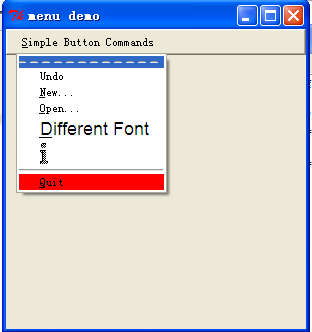
======================================
代码部分:
======================================
 from tkinter import *

 '''

     菜单选项的不同形式

 '''

 #global var

 number = 0

 # some miscellaneous callbacks

 def new_file():

     global number

     number += 1

     tk = Tk()

     tk.geometry('300x300')

     tk.title('Demo %s'%number)

 def open_file():

     print("opening OLD file")

 def print_something():

     print("picked a menu item")

 def makeCommandMenu():

     # make menu button

     Command_button = Menubutton(mBar, text='Simple Button Commands',

                                 underline=0)

     Command_button.pack(side=LEFT, padx="2m")

     # make the pulldown part of the File menu. The parameter passed is the master.

     # we attach it to the button as a python attribute called "menu" by convention.

     # hopefully this isn't too confusing...

     Command_button.menu = Menu(Command_button)

     # just to be cute, let's disable the undo option:

     Command_button.menu.add_command(label="Undo")

     # undo is the 0th entry...

     Command_button.menu.entryconfig(0, state=DISABLED)

     Command_button.menu.add_command(label='New...', underline=0,

                                     command=new_file)

     Command_button.menu.add_command(label='Open...', underline=0,

                                     command=open_file)

     Command_button.menu.add_command(label='Different Font', underline=0,

                                     font='-*-helvetica-*-r-*-*-*-180-*-*-*-*-*-*',

                                     command=print_something)

     # we can make bitmaps be menu entries too. File format is X11 bitmap.

     # if you use XV, save it under X11 bitmap format. duh-uh.,..

     Command_button.menu.add_command(

         bitmap="info")

         #bitmap='@/home/mjc4y/dilbert/project.status.is.doomed.last.panel.bm')

     # this is just a line

     Command_button.menu.add('separator')

     # change the color

     Command_button.menu.add_command(label='Quit', underline=0,

                                     background='red',

                                     activebackground='green',

                                     command=Command_button.quit)

     # set up a pointer from the file menubutton back to the file menu

     Command_button['menu'] = Command_button.menu

     return Command_button

 #################################################

 #### Main starts here ...

 root = Tk()

 root.geometry('300x300')

 # make a menu bar

 mBar = Frame(root, relief=RAISED, borderwidth=2)

 mBar.pack(fill=X)

 Command_button = makeCommandMenu()

 # finally, install the buttons in the menu bar.

 # This allows for scanning from one menubutton to the next.

 mBar.tk_menuBar(Command_button)

 root.title('menu demo')

 root.iconname('menu demo')

 root.mainloop()
========================================================
More reading,and english is important.
I'm Hongten
大哥哥大姐姐,觉得有用打赏点哦!多多少少没关系,一分也是对我的支持和鼓励。谢谢。
Hongten博客排名在100名以内。粉丝过千。
Hongten出品,必是精品。
E | hongtenzone@foxmail.com B | http://www.cnblogs.com/hongten
========================================================
python开发_tkinter_菜单的不同选项的更多相关文章
- python开发_tkinter_菜单选项中英文切换_菜单选项不可用操作_博主推荐
我使用的python版本为:3.3.2 如果你对python中tkinter模块的菜单操作不是很了解,你可以看看: python开发_tkinter_窗口控件_自己制作的Python IDEL_博主推 ...
- python开发_tkinter_多级子菜单
在之前的blog中有提到python的tkinter中的菜单操作 python开发_tkinter_窗口控件_自己制作的Python IDEL_博主推荐 python开发_tkinter_窗口控件_自 ...
- python开发_tkinter_单选菜单_不可用菜单操作
在之前的blog中有提到python的tkinter中的菜单操作 python开发_tkinter_窗口控件_自己制作的Python IDEL_博主推荐 python开发_tkinter_窗口控件_自 ...
- python开发_tkinter_复选菜单
在之前的blog中有提到python的tkinter中的菜单操作 python开发_tkinter_窗口控件_自己制作的Python IDEL_博主推荐 python开发_tkinter_窗口控件_自 ...
- python开发_tkinter_获取文本框内容_给文本框添加键盘输入事件
在之前的blog中有提到python的tkinter中的菜单操作 python开发_tkinter_窗口控件_自己制作的Python IDEL_博主推荐 python开发_tkinter_窗口控件_自 ...
- python开发_tkinter_获取单选菜单值
在之前的blog中有提到python的tkinter中的菜单操作 python开发_tkinter_窗口控件_自己制作的Python IDEL_博主推荐 python开发_tkinter_窗口控件_自 ...
- python开发_tkinter_窗口控件_自己制作的Python IDEL_博主推荐(二)
在上一篇blog:python开发_tkinter_窗口控件_自己制作的Python IDEL_博主推荐 中介绍了python中的tkinter的一些东西,你可能对tkinter有一定的了解了.这篇b ...
- python开发_tkinter_小球完全弹性碰撞游戏
python开发_tkinter_小球完全弹性碰撞游戏 完成这个小球的完全弹性碰撞游戏灵感来自于: 下面是我花了一周下班时间所编写的一个小球完全弹性碰撞游戏: 游戏初始化状态: 最下面的游标和修改 ...
- python开发_tkinter_窗口控件_自己制作的Python IDEL_博主推荐
在了解python中的tkinter模块的时候,你需要了解一些tkinter的相关知识 下面是python的API文档中的一个简单例子: import tkinter as tk class Appl ...
随机推荐
- NTC热敏电阻认识及功率型热敏电阻选型
-------------------记公司一款已经量产的产品,在最新加工的批次上出现:刚上电就炸毁功率型热敏电阻的问题------------------------- ************写在 ...
- C#基础学习之FileStream
FileStream和File的区别 后者比前者给内存带来压力大. FileStream可以操作字节也就是可以保存任何类型的文件. 1.FileStream读文件操作 //OpenOrCreate: ...
- C# Guid 16位 唯一
public static class GuidExtentions { /// <summary> /// 根据GUID获取16位的唯一字符串 /// </summary> ...
- 使用JS实现文字搬运工
使用JS实现文字搬运工 效果图: 代码如下,复制即可使用: <!DOCTYPE html> <html><head><meta http-equiv=&quo ...
- (最大矩阵链乘)Matrix-chain product
Matrix-chain product. The following are some instances. a) <3, 5, 2, 1,10> b) < ...
- ***codeigniter操作xml(Simplexml第三方扩展)
This Simplexml class provides an alternative implementation of the SimpleXML API that works under PH ...
- jboss各种测试方式归类
不跨工程访问(如:HBase) 跨工程访问(如:Business) 不部署到服务器上 部署到服务器上 不部署到服务器上 部署到服务器上 Junit测试 实例化直接调用 true true Fals ...
- JavaScript工程师都应懂的33个概念
最近福利发的有点多啊,各种硬干货,小伙伴们是不是觉得很爽啊.Github真的蕴含着各种各样的宝藏,难怪各个大厂也都纷纷贡献自己的代码到Github上. 所以各种干货还是会源源不断的po给大家,觉得有帮 ...
- Error_code: 1594(mysql 5617)主从同步报错
报错信息 2017-09-05 09:37:22 7425 [ERROR] Slave SQL: Relay log read failure: Could not parse relay log e ...
- GUC-13 生产者和消费者案例-旧
/* * 生产者和消费者案例 */ public class TestProductorAndConsumer { public static void main(String[] args) { C ...