
Machine learning 第8周编程作业 K-means and PCA
1.findClosestCentroids
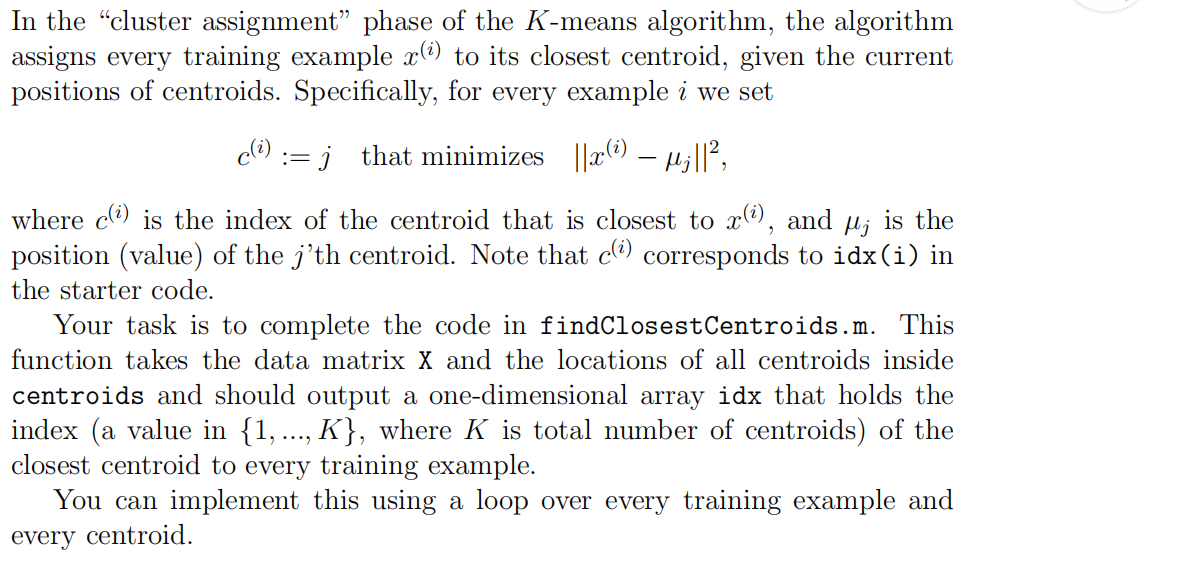
function idx = findClosestCentroids(X, centroids)

%FINDCLOSESTCENTROIDS computes the centroid memberships for every example

%   idx = FINDCLOSESTCENTROIDS (X, centroids) returns the closest centroids

%   in idx for a dataset X where each row is a single example. idx = m x 1

%   vector of centroid assignments (i.e. each entry in range [1..K])

%

% Set K

K = size(centroids, 1);

% You need to return the following variables correctly.

idx = zeros(size(X,1), 1);

% ====================== YOUR CODE HERE ======================

% Instructions: Go over every example, find its closest centroid, and store

%               the index inside idx at the appropriate location.

%               Concretely, idx(i) should contain the index of the centroid

%               closest to example i. Hence, it should be a value in the

%               range 1..K

%

% Note: You can use a for-loop over the examples to compute this.

%

for i=1:size(X,1),

  for j=1:K,

    dis(j)=sum( (centroids(j,:)-X(i,:)).^2, 2 );

  endfor

  [t,idx(i)]=min(dis);

endfor

% =============================================================

end
2.computerCentroids

function centroids = computeCentroids(X, idx, K)

%COMPUTECENTROIDS returns the new centroids by computing the means of the

%data points assigned to each centroid.

%   centroids = COMPUTECENTROIDS(X, idx, K) returns the new centroids by

%   computing the means of the data points assigned to each centroid. It is

%   given a dataset X where each row is a single data point, a vector

%   idx of centroid assignments (i.e. each entry in range [1..K]) for each

%   example, and K, the number of centroids. You should return a matrix

%   centroids, where each row of centroids is the mean of the data points

%   assigned to it.

%

% Useful variables

[m n] = size(X);

% You need to return the following variables correctly.

centroids = zeros(K, n);

% ====================== YOUR CODE HERE ======================

% Instructions: Go over every centroid and compute mean of all points that

%               belong to it. Concretely, the row vector centroids(i, :)

%               should contain the mean of the data points assigned to

%               centroid i.

%

% Note: You can use a for-loop over the centroids to compute this.

%

for i=1:K,

  ALL=0;

  cnt=sum(idx==i);

  temp=find(idx==i);

  for j=1:numel(temp),

    ALL=ALL+X(temp(j),:);

  endfor

  centroids(i,:)=ALL/cnt;

endfor

% =============================================================

end
3.pca
function [U, S] = pca(X)

%PCA Run principal component analysis on the dataset X

%   [U, S, X] = pca(X) computes eigenvectors of the covariance matrix of X

%   Returns the eigenvectors U, the eigenvalues (on diagonal) in S

%

% Useful values

[m, n] = size(X);

% You need to return the following variables correctly.

U = zeros(n);

S = zeros(n);

% ====================== YOUR CODE HERE ======================

% Instructions: You should first compute the covariance matrix. Then, you

%               should use the "svd" function to compute the eigenvectors

%               and eigenvalues of the covariance matrix.

%

% Note: When computing the covariance matrix, remember to divide by m (the

%       number of examples).

%

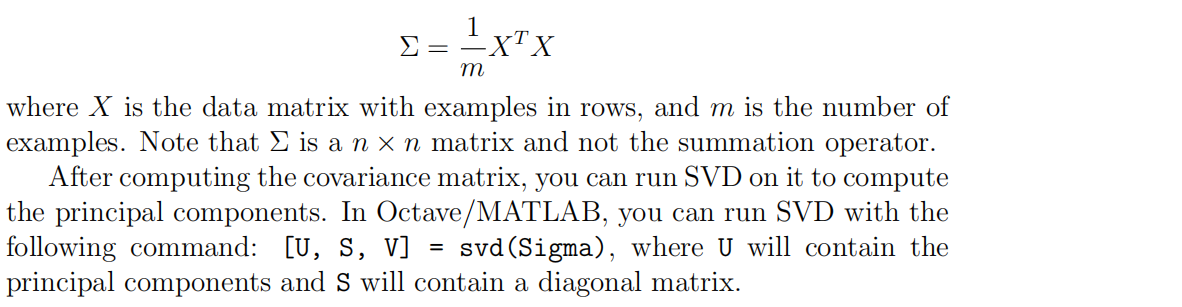
Sigma=(X'*X)./m;

[U,S,V]=svd(Sigma);

% =========================================================================

end
4.projectData
function Z = projectData(X, U, K)

%PROJECTDATA Computes the reduced data representation when projecting only

%on to the top k eigenvectors

%   Z = projectData(X, U, K) computes the projection of

%   the normalized inputs X into the reduced dimensional space spanned by

%   the first K columns of U. It returns the projected examples in Z.

%

% You need to return the following variables correctly.

Z = zeros(size(X, 1), K);

% ====================== YOUR CODE HERE ======================

% Instructions: Compute the projection of the data using only the top K

%               eigenvectors in U (first K columns).

%               For the i-th example X(i,:), the projection on to the k-th

%               eigenvector is given as follows:

%                    x = X(i, :)';

%                    projection_k = x' * U(:, k);

%

U_reduce=U(:,1:K);

Z=X*U_reduce;

% =============================================================

end
5.recoverData
function X_rec = recoverData(Z, U, K)

%RECOVERDATA Recovers an approximation of the original data when using the

%projected data

%   X_rec = RECOVERDATA(Z, U, K) recovers an approximation the

%   original data that has been reduced to K dimensions. It returns the

%   approximate reconstruction in X_rec.

%

% You need to return the following variables correctly.

X_rec = zeros(size(Z, 1), size(U, 1));

% ====================== YOUR CODE HERE ======================

% Instructions: Compute the approximation of the data by projecting back

%               onto the original space using the top K eigenvectors in U.

%

%               For the i-th example Z(i,:), the (approximate)

%               recovered data for dimension j is given as follows:

%                    v = Z(i, :)';

%                    recovered_j = v' * U(j, 1:K)';

%

%               Notice that U(j, 1:K) is a row vector.

%

X_rec=Z*U(:,1:K)';

% =============================================================

end
Machine learning 第8周编程作业 K-means and PCA的更多相关文章
- Machine learning 第7周编程作业 SVM
1.Gaussian Kernel function sim = gaussianKernel(x1, x2, sigma) %RBFKERNEL returns a radial basis fun ...
- Machine learning第6周编程作业
1.linearRegCostFunction: function [J, grad] = linearRegCostFunction(X, y, theta, lambda) %LINEARREGC ...
- Machine learning 第5周编程作业
1.Sigmoid Gradient function g = sigmoidGradient(z) %SIGMOIDGRADIENT returns the gradient of the sigm ...
- Machine learning第四周code 编程作业
1.lrCostFunction: 和第三周的那个一样的: function [J, grad] = lrCostFunction(theta, X, y, lambda) %LRCOSTFUNCTI ...
- c++ 西安交通大学 mooc 第十三周基础练习&第十三周编程作业
做题记录 风影影,景色明明,淡淡云雾中,小鸟轻灵. c++的文件操作已经好玩起来了,不过掌握好控制结构显得更为重要了. 我这也不做啥题目分析了,直接就题干-代码. 总结--留着自己看 1. 流是指从一 ...
- 吴恩达深度学习第4课第3周编程作业 + PIL + Python3 + Anaconda环境 + Ubuntu + 导入PIL报错的解决
问题描述: 做吴恩达深度学习第4课第3周编程作业时导入PIL包报错. 我的环境: 已经安装了Tensorflow GPU 版本 Python3 Anaconda 解决办法: 安装pillow模块,而不 ...
- 吴恩达深度学习第2课第2周编程作业 的坑(Optimization Methods)
我python2.7, 做吴恩达深度学习第2课第2周编程作业 Optimization Methods 时有2个坑: 第一坑 需将辅助文件 opt_utils.py 的 nitialize_param ...
- Machine Learning - 第7周(Support Vector Machines)
SVMs are considered by many to be the most powerful 'black box' learning algorithm, and by posing构建 ...
- Machine Learning – 第2周(Linear Regression with Multiple Variables、Octave/Matlab Tutorial)
Machine Learning – Coursera Octave for Microsoft Windows GNU Octave官网 GNU Octave帮助文档 (有900页的pdf版本) O ...
随机推荐
- iCn3D结构查看器的实现方法
iCn3D Structure Viewer:iCn3D结构查看器 演示效果如下: 上面只是一个Basic UI的演示,如果要Advanced UI的话可以去NCBI官网看API
- 2018.10.04 NOIP模拟 K进制(模拟)
传送门 签到题,直接瞎模拟就行了. 代码
- 2018.09.07 Amount of degrees(数位dp)
描述 求给定区间[X,Y]中满足下列条件的整数个数:这个数恰好等于K个互不相等的B的整数次幂之和. 例如,设X=15,Y=20,K=2,B=2,则有且仅有下列三个数满足题意: 17 = 24+20, ...
- Intelj IDEA的pom.xml显示错误can not reconnect
从GitHub上边down下来的开源项目,报错莫名其妙,后来发现是跟本地hosts文件有关系 hosts文件加上 127.0.0.1 localhost 然后pom文件reload一下就
- Docker挂载宿主机目录
一.普通方式直接挂载 1.查看已有容器 docker ps 2.进入容器并挂载 docker run -it -v /root/work/docker:/root/hzbtest tomcat:7.0 ...
- 20155336 2016-2017-2《JAVA程序设计》第六周学习总结
20155336 2016-2017-2<JAVA程序设计>第六周学习总结 教材学习内容总结 第十章 串流(Stream): 数据有来源及目的地,衔接两者的是串流对象.如果要将数据从来源取 ...
- HDU1551&&HDU1064 Cable master 2017-05-11 17:50 38人阅读 评论(0) 收藏
Cable master Time Limit: ...
- jquery使用ajax报错[Uncaught SyntaxError: Unexpected token :]
$.post('/ajax/validate.do',{"id": id},function(ret){ //ret }); 返回值明明是json,格式也是正确的,却解析不成功,在 ...
- 拷贝构造函数——防篡改
对于普通类型的对象来说,他们之间的复制是简单的,比如: int a = 88; int b = a; 而类和普通对象不同,类对象内部结构一般较为复杂,存在各种成员变量. #include <io ...
- WebAPI+Html跨域时对session的支持
1.Global.asax中添加对Session的支持,重新Init方法: public override void Init() { this.PostAuthenticateRequest += ...