
Spring Cloud 入门教程(一): 服务注册
1. 什么是Spring Cloud?
Spring提供了一系列工具,可以帮助开发人员迅速搭建分布式系统中的公共组件(比如:配置管理,服务发现,断路器,智能路由,微代理,控制总线,一次性令牌,全局锁,主节点选举, 分布式session, 集群状态)。协调分布式环境中各个系统,为各类服务提供模板性配置。使用Spring Cloud, 开发人员可以搭建实现了这些样板的应用,并且在任何分布式环境下都能工作得非常好,小到笔记本电脑, 大到数据中心和云平台。
Spring Cloud官网的定义比较抽象,我们可以从简单的东西开始。Spring Cloud是基于Spring Boot的, 最适合用于管理Spring Boot创建的各个微服务应用。要管理分布式环境下的各个Spring Boot微服务,必然存在服务的注册问题。所以我们先从服务的注册谈起。既然是注册,必然有个管理注册中心的服务器,各个在Spring Cloud管理下的Spring Boot应用就是需要注册的client
Spring Cloud使用erureka server, 然后所有需要访问配置文件的应用都作为一个erureka client注册上去。eureka是一个高可用的组件,它没有后端缓存,每一个实例注册之后需要向注册中心发送心跳,在默认情况下erureka server也是一个eureka client ,必须要指定一个 server。
2. 创建Eureka Server
1).创建一个Maven工程helloworld.eureka.server, pom.xml内容如下:
 <?xml version="1.0" encoding="UTF-8"?>

 <project xmlns="http://maven.apache.org/POM/4.0.0" xmlns:xsi="http://www.w3.org/2001/XMLSchema-instance"

     xsi:schemaLocation="http://maven.apache.org/POM/4.0.0 http://maven.apache.org/xsd/maven-4.0.0.xsd">

   <modelVersion>4.0.0</modelVersion>

   <groupId>com.chry</groupId>

   <artifactId>springcloud.helloworld.eureka.server</artifactId>

   <version>0.0.1-SNAPSHOT</version>

   <packaging>jar</packaging>

   <name>springcloud.helloworld.Eureka.server</name>

   <description>Demo Spring Eureka Server</description>

     <parent>

         <groupId>org.springframework.boot</groupId>

         <artifactId>spring-boot-starter-parent</artifactId>

         <version>1.5.3.RELEASE</version>

         <relativePath/> <!-- lookup parent from repository -->

     </parent>

     <properties>

         <project.build.sourceEncoding>UTF-8</project.build.sourceEncoding>

         <project.reporting.outputEncoding>UTF-8</project.reporting.outputEncoding>

         <java.version>1.8</java.version>

     </properties>

     <dependencies>

         <!--eureka server -->

         <dependency>

             <groupId>org.springframework.cloud</groupId>

             <artifactId>spring-cloud-starter-eureka</artifactId>

         </dependency>

         <dependency>

             <groupId>org.springframework.cloud</groupId>

             <artifactId>spring-cloud-starter-eureka-server</artifactId>

         </dependency>

         <dependency>

             <groupId>org.springframework.cloud</groupId>

             <artifactId>spring-cloud-starter-config</artifactId>

         </dependency>

         <!-- spring boot test-->

         <dependency>

             <groupId>org.springframework.boot</groupId>

             <artifactId>spring-boot-starter-test</artifactId>

             <scope>test</scope>

         </dependency>

     </dependencies>

     <dependencyManagement>

         <dependencies>

             <dependency>

                 <groupId>org.springframework.cloud</groupId>

                 <artifactId>spring-cloud-dependencies</artifactId>

                 <version>Dalston.RC1</version>

                 <type>pom</type>

                 <scope>import</scope>

             </dependency>

         </dependencies>

     </dependencyManagement>

     <build>

         <plugins>

             <plugin>

                 <groupId>org.springframework.boot</groupId>

                 <artifactId>spring-boot-maven-plugin</artifactId>

             </plugin>

         </plugins>

     </build>

     <repositories>

         <repository>

             <id>spring-milestones</id>

             <name>Spring Milestones</name>

             <url>https://repo.spring.io/milestone</url>

             <snapshots>

                 <enabled>false</enabled>

             </snapshots>

         </repository>

     </repositories>

 </project>
pom.xml
2). 用Spring Boot创建一个服务类EurekaServerApplication,需要一个注解@EnableEurekaServer加在springboot工程的启动类上
 package springcloud.helloworld.eureka.server;

 import org.springframework.boot.SpringApplication;

 import org.springframework.boot.autoconfigure.SpringBootApplication;

 import org.springframework.cloud.netflix.eureka.server.EnableEurekaServer;

 @EnableEurekaServer

 @SpringBootApplication

 public class EurekaServerApplication {

     public static void main(String[] args) {

         SpringApplication.run(EurekaServerApplication.class, args);

     }

 }
3).eureka server的配置文件application.yml,其中registerWithEureka:false和fetchRegistry:false表明自己是一个eureka server
 server:

    port: 8761

 eureka:

    instance:

        hostname: localhost

    client:

        registerWithEureka: false

        fetchRegistry: false

        serviceUrl:

            defaultZone: http://${eureka.instance.hostname}:${server.port}/eureka/
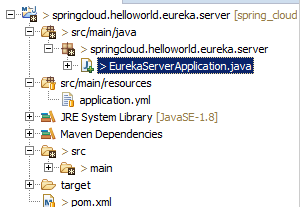
4) eureka server的工程结构如下
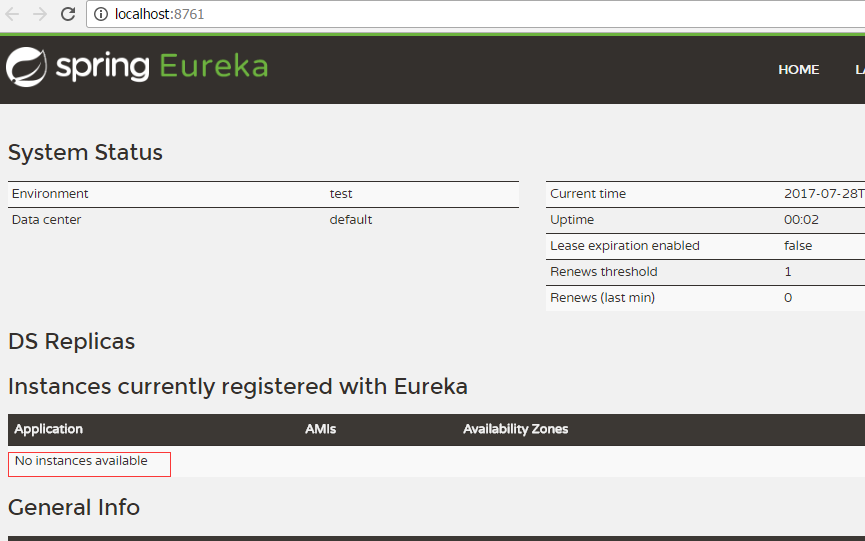
5)启动eureka server,然后访问http://localhost:8761, 界面如下, "No instances available" 表示无client注册
3. 创建Eureka Client
1). 创建一个Maven工程helloworld.eureka.client, pom.xml内容如下:
 <?xml version="1.0" encoding="UTF-8"?>

 <project xmlns="http://maven.apache.org/POM/4.0.0" xmlns:xsi="http://www.w3.org/2001/XMLSchema-instance" xsi:schemaLocation="http://maven.apache.org/POM/4.0.0 http://maven.apache.org/xsd/maven-4.0.0.xsd">

     <modelVersion>4.0.0</modelVersion>

     <groupId>com.chry</groupId>

     <artifactId>springcloud.helloworld.eureka.client</artifactId>

     <version>0.0.1-SNAPSHOT</version>

     <name>springcloud.helloworld.eureka.client</name>

     <packaging>jar</packaging>

     <description>Demo Spring Boot Client</description>

     <parent>

         <groupId>org.springframework.boot</groupId>

         <artifactId>spring-boot-starter-parent</artifactId>

         <version>1.5.3.RELEASE</version>

         <relativePath/> <!-- lookup parent from repository -->

     </parent>

     <properties>

         <project.build.sourceEncoding>UTF-8</project.build.sourceEncoding>

         <project.reporting.outputEncoding>UTF-8</project.reporting.outputEncoding>

         <java.version>1.8</java.version>

     </properties>

     <dependencies>

         <dependency>

             <groupId>org.springframework.cloud</groupId>

             <artifactId>spring-cloud-starter-eureka</artifactId>

         </dependency>

         <dependency>

             <groupId>org.springframework.boot</groupId>

             <artifactId>spring-boot-starter-web</artifactId>

         </dependency>

         <dependency>

             <groupId>org.springframework.boot</groupId>

             <artifactId>spring-boot-starter-test</artifactId>

             <scope>test</scope>

         </dependency>

     </dependencies>

     <dependencyManagement>

         <dependencies>

             <dependency>

                 <groupId>org.springframework.cloud</groupId>

                 <artifactId>spring-cloud-dependencies</artifactId>

                 <version>Dalston.RC1</version>

                 <type>pom</type>

                 <scope>import</scope>

             </dependency>

         </dependencies>

     </dependencyManagement>

     <build>

         <plugins>

             <plugin>

                 <groupId>org.springframework.boot</groupId>

                 <artifactId>spring-boot-maven-plugin</artifactId>

             </plugin>

         </plugins>

     </build>

     <repositories>

         <repository>

             <id>spring-milestones</id>

             <name>Spring Milestones</name>

             <url>https://repo.spring.io/milestone</url>

             <snapshots>

                 <enabled>false</enabled>

             </snapshots>

         </repository>

     </repositories>

 </project>
pom.xml
2). 创建主类EurekaClientApplication
使用@EnableEurekaClient注解表明是client
 package springcloud.helloworld.eureka.client;

 import org.springframework.beans.factory.annotation.Value;

 import org.springframework.boot.SpringApplication;

 import org.springframework.boot.autoconfigure.SpringBootApplication;

 import org.springframework.cloud.netflix.eureka.EnableEurekaClient;

 import org.springframework.web.bind.annotation.RequestMapping;

 import org.springframework.web.bind.annotation.RequestParam;

 import org.springframework.web.bind.annotation.RestController;

 @SpringBootApplication

 @EnableEurekaClient

 @RestController

 public class EurekaClientApplication {

     public static void main(String[] args) {

         SpringApplication.run(EurekaClientApplication.class, args);

     }

     @Value("${server.port}")

     String port;

     @RequestMapping("/")

     public String home() {

         return "hello world from port " + port;     }

 }
3) eureka client的配置文件appication.yml
 eureka:

     client:

         serviceUrl:

             defaultZone: http://localhost:8761/eureka/

 server:

     port: 8762

 spring:

     application:

         name: service-helloworld
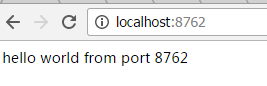
4). Client启动后, 可以访问http://localhost:8762
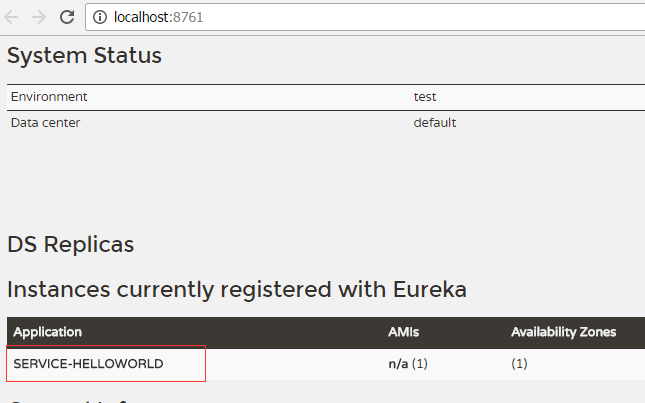
5). 再次访问服务器端口, 可以看到Service Helloworld已经自动注册到之前的server中
下一篇: Spring Cloud 入门教程(二): 配置管理
- 参考资料:
- Spring Cloud 官网
- 博客: http://blog.csdn.net/forezp/article/details/70148833
Spring Cloud 入门教程(一): 服务注册的更多相关文章
- Spring Cloud 入门教程 - Eureka服务注册与发现
简介 在微服务中,服务注册与发现对管理各个微服务子系统起着关键作用.随着系统水平扩展的越来越多,系统拆分为微服务的数量也会相应增加,那么管理和获取这些微服务的URL就会变得十分棘手,如果我们每新加一个 ...
- Spring Cloud 入门教程(二): 服务消费者(rest+ribbon)
在上一篇文章,讲了服务的注册和发现.在微服务架构中,业务都会被拆分成一个独立的服务,服务与服务的通讯是基于http restful的.Spring cloud有两种服务调用方式,一种是ribbon+r ...
- Spring Cloud 入门教程(四): 分布式环境下自动发现配置服务
前一章, 我们的Hello world应用服务,通过配置服务器Config Server获取到了我们配置的hello信息“hello world”. 但自己的配置文件中必须配置config serve ...
- Spring Cloud 入门教程(五): Ribbon实现客户端的负载均衡
接上节,假如我们的Hello world服务的访问量剧增,用一个服务已经无法承载, 我们可以把Hello World服务做成一个集群. 很简单,我们只需要复制Hello world服务,同时将原来的端 ...
- Spring Cloud 入门教程 - 搭建配置中心服务
简介 Spring Cloud 提供了一个部署微服务的平台,包括了微服务中常见的组件:配置中心服务, API网关,断路器,服务注册与发现,分布式追溯,OAuth2,消费者驱动合约等.我们不必先知道每个 ...
- Spring Cloud 入门教程(六): 用声明式REST客户端Feign调用远端HTTP服务
首先简单解释一下什么是声明式实现? 要做一件事, 需要知道三个要素,where, what, how.即在哪里( where)用什么办法(how)做什么(what).什么时候做(when)我们纳入ho ...
- Spring Cloud 入门教程(九): 路由网关zuul
在微服务架构中,需要几个关键的组件,服务注册与发现.服务消费.负载均衡.断路器.智能路由.配置管理等,由这几个组件可以组建一个简单的微服务架构.客户端的请求首先经过负载均衡(zuul.Ngnix),再 ...
- Spring Cloud 入门教程(二): 配置管理
使用Config Server,您可以在所有环境中管理应用程序的外部属性.客户端和服务器上的概念映射与Spring Environment和PropertySource抽象相同,因此它们与Spring ...
- Spring Cloud入门教程(二):客户端负载均衡(Ribbon)
对于大型应用系统负载均衡(LB:Load Balancing)是首要被解决一个问题.在微服务之前LB方案主要是集中式负载均衡方案,在服务消费者和服务提供者之间又一个独立的LB,LB通常是专门的硬件,如 ...
随机推荐
- 观实验室PPT演讲有感
outline 一定要有 说话的语速要慢,压制住紧张的心情 提前一天发布PPT dont` argue with audience, especially professor and teachers ...
- Bugku-CTF之矛盾
Day5 地址:http://123.206.87.240:8002/get/index1.php
- Bugku-CTF之flag.php(点了login咋没反应)
Day2 flag.php(点了login咋没反应) 地址:http://123.206.87.240:8002/flagphp/
- Spring 学习——Spring JSR注解——@Resoure、@PostConstruct、@PreDestroy、@Inject、@Named
JSR 定义:JSR是Java Specification Requests的缩写,意思是Java 规范提案.是指向JCP(Java Community Process)提出新增一个标准化技术规范的正 ...
- 【做题】UVA-12304——平面计算集合六合一
可真是道恶心题-- 首先翻译一下6个任务: 给出一个三角形,求它的外界圆. 给出一个三角形,求它的内接圆. 给出一个圆和一个点,求过这个点的切线的倾斜角\(\alpha \in [0,180)\).( ...
- fw-cloud-framework项目配置、启动问题
1.config组件:其配置优先级高于每个注册到同一个中心的工程的本地配置,所以在统一以dev这个 profile启动各个项目时,去config中心中找-dev结尾的各个工程名命名的文件. confi ...
- (转)Multi-Object-Tracking-Paper-List
Multi-Object-Tracking-Paper-List 2018-08-07 22:18:05 This blog is copied from: https://github.com/Sp ...
- 解决Android Studio No cached version of org.jetbrains.kotlin:kotlin-gradle-plugin:1.1.50 available for offline mode.
打开 file --> Settings... --> Build,Execution,Deployment下点击 Gradle 在Global Gradle settings 处 取消勾 ...
- Component 父子组件关系
我们把组件编写的代码放到构造器外部或者说单独文件 我们需要先声明一个对象,对象里就是组件的内容. var zdy = { template:`<div>Panda from China!& ...
- 【Hadoop 分布式部署 四:配置Hadoop 2.x 中主节点(NN和RM)到从节点的SSH无密码登录】
******************* 一定要使这三台机器的用户名相同,安装目录相同 ************* SSH 无密钥登录的简单介绍(之前再搭 ...