
js 事件冒泡和事件捕获
事件流:指的是网页中元素接受事件的顺序,它是一个概念,而不是具体的实际的东西
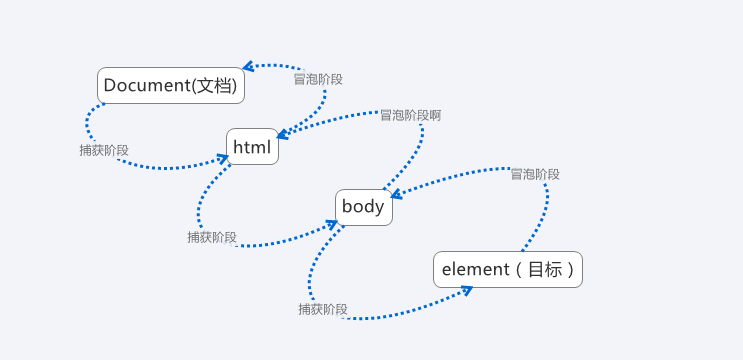
事件冒泡:指的是内层元素的事件,会触发包含着此元素的外层元素的事件,触发的顺序是:由内而外的
例如:
 <!DOCTYPE html>

 <html lang="en">

 <head>

     <meta charset="UTF-8">

     <title>Document</title>

     <style>

         div{

             padding:20px;

             border:1px solid gray;

         }

         .box1{

             position:relative;

             width:200px;

             margin:50px auto;

             background: red;

         }

         .box2{

              background: green;

         }

         .box3{

              background: blue;

         }

     </style>

     <script>

         window.onload=function(){

             var Obox1 = document.querySelector('.box1');

             var Obox2 = document.querySelector('.box2');

             var Obox3 = document.querySelector('.box3');

             var Obtn = document.querySelector('.source');

             Obox1.addEventListener('click',function(){

                 alert(1);

             },false);

             Obox2.addEventListener('click',function(){

                 alert(2);

             },false);

             Obox3.addEventListener('click',function(){

                 alert(3);

             },false);

             Obtn.addEventListener('click',function(){

                 alert('Hello,huanying2015!');

             },false);

         }

     </script>

 </head>

 <body>

     <div class="box1">

         <div class="box2">

             <div class="box3">

                 <input class="source" type="button" value="触发源">

             </div>

         </div>

     </div>

 </body>

 </html>
以下代码中:Obtn的点击事件,会触发外层box1,box2,box3的点击事件,触发顺序:Obtn---->box3---->box2---->box1
(也可以这样理解:Obtn实际是包含在box1,box2,box3中的,点击了Obtn,实际上box1,box2,box3都点击到了,所以box1,box2,box3会触发点击事件)

那么,怎么阻止冒泡事件呢?
阻止冒泡事件:可以使用stopPropagation()函数来阻止;
想在哪里阻止,就把函数加在哪里,例如,点击Obtn,而Obtn外层不会产生冒泡,可以在Obtn的点击函数里加入stopPropagation() 函数;
 <!DOCTYPE html>

 <html lang="en">

 <head>

     <meta charset="UTF-8">

     <title>Document</title>

     <style>

         div{

             padding:20px;

             border:1px solid gray;

         }

         .box1{

             position:relative;

             width:200px;

             margin:50px auto;

             background: red;

         }

         .box2{

              background: green;

         }

         .box3{

              background: blue;

         }

     </style>

     <script>

         window.onload=function(){

             var Obox1 = document.querySelector('.box1');

             var Obox2 = document.querySelector('.box2');

             var Obox3 = document.querySelector('.box3');

             var Obtn = document.querySelector('.source');

             Obox1.addEventListener('click',function(){

                 alert(1);

             },false);

             Obox2.addEventListener('click',function(){

                 alert(2);

             },false);

             Obox3.addEventListener('click',function(){

                 alert(3);

             },false);

             Obtn.addEventListener('click',function(event){

                 alert('Hello,huanying2015!');

                 event.stopPropagation();

             },false);

         }

     </script>

 </head>

 <body>

     <div class="box1">

         <div class="box2">

             <div class="box3">

                 <input class="source" type="button" value="触发源">

             </div>

         </div>

     </div>

 </body>

 </html>
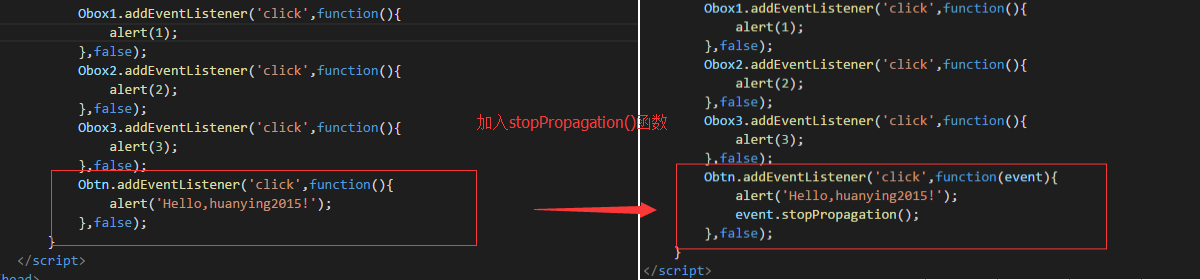
运行结果:
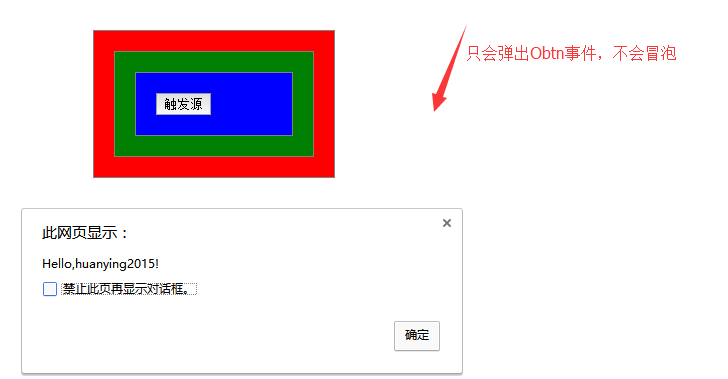
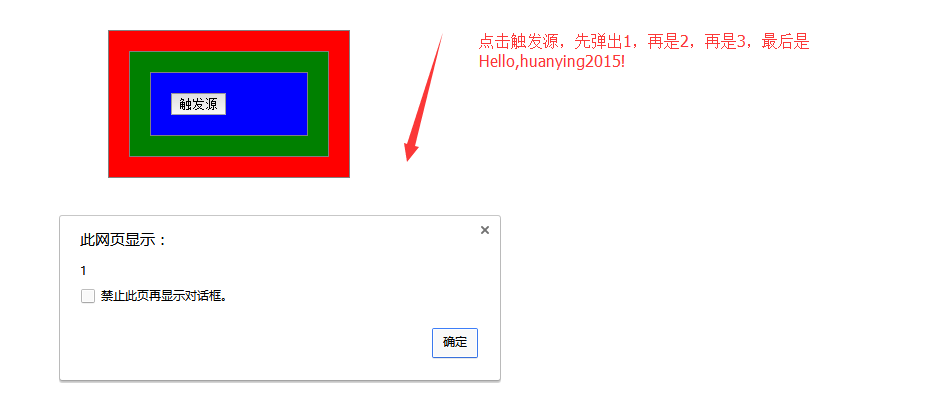
事件捕获:和事件冒泡类似,不过顺序相反,顺序是由外向内
事件捕获,只要把监听函数了的第三个参数,有false改为true,就可以了
 <!DOCTYPE html>

 <html lang="en">

 <head>

     <meta charset="UTF-8">

     <title>Document</title>

     <style>

         div{

             padding:20px;

             border:1px solid gray;

         }

         .box1{

             position:relative;

             width:200px;

             margin:50px auto;

             background: red;

         }

         .box2{

              background: green;

         }

         .box3{

              background: blue;

         }

     </style>

     <script>

         window.onload=function(){

             var Obox1 = document.querySelector('.box1');

             var Obox2 = document.querySelector('.box2');

             var Obox3 = document.querySelector('.box3');

             var Obtn = document.querySelector('.source');

             Obox1.addEventListener('click',function(){

                 alert(1);

             },true);

             Obox2.addEventListener('click',function(){

                 alert(2);

             },true);

             Obox3.addEventListener('click',function(){

                 alert(3);

             },true);

             Obtn.addEventListener('click',function(){

                 alert('Hello,huanying2015!');

             },true);

         }

     </script>

 </head>

 <body>

     <div class="box1">

         <div class="box2">

             <div class="box3">

                 <input class="source" type="button" value="触发源">

             </div>

         </div>

     </div>

 </body>

 </html>
运行结果:
那怎么阻止事件捕获呢,类似的,加入一个stopImmediatePropagation() 或者stopPropagation()函数 就可以了
 <!DOCTYPE html>

 <html lang="en">

 <head>

     <meta charset="UTF-8">

     <title>Document</title>

     <style>

         div{

             padding:20px;

             border:1px solid gray;

         }

         .box1{

             position:relative;

             width:200px;

             margin:50px auto;

             background: red;

         }

         .box2{

              background: green;

         }

         .box3{

              background: blue;

         }

     </style>

     <script>

         window.onload=function(){

             var Obox1 = document.querySelector('.box1');

             var Obox2 = document.querySelector('.box2');

             var Obox3 = document.querySelector('.box3');

             var Obtn = document.querySelector('.source');

             Obox1.addEventListener('click',function(e){

                  alert(1);

                  e.stopPropagation();

             },true);

             Obox2.addEventListener('click',function(){

                 alert(2);

             },true);

             Obox3.addEventListener('click',function(){

                 alert(3);

             },true);

             Obtn.addEventListener('click',function(){

                 alert('Hello,huanying2015!');

             },true);

         }

     </script>

 </head>

 <body>

     <div class="box1">

         <div class="box2">

             <div class="box3">

                 <input class="source" type="button" value="触发源">

             </div>

         </div>

     </div>

 </body>

 </html>
运行结果:
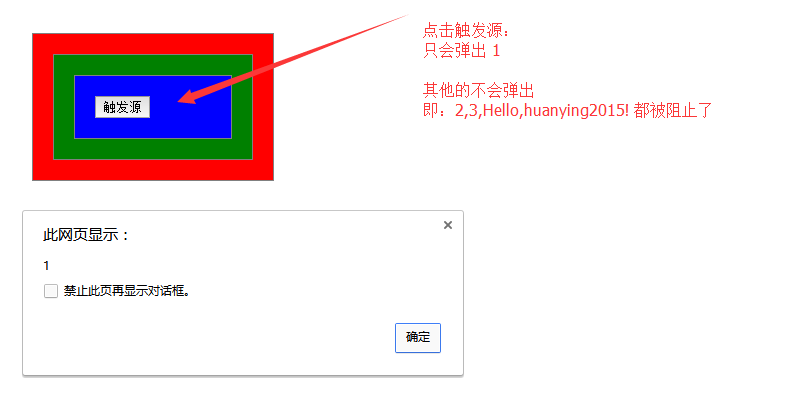
这里要注意的是:stopPropagation() 函数必须放在外层容器中,捕获的顺序是从外到内执行的,放在最内层无效(因为程序已经执行过捕获过程了)
事件冒泡与事件捕获的顺序可以如下归纳:
js 事件冒泡和事件捕获的更多相关文章
- JS事件(事件冒泡和事件捕获)
事件流:描述的是在页面中接收事件的顺序 事件冒泡:由最具体的元素接收,然后逐级向上传播至最不具体的元素的节点(文档) 事件捕获:最不具体的节点先接收事件,而最具体的节点应该是最后接收事件 DOM中:用 ...
- js进阶 12-2 彻底弄懂JS的事件冒泡和事件捕获
js进阶 12-2 彻底弄懂JS的事件冒泡和事件捕获 一.总结 一句话总结:他们是描述事件触发时序问题的术语.事件捕获指的是从document到触发事件的那个节点,即自上而下的去触发事件.相反的,事件 ...
- JS事件冒泡与事件捕获怎么理解?
在js中存在事件冒泡与事件捕获两种概念,这两个概念都是为了解决页面中事件流(事件发生顺序)的问题. 事件冒泡(dubbed bubbling) 事件冒泡我们从字面意思理解就是当用户行为触发我们页面的定 ...
- JS中的事件绑定,事件捕获,事件冒泡以及事件委托,兼容IE
转载请注明出处:http://www.cnblogs.com/zhangmingze/p/4864367.html ● 事件分为三个阶段: 事件捕获 --> 事件目标 --> ...
- 彻底弄懂JS的事件冒泡和事件捕获
先上结论:在事件执行流中有两种执行方式.一种是事件冒泡(即事件的执行顺序是从下往上执行的) ; 另一种是捕获(即事件的执行顺序是从上往下执行的); 阻止事件冒泡: return false; ...
- js高级:event,事件冒泡,事件捕获
1.事件 浏览器客户端上客户触发的行为都称为事件 所有的事件都是天生自带的,不需要我们去绑定,只需要我们去触发. 通过 obj.事件名=function(){} 事件名:onmouseover 鼠标悬 ...
- JS高级:事件冒泡和事件捕获;
1.事件:浏览器客户端上客户触发的行为成为时事件:所有的事件都是天生自带的,不需要我们去绑定,只需要我们去触发 当用户触发一个事件时,浏览器的所有详细信息都存在一个叫做event的对象上,我们把它叫做 ...
- 彻底弄懂JS的事件冒泡和事件捕获(不推荐阅读)
由于搬去敌台了,好久没来博客园,今天无意中翻到有“误认子弟”的评论,这里特意做个说明. 本文中关于事件冒泡和事件捕获的描述和例子都是OK的,错就错在后面用jquery去展示了利用事件冒泡的例子有误,其 ...
- JS事件冒泡和事件捕获的详解
在学校,听老师讲解事件冒泡和事件捕获机制的时候跟听天书一样,只依稀记得IE使用的是事件冒泡,其他浏览器则是事件捕获.当时的我,把它当成IE浏览器兼容问题,所以没有深究(IE8以下版本的浏览器已基本退出 ...
随机推荐
- 如何升级laravel5.4到laravel5.5并使用新特性?
如何升级laravel5.4到laravel5.5并使用新特性? 修改composer.json: "laravel/framework": "5.5.*", ...
- jQuery 常用操作(转)
一.书写规则 支持链式操作: 在变量前加"$"符号(var $variable = jQuery 对象): 注:此规定并不是强制要求. 二.寻找元素 选择器 基本选择器 层级选择器 ...
- 64、django之模型层(model)--建表、查询、删除基础
要说一个项目最重要的部分是什么那铁定数据了,也就是数据库,这篇就开始带大家走进django关于模型层model的使用,model主要就是操纵数据库不使用sql语句的情况下完成数据库的增删改查.本篇仅带 ...
- Java基础总结--泛型总结
-----泛型------JDK1.5出现的机制1.泛型出现的原因--简化书写,提高安全性技术的由来是为了解决问题,现在存在该问题,所有的容器定义类型为Object,所以任何对 象均可以放入容器--进 ...
- LeetCode 448. Find All Numbers Disappeared in an Array (在数组中找到没有出现的数字)
Given an array of integers where 1 ≤ a[i] ≤ n (n = size of array), some elements appear twice and ot ...
- 【20171025晚】alert(1) to win 第五题 正则表达式过滤
吃过晚饭,再练一题 第五题 function escape(s) { var text = s.replace(/</g, '<').replace(/"/g, '"' ...
- 从零使用Python测试。Testing Using Python.
0. 写在前面 本人使用Python测试已有多年,略有些皮毛经验.每次有新员工入职,都会从头教一遍如何入门上手使用Python进行测试.趁这段有空,整理成文档,也好方便后续新员工学习.文章如有不妥之处 ...
- zabbix 2.2.20 安装详解(Centos6.9)
环境说明 [root@centos ~]# cat /etc/redhat-release CentOS release 6.9 (Final) [root@centos ~]# uname -a L ...
- C# into子句
可使用 into 上下文关键字创建临时标识符,将 group.join 或 select 子句的结果存储至新标识符. 此标识符本身可以是附加查询命令的生成器. 有时称在 group 或 select ...
- HTML学习笔记 CSS文本及字体及连接及列表(a标签使用及缩进) 案例 第七节 (原创)参考使用表
<!DOCTYPE html> <html lang="en"> <head> <meta charset="UTF-8&quo ...