
o.s.b.d.LoggingFailureAnalysisReporter
1、错误信息

***************************

APPLICATION FAILED TO START

***************************

Description:

Field userMapper in club.sscai.userservice.user.service.UserService required a bean of type 'club.sscai.userservice.user.mapper.UserMapper' that could not be found.

The injection point has the following annotations:

    - @org.springframework.beans.factory.annotation.Autowired(required=true)

Action:

Consider defining a bean of type 'club.sscai.userservice.user.mapper.UserMapper' in your configuration.
2、解决问题
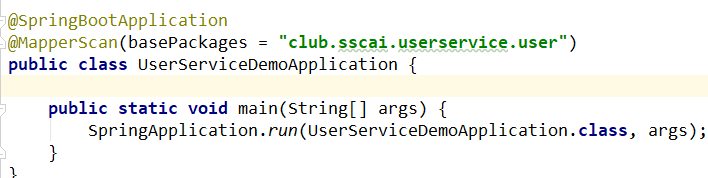
程序启动入口少了 @MapperScan(basePackages = "club.sscai.userservice.user") 扫描 mapper 包的注解
o.s.b.d.LoggingFailureAnalysisReporter的更多相关文章
- Spring Boot 启动报错:LoggingFailureAnalysisReporter
17:57:19: Executing task 'bootRun'... Parallel execution with configuration on demand is an incubati ...
- springboot启动项目报错:ERROR:o.s.b.d.LoggingFailureAnalysisReporter解决办法
原因是引入了spring security的依赖,将spring security对应的依赖删除即可. 具体可参照: https://blog.csdn.net/qq_37887131/article ...
- ERROR 1552 --- [ main] o.s.b.d.LoggingFailureAnalysisReporter : 问题的解决
找到SpringbootApplication类, 在注释@SpringBootApplication后加上(exclude = {DataSourceAutoConfiguration.class} ...
- spring boot容器启动详解
目录 一.前言 二.容器启动 三.总结 =======正文分割线====== 一.前言 spring cloud大行其道的当下,如果不了解基本原理那么是很纠结的(看见的都是约定大于配置,但是原理呢?为 ...
- 解决spring-boot启动中碰到的问题:Cannot determine embedded database driver class for database type NONE
问题 如下: 2017-07-16 08:50:57.436 INFO 13524 --- [ main] c.p.p.web.PointshopWebApplication ...
- springboot 的部分细节
Application.properties 中#指定端口号 server.port= #指定访问路径必须以/crud/xxx 开始 server.servlet.context-path=/crud ...
- java.net.SocketException: 权限不够
java.net.SocketException: 权限不够 一切问题的根源都是缺乏常识 0.0.....背景:今天部署一个spring cloud服务,tanainaide 服务的端口为80,然后 ...
- Consider defining a bean of type 'com.lvjing.dao.DeviceStatusMapper' in your configuration.
"C:\Program Files\Java\jdk1.8.0_181\bin\java.exe" "-javaagent:C:\Program Files\JetBra ...
- Sping Cloud项目启动报A component required a bean of type 'com.tianyan.bbc.dao.SecurityUserBaseMapper' that could not be found.
项目构建正常,启动和Debug报以下错误: Error starting ApplicationContext. To display the conditions report re-run you ...
随机推荐
- 改变eclipse默认的Tomcat部署路径
eclipse中默认的项目部署路径是在项目的路径,不像myeclipse那样部署后项目在Tomcat的安装路径webapps下.这样虽然可以运行,但是不方便开发和调试,本文将介绍如何改变eclipse ...
- MSQL基本增删改语句汇总练习
删除约束注意: 网上说是 ALTER TABLE 表名 DROP CONSTRAINT 约束名; 这里的CONSTRAINT 是指primary key,foreign key,unique,等实际的 ...
- Myeclipse 添加插件
配置方式添加插件,添加一个反编译插件示例 1.官网下载(http://java-decompiler.github.io/) 2.下载到本地之后,删除多余的文件(其他的插件也是如此,例如SVN) 3. ...
- 提高 JavaScript 开发效率的高级 VSCode 扩展!
原文:提高 JavaScript 开发效率的高级 VSCode 扩展! 作者:前端小智 Fundebug经授权转载,版权归原作者所有. Quokka.js Quokka.js 是一个用于 JavaSc ...
- LNMP 一键安装 yum install php-mcrypt libmcrypt libmcrypt-devel
centos源不能安装libmcrypt-devel,由于版权的原因没有自带mcrypt的包 有两种方法解决,一种是使用第三方源,这样还可以使用yum来安装,简单方便,坏处是第三方源多少有中不可靠的感 ...
- H5_canvas与svg
Canvas 什么是canvas: HTML5 的 canvas 元素是使用 JavaScript 在网页上绘制图像,canvas 元素本身是没有绘图能力的,所有的绘制工作必须在 JavaScript ...
- Android和H5进行数据交互,Android获取H5Input框中的内容
项目中嵌入了H5 页面,这个时候就需要拿到H5 input中的内容进行数据传递,先看实现的效果图
- django rest framework 项目创建
Django Rest Framework 是一个强大且灵活的工具包,用以构建Web API 为什么要使用Rest Framework Django REST Framework可以在Django的基 ...
- 你不可不知的Java引用类型之——PhantomReference源码详解
定义 PhantomReference是虚引用,该引用不会影响不会影响对象的生命周期,也无法从虚引用中获取对象实例. 说明 源码介绍部分其实也没多大内容,主要内容都在前面介绍中说完了.PhantomR ...
- 测试系统工程师TSE的职责与培养
测试系统工程师TSE的职责与培养 研发资深顾问 杨学明 如今,国内所有的研发型的公司都有测试部门,无论测试团队大小,都有测试组长,测试经理,测试工程师等头衔,但随着产品和业务的质量要求越来越高,产品的 ...