
WinForm实现Rabbitmq官网6个案例-RPC
获取源码
客户端代码:
namespace RabbitMQDemo

{

    public partial class RPC : Form

    {

        private readonly static RPC _RPC;

        Action<string, TextBox> SetText;

        static RPC()

        {

            _RPC = new RPC();

        }

        /// <summary>

        /// 单例模式

        /// </summary>

        public static RPC SingleForm { get { return _RPC; } }

        private RPC()

        {

            CheckForIllegalCrossThreadCalls = false;

            InitializeComponent();

        }

        private void btnSendMsg_Click(object sender, EventArgs e)

        {//RPC客户端发出请求

            string message = txtPublisher.Text;

            if (message.Trim().Length <= )

            {

                MessageBox.Show("请输入要发送的消息");

            }

            RpcClient client = new RpcClient();

            var response = client.Call(message);

            txtRpcClient.Text += string.Format("{0}\r\n", response);

            client.Close();

        }

        /// <summary>

        /// 客户端类

        /// </summary>

        private class RpcClient

        {

            #region 参数

            /// <summary>

            /// rabbitmq连接

            /// </summary>

            private readonly IConnection connection;

            /// <summary>

            /// 通道

            /// </summary>

            private readonly IModel channel;

            /// <summary>

            /// 客户端关联的队列

            /// </summary>

            private readonly string replyQueueName;

            /// <summary>

            /// 消费者

            /// </summary>

            private readonly EventingBasicConsumer consumer;

            //private readonly BlockingCollection<string> resQueue = new BlockingCollection<string>();

            private readonly BlockingCollection<string> resQueue = new BlockingCollection<string>();

            /// <summary>

            /// 消息属性

            /// </summary>

            private readonly IBasicProperties props;

            #endregion

            /// <summary>

            /// 构造函数

            /// </summary>

            public RpcClient()

            {

                var factory = new ConnectionFactory() { HostName = "localhost" };

                connection = factory.CreateConnection();

                channel = connection.CreateModel();

                replyQueueName = channel.QueueDeclare().QueueName;

                consumer = new EventingBasicConsumer(channel);

                props = channel.CreateBasicProperties();

                //关联response,request和replyQueueName

                var correlationID = Guid.NewGuid().ToString();

                props.CorrelationId = correlationID;

                props.ReplyTo = replyQueueName;

                consumer.Received += (model, ea) =>

                  {

                      var response = Encoding.UTF8.GetString(ea.Body);

                      //确定返回的响应是这个请求发出的

                      if (ea.BasicProperties.CorrelationId == correlationID)

                          resQueue.Add(response);

                  };

            }

            public string Call(string msg)

            {

                var msgBytes = Encoding.UTF8.GetBytes(msg);

                channel.BasicPublish(exchange: "",

                    routingKey: "rpc_queue",

                    basicProperties: props,

                    body: msgBytes);

                channel.BasicConsume(

                    consumer: consumer,

                    queue: replyQueueName,

                    noAck: true);

                return resQueue.Take();

            }

            public void Close()

            {

                connection.Close();

            }

        }//class

    }

}
服务端代码:
namespace RpcServer

{

    public partial class RpcServer : Form

    {

        private readonly static RpcServer _RpcServer;

        Action<string, TextBox> SetText;

        static RpcServer()

        {

            _RpcServer = new RpcServer();

        }

        /// <summary>

        /// 单例模式

        /// </summary>

        public static RpcServer SingleForm { get { return _RpcServer; } }

        private RpcServer()

        {

            CheckForIllegalCrossThreadCalls = false;

            InitializeComponent();

            ReceiveMsg(txtRpcServer);//服务端

            SetText += OnSetText;

        }

        /// <summary>

        /// 服务端接收消息

        /// </summary>

        private void ReceiveMsg(TextBox box)

        {

            try

            {

                var factory = new ConnectionFactory() { HostName = "localhost" };

                var connection = factory.CreateConnection();

                var channel = connection.CreateModel();

                //声明队列

                channel.QueueDeclare(queue: "rpc_queue",

                    durable: false,

                    exclusive: false,

                    autoDelete: false,

                    arguments: null);

                //每个消费者最多消费一条消息,没返回消息确认之前不再接收消息

                channel.BasicQos(, , false);

                var consumer = new EventingBasicConsumer(channel);

                consumer.Received += (model, ea) =>

                {

                    string response = null;

                    var body = ea.Body;

                    var props = ea.BasicProperties;

                    var replyProps = channel.CreateBasicProperties();

                    replyProps.CorrelationId = props.CorrelationId;

                    var msg = Encoding.UTF8.GetString(body);

                    //服务端显示内容

                    box.Invoke(SetText, msg, box);

                    response = "我将给你回复:已收到消息-" + msg;

                    var responseBytes = Encoding.UTF8.GetBytes(response);

                    channel.BasicPublish(exchange: "",

                        routingKey: props.ReplyTo,

                        basicProperties: replyProps,

                        body: responseBytes);

                    //手动向rabbitmq发送消息确认

                    channel.BasicAck(deliveryTag: ea.DeliveryTag,

                        multiple: false);

                };

                channel.BasicConsume(queue: "rpc_queue",

                    noAck: false,//手动确认消息

                    consumer: consumer);

            }

            catch (Exception ex)

            {

                MessageBox.Show(ex.ToString());

            }

        }

        private void OnSetText(string text, TextBox box)

        {

            box.Text += string.Format("{0}\r\n", text);

        }

    }

}
界面:
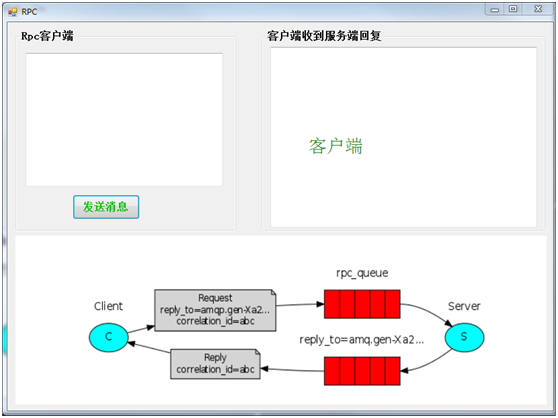
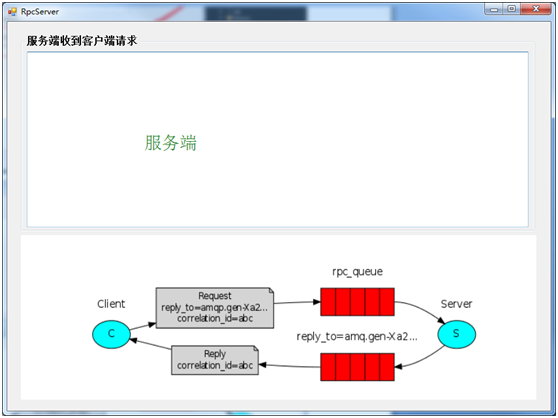
大概流程:
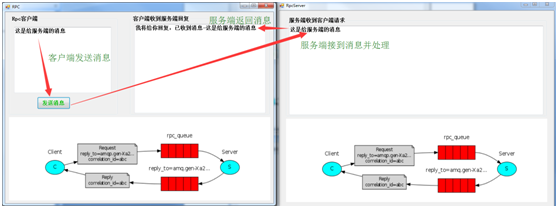
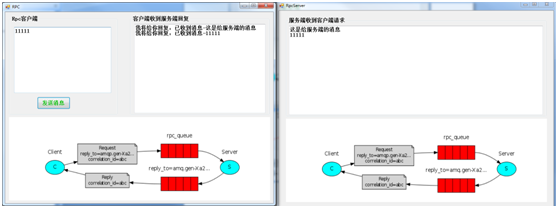
客户端模拟发送一个请求到队列,服务端从队列消费消息并模拟发送一个响应到队列,客户端消费该消息(新建2个winform程序测试,一个客户端,一个服务端)
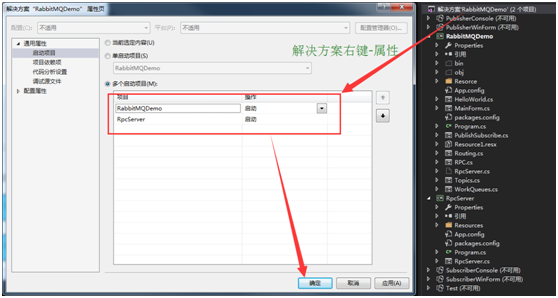
vs同时启动两个winform程序:鼠标点击解决方案-右键属性-多个启动项目-操作改为启动-确定-即可
测试结果:
WinForm实现Rabbitmq官网6个案例-RPC的更多相关文章
- WinForm实现Rabbitmq官网6个案例-Publishe/Subscribe
代码: namespace RabbitMQDemo { public partial class PublishSubscribe : Form { private string exchangeN ...
- WinForm实现Rabbitmq官网6个案例-Work Queues
代码: namespace RabbitMQDemo { public partial class WorkQueues : Form { private string queueName = &qu ...
- WinForm实现Rabbitmq官网6个案例-Hello World
先上代码 namespace RabbitMQDemo { public partial class HelloWorld : Form { string queueName1 = "hel ...
- WinForm实现Rabbitmq官网6个案例-Topics
代码: namespace RabbitMQDemo { public partial class Topics : Form { private string exchangeName = &quo ...
- WinForm实现Rabbitmq官网6个案例-Routing
代码: namespace RabbitMQDemo { public partial class Routing : Form { private string exchangeName = &qu ...
- 官网英文版学习——RabbitMQ学习笔记(一)认识RabbitMQ
鉴于目前中文的RabbitMQ教程很缺,本博主虽然买了一本rabbitMQ的书,遗憾的是该书的代码用的不是java语言,看起来也有些不爽,且网友们不同人学习所写不同,本博主看的有些地方不太理想,为此本 ...
- 2022年官网下安装RabbitMQ最全版与官网查阅方法
目录 一.Erlang环境部署 1.百度搜索"Erlang",或者访问网址:https://www.erlang.org/,找到DOWNLOAD双击进入. 2.找到支持的windo ...
- Yeoman 官网教学案例:使用 Yeoman 构建 WebApp
STEP 1:设置开发环境 与yeoman的所有交互都是通过命令行.Mac系统使用terminal.app,Linux系统使用shell,windows系统可以使用cmder/PowerShell/c ...
- MXNet官网案例分析--Train MLP on MNIST
本文是MXNet的官网案例: Train MLP on MNIST. MXNet所有的模块如下图所示: 第一步: 准备数据 从下面程序可以看出,MXNet里面的数据是一个4维NDArray. impo ...
随机推荐
- 创建第一个flask项目
安装flask模块 pip install flask或conda install flask 创建一个run.py文件,文件内容如下: from flask import Flask app = F ...
- 配置Nginx支持pathinfo模式
Nginx服务器默认不支持pathinfo, 在需要pathinfo支持的程序中(如thinkphp),则无法支持”/index.php/Home/Index/index”这种网址.网上流传的解决办法 ...
- 原 form 表单中 disabled 属性的元素不参与表单提交
https://blog.csdn.net/benben683280/article/details/79173336
- Vue 不睡觉教程2 - 洋气的文件结构
目标书接上回,上回那个例子实在太土了.实际开发中我们不可能把整个网站的js和html全写到一个页面上.所以我们这节课的目标在于改造这个例子的文件结构,让它不那么土Let's do it 环境参数vue ...
- SVN解决冲突的方法
SVN管理代码工具在群组合作开发的过程中,若多人同时修改一个文件,就会出现冲突的情况. 冲突演示: 有A.B两个用户,他们各自从svn服务器中检出了file.txt文件,此时A.B.服务器三个地方的f ...
- MongoDB学习笔记(二)
MongoDB的其他方法: 显示指定数目的数据: 1.在mongodb中查询指定数目的记录,可以使用: db.collectionname.find().limit(number); 2.在mongo ...
- python描述符学习
目录 一.对象属性的访问控制 二.描述符基本理解 三.基本使用 四.使用描述符完成property.classmethod.staticmethod自定义实现 1.property的自定义实现 2.c ...
- javac符号名字的管理
在符号表中,很重要的一项内容就是符号的名字.名字的管理,要解决的主要问题就是名字的变长问题.在javac中,所有的符号名字放到了一个公用字符池中,对于相同的名字只保存一个. 其中涉及到的主要类及关系如 ...
- c++面试题中经常被面试官面试的小问题总结(二)(本篇偏向指针知识)
原文作者:aircraft 原文链接:https://www.cnblogs.com/DOMLX/p/10713204.html 1.利用指针交换两个字符串方法?(这题是我当年读大一的时候看到的,好怀 ...
- bash切割文件
split -l 100 ./x01.txt -d -a 3 --additional-suffix=.txt 将 x01.txt文件,-l 100 按照每个100行, -d 以数字累加, -a 3 ...