
WinForm实现Rabbitmq官网6个案例-Topics
代码:
namespace RabbitMQDemo

{

    public partial class Topics : Form

    {

        private string exchangeName = "topic_logs"; //

        private string exchangeType = ExchangeType.Topic;//交换机类型

        private readonly static Topics _Topics;

        Action<string, TextBox> SetText;

        static Topics()

        {

            _Topics = new Topics();

        }

        /// <summary>

        /// 单例模式

        /// </summary>

        public static Topics SingleForm { get { return _Topics; } }

        private Topics()

        {

            CheckForIllegalCrossThreadCalls = false;

            InitializeComponent();

            ReceiveMsg(txtConsumer1);

            ReceiveMsg(txtConsumer2);

            SetText += OnSetText;

        }

        private void btnSendMsg_Click(object sender, EventArgs e)

        {

            SendMsg();

        }

        private void SendMsg()

        {

            string message = txtPublisher.Text;

            if (message.Trim().Length <= )

            {

                MessageBox.Show("请输入要发送的消息");

            }

            var factory = new ConnectionFactory() { HostName = "localhost" };

            using (var connection = factory.CreateConnection())

            using (var channel = connection.CreateModel())

            {

                channel.ExchangeDeclare(exchange: exchangeName,

                    type: exchangeType);

                var routingKey = cbBoxRoutingKey.Text;

                var body = Encoding.UTF8.GetBytes(message);

                channel.BasicPublish(exchange: exchangeName,

                    routingKey: routingKey,

                    basicProperties: null,

                    body: body);

            }

        }

        private void ReceiveMsg(TextBox box)

        {

            var factory = new ConnectionFactory() { HostName = "localhost" };

            var connection = factory.CreateConnection();

            var channel = connection.CreateModel();

            channel.ExchangeDeclare(exchange: exchangeName,

                type: exchangeType);

            var queueName = channel.QueueDeclare().QueueName;

            if (box.Name == "txtConsumer1")

            {//消费者1

                channel.QueueBind(queue: queueName,

                    exchange: exchangeName,

                    routingKey: "*.*.one");

                channel.QueueBind(queue: queueName,

                    exchange: exchangeName,

                    routingKey: "one.#");

            }

            else if (box.Name == "txtConsumer2")

            {//消费者2

                channel.QueueBind(queue: queueName,

                    exchange: exchangeName,

                    routingKey: "*.*.two");

                channel.QueueBind(queue: queueName,

                    exchange: exchangeName,

                    routingKey: "two.#");

            }

            var consumer = new EventingBasicConsumer(channel);

            consumer.Received += (model, ea) =>

              {

                  var msg = Encoding.UTF8.GetString(ea.Body);

                  box.Invoke(SetText, msg, box);

              };

            channel.BasicConsume(queue: queueName,

                noAck: true,

                consumer: consumer);

        }

        private void OnSetText(string text, TextBox box)

        {

            box.Text += string.Format("{0}\r\n", text);

        }

        private void Topics_Load(object sender, EventArgs e)

        {

            string[] dataSource = new string[] { "send.msg.one", "send.msg.two", "one.receive.msg", "two.receive.msg" };

            cbBoxRoutingKey.DataSource = dataSource; cbBoxRoutingKey.DropDownStyle = ComboBoxStyle.DropDown;

        }

    }

}
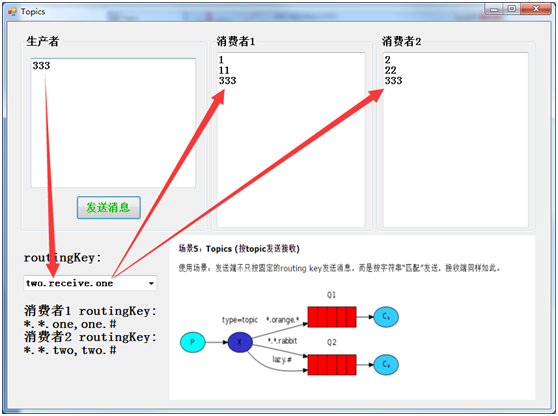
界面:
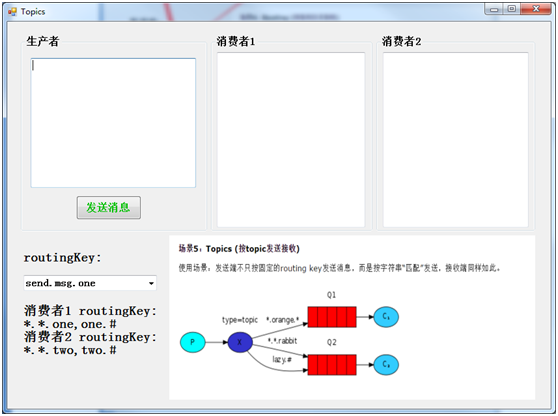
大概流程:
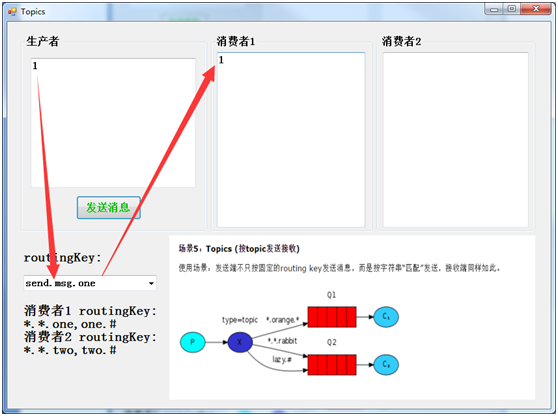
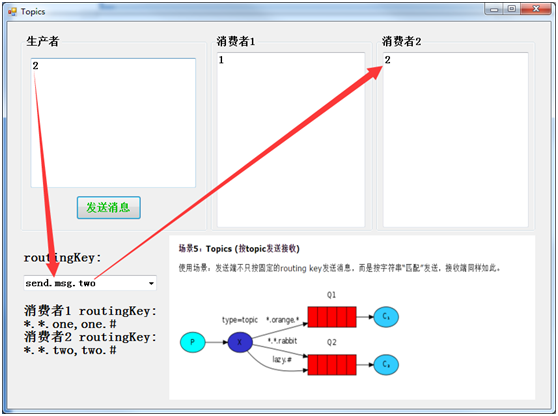
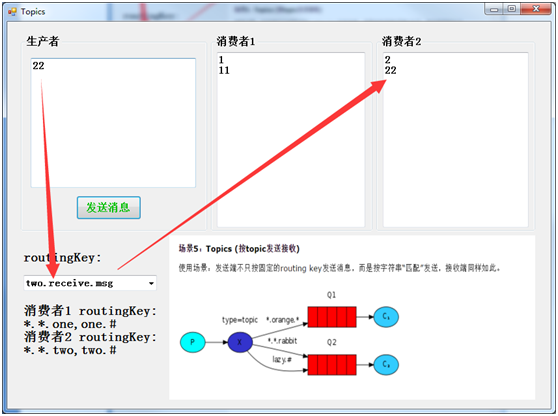
生产者绑定一条消息和type='topic'的交换机以及路由键routingKey来发送到队列,消费者绑定同样的交换机和路由键来获取并处理消息
测试结果:

WinForm实现Rabbitmq官网6个案例-Topics的更多相关文章
- WinForm实现Rabbitmq官网6个案例-RPC
获取源码 客户端代码: namespace RabbitMQDemo { public partial class RPC : Form { private readonly static RPC _ ...
- WinForm实现Rabbitmq官网6个案例-Publishe/Subscribe
代码: namespace RabbitMQDemo { public partial class PublishSubscribe : Form { private string exchangeN ...
- WinForm实现Rabbitmq官网6个案例-Work Queues
代码: namespace RabbitMQDemo { public partial class WorkQueues : Form { private string queueName = &qu ...
- WinForm实现Rabbitmq官网6个案例-Hello World
先上代码 namespace RabbitMQDemo { public partial class HelloWorld : Form { string queueName1 = "hel ...
- WinForm实现Rabbitmq官网6个案例-Routing
代码: namespace RabbitMQDemo { public partial class Routing : Form { private string exchangeName = &qu ...
- 官网英文版学习——RabbitMQ学习笔记(一)认识RabbitMQ
鉴于目前中文的RabbitMQ教程很缺,本博主虽然买了一本rabbitMQ的书,遗憾的是该书的代码用的不是java语言,看起来也有些不爽,且网友们不同人学习所写不同,本博主看的有些地方不太理想,为此本 ...
- 2022年官网下安装RabbitMQ最全版与官网查阅方法
目录 一.Erlang环境部署 1.百度搜索"Erlang",或者访问网址:https://www.erlang.org/,找到DOWNLOAD双击进入. 2.找到支持的windo ...
- Yeoman 官网教学案例:使用 Yeoman 构建 WebApp
STEP 1:设置开发环境 与yeoman的所有交互都是通过命令行.Mac系统使用terminal.app,Linux系统使用shell,windows系统可以使用cmder/PowerShell/c ...
- MXNet官网案例分析--Train MLP on MNIST
本文是MXNet的官网案例: Train MLP on MNIST. MXNet所有的模块如下图所示: 第一步: 准备数据 从下面程序可以看出,MXNet里面的数据是一个4维NDArray. impo ...
随机推荐
- Win10将用户名修改为英文
前言 最近重装了一次Win10系统,手贱地在引导里设置了中文的用户名.使用微软账户进行登录后,Win10以这个中文名建立了用户的文件夹,使得少数软件安装或使用过程中,保存路径不支持中文路径,从而报错, ...
- Github概念理解备忘录
总结: add就是用来建立跟踪,添加文件到缓存区: commit就是把文件缓存区的文件正式加到本地库中: push就是把本地库更新到远程库中: git命令的操作要在仓库所在目录下进行才有效: 在Git ...
- 图示NP, P, NP-Complete和NP-Hard问题
P问题是一类可以通过确定性图灵机(以下简称图灵机)在多项式时间(Polynomial time)内解决的问题集合. NP问题是一类可以通过非确定性图灵机( Non-deterministic Turi ...
- OS X获取process.env.NODE_ENV出错
原来项目是其它小组在维护,现在我们需要维护部分功能,把项目带到OS X上运行发现 webpack.config.js获取process.env.NODE_ENV变量出错 解决: 根据电脑操作系统平台类 ...
- Mac下安装tomcat8(Mac 10.12)
1.到官网下载tomcat8 http://tomcat.apache.org/download-80.cgi 说明:tomcat最好不要下载最新的,选择一个适中的最好. 2.安装 ▲解压并重命名文件 ...
- thinkPHP5配置nginx环境无法打开(require(): open_basedir restriction in effect. File(/mnt/hgfs/root/tp5/thinkphp/start.php) is not within the allowed path(s)
今天想把玩一下tp5,结果怎么都无法访问,每次都是报500错误,我把错误提示都打开看到下面的错误 require(): open_basedir restriction in effect. File ...
- Ambari集群里操作时典型权限问题put: `/home/bigdata/1.txt': No such file or directory的解决方案(图文详解)
不多说,直接上干货! 问题详情 明明put该有的文件在,可是怎么提示的是文件找不到的错误呢? 我就纳闷了put: `/home/bigdata/1.txt': No such file or dire ...
- ASP.NET Core 集成 WebSocket
1. 环境 AspNetCore Web 2.0 (MVC) Windows 10 IIS 10 Express/IIS VS 2017 2.如何配置 在已有的或者新创建的 AspNet Core M ...
- jquery 选择唯一值 选择器“”非“用法
$(document).ready(function () { $("#addwork").hide(); $(".xi").click(function(){ ...
- Cannot find module 'rxjs/operators/share'
描述: ionic项目,在使用了ngx-translate之后,项目编译完成,运行到浏览器时,出现如下错误: 其中ngx-translate参照官网最新教程使用,并且也尝试了angular4.3之前的 ...