
Qml 中实现任意角为圆角的矩形
【写在前面】
在 Qml 中,矩形(Rectangle)是最常用的元素之一。
然而,标准的矩形元素仅允许设置统一的圆角半径。
在实际开发中,我们经常需要更灵活的圆角设置,例如只对某些角进行圆角处理,或者设置不同角的圆角半径。
本文将介绍如何通过自定义 Qml 元素实现一个任意角可为圆角的矩形。
【正文开始】
效果图
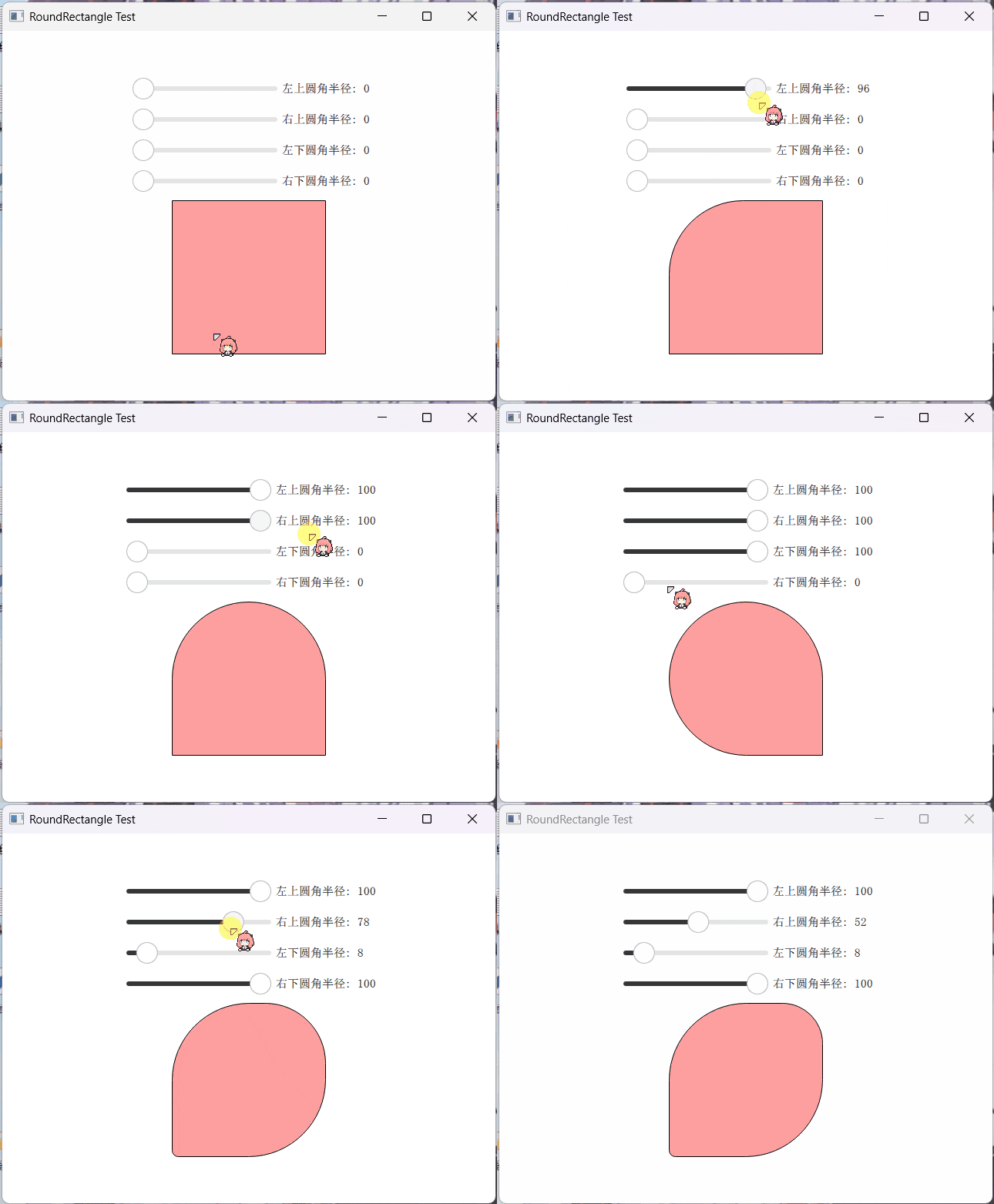
自定义 Qml 元素:DelRectangle
我们将创建一个名为 DelRectangle 的自定义 Qml 元素,它继承自 QQuickPaintedItem,并重写其 paint() 方法来自定义绘制逻辑。
头文件(delrectangle.h)
#ifndef DELRECTANGLE_H

#define DELRECTANGLE_H

#include <QQuickPaintedItem>

class DelPen: public QObject

{

    Q_OBJECT

    Q_PROPERTY(qreal width READ width WRITE setWidth NOTIFY widthChanged FINAL)

    Q_PROPERTY(QColor color READ color WRITE setColor NOTIFY colorChanged FINAL)

    QML_NAMED_ELEMENT(DelPen)

public:

    DelPen(QObject *parent = nullptr);

    qreal width() const;

    void setWidth(qreal width);

    QColor color() const;

    void setColor(const QColor &color);

    bool isValid() const;

signals:

    void widthChanged();

    void colorChanged();

private:

    qreal m_width = 1;

    QColor m_color = Qt::transparent;

};

class DelRectangle: public QQuickPaintedItem

{

    Q_OBJECT

    Q_PROPERTY(qreal radius READ radius WRITE setRadius NOTIFY radiusChanged FINAL)

    Q_PROPERTY(qreal topLeftRadius READ topLeftRadius WRITE setTopLeftRadius NOTIFY topLeftRadiusChanged FINAL)

    Q_PROPERTY(qreal topRightRadius READ topRightRadius WRITE setTopRightRadius NOTIFY topRightRadiusChanged FINAL)

    Q_PROPERTY(qreal bottomLeftRadius READ bottomLeftRadius WRITE setBottomLeftRadius NOTIFY bottomLeftRadiusChanged FINAL)

    Q_PROPERTY(qreal bottomRightRadius READ bottomRightRadius WRITE setBottomRightRadius NOTIFY bottomRightRadiusChanged FINAL)

    Q_PROPERTY(QColor color READ color WRITE setColor NOTIFY colorChanged FINAL)

    Q_PROPERTY(DelPen* border READ border CONSTANT)

    QML_NAMED_ELEMENT(DelRectangle)

public:

    explicit DelRectangle(QQuickItem *parent = nullptr);

    ~DelRectangle();

    qreal radius() const;

    void setRadius(qreal radius);

    qreal topLeftRadius() const;

    void setTopLeftRadius(qreal radius);

    qreal topRightRadius() const;

    void setTopRightRadius(qreal radius);

    qreal bottomLeftRadius() const;

    void setBottomLeftRadius(qreal radius);

    qreal bottomRightRadius() const;

    void setBottomRightRadius(qreal radius);

    QColor color() const;

    void setColor(QColor color);

    DelPen *border();

    void paint(QPainter *painter) override;

signals:

    void radiusChanged();

    void topLeftRadiusChanged();

    void topRightRadiusChanged();

    void bottomLeftRadiusChanged();

    void bottomRightRadiusChanged();

    void colorChanged();

private:

    Q_DECLARE_PRIVATE(DelRectangle);

    QSharedPointer<DelRectanglePrivate> d_ptr;

};

#endif // DELRECTANGLE_H
实现文件(delrectangle.cpp)
#include "delrectangle.h"

#include <QPainter>

#include <QPainterPath>

#include <private/qqmlglobal_p.h>

class DelRectanglePrivate

{

public:

    QColor m_color = { 0xffffff };

    DelPen *m_pen = nullptr;

    qreal m_radius = 0;

    qreal m_topLeftRadius = 0;

    qreal m_topRightRadius = 0;

    qreal m_bottomLeftRadius = 0;

    qreal m_bottomRightRadius = 0;

};

DelRectangle::DelRectangle(QQuickItem *parent)

    : QQuickPaintedItem{parent}

    , d_ptr(new DelRectanglePrivate)

{

}

DelRectangle::~DelRectangle()

{

}

qreal DelRectangle::radius() const

{

    Q_D(const DelRectangle);

    return d->m_radius;

}

void DelRectangle::setRadius(qreal radius)

{

    Q_D(DelRectangle);

    if (d->m_radius != radius) {

        d->m_radius = radius;

        d->m_topLeftRadius = radius;

        d->m_topRightRadius = radius;

        d->m_bottomLeftRadius = radius;

        d->m_bottomRightRadius = radius;

        emit radiusChanged();

        update();

    }

}

// 其他 getter 和 setter 方法省略...

QColor DelRectangle::color() const

{

    Q_D(const DelRectangle);

    return d->m_color;

}

void DelRectangle::setColor(QColor color)

{

    Q_D(DelRectangle);

    if (d->m_color != color) {

        d->m_color = color;

        emit colorChanged();

        update();

    }

}

DelPen *DelRectangle::border()

{

    Q_D(DelRectangle);

    if (!d->m_pen) {

        d->m_pen = new DelPen;

        QQml_setParent_noEvent(d->m_pen, this);

        connect(d->m_pen, &DelPen::colorChanged, this, [this]{ update(); });

        connect(d->m_pen, &DelPen::widthChanged, this, [this]{ update(); });

        update();

    }

    return d->m_pen;

}

void DelRectangle::paint(QPainter *painter)

{

    Q_D(DelRectangle);

    painter->save();

    painter->setRenderHint(QPainter::Antialiasing);

    QRectF rect = boundingRect();

    if (d->m_pen && d->m_pen->isValid()) {

        rect = boundingRect();

        if (rect.width() > d->m_pen->width() * 2) {

            auto dx = d->m_pen->width() * 0.5;

            rect.adjust(dx, 0, -dx, 0);

        }

        if (rect.height() > d->m_pen->width() * 2) {

            auto dy = d->m_pen->width() * 0.5;

            rect.adjust(0, dy, 0, -dy);

        }

        painter->setPen(QPen(d->m_pen->color(), d->m_pen->width(), Qt::SolidLine, Qt::SquareCap, Qt::SvgMiterJoin));

    }

    QPainterPath path;

    path.moveTo(rect.bottomRight() - QPointF(0, d->m_bottomRightRadius));

    path.lineTo(rect.topRight() + QPointF(0, d->m_topRightRadius));

    path.arcTo(QRectF(QPointF(rect.topRight() - QPointF(d->m_topRightRadius * 2, 0)), QSize(d->m_topRightRadius * 2, d->m_topRightRadius * 2)), 0, 90);

    path.lineTo(rect.topLeft() + QPointF(d->m_topLeftRadius, 0));

    path.arcTo(QRectF(QPointF(rect.topLeft()), QSize(d->m_topLeftRadius * 2, d->m_topLeftRadius * 2)), 90, 90);

    path.lineTo(rect.bottomLeft() - QPointF(0, d->m_bottomLeftRadius));

    path.arcTo(QRectF(QPointF(rect.bottomLeft().x(), rect.bottomLeft().y() - d->m_bottomLeftRadius * 2), QSize(d->m_bottomLeftRadius * 2, d->m_bottomLeftRadius * 2)), 180, 90);

    path.lineTo(rect.bottomRight() - QPointF(d->m_bottomRightRadius, 0));

    path.arcTo(QRectF(QPointF(rect.bottomRight() - QPointF(d->m_bottomRightRadius * 2, d->m_bottomRightRadius * 2)), QSize(d->m_bottomRightRadius * 2, d->m_bottomRightRadius * 2)), 270, 90);

    painter->setBrush(d->m_color);

    painter->drawPath(path);

    painter->restore();

}
关键点解析
自定义 Qml 元素:通过继承
QQuickPaintedItem并使用QML_NAMED_ELEMENT宏,我们可以将自定义的 C++ 类注册为 Qml 元素。属性定义:我们定义了多个属性来控制矩形的圆角半径和颜色,例如
radius、topLeftRadius、color等,并提供了相应的 getter 和 setter 方法。边框管理:通过
DelPen类来管理矩形的边框样式,包括边框颜色和宽度。绘制逻辑:在
paint()方法中,我们使用QPainterPath来绘制具有不同圆角的矩形。通过组合使用直线和弧线,我们可以实现任意角的圆角效果。
使用示例
在 Qml 文件中,我们可以像使用标准的 Rectangle 元素一样使用 DelRectangle:
import QtQuick 2.15

import QtQuick.Window 2.15

import DelegateUI.Controls 1.0

Window {

    visible: true

    width: 400

    height: 300

    title: "DelRectangle Example"

    DelRectangle {

        anchors.centerIn: parent

        width: 200

        height: 150

        color: "lightblue"

        topLeftRadius: 20

        bottomRightRadius: 30

        border {

            width: 2

            color: "blue"

        }

    }

}
总结
通过自定义 Qml 元素 DelRectangle,我们实现了对矩形圆角的更灵活控制,使其能够满足更多实际开发需求。
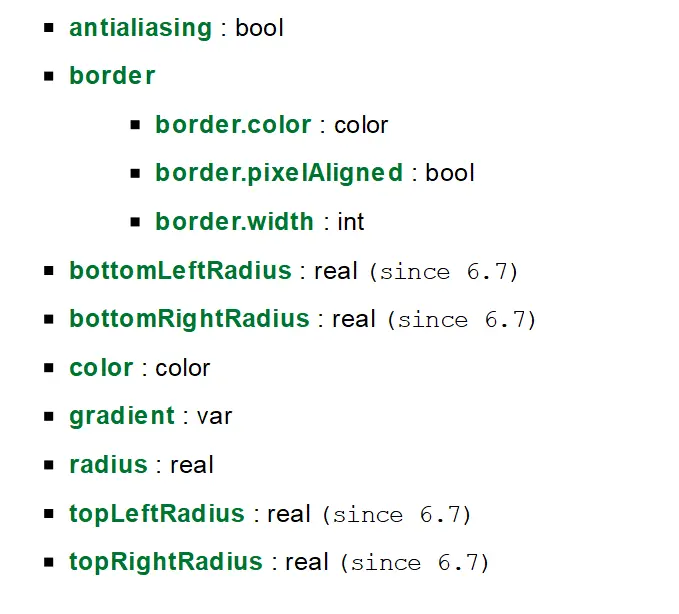
要注意的是,在 Qt 6.7 版本以后,内置的 Rectangle 将提供同等功能( 作为技术预览 ),并且效果更好:
最后:项目链接(多多star呀.._):
Github: https://github.com/mengps/QmlControls
Gitee: https://gitee.com/MenPenS/QmlControls
Qml 中实现任意角为圆角的矩形的更多相关文章
- android中对Bitmap图片设置任意角为圆角
http://blog.csdn.net/l448288137/article/details/48276681 最近项目开发中使用到了圆角图片,网上找到的圆角图片控件大多比较死板,只可以全圆角.其中 ...
- iOS 琐碎点------切某个或某几个角的圆角
不说废话----------> 1.如果是切四个角的圆角,代码示例: self.picImage.layer.cornerRadius = 8; self.picImage.layer.mask ...
- qml中打开本地html
main.cpp QString tmploc = QStandardPaths::writableLocation(QStandardPaths::GenericDataLocation); QDi ...
- SGU 275 To xor or not to xor 高斯消元求N个数中选择任意数XORmax
275. To xor or not to xor The sequence of non-negative integers A1, A2, ..., AN is given. You are ...
- LightOj1203 - Guarding Bananas(凸包求多边形中的最小角)
题目链接:http://lightoj.com/volume_showproblem.php?problem=1203 题意:给你一个点集,求凸包中最小的角:模板题,但是刚开始的时候模板带错了,错的我 ...
- PHP 提取图片img标记中的任意属性
PHP 提取图片img标记中的任意属性的简单实例. 复制代码代码如下: <?php /* PHP正则提取图片img标记中的任意属性 */ $str = '<center><im ...
- pojg2744找一个最长的字符串x,使得对于已经给出的字符串中的任意一个y,x或者是y的子串,或者x中的字符反序之后得到的新字符串是y的子串。
http://poj.grids.cn/practice/2744 描述现在有一些由英文字符组成的大小写敏感的字符串,你的任务是找到一个最长的字符串x,使得对于已经给出的字符串中的任意一个y,x或者是 ...
- qt qml中PropertyAnimation的几种使用方法
qml文章 qt qml中PropertyAnimation的几种使用方法 动画应用场景有以下几种: 首先如果一个Rectangle.动画是要改变它的x和y值 1,Rectangle一旦被创建,就要移 ...
- qml 中 使用 shader
使用绘制工具如Photoshop .Flash已经可以创建许多效果非常绚丽的图像.动画等. Qt/QML 的努力其实是在这些工具发展的后面, 因此很多效果在Qt中无法实现. 不得不佩服Qt小组的才智, ...
- cv2.cornerHarris()详解 python+OpenCV 中的 Harris 角点检测
参考文献----------OpenCV-Python-Toturial-中文版.pdf 参考博客----------http://www.bubuko.com/infodetail-2498014. ...
随机推荐
- MySQL造数据,批量插入数据脚本
新建表 create table bigdata( name varchar(32), age int(32), createTime datetime); MySQL批量插入数据脚本 #!/bin/ ...
- 鸿蒙NEXT开发案例:抛硬币
[1]引言(完整代码在最后面) 本项目旨在实现一个简单的"抛硬币"功能,用户可以通过点击屏幕上的地鼠图标来模拟抛硬币的过程.应用会记录并显示硬币正面(地鼠面)和反面(数字100面) ...
- aiflow部署文档
aiflow部署文档 一.简介 本文档用来进行aiflow项目的完全部署 二.安装环境 2.1 安装系统镜像版本 使用Centos镜像文件:CentOS-7-x86_64-DVD-1908.iso c ...
- 居然都到 7.x版本了!!!雷池 WAF 社区版 7.x 的体验记录
雷池 WAF 简介 雷池 WAF,英文名 "SafeLine",由长亭科技出品的一款 Web 应用防火墙,可以保护 Web 服务不受黑客攻击,早年就以 "智能语义分析技术 ...
- vant中dialog的使用
按照文档上的方式引入组件,但是还是会报错说没有注册 引入方式如下: import { Cell, CellGroup, Field, Dialog } from 'vant'; components: ...
- Elasticsearch之常见问题
一. 聚合操作时,报Fielddata is disabled on text fields by default GET /megacorp/employee/_search { "agg ...
- docker 下载镜像配置
现在docker 安装镜像的时候,会发现下载不了镜像. 有网友提供了一些可用的镜像,亲测可用. { "registry-mirrors": [ "https://dock ...
- 使用 spring stream 发送消息
为什么使用spring stream ? spring stream 是用来做消息队列发送消息使用的.他隔离了各种消息队列的区别,使用统一的编程模型来发送消息. 目前支持: rabbitmq kafk ...
- Vue.js 组件基础
1.前言 本节讲述vue组件的基本格式以及实际开发的应用场景,本节内容兼容Vue2.x与Vue3.x 2.组件基础 组件的本质其实就是一个对象,这个对象包含多个属性,常见的属性有:template/d ...
- HTML5 多媒体
1.互联网上的音频 直到现在,仍然不存在一项旨在网页上播放音频的标准. 今天,大多数音频是通过插件(比如 Flash)来播放的.然而,并非所有浏览器都拥有同样的插件. HTML5 规定了在网页上嵌入音 ...