
Vue2.5开发去哪儿网App 搜索功能完成
效果展示:
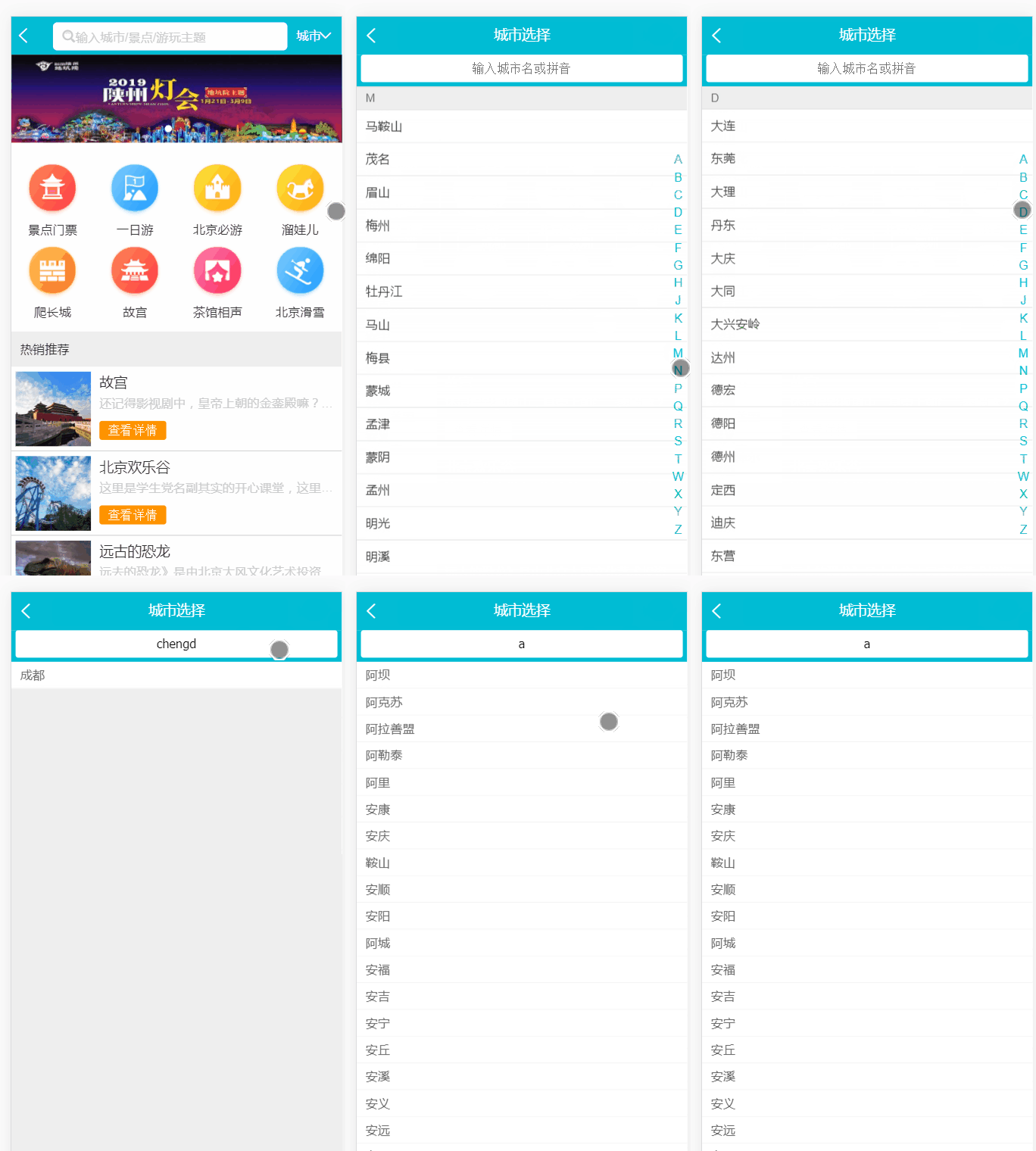
Search.vue:
    <div class="search-content" ref="search" v-show="keyword">

      <!--双向绑定keyword-->

      <ul>

        <!--遍历找到的城市-->

        <li class="search-item border-bottom" v-for="(city,index) in cityList" :key="index">{{city}}</li>

        <!--没有找到时的显示-->

        <li class="search-item border-bottom" v-show="hasCity">

          没有找到匹配数据

        </li>

      </ul>

    </div>
当有输入时:
const result = []
//this.cities格式: {
//   "id": 933,
//   "spell": "zhangpu",
//   "name": "漳浦"
// }
...
for (let i in this.cities) {
  this.cities[i].forEach((value) => {
    if (value.spell.indexOf(this.keyword) > -1 || value.name.indexOf(this.keyword) > -1) {
      result.push(value.name)
    }
  })
  this.cityList = result
}
没有输入时:
if (!this.keyword) {

this.cityList = []

return

}
添加 computed 计算属性:
  computed: {

    hasCity () {

      return !this.cityList.length

    }

  }
  //负责显示与否:
<li class="search-item border-bottom" v-show="hasCity">
  没有找到匹配数据
</li>
<template>

  <div>

    <div class="search">

      <input type="text" v-model="keyword" class="search-input" placeholder="输入城市名或拼音">

    </div>

    <div class="search-content" ref="search" v-show="keyword">

      <!--双向绑定keyword-->

      <ul>

        <!--遍历找到的城市-->

        <li class="search-item border-bottom" v-for="(city,index) in cityList" :key="index">{{city}}</li>

        <!--没有找到时的显示-->

        <li class="search-item border-bottom" v-show="hasCity">

          没有找到匹配数据

        </li>

      </ul>

    </div>

  </div>

</template>

<script>

import BScroll from 'better-scroll'

export default {

  name: 'CitySearch',

  props: ['cities'],

  data: function () {

    return {

      // 关键字

      keyword: '',

      // 城市列表

      cityList: [],

      // 函数节流

      timer: null

    }

  },

  computed: {

    hasCity () {

      return !this.cityList.length

    }

  },

  watch: {

    keyword: function () {

      if (this.timer) {

        clearTimeout(this.timer)

      }

      this.timer = setTimeout(() => {

        if (!this.keyword) {

          this.cityList = []

          return

        }

        const result = []

        for (let i in this.cities) {

          this.cities[i].forEach((value) => {

            if (value.spell.indexOf(this.keyword) > -1 || value.name.indexOf(this.keyword) > -1) {

              result.push(value.name)

            }

          })

          this.cityList = result

        }

      }, 100)

    }

  },

  mounted () {

    this.scroll = new BScroll(this.$refs.search)

  }

}

</script>

<!--组件样式,不影响其他组件-->

<!--1rem = html front-size = 50px-->

<style lang="stylus" scoped>

@import "~styles/varibles.styl"

  .search

    height .72rem

    padding 0 .1rem

    background $bgColor

    .search-input

      padding 0 .1rem

      box-sizing border-box

      height .62rem

      line-height .62rem

      width 100%

      text-align center

      border-radius .06rem

  .search-content

    overflow hidden

    background #eee

    position absolute

    top 1.58rem

    left 0

    right 0

    z-index: 1

    bottom 0

    .search-item

      line-height .62rem

      padding-left .2rem

      color #666

      background #fff

</style>
Search.vue
项目地址:
https://github.com/1417766861/Vue2.5-App/tree/city-search-logic/Travel
Vue2.5开发去哪儿网App 搜索功能完成的更多相关文章
- Vue2.5 开发去哪儿网App
Vue2.5开发去哪儿网App 技术栈和主要框架
- Vue2.5开发去哪儿网App 首页开发
主页划 5 个组件,即 header icon swiper recommend weekend 一. header区域开发 1. 安装 stylus npm install stylus --s ...
- Vue2.5开发去哪儿网App 城市列表开发之 Vuex实现数据共享及高级使用
一,数据共享 1. 安装: npm install vuex --save 2. 在src目录下 新建state文件夹,新建index.js文件 3. 创建一个 store import Vue f ...
- Vue2.5开发去哪儿网App 从零基础入门到实战项目
第1章 课程介绍本章主要介绍课程的知识大纲,学习前提,讲授方式及预期收获. 1-1 课程简介 试看第2章 Vue 起步本章将快速讲解部分 Vue 基础语法,通过 TodoList 功能的编写,在熟悉基 ...
- Vue2.5开发去哪儿网App 第五章笔记 上
1.css动画原理 .fade-enter{ opacity: 0; } .fade-enter-active{ transition: opacity 2s; } .fade-leave-to{ o ...
- Vue2.5开发去哪儿网App 城市列表开发之 兄弟组件间联动及列表性能优化
一, 兄弟组件间联动 1. 点击城市字母,左侧对应显示 给遍历的 字母 添加一个点击事件: Alphabet.vue @click="handleLetterClick" ha ...
- Vue2.5开发去哪儿网App 城市列表开发
一,城市选择页面路由配置 ...
- Vue2.5开发去哪儿网App 第五章笔记 下
1. 多个元素或组件的过渡 多个元素的过渡: <style> .v-enter,.v-leace-to{ opacity: 0; } .v-enter-active,.v-leave-ac ...
- Vue2.5开发去哪儿网App 第四章笔记 下
1.解决非父子组件之间的传值问题 非父子组件传值(Bus/总线/发布订阅模式/观察者模式) 给 Vue类上挂在一个属性,然后创建vue实例时,实例就拥有了这个属性 Vue.prototype.bus ...
随机推荐
- Win7 VS2015环境使用qt-msvc2015-5.6.0
QT下载 http://www.qt.io/download-open-source/#section-2 我用的是 qt-opensource-windows-x86-msvc2015-5.6.0. ...
- python3 print函数的用法
1. 输出字符串 >>> strHello = 'Hello World' >>> print (strHello) Hello World 2. 格式化输出整数 ...
- activemq部署
系统环境 IP salt-master-1:192.168.0.156 salt-master-2:192.168.0.157 node-test-1:192.168.0.158 node-test- ...
- Arria10中的OCT功能
OCT是什么? 串行(RS)和并行(RT) OCT 提供了 I/O 阻抗匹配和匹配性能.OCT 维持信号质量,节省电路板空 间,并降低外部组件成本. Arria 10 器件支持所有 FPGA 和 HP ...
- ArcGIS 关于Web_Mercator
#小知识#EPSG,即 European Petroleum Standards Group 欧洲石油标准组织 在ArcGIS 10中Web Mercator有三种EPSG编号.他们分别是EPSG38 ...
- MIT Molecular Biology 笔记3 DNA同源重组
视频 https://www.bilibili.com/video/av7973580?from=search&seid=16993146754254492690 教材 Molecular ...
- c需要注意的细节
1.在纯的.c文件中,例如struct Stu,之后不可以只使用Stu作为关键字来表示这个定义的结构体类型,一定要使用struct Stu一起作为类似int这种关键字来定义或者获取size. 2.函数 ...
- 万物云平台数据转发 c# 控制台程序
using System; using System.Collections.Generic; using System.Linq; using System.Text; using System.N ...
- Anroid 手机助手 详细解析 概述(二)
这篇主要说一下手机插入之后的一些动作. 1) 捕获窗口消息 插入拔出一个USB设备windows 会给所有的窗口发送特定的消息,只要我们捕获这些消息就可以处理设备插入和拔出.需要注意的是插入或者拔出 ...
- Javascript 对象继承 原型链继承 对象冒充 call 混合方式
一.原型链继承 function ClassA() {} ClassA.prototype.color = "blue"; ClassA.prototype.sayColor = ...