
[iOS微博项目 - 4.4] - 会员标识
 //

 //  HVWUser.h

 //  HVWWeibo

 //

 //  Created by hellovoidworld on 15/2/5.

 //  Copyright (c) 2015年 hellovoidworld. All rights reserved.

 //

 #import <Foundation/Foundation.h>

 @interface HVWUser : NSObject

 /** 友好显示名称 */

 @property(nonatomic, copy) NSString *name;

 /** 用户头像地址(中图),50×50像素 */

 @property(nonatomic, copy) NSString *profile_image_url;

 /** 用户昵称 */

 @property(nonatomic, copy) NSString *screen_name;

 /** 会员等级 */

 @property(nonatomic, assign) int mbrank;

 /** 会员类型 */

 @property(nonatomic, assign) int mbtype;

 /** 是否是会员 */

 @property(nonatomic, assign, getter=isVip) BOOL vip;

 @end
 //

 //  HVWUser.m

 //  HVWWeibo

 //

 //  Created by hellovoidworld on 15/2/5.

 //  Copyright (c) 2015年 hellovoidworld. All rights reserved.

 //

 #import "HVWUser.h"

 @implementation HVWUser

 /** 判断是否是会员 */

 - (BOOL)isVip {

     return self.mbtype > ;

 }

 @end

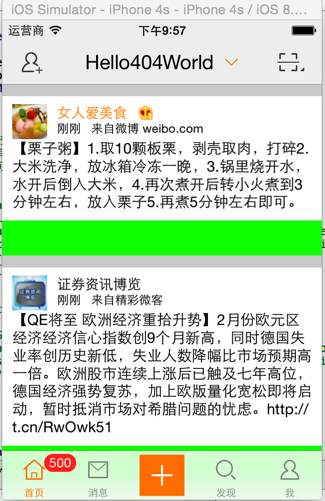
 ()加上vip标识的view

 //  HVWStatusOriginalView.m

 /** vip会员标识 */

 @property(nonatomic, weak) UIImageView *vipView;

 /** 代码初始化方法 */

 - (instancetype)initWithFrame:(CGRect)frame {

     self = [super initWithFrame:frame];

     if (self) { // 初始化子控件开始

 ...

         // vip会员

         UIImageView *vipView = [[UIImageView alloc] init];

         vipView.contentMode = UIViewContentModeCenter;

         self.vipView = vipView;

         [self addSubview:vipView];

 ...

     }

     return self;

 }

 /** 设置frame */

 - (void)setOriginalFrame:(HVWStatusOriginalFrame *)originalFrame {

 ...

     // vip会员标识

     if (user.isVip) {

         self.nameLabel.textColor = [UIColor orangeColor];

         self.vipView.hidden = NO;

         self.vipView.frame = originalFrame.vipFrame;

         self.vipView.image = [UIImage imageWithNamed:[NSString stringWithFormat:@"common_icon_membership_level%d", user.mbrank]];

     } else { // 注意cell的重用问题,需要回复设置

         self.nameLabel.textColor = [UIColor blackColor];

         self.vipView.hidden = YES;

     }

 ...

 }
 //  HVWStatusOriginalFrame.m

 /** 加载微博数据 */

 - (void)setStatus:(HVWStatus *)status {

     _status = status;

 ...

     // vip会员标识

     if (user.isVip) {

         CGFloat vipX = CGRectGetMaxX(self.nameFrame) + HVWStatusCellInset;

         CGFloat vipY = nameY;

         CGFloat vipWidth = nameSize.height;

         CGFloat vipHeight = vipWidth;

         self.vipFrame = CGRectMake(vipX, vipY, vipWidth, vipHeight);

     }

 ...

 }
[iOS微博项目 - 4.4] - 会员标识的更多相关文章
- [iOS微博项目 - 2.0] - OAuth授权3步
A.概念 OAUTH协议为用户资源的授权提供了一个安全的.开放而又简易的标准.与以往的授权方式不同之处是OAUTH的授权不会使第三方触及到用户的帐号信息(如用户名与密码),即第三方无需使用用 ...
- [iOS微博项目 - 4.6] - 微博配图
github: https://github.com/hellovoidworld/HVWWeibo A.微博配图 1.需求 显示原创微博.转发微博的缩略图 4张图使用2x2布局,其他使用3x3布局, ...
- [iOS微博项目 - 4.0] - 自定义微博cell
github: https://github.com/hellovoidworld/HVWWeibo A.自定义微博cell基本结构 1.需求 创建自定义cell的雏形 cell包含:内容.工具条 内 ...
- [iOS微博项目 - 3.4] - 获取用户信息
github: https://github.com/hellovoidworld/HVWWeibo A.获取用户信息 1.需求 获取用户信息并储存 把用户昵称显示在“首页”界面导航栏的标题上 ...
- [iOS微博项目 - 3.2] - 发送微博
github: https://github.com/hellovoidworld/HVWWeibo A.使用微博API发送微博 1.需求 学习发送微博API 发送文字微博 发送带有图片的微博 ...
- [iOS微博项目 - 3.1] - 发微博界面
github: https://github.com/hellovoidworld/HVWWeibo A.发微博界面:自定义UITextView 1.需求 用UITextView做一个编写微博的输 ...
- [iOS微博项目 - 3.0] - 手动刷新微博
github: https://github.com/hellovoidworld/HVWWeibo A.下拉刷新微博 1.需求 在“首页”界面,下拉到一定距离的时候刷新微博数据 刷新数据的时候使 ...
- [iOS微博项目 - 2.6] - 获取微博数据
github: https://github.com/hellovoidworld/HVWWeibo A.新浪获取微博API 1.读取微博API 2.“statuses/home_time ...
- [iOS微博项目 - 2.3] - 用户取消对app的授权
github: https://github.com/hellovoidworld/HVWWeibo A.用户取消对app的授权 用户可以在微博网站上取消对某个应用(app)的授权 1.打开& ...
随机推荐
- C/C++:C++伪函数
C++伪函数: 所谓的伪函数.就是说它不是一个真正的函数,而是一个类或者说是一个结构体. <span style="font-size:18px;"> #include ...
- Getting Started with Amazon EC2 (1 year free AWS VPS web hosting)
from: http://blog.coolaj86.com/articles/getting-started-with-amazon-ec2-1-year-free-aws-vps-web-host ...
- Hystrix的用法
package com.example.demo; import com.netflix.hystrix.contrib.javanica.annotation.HystrixCommand; imp ...
- CodeForces 35D Animals
G - Animals Time Limit:2000MS Memory Limit:65536KB 64bit IO Format:%I64d & %I64u Submit ...
- Okra框架(三) 搭建HTTP服务器
Okra通过封装成熟高效的框架以简化应用程序服务器构建的过程.上一篇介绍了使用Okra快速搭建Socket服务器. 本篇承接上一篇,介绍快速搭建简单高性能的Http服务器. 这里需要说明一下Okra框 ...
- tftp server setup
今天开始调试ARM的板子,要通过tftp下载到板子上,所以又要配置tftp服务器,真的烦死了… (本人酷爱装系统,所以经常都要搞配置) 因为之前已经在Ubuntu下搭建过很多次tftp服务器了,但是一 ...
- Github优秀开源项目
王潜升 https://github.com/code4craft/webmagic 一个爬虫框架,除了不会反爬虫外(当然可以自己加)其他都很牛逼.这个项目更新还是很快的. ansi分词 htt ...
- C++ 引用做左值
//引用做左值 #include<iostream> using namespace std; int SetA(int *p){ *p = ; return *p; } int& ...
- SQL之Join的使用
一.基本概念 关于sql语句中的连接(join)关键字,是较为常用而又不太容易理解的关键字,下面这个例子给出了一个简单的解释 –建表user1,user2: table1 : create table ...
- Win10下安装MySQL总卡在write configuration的解决办法
先说结论 删除 C:\ProgramData 下的MySQL文件夹!!! 折腾过程 反复安装卸载,安装版.绿色版,都不行,清理注册表,清理安装文件夹,还是不行!!! 最后找到并删除 C:\Prog ...