
iPhone / iPad L2TP Client Setup
原文链接:http://www.softether.org/4-docs/2-howto/9.L2TPIPsec_Setup_Guide_for_SoftEther_VPN_Server/2.iPhone_iPad_L2TP_Client_Setting
iPhone / iPad L2TP Client Setup
This document describes how to connect to your SoftEther VPN Server by using the L2TP/IPsec VPN Client which is bundled with iOS.
On this instruction, every screen-shots are taken on iOS 6. Other versions of iOS are similar to be configured, however there might be minor different on UIs.
These screen-shots are in English version of iOS. If you use other language, you can still configure it easily by referring the following instructions.
1. Initial configurations (only once at the first time)
From the iOS main screen, start the "Settings" application.
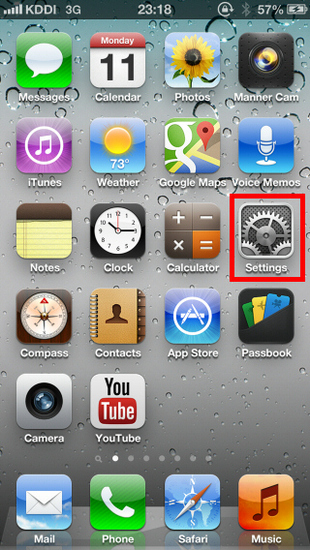
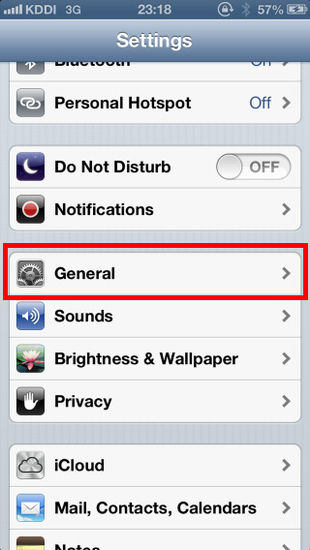
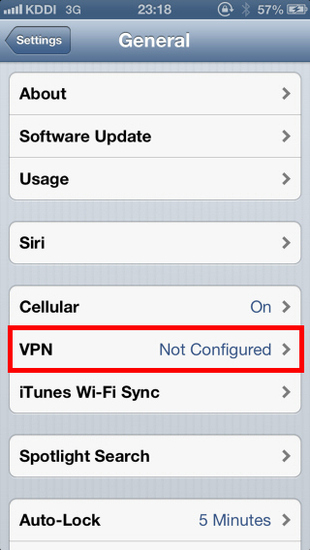
Open "VPN" in "General" , and tap "Add VPN Configuration..." .
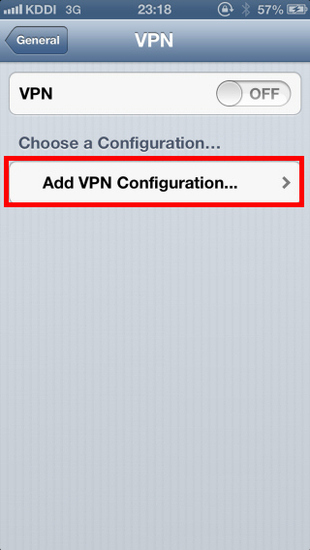
A new L2TP VPN connection setting will be created, and the configuration screen will appear.
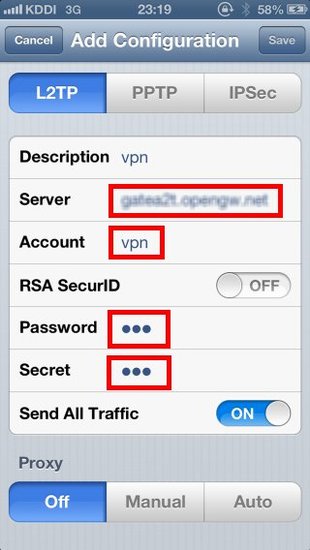
On this screen, you have to specify either hostname or IP address of the destination SoftEther VPN Server. You also have to enter the user-name, password and secret (pre-shared key) on the iOS screen.
2. Connect a VPN
You can start a VPN connection by using a created VPN connection setting at any time.
Tap the "OFF" button to initiate a VPN connection.
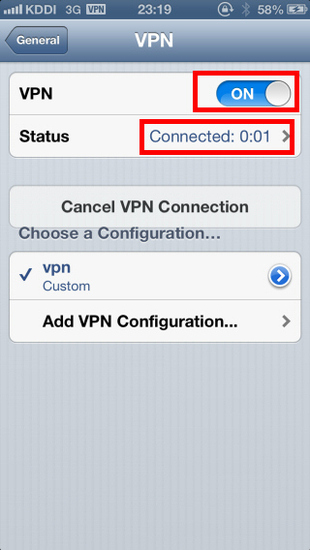
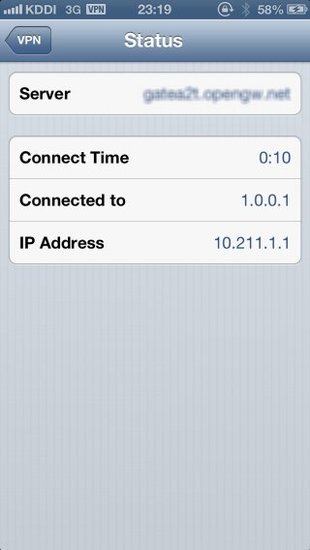
While VPN is established, you can see the status and connect time on the status screen. Your private IP address in VPN is also displayed. The "Connect to" IP address reports "1.0.0.1" , but it is not an unusual.
3. Enjoy VPN communication
While VPN is established, all communications will be relayed via the VPN Server. You can access to any local servers and workstation on the destination network.
iPhone / iPad L2TP Client Setup的更多相关文章
- Mac OS X L2TP Client Setup
原文链接:http://www.softether.org/4-docs/2-howto/9.L2TPIPsec_Setup_Guide_for_SoftEther_VPN_Server/5.Mac_ ...
- Windows L2TP Client Setup
原文链接:http://www.softether.org/4-docs/2-howto/9.L2TPIPsec_Setup_Guide_for_SoftEther_VPN_Server/4.Wind ...
- Android L2TP Client Setup
原文链接:http://www.softether.org/4-docs/2-howto/9.L2TPIPsec_Setup_Guide_for_SoftEther_VPN_Server/3.Andr ...
- iPhone/iPad/Android UI尺寸规范 UI尺寸规范,UI图标尺寸,UI界面尺寸,iPhone6尺寸,iPhone6 Plus尺寸,安卓尺寸,iOS尺寸
iPhone/iPad/Android UI尺寸规范 UI尺寸规范,UI图标尺寸,UI界面尺寸,iPhone6尺寸,iPhone6 Plus尺寸,安卓尺寸,iOS尺寸 iPhone界面尺寸 设备 分辨 ...
- Glyphish – 精心打造的 iPhone & iPad 应用程序图标
Glyphish 是一套精心打造的图标库,包含 iOS 工具栏.标签栏.导航条等等,Glyphish 图标也完美的用在 Android.Windows Mobile App 和移动网站的 UI 设计等 ...
- 通过Mac远程调试iPhone/iPad上的网页(转)
我们知道在 Mac/PC 上的浏览器都有 Web 检查器这类的工具(如最著名的 Firebug)对前端开发进行调试,而在 iPhone/iPad 由于限于屏幕的大小和触摸屏的使用习惯,直接对网页调试非 ...
- 体验应用程序在Mac/iPhone/iPad之间的Handoff
对于苹果新推出的Handoff功能,之前只体验了接电话的Handoff.一个电话打过来,iPhone/iPad/Mac同时响起,这时如果手上拿着东西在吃,就可以直接在Mac上接电话. 除此之外,还可以 ...
- iphone/ipad关于size, frame and bounds总结和UIScroll view学习笔记
1. iphone/ipad大小 Device Screen dimensions(in points) iphone and ipod 320 X 480 ipad 768 X 1024 2. UI ...
- HOWTO: Create native-looking iPhone/iPad applications from HTML, CSS and JavaScript
HOWTO: Create native-looking iPhone/iPad applications from HTML, CSS and JavaScript Though it's not ...
随机推荐
- python基础数据类型练习2
1,写代码,有如下列表,按照要求实现每一个功能li = ['alex', 'wusir', 'eric', 'rain', 'alex'] 计算列表的长度并输出print(len(li))答:结果为5 ...
- 简要log4j配置
若排版紊乱可查看我的个人博客原文地址 1. 配置效果 下面的log4j日志配置最终能达到的效果是对于全局日志可以根据级别输入到对应级别的日志文件中,注意低级别的日志文件会同时包含高级别的日志信息,例如 ...
- 如何用ESP8266实现网页配置(web)
准备工作 准备一个深圳四博智联科技有限公司的ESP-F 模组.或者四博智联科技的NODEMCU 当我们拿到ESP-F模块后,可以按照以下接线进行测试: 即 VCC.EN 接 3.3v.GPIO15 G ...
- CSS1 !important
CSS1 !important 提升指定样式规则的应用优先权 ie6并不支持.还是会被后面的样式覆盖
- JAVA 平时作业二
编写一个 Java 应用程序,统计数组{1,3,4,7,2,1,1,5,2,5,7,2,1,1,3},统 计显示每种数字其出现的次数以及出现最多和最少次数的数字 public class Number ...
- python字符串编码理解(转载)
(转载)字符编码和python使用encode,decode转换utf-8, gbk, gb2312 (http://www.cnblogs.com/jxzheng/p/5186490.html) A ...
- 小白的REDIS学习(二)-链表
本文为读<Redis设计与实现>的记录.该书以Redis2.9讲解Redis相关内容.请注意版本差异. Redis使用C语言,实现了自己的链表结构,实现的代码如下 //集成了链表的各类信息 ...
- puts方法要点
puts是print string的缩写.尽管没有直观的表示会调用换行符,但是puts会这样做:如同print,打印用户的数据,之后自动地转到新一行.假如让puts打印已经以换行符结束的一行,它不会再 ...
- 用Spring Boot去创建web service
1. 环境 JDK1.8 JavaSE1.8 web容器是 webSphere IDE是Eclipse 2. 创建一个空的 Maven Project 3. 打开pom.xml 配置相应的packag ...
- .Net Core+Angular6 学习 第四部分(EF Core(Code First))
目的: 打算通过EF core 练习从database receive data 显示到UI. 1. 创建一个新的project Model.定义一个 base interface entity以及实 ...