
rust语言写的贪吃蛇游戏
首先新建工程,然后用vscode打开,命令如下:
cargo new snake --bin
文件结构如下:
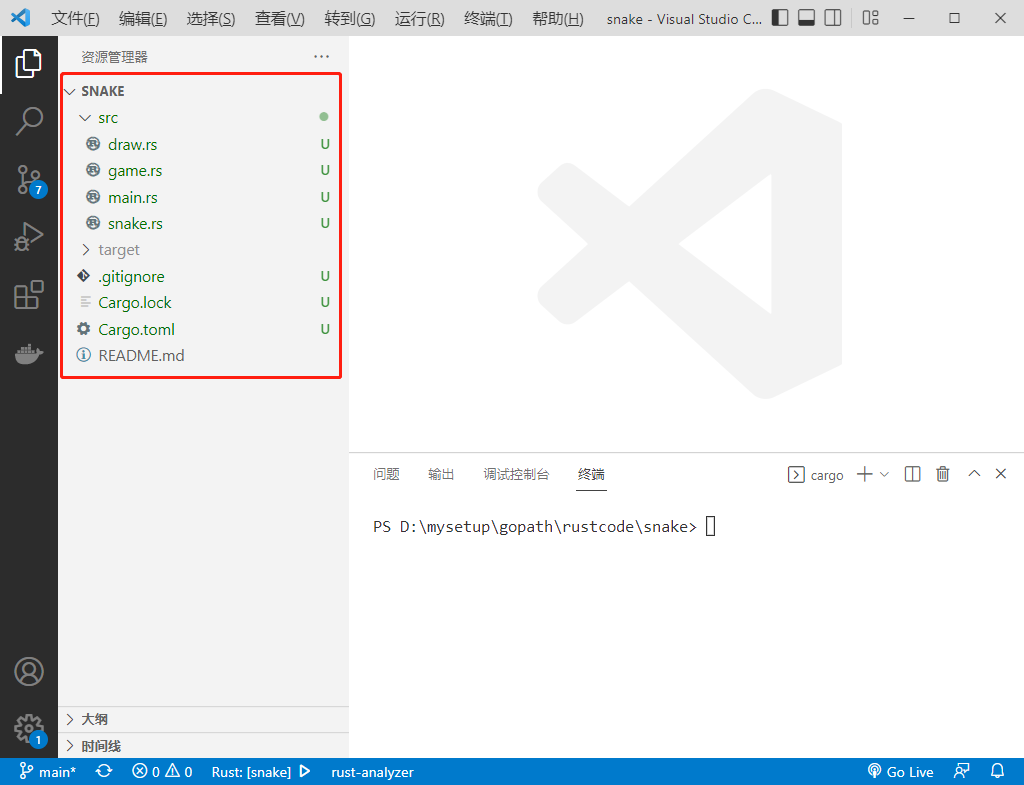
Cargo.Toml文件内容如下:
[package]

name = "snake"

version = "0.1.0"

edition = "2021"

# See more keys and their definitions at https://doc.rust-lang.org/cargo/reference/manifest.html

[dependencies]

rand = "0.4.6"

piston_window="0.74.0"

[profile.release]

opt-level = 0

lto = true

codegen-units = 1

panic = "abort"
src/draw.rs文件内容如下:
use piston_window::types::Color;

use piston_window::{rectangle, Context, G2d};

const BLOCK_SIZE: f64 = 25.0;

pub fn to_coord(game_coord: i32) -> f64 {

    (game_coord as f64) * BLOCK_SIZE

}

pub fn to_coord_u32(game_coord: i32) -> u32 {

    to_coord(game_coord) as u32

}

pub fn draw_block(color: Color, x: i32, y: i32, con: &Context, g: &mut G2d) {

    let gui_x = to_coord(x);

    let gui_y = to_coord(y);

    rectangle(

        color,

        [gui_x, gui_y, BLOCK_SIZE, BLOCK_SIZE],

        con.transform,

        g,

    );

}

pub fn draw_rectangle(

    color: Color,

    x: i32,

    y: i32,

    width: i32,

    height: i32,

    con: &Context,

    g: &mut G2d,

) {

    let x = to_coord(x);

    let y = to_coord(y);

    rectangle(

        color,

        [

            x,

            y,

            BLOCK_SIZE * (width as f64),

            BLOCK_SIZE * (height as f64),

        ],

        con.transform,

        g,

    );

}
game.rs文件内容如下:
use crate::draw::{draw_block, draw_rectangle};

use piston_window::types::Color;

use piston_window::*;

use rand::{thread_rng, Rng};

use crate::snake::{Direction, Snake};

const FOOD_COLOR: Color = [0.80, 0.00, 0.00, 1.0];

const BORDER_COLOR: Color = [0.80, 0.00, 0.00, 1.0];

const GAMEOVER_COLOR: Color = [0.90, 0.00, 0.00, 0.5];

const MOVING_PERIOD: f64 = 0.1;

const RESTART_TIME: f64 = 1.0;

pub struct Game {

    snake: Snake,

    food_exists: bool,

    food_x: i32,

    food_y: i32,

    width: i32,

    height: i32,

    game_over: bool,

    waiting_time: f64,

}

impl Game {

    pub fn new(width: i32, height: i32) -> Game {

        Game {

            snake: Snake::new(2, 2),

            food_exists: true,

            food_x: 6,

            food_y: 4,

            width,

            height,

            game_over: false,

            waiting_time: 0.0,

        }

    }

    pub fn key_pressed(&mut self, key: Key) {

        if self.game_over {

            return;

        }

        let dir = match key {

            Key::Up => Some(Direction::Up),

            Key::Down => Some(Direction::Down),

            Key::Left => Some(Direction::Left),

            Key::Right => Some(Direction::Right),

            _ => None,

        };

        if dir.unwrap() == self.snake.head_direction().opposite() {

            return;

        }

        self.update_snake(dir);

    }

    pub fn draw(&self, con: &Context, g: &mut G2d) {

        self.snake.draw(con, g);

        if self.food_exists {

            draw_block(FOOD_COLOR, self.food_x, self.food_y, con, g);

        }

        draw_rectangle(BORDER_COLOR, 0, 0, self.width, 1, con, g);

        draw_rectangle(BORDER_COLOR, 0, self.height - 1, self.width, 1, con, g);

        draw_rectangle(BORDER_COLOR, 0, 0, 1, self.height, con, g);

        draw_rectangle(BORDER_COLOR, self.width - 1, 0, 1, self.height, con, g);

        if self.game_over {

            draw_rectangle(GAMEOVER_COLOR, 0, 0, self.width, self.height, con, g);

        }

    }

    pub fn update(&mut self, delta_time: f64) {

        self.waiting_time += delta_time;

        if self.game_over {

            if self.waiting_time > RESTART_TIME {

                self.restart();

            }

            return;

        }

        if !self.food_exists {

            self.add_food();

        }

        if self.waiting_time > MOVING_PERIOD {

            self.update_snake(None);

        }

    }

    fn check_eating(&mut self) {

        let (head_x, head_y): (i32, i32) = self.snake.head_position();

        if self.food_exists && self.food_x == head_x && self.food_y == head_y {

            self.food_exists = false;

            self.snake.restore_tail();

        }

    }

    fn check_if_snake_alive(&self, dir: Option<Direction>) -> bool {

        let (next_x, next_y) = self.snake.next_head(dir);

        if self.snake.overlap_tail(next_x, next_y) {

            return false;

        }

        next_x > 0 && next_y > 0 && next_x < self.width - 1 && next_y < self.height - 1

    }

    fn add_food(&mut self) {

        let mut rng = thread_rng();

        let mut new_x = rng.gen_range(1, self.width - 1);

        let mut new_y = rng.gen_range(1, self.width - 1);

        while self.snake.overlap_tail(new_x, new_y) {

            new_x = rng.gen_range(1, self.width - 1);

            new_y = rng.gen_range(1, self.width - 1);

        }

        self.food_x = new_x;

        self.food_y = new_y;

        self.food_exists = true;

    }

    fn update_snake(&mut self, dir: Option<Direction>) {

        if self.check_if_snake_alive(dir) {

            self.snake.move_forward(dir);

            self.check_eating();

        } else {

            self.game_over = true;

        }

        self.waiting_time = 0.0;

    }

    fn restart(&mut self) {

        self.snake = Snake::new(2, 2);

        self.waiting_time = 0.0;

        self.food_exists = true;

        self.food_x = 6;

        self.food_y = 4;

        self.game_over = false;

    }

}
main.rs文件内容如下:
extern crate piston_window;

extern crate rand;

mod draw;

mod game;

mod snake;

use draw::to_coord_u32;

use game::Game;

use piston_window::types::Color;

use piston_window::*;

const BACK_COLOR: Color = [0.5, 0.5, 0.5, 1.0];

fn main() {

    //https://magiclen.org/rust-compile-optimize/

    let (width, height) = (30, 30);

    let mut window: PistonWindow =

        WindowSettings::new("Snake", [to_coord_u32(width), to_coord_u32(height)])

            .exit_on_esc(true)

            .build()

            .unwrap();

    let mut game = Game::new(width, height);

    while let Some(event) = window.next() {

        if let Some(Button::Keyboard(key)) = event.press_args() {

            game.key_pressed(key);

        }

        window.draw_2d(&event, |c, g| {

            clear(BACK_COLOR, g);

            game.draw(&c, g);

        });

        event.update(|arg| {

            game.update(arg.dt);

        });

    }

}
snake.rs文件内容如下:
use piston_window::types::Color;

use piston_window::{Context, G2d};

use std::collections::LinkedList;

use crate::draw::draw_block;

const SNAKE_COLOR: Color = [0.00, 0.80, 0.00, 1.0];

#[derive(Copy, Clone, PartialEq)]

pub enum Direction {

    Up,

    Down,

    Left,

    Right,

}

impl Direction {

    pub fn opposite(&self) -> Direction {

        match *self {

            Direction::Up => Direction::Down,

            Direction::Down => Direction::Up,

            Direction::Left => Direction::Right,

            Direction::Right => Direction::Left,

        }

    }

}

#[derive(Debug, Clone)]

struct Block {

    x: i32,

    y: i32,

}

pub struct Snake {

    direction: Direction,

    body: LinkedList<Block>,

    tail: Option<Block>,

}

impl Snake {

    pub fn new(x: i32, y: i32) -> Snake {

        let mut body: LinkedList<Block> = LinkedList::new();

        body.push_back(Block { x: x + 2, y });

        body.push_back(Block { x: x + 1, y });

        body.push_back(Block { x, y });

        Snake {

            direction: Direction::Right,

            body,

            tail: None,

        }

    }

    pub fn draw(&self, con: &Context, g: &mut G2d) {

        for block in &self.body {

            draw_block(SNAKE_COLOR, block.x, block.y, con, g);

        }

    }

    pub fn head_position(&self) -> (i32, i32) {

        let head_block = self.body.front().unwrap();

        (head_block.x, head_block.y)

    }

    pub fn move_forward(&mut self, dir: Option<Direction>) {

        match dir {

            Some(d) => self.direction = d,

            None => (),

        }

        let (last_x, last_y): (i32, i32) = self.head_position();

        let new_block = match self.direction {

            Direction::Up => Block {

                x: last_x,

                y: last_y - 1,

            },

            Direction::Down => Block {

                x: last_x,

                y: last_y + 1,

            },

            Direction::Left => Block {

                x: last_x - 1,

                y: last_y,

            },

            Direction::Right => Block {

                x: last_x + 1,

                y: last_y,

            },

        };

        self.body.push_front(new_block);

        let removed_block = self.body.pop_back().unwrap();

        self.tail = Some(removed_block);

    }

    pub fn head_direction(&self) -> Direction {

        self.direction

    }

    pub fn next_head(&self, dir: Option<Direction>) -> (i32, i32) {

        let (head_x, head_y): (i32, i32) = self.head_position();

        let mut moving_dir = self.direction;

        match dir {

            Some(d) => moving_dir = d,

            None => {}

        }

        match moving_dir {

            Direction::Up => (head_x, head_y - 1),

            Direction::Down => (head_x, head_y + 1),

            Direction::Left => (head_x - 1, head_y),

            Direction::Right => (head_x + 1, head_y),

        }

    }

    pub fn restore_tail(&mut self) {

        let blk = self.tail.clone().unwrap();

        self.body.push_back(blk);

    }

    pub fn overlap_tail(&self, x: i32, y: i32) -> bool {

        let mut ch = 0;

        for block in &self.body {

            if x == block.x && y == block.y {

                return true;

            }

            ch += 1;

            if ch == self.body.len() - 1 {

                break;

            }

        }

        return false;

    }

}
cargo build --release
./target/release/snake.exe
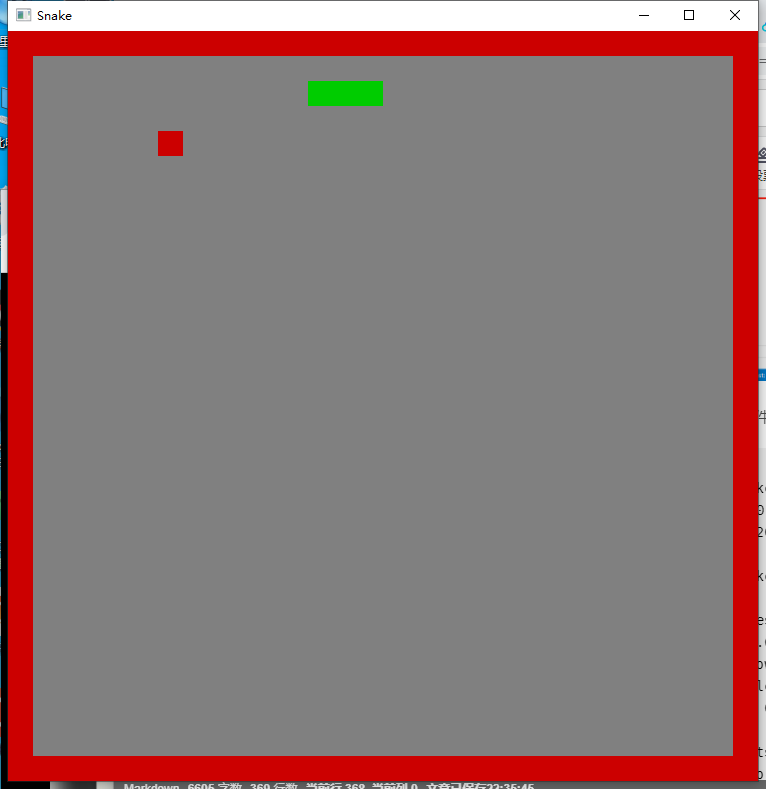
结果如下:
rust语言写的贪吃蛇游戏的更多相关文章
- 【C语言项目】贪吃蛇游戏(上)
目录 00. 目录 01. 开发背景 02. 功能介绍 03. 欢迎界面设计 3.1 常用终端控制函数 3.2 设置文本颜色函数 3.3 设置光标位置函数 3.4 绘制字符画(蛇) 3.5 欢迎界面函 ...
- 关于用Java写的贪吃蛇游戏的一些感想
学习Java有那么一个月了,兴趣还是挺高的.然而最近老师布置的一个迷宫问题,着实让我头疼了一两个礼拜,以至于身心疲惫,困扰不安.无奈,暂且先放下这个迷宫问题,写个简单点的贪吃蛇程序,以此来提高低落的情 ...
- Python写的贪吃蛇游戏例子
第一次用Python写这种比较实用且好玩的东西,权当练手吧 游戏说明: * P键控制“暂停/开始”* 方向键控制贪吃蛇的方向 源代码如下: 复制代码代码如下: from Tkinter import ...
- 【C语言项目】贪吃蛇游戏(下)
目录 00. 目录 07. 游戏逻辑 7.5 按下ESC键结束游戏 7.6 判断是否撞到墙 7.7 判断是否咬到自己 08. 游戏失败界面设计 8.1 游戏失败界面边框设计 8.2 撞墙失败界面 8. ...
- 用最少的JS代码写出贪吃蛇游戏---迷你版
游戏进行页面展示 GAME OVER 页面展示 代码如下: <!doctype html> <html> <body> <canvas id=&q ...
- python 写一个贪吃蛇游戏
#!usr/bin/python #-*- coding:utf-8 -*- import random import curses s = curses.initscr() curses.curs_ ...
- 原生js写的贪吃蛇网页版游戏特效
<meta http-equiv="Content-Type" content="text/html; charset=utf-8"> <bo ...
- 「JavaScript」手起刀落-一起来写经典的贪吃蛇游戏
回味 小时候玩的经典贪吃蛇游戏我们印象仍然深刻,谋划了几天,小时候喜欢玩的游戏,长大了终于有能力把他做出来(从来都没有通关过,不知道自己写的程序,是不是能通关了...),好了,闲话不多谈,先来看一下效 ...
- 贪吃蛇游戏——C语言双向链表实现
采用了双向链表结点来模拟蛇身结点: 通过C语言光标控制函数来打印地图.蛇身和食物: /************************** *************************** 贪吃 ...
- 贪吃蛇游戏(printf输出C语言版本)
这一次我们应用printf输出实现一个经典的小游戏—贪吃蛇,主要难点是小蛇数据如何存储.如何实现转弯的效果.吃到食物后如何增加长度. 1 构造小蛇 首先,在画面中显示一条静止的小蛇.二维数组canva ...
随机推荐
- python数据结构转字符串_python2中字符不显示问题_python2_递归
# encoding:utf-8 def get_str(data): """将python数据转化为肉眼可见的字符串 :param data: str.dict.lis ...
- vue element表格合计问题
vue element计算表格合计问题 问题:当表格的el-table-column标签下的属性prop属性值为'对象.属性'时,将不能自动合计.例如: <el-table border v-l ...
- flask orm 操作方法
数据库操作 常用的查询过滤器 过滤器 说明 filter() 把过滤器添加到原查询上,返回一个新查询 filter_by() 把等值过滤器添加到原查询上,返回一个新查询 limit() 使用指定的值限 ...
- MFC 错误调试总结
1. msdia80.dll can not be loaded 该文件的路径应该是:C:\Program Files\Common Files\microsoft shared\VC\msdia8 ...
- DVWA-CSRF(跨站请求伪造)
csrf(Cross-site request forgery)跨站请求伪造:攻击者诱导用户访问第三方网站,在第三方网站中携带恶意代码,向被攻击者发送请求 原理可以这样来说 用户在访问了一个后台管理网 ...
- 👋 和我一起学【Three.js】「初级篇」:0. 总论
「和我一起学 XXX」是我 2023 年的一个新企划,目的是向读者(也包括未来的自己)介绍我正在学习的某项新技术.文章会通过长期反复迭代的方式保持其内容的新鲜度.文章有较大内容更新时,会在文章开头进行 ...
- Python查找存储区0KB文件并记录下地址
查找存储区域中0KB大小文件,可以根据需要变更指定大小. #-*- coding: utf-8 -*- #!/usr/bin/python from os.path import isdir,absp ...
- IDEA编写JSP无代码提示
网上的版本 网上的版本 网上的我试了 但是未能解决 我自己解决的方法是 File => Poject Struct=>Modules=>"+"=>找到自己系 ...
- MyBatis 重点知识归纳
一.MyBatis 简介 [1]MyBatis 是支持定制化 SQL,存储过程以及高级映射的优秀持久化框架.[2]MyBatis 避免了几乎所有的 JDBC 代码和手动设置参数以及获取查询结果集.[3 ...
- 记一次 .NET 某医疗住院系统 崩溃分析
一:背景 1. 讲故事 最近收到了两起程序崩溃的dump,查了下都是经典的 double free 造成的,蛮有意思,这里就抽一篇出来分享一下经验供后面的学习者避坑吧. 二:WinDbg 分析 1. ...