
How to Hack Unity Games using Mono Injection Tutorial
https://guidedhacking.com/threads/how-to-hack-unity-games-using-mono-injection-tutorial.11674/
Unity Game Hacking Guide & Tutorials
Hacking Unity Games is different than native games. Any game that uses a modern game engine requires a special approach and Unity games are no exception.
In a regular native game you can typically find pointers and offsets and use them easily. The way memory is mapped and the executable is loaded into memory is predictable and follows the same pattern every time, it's just how the PE file format and the Windows loader works. But game engines are large infrastructures that load and run the game logic that the developers of the actual game create. They have their own methods of loading dynamic code and data. Game engines add another layer of abstraction and often utilize alot of inheritance, overloading and polymorphism which makes reversing them more difficult.
First thing you will notice is that it is hard to find pointers that work after you restart the game in Unity games. For that reason pattern scanning and hooking is typically easier. I don't recommend trying to go after multilevel pointers in most Unity games.
Second thing you will see is that Unity games code is located in an Assembly-CSharp.dll module and not in the main EXE. What's good about this is you can easily de-compile and modify this file using dnSpywhich is a .NET de-compiler/debugger.
If you're thinking of using the native route of hacking and not using mono injection please view this thread to understand how much work it is. Thanks @Boboo99 for providing a ton of information on reversing this game
Static Analysis
You can statically analyze the game code using a .NET decompiler. You will see the structures and the functions. Keep in mind all the game engine code won't be in there, it's just the game logic. Not all the functions and structs the game uses will be in the Assembly-CSharp.dll. Sometimes it will include all the names of the structures, variables and functions. Other times the developer will strip these out or obfuscate it. Even with the names stripped, it is easy to reverse engineer functions like this.
L2CPP Compilation
Some games are using IL2CPP which compiles the game code to C++ then to assembly, which makes decompiling with dnSpy and mono injection impossible. This is more efficient and makes hacking the games more difficult so we are seeing more and more games use it.
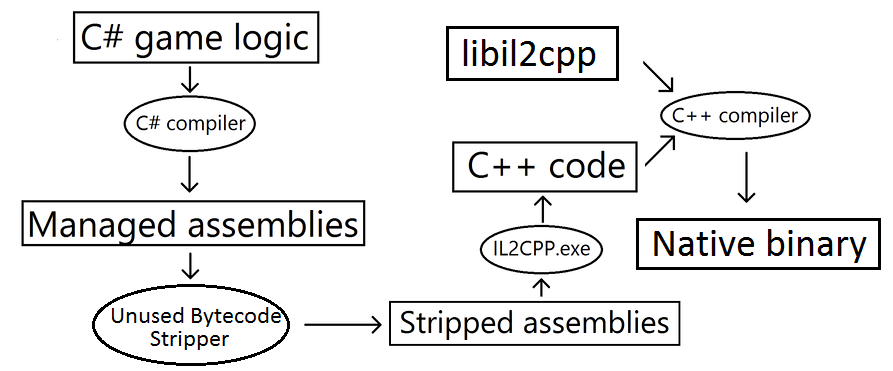
If your game is using IL2CPP skip this tutorial and just use native game hacking methods is probably best. But here is a IL2CPPDumper as well:
Cheat Engine Mono Dissector
Cheat Engine has basic features to view Unity game data as well. We don't have tutorials for it but @ChrisFayte has a bunch:
Here's some mono tutorials from @DSASMBLR
Editing Assembly-CSharp.dll
If the game doesn't have integrity checks, and especially for single player games you can simple modify the Assembly-cSharp.dll using a decompiler and save it. If the game has integrity checks, which most good multiplayer games will, this will not work.
Mono Injection - the best way to hack unity games
Mono injection is a technique of writing your own C# assembly and injecting it into the game engine, you essentially override game functions with your own functions. It has the same effect as hooking a function basically, you run your code and the games original code. It is pretty easy to do.
Here is an excellent mono injection tutorial by @Truth
https://guidedhacking.com/threads/how-to-hack-unity-games-using-mono-injection-tutorial.11674/
Hello all
Here is my first tutorial I hope it is useful! Any reasonable questions are welcome!
First create a new project and in the Visual C# menu click on Class Library (.NET Framework) call it what you want. I just did "Darkwood_Hack"

which Then becomes our Namespace by default which is important but you can change it later if you want but you will need it for the injector.
Then we want to add references. So to the right in the solution explorer right click references and click add reference.
Browse to your games managed folder where Assembly-CSharp.dll is and you will want to add that as well as UnityEngine.dll
which should also be in that folder once done we can start the haxor codes.
Rename Class1.cs to Loader.cs
This class is what injectors use to initialize our hack 
The code for this is pretty simple and any google search would land you to what I'm going to show here so I take no credit for this code
using UnityEngine

namespace Gamename_Hack

{

    public class Loader

    {

        public static void Init()

        {

            _Load = new GameObject();

            _Load.AddComponent<Main>();

            GameObject.DontDestroyOnLoad(_Load);

        }

        public static void Unload()

        {

            _Unload();

        }

        private static void _Unload()

        {

            GameObject.Destroy(_Load);

        }

        private GameObject _gameObject;

    }

}
Once our injector has injected our DLL it uses the namespace class and method you define to run our DLL code
So in our Example here we would say
Gamename_Hack
Loader
Init
And the injector calls our Init function which if you know about Unity this is just creating a new GameObject adding our "main" cs file as a component which will contain our hacks.
I would suggest if you are interested to go read up on some Unity tutorials and it will teach you how it works as they will do a much better job that I will
So next is the best part! actually learning how the game works and creating our hack!
Create a new file named Main.cs (can be what ever you want)
And it will look something like this
using UnityEngine

namespace Gamename_Hack

{

    class Main : MonoBehaviour

    {

        public void Start()

        {

        }

        public void Update()

        {

        }

        public void OnGUI()

        {

            // Here you can call IMGUI functions of Unity to build your UI for the hack :)

        }

    }

}
Open the Assembly-CSharp.dll in game spy or what ever disassembler you use. it will look like this.
Now in the {} section I found my Player class.
For my example I'm going to call the upgradeHealth() function
so let's do that first we want to get the player using FindObjectOfType<Player>
I also added some GUI code so if you just want to inject and test everything is working that text should pop up on screen
The finished code may look like this
using UnityEngine

namespace Gamename_Hack

{

    class Main : MonoBehaviour

    {

        public void Start()

        {

             _Player = FindObjectOfType<Player>();

        }

        public void Update()

        {

            if(Input.GetKeyDown(KeyCode.U))

            {

                _player.upgradeHealth();

            }

            if(Input.GetKeyDown(KeyCode.Delete)) // Will just unload our DLL

            {

                Loader.Unload();

            }

        }

        public void OnGUI()

        {

            GUI.Label(new Rect(Screen.width / , Screen.height / , 150f, 50f), "GAME INJECTED"); // Should work and when injected you will see this text in the middle of the screen

        }

        private Player _player;

    }

}
You may need to open up properties in the solution explorer above references and edit AssemblyInfo.cs if when you unload the DLL and and re-inject it does not run updated code
This is because Unity can Cache your DLL once injected and even when re-injecting it will still load the old code. So to fix this we edit the line at the bottom to this:
Now you can compile your DLL and Inject it into the game and test it!
You can use the Guided Hacking Mono-Injector or what ever mono-injector you want.
I hope this is useful and you learned something from it
As this is my first tutorial any feedback on the structure of it or any tips you may have would be awesome!
How to Hack Unity Games using Mono Injection Tutorial的更多相关文章
- Unity性能优化(3)-官方教程Optimizing garbage collection in Unity games翻译
本文是Unity官方教程,性能优化系列的第三篇<Optimizing garbage collection in Unity games>的翻译. 相关文章: Unity性能优化(1)-官 ...
- Unity性能优化(4)-官方教程Optimizing graphics rendering in Unity games翻译
本文是Unity官方教程,性能优化系列的第四篇<Optimizing graphics rendering in Unity games>的翻译. 相关文章: Unity性能优化(1)-官 ...
- Unity中的Mono & Linux上编译Mono的流程
前段时间编译了一下Unity的Mono,看了很多相关的文章,也遇到很多新坑.所以来总结一下,加深自己对Mono的理解 为什么Unity可以跨平台运行呢 通常Unity的脚本有C#.JS.Boo.不过现 ...
- Unity for Windows: II – Publishing Unity games to Windows Store
原地址:http://digitalerr0r.wordpress.com/2013/08/27/unity-for-windows-ii-publishing-to-windows-8/ Windo ...
- 扒一扒.net、.net framework、mono和Unity
zhaichao 标签: .net.net frameworkc#monounity 2017-04-23 14:39 425人阅读 评论(0) 收藏 举报 版权声明:本文为博主原创文章,未经博主允许 ...
- 编译UNITY的MONO模块记录
起因 接收到一个UNITY文件处理的任务(c#逻辑代码存放的Assembly-CSharp.dll可热更等需求) 需要重新编译UNITY的mono模块 用于安卓环境下对DLL的定制处理 上网查阅了一些 ...
- Unity C#最佳实践(上)
本文为<effective c#>的读书笔记,此书类似于大名鼎鼎的<effective c++>,是入门后提高水平的进阶读物,此书提出了50个改进c#代码的原则,但是由于主要针 ...
- unity的坑
http://dearymz.blog.163.com/blog/static/20565742013341916919/ 编辑器: Hierarchy窗口中是场景中的Game Object列表 Pr ...
- Creating A Moddable Unity Game
前言: 对游戏进行修改与拓展(MOD)是我一直以来感兴趣的东西,我的程序生涯,也是因为在初中接触到GBA口袋妖怪改版开始的,改过也研究过一些游戏的MOD实现方式,早就想在自己的游戏中实现“MOD系统” ...
随机推荐
- TableCache设置过小造成MyISAM频繁损坏 与 把table_cache适当调小mysql能更快地工作
来源: 前些天说了一下如何修复损坏的MyISAM表,可惜只会修复并不能脱离被动的境地,只有查明了故障原因才会一劳永逸. 如果数据库服务非正常关闭(比如说进程被杀,服务器断电等等),并且此时恰好正在更新 ...
- Linux操作系统的文件查找工具locate和find命令常用参数介绍
Linux操作系统的文件查找工具locate和find命令常用参数介绍 作者:尹正杰 版权声明:原创作品,谢绝转载!否则将追究法律责任. 一.非实时查找(数据库查找)locate工具 locate命 ...
- 2013.4.30 - KDD第十二天
早上来实验室,本来打算向秦师兄要文献的,不过秦师兄上午不在,所以就没有联系他.于是就开始调试郑茂的代码,发现原来那个itoa函数不是标准库里面 的,所以可能只有windows上可以用.然后我就在打电脑 ...
- Mongodb3.6 Replica Set 配置
单机下执行: /usr/local/mongodb/bin/mongod --dbpath /usr/local/mongodb/r1 --port --replSet myset /usr/loca ...
- 个性化排序算法实践(三)——deepFM算法
FM通过对于每一位特征的隐变量内积来提取特征组合,最后的结果也不错,虽然理论上FM可以对高阶特征组合进行建模,但实际上因为计算复杂度原因,一般都只用到了二阶特征组合.对于高阶特征组合来说,我们很自然想 ...
- 《The One!团队》:BETA Scrum metting3
项目 内容 作业所属课程 所属课程 作业要求 作业要求 团队名称 < The One !> 作业学习目标 (1)掌握软件黑盒测试技术:(2)学会编制软件项目总结PPT.项目验收报告:(3) ...
- Attention Model详解
要是关注深度学习在自然语言处理方面的研究进展,我相信你一定听说过Attention Model(后文有时会简称AM模型)这个词.AM模型应该说是过去一年来NLP领域中的重要进展之一,在很多场景被证明有 ...
- [Kubernetes] Kubectl and Pod
1. Create and run a Pod kubectl run my-nginx --image=nginx:alpine We can run kubectl get all to see ...
- Acwing P277 饼干 题解
每日一题 day20 打卡 Analysis 线型动态规划 读入每个人的贪婪度之后,对其按照从大到小的顺序排序,定义状态f[i][j]为前i个人(排序后)分j个饼干的答案,那么答案为f[n][m],考 ...
- flutter ListView 页面滚动组件
ListView class A scrollable list of widgets arranged linearly. ListView is the most commonly used sc ...