
iOS Programming Views :Redrawing and UIScrollView
iOS Programming Views :Redrawing and UIScrollView
1.1 event
You are going to see how views are redrawn in response to an event.
你将看到view如何响应event的。
You declared properties in header files. You can also declare properties in class extensions.
你可以声明属性在header文件,也可以声明在class extensions中。
#import "BNRHypnosisView.h"
@interface BNRHypnosisView ()
@property (strong, nonatomic) UIColor *circleColor;
@end
@implementation BNRHypnosisView
These three lines of code are a class extension with one property declaration.
有三行代码在一个类扩展中。
When the user touches a view, the view is sent the message touchesBegan:withEvent:.
当用户触摸一个view 时,这个view将会发送消息给tochesBegan:withEvent:
Override touchesBegan:withEvent: to change the circleColor property of the view to a random color.
重写touchesBegan:withEvent方法
// When a finger touches the screen
- (void)touchesBegan:(NSSet *)touches withEvent:(UIEvent *)event
{
NSLog(@"%@ was touched", self);
// Get 3 random numbers between 0 and 1 float red = (arc4random() % 100) / 100.0; float green = (arc4random() % 100) / 100.0; float blue = (arc4random() % 100) / 100.0;
UIColor *randomColor = [UIColor colorWithRed:red green:green
blue:blue alpha:1.0];
self.circleColor = randomColor; }
1.2 Run Loop and redrawing views 循环和重绘views
When an iOS application is launched, it starts a run loop. The run loop's job is to listen for events, such as a touch.
当一个iOS application启动后,它便开始循环了。run loop's工作就是监听事件,如touch
When an event occurs, the run loop then finds the appropriate handler methods for the event. Those handler methods call other methods, which call more methods, and so on. Once all of the methods have completed, control returns to the run loop.
当event发生后,run loop 要找到合适的handler 方法处理event。这个handler 处理其他方法,调用更多的方法。直到所有的方法完成后,控制权又回到了run loop。
When the run loop regains control, it checks a list of "dirty views" – views that need to be re- rendered based on what happened in the most recent round of event handling.
当run loop重新得到控制权后,它会检测一系列的dirty views- views 根据最近的event handling 发生了什么要重绘 。
The run loop then sends the drawRect: message to the views in this list before all of the views in the hierarchy are composited together again.
在所有的view重新组合以前,run loop 会发送信息给在列表中得view 的drawRect方法。
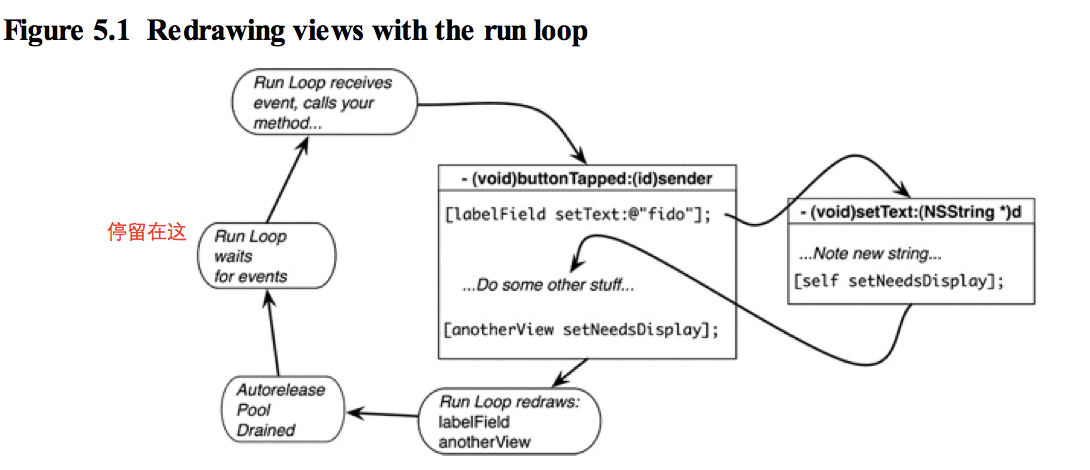
Batching the redrawing of views at the end of a run loop cycle prevents needlessly redrawing a view more than once if more than one of its properties is changed in a single event.
批量处理redrawing of views 在run loop 的结尾,可以节约大量的时间。
To get a view on the list of dirty views, you must send it the message setNeedsDisplay.
为了让一个views加入dirty views 的列表中,你应该向该view发送setNeedsDisplay.
The subclasses of UIView that are part of the iOS SDK send themselves setNeedsDisplay whenever their content changes.
在iOS SDK内的UIView子类都会给自己发送setNeedsDisplay,无论什么时候他们的内容改变。
In custom UIView subclasses, like BNRHypnosisView, you must send this message yourself.
In BNRHypnosisView.m, implement a custom accessor for the circleColor property to send setNeedsDisplay to the view whenever this property is changed.
在我们的例子中,我们在accessor 的set方法中设置setNeedsDisplay。
- (void)setCircleColor:(UIColor *)circleColor
{
_circleColor = circleColor;
[self setNeedsDisplay]; }
1.3 Class Extensions
What is the difference between a property declared in a class extension and one declared in a header file?
声明在class extension and in header file?
A class's header file is visible to other classes. That, in fact, is its purpose. A class declares properties and methods in its header file to advertise to other classes how they can interact with the class or its instances.
在header file中声明的变量可以被别的类调用。这也是其目的。
Properties and methods that are used internally by the class belong in a class extension.
属性或方法只用在内部的就可以在类扩展中调用。
It is good practice to keep your header file as brief as it can be. This makes it easier for others to understand how they can use your class.
让header file 保持小得尺寸是个好习惯。能让别人更容易理解你得类。
a class extension looks a little like a header file. It begins with @interface followed by an empty set of parentheses. The @end marks the end of the class extension.
一个类扩展@interface开头,紧跟着是类名,后面是个空括号。
2.1 UIScrollView

Scroll views are typically used for views that are larger than the screen. A scroll view draws a rectangular portion of its subview, and moving your finger, or panning, on the scroll view changes the position of that rectangle on the subview.
Scroll views 用作那些比屏幕大的view 。 一个scroll view 画它的subview 的一部分。当你在scroll view 上移动手指时将改变矩形在subview 上的位置。
Thus, you can think of the scroll view as a viewing port that you can move around
因此可以把scroll view 看做是一个view port。
The size of the scroll view is the size of this viewing port.
scroll view 的尺寸是你看到的视图部分。
The size of the area that it can be used to view is the UIScrollView's contentSize, which is typically the size of the UIScrollView's subview.
而你能用到view的尺寸是UIScrollView的contentSize,也就是UIScrollView的subview的尺寸。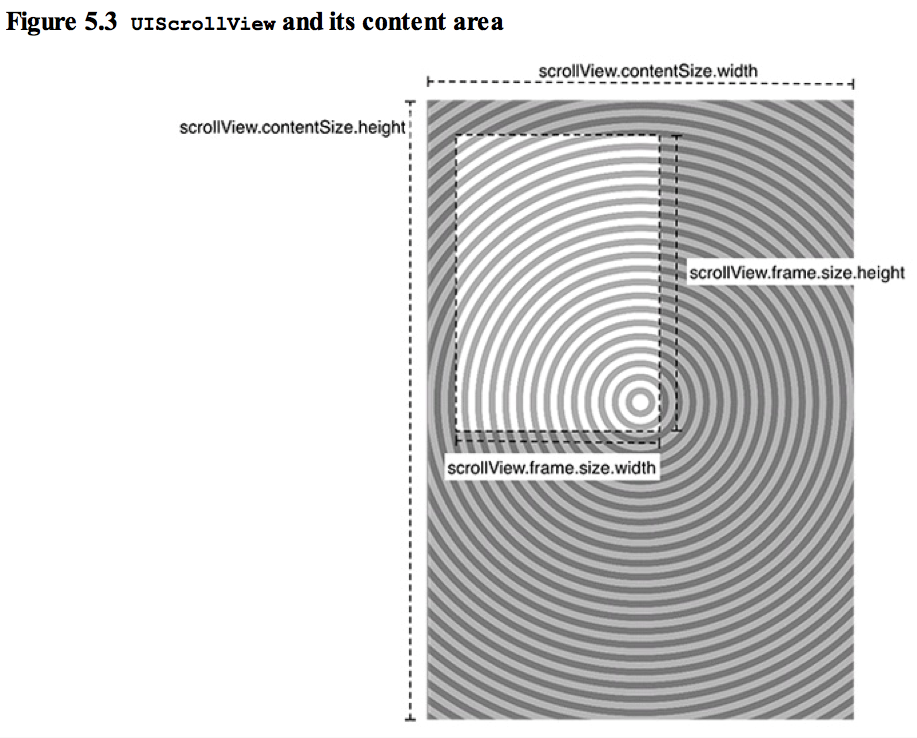
// Create CGRects for frames
CGRect screenRect = self.window.bounds; CGRect bigRect = screenRect; bigRect.size.width *= 2.0; bigRect.size.height *= 2.0;
// Create a screen-sized scroll view and add it to the window
UIScrollView *scrollView = [[UIScrollView alloc] initWithFrame:screenRect];
[self.window addSubview:scrollView];
// Create a super-sized hypnosis view and add it to the scroll view
BNRHypnosisView *hypnosisView = [[BNRHypnosisView alloc] initWithFrame:bigRect];
[scrollView addSubview:hypnosisView];
// Tell the scroll view how big its content area is scrollView.contentSize = bigRect.size;
2.2 Panning and paging
Another use for a scroll view is panning between a number of view instances.
另外scroll view的一个应用是panning (应该是切换的意思) view instances 。
// Create a screen-sized hypnosis view and add it to the scroll view BNRHypnosisView *hypnosisView = [[BNRHypnosisView alloc] initWithFrame:screenRect];
To force the scroll view to snap its viewing port to one of the views, turn on paging for the scroll view in BNRAppDelegate.m.
有时候你不想让图停在中间位置,你可以用pagingEnabled =yes;
UIScrollView *scrollView = [[UIScrollView alloc] initWithFrame:screenRect]; scrollView.pagingEnabled = YES;
[self.window addSubview:scrollView];
Paging works by taking the size of the scroll view's bounds and dividing up the contentSize it displays into sections of the same size.
分页通过获得scroll view的bounds并且划分 contentsize,显示成相同尺寸的分节。
After the user pans, the view port will scroll to show only one of these sections.
在用户来回翻的时候,视图端口就只显示这些分节中的一个。
iOS Programming Views :Redrawing and UIScrollView的更多相关文章
- iOS Programming - Views(视图 - 基本绘制,变换,平移,旋转,反转,倾斜)
1. Views A view (an object whose class is UIView or a subclass of UIView) knows how to draw itself i ...
- Collection View Programming Guide for iOS---(一)----About iOS Collection Views
Next About iOS Collection Views 关于iOS Collection Views A collection view is a way to present an orde ...
- iOS Programming State Restoration 状态存储
iOS Programming State Restoration 状态存储 If iOS ever needs more memory and your application is in the ...
- iOS Programming Autorotation, Popover Controllers, and Modal View Controllers
iOS Programming Autorotation, Popover Controllers, and Modal View Controllers 自动旋转,Popover 控制器,Moda ...
- iOS Programming Controlling Animations 动画
iOS Programming Controlling Animations 动画 The word "animation" is derived from a Latin wor ...
- iOS Programming UIStoryboard 故事板
iOS Programming UIStoryboard In this chapter, you will use a storyboard instead. Storyboards are a f ...
- iOS Programming UISplitViewController
iOS Programming UISplitViewController The iPad, on the other hand, has plenty of screen space to pr ...
- iOS Programming Dynamic Type 2
iOS Programming Dynamic Type 2 You will need to update two parts of this view controller for ...
- iOS Programming Dynamic Type 1
iOS Programming Dynamic Type 1 Dynamic Type is a technology introduced in iOS 7 that helps realize ...
随机推荐
- #include "*.c"文件的妙用
今天我在看代码的时候突然看到在一个.c文件里包括了#include "*.c"代码,这个让我非常诧异,然后google了一下.才发现是这么回事情.以下我写了一个測试代码.我相信你看 ...
- jquery ajax 回调函数
function test(callback){ $.ajax({ url:'/mall/credit', type: 'get', dataType:'json', processData: fal ...
- 设计模式-(16)模版模式 (swift版)
一,概念: 定义一个算法中的操作框架,而将一些步骤延迟到子类中.使得子类可以不改变算法的结构即可重定义该算法的某些特定步骤.(Define the skeleton of an algorithm i ...
- mysql03---触发器
触发器trigger:某条数据改变,希望其他数据也改变(一张表的数据改变,另一张表的数据也变).监测insert,update,delete.能够监测增删改并出发增删改. 监测点(table)监测事件 ...
- Java总结基础知识
权限关键字: public:可以被所有其他类所访问,不同的包 protected:当前类的成员.同一个包中.不同包中对子类可见父类protected,继承类 default:同一包中的类可以访问,声明 ...
- Center OS Tomcat7 服务器配置总结
tomcat7 目录结构 --- webapps 应用存放目录,可以配置Host 来决定这个文件的目录,可以配置多个Host,多个webapps ---ROOT 项目根目录,Tomcat会特殊对待这个 ...
- 《Iterative-GAN》的算法伪代码整理
花了一下午时间整理本人的论文Iterative-GAN的算法伪代码,由于篇幅较长,投会议方面的文章就不加入了,以后如果投期刊再说.留此存档.
- 【性能测试】服务器资源监测工具sar安装
[root@yyy ~]# sar Cannot open /var/log/sa/sa19: No such file or directory 在Linux系统中,运行sar命令,发现无法执行: ...
- Python机器学习算法 — 关联规则(Apriori、FP-growth)
关联规则 -- 简介 关联规则挖掘是一种基于规则的机器学习算法,该算法可以在大数据库中发现感兴趣的关系.它的目的是利用一些度量指标来分辨数据库中存在的强规则.也即是说关联规则挖掘是用于知识发现,而非预 ...
- bzoj 2618【半平面交模板】
#include<iostream> #include<cstdio> #include<algorithm> #include<cmath> usin ...