
通用窗口类 Inventory Pro 2.1.2 Demo1(下)
本篇想总结的是Inventory Pro中通用窗口的具体实现,但还是要强调下该插件的重点还是装备系统而不是通用窗口系统,所以这里提到的通用窗口类其实是通用装备窗口类(其实该插件中也有非装备窗口比如NoticeUI等)。
本篇涉及的功能用加出标出,具体的功能如下:
1、实现了两个窗口,通过点击键盘I来,打开或者关闭窗口也就是Toggle功能
2、装备窗口中的物品栏空格数量动态生成可控,可以在属性窗口手动配置
3、窗口具有拖拽功能
4、窗口物品具有拖拽,及窗口间拖拽
5、可以在窗口使用物品的功能,物品有消耗扇形显示功能
6、通用窗口的类体系结构
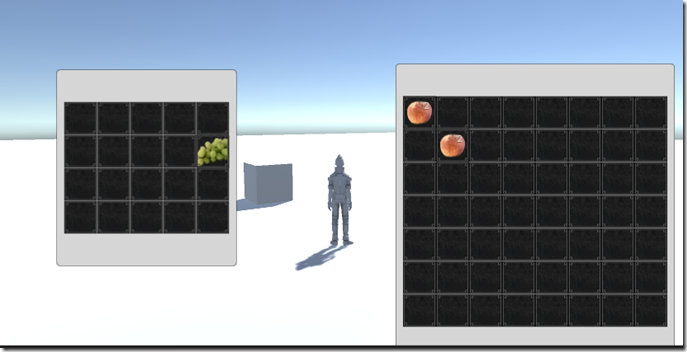
这一篇进入到了游戏中装备窗口的逻辑的深水区了
窗口间物品的拖拽
自己在学习的过程中,虽然读了源码过了几天来写教程,还是有点不清楚,不能亲车熟路(这也许就是读与写的区别吧),给自己提出了几个问题,在重新去翻代码之前先给自己提出几个问题:
1、拖拽的事件发起者应该是那个类?
2、拖拽的事件的Drag是如何确定下方的UI元素的?
3、拖拽后的逻辑操作,应该由哪个类来承接?
4、窗口与窗口之间的拖拽,既有Drag又有Drop,如何更加合理的解决这个问题?
5、窗口间物品拖拽的以及同窗口物品拖拽的逻辑流程是什么?
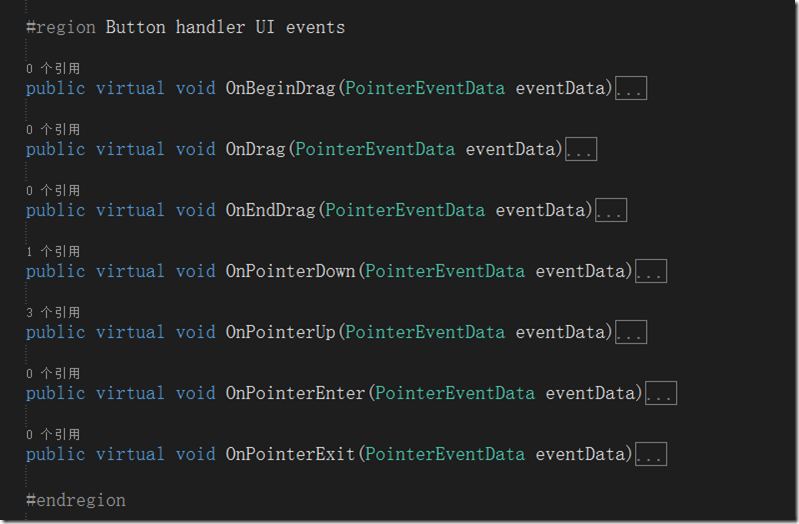
A1 拖拽的事件发起者应该是那个类?:拖拽的发起者必须是UI元素这点是必须的,目前涉及的UI元素有两种一种是窗口容器,一种数据装备格元素,显然装备格元素更有优势,因为少了一层定位逻辑判断,Drag事件直接发起,还可以做Move的相关逻辑,这里Inventory Pro2也确实是怎么做的(这里初次接触UGUI的同学可能要去学习下相关的事件系统,这里就不多说了),这里InventoryUIItemWrapper就是装备格的基类,这里继承了UGUI的相关UI事件,IBeginDragHandler, IEndDragHandler, IDragHandler, IPointerUpHandler, IPointerDownHandler, IPointerEnterHandler, IPointerExitHandler,这么多接口也预示着代码并不简单

这些就是接口实现函数,把他们都弄明白了也就明白了如何实现拖拽
A5 窗口间物品拖拽的以及同窗口物品拖拽的逻辑流程是什么?:先回答这个问题比较合理,在过去的winform的拖拽中并没有这么多接口可以实现,但是我相信拖拽操作的本身逻辑应该是不变的,也就是几个步骤,
1)在物品上点击鼠标左键(记录鼠标点击的元素)->
2)在鼠标不up,且move事件中确认了拖拽开始(Drag事件) –>
3) mouse Move事件中获得鼠标下的元素->
4)mouse up 事件触发Drop,判断鼠标位置及鼠标下元素是否可以drop如果可以进行Drop逻辑至此,这个拖拽操作结束
技术原型就是这么简单。下面看看Uintiy3d ugui Inventory Pro是如何实现的,又读了一遍代码,深深的有体会到了一把,“原理很简单,现实很残酷”,这还是在ugui为我们做了一些封装的情况下,这里其实涉及的函数其实有5个
OnPointerEnter:确定了点击了那个UI元素,对应1)
OnBeginDrag:开始拖拽,对应2)
OnDrag:拖拽中,对应3)
OnEndDrag:结束拖拽,对应4)
OnPointExit:清空选中元素,恢复默认值
具体代码比较多这里不再展开说了,这里庆幸的是,Inventory Pro对拖拽的逻辑进行了封装,在InventoryUIItemWrapper中接口实现函数中,主要做的参数舒适化,主要关于UI的逻辑代码封装在了InventoryUIUtility类中,
以下是主要接口实现函数的代码
public virtual void OnBeginDrag(PointerEventData eventData)

        {

            if (itemCollection == null)

                return;

            if (item != null && eventData.button == PointerEventData.InputButton.Left && itemCollection.canDragInCollection)

            {

                // Create a copy

                var copy = GameObject.Instantiate<InventoryUIItemWrapper>(this);

                copy.index = index;

                copy.itemCollection = itemCollection;

                var copyComp = copy.GetComponent<RectTransform>();

                copyComp.SetParent(InventorySettingsManager.instance.guiRoot);

                copyComp.transform.localPosition = new Vector3(copyComp.transform.localPosition.x, copyComp.transform.localPosition.y, 0.0f);

                copyComp.sizeDelta = GetComponent<RectTransform>().sizeDelta;

                InventoryUIUtility.BeginDrag(copy, (uint)copy.index, itemCollection, eventData); // Make sure they're the same size, copy doesn't handle this.

            }

        }

        public virtual void OnDrag(PointerEventData eventData)

        {

            if (item != null && itemCollection != null && itemCollection.canDragInCollection) // Can only drag existing item

                InventoryUIUtility.Drag(this, index, itemCollection, eventData);

        }

        public virtual void OnEndDrag(PointerEventData eventData)

        {

            if (item != null && itemCollection != null && itemCollection.canDragInCollection)

            {

                var lookup = InventoryUIUtility.EndDrag(this, index, itemCollection, eventData);

                // Didn't end on a button or used wrong key.

                if (lookup == null)

                    return;

                if (lookup.endOnButton)

                {

                    // Place on a slot

                    lookup.startItemCollection.SwapOrMerge((uint)lookup.startIndex, lookup.endItemCollection, (uint)lookup.endIndex);

                }

                else if (lookup.startItemCollection.useReferences)

                {

                    lookup.startItemCollection.SetItem((uint)lookup.startIndex, null);

                    lookup.startItemCollection[lookup.startIndex].Repaint();

                }

                else if(InventoryUIUtility.clickedUIElement == false)

                {

                    TriggerDrop();

                }

            }

        }
以下是InventoryUIUtility类封装的静态函数代码
        public static InventoryUIDragLookup BeginDrag(InventoryUIItemWrapper toDrag, uint startIndex, ItemCollectionBase collection, PointerEventData eventData)

        {

            if (draggingItem != null)

            {

                Debug.LogWarning("Item still attached to cursor, can only drag one item at a time", draggingItem.gameObject);

                return null; // Can only drag one item at a time

            }

            if (eventData.button != PointerEventData.InputButton.Left)

                return null;

            draggingItem = toDrag;

            //draggingButtonCollection = collection;

            // Canvas group allows object to ignore raycasts.

            CanvasGroup group = draggingItem.gameObject.GetComponent<CanvasGroup>();

            if(group == null)

                group = draggingItem.gameObject.AddComponent<CanvasGroup>();

            group.blocksRaycasts = false; // Allows rays to go through so we can hover over the empty slots.

            group.interactable = false;

            var lookup = new InventoryUIDragLookup();

            lookup.startIndex = (int)startIndex;

            lookup.startItemCollection = collection;

            return lookup;

        }

        public static void Drag(InventoryUIItemWrapper toDrag, uint startSlot, ItemCollectionBase handler, PointerEventData eventData)

        {

            if(eventData.button == PointerEventData.InputButton.Left)

                draggingItem.transform.position = new Vector3(eventData.position.x, eventData.position.y, 0.0f);

        }

        public static InventoryUIDragLookup EndDrag(InventoryUIItemWrapper toDrag, uint startSlot, ItemCollectionBase handler, PointerEventData eventData)

        {

            if(eventData.button == PointerEventData.InputButton.Left)

            {

                var lookup = new InventoryUIDragLookup();

                lookup.startIndex = (int)draggingItem.index;

                lookup.startItemCollection = draggingItem.itemCollection;

                if (hoveringItem != null)

                {

                    lookup.endIndex = (int)hoveringItem.index;

                    lookup.endItemCollection = hoveringItem.itemCollection;

                }

                Object.Destroy(draggingItem.gameObject); // No longer need it

                draggingItem = null;

                //draggingButtonCollection = null;

                return lookup;

            }

            return null;

        }

        /// <summary>

        /// When the cursor enters an item

        /// </summary>

        public static void EnterItem(InventoryUIItemWrapper item, uint slot, ItemCollectionBase handler, PointerEventData eventData)

        {

            hoveringItem = item;

            //hoveringItemCollection = handler;

        }

        /// <summary>

        /// When the cursor exits an item

        /// </summary>

        /// <param name="item"></param>

        /// <param name="slot">The slot is the IButtonHandler index not the inventory index.</param>

        /// <param name="handler"></param>

        /// <param name="eventData"></param>

        public static void ExitItem(InventoryUIItemWrapper item, uint slot, ItemCollectionBase handler, PointerEventData eventData)

        {

            hoveringItem = null;

            //hoveringItemCollection = null;

        }
A2 拖拽的事件的Drag是如何确定下方的UI元素的?
这里DragDrop中的元素由 OnPointerEnter 来触发获得(有点像Mouse Move事件),具体保存在InventoryUIUtility类的一个静态变量中
public static InventoryUIItemWrapper hoveringItem { get; private set; }
A3 拖拽后的逻辑操作,应该由哪个类来承接?
也就是Drop的操作由谁来完成,首先回忆下职责InventoryUIItemWrapper类负责事件的触发,InventoryUIUtility类负责UI相关的逻辑(选中,射线,坐标系统)
再看一遍OnDragEnd函数,具体的Drop逻辑是有Drop的后查找的lookup集合类(装备格集合基类ItemCollectionBase)来处理的,具体又有交换\合并两个逻辑,触发代码如下:
if (lookup.endOnButton)
{
// Place on a slot
lookup.startItemCollection.SwapOrMerge((uint)lookup.startIndex, lookup.endItemCollection, (uint)lookup.endIndex);
}
当然还有一种复杂的逻辑,就是扔掉物品的操作,这个是有具体的Item装备模型类(InventoryItemBase)来处理,核心代码在TriggerDrop方法中来调用,具体如下:
        public override void TriggerDrop(bool useRaycast = true)

        {

            if (item == null || itemCollection.canDropFromCollection == false)

                return;

            if(item.isDroppable == false)

            {

                InventoryManager.instance.lang.itemCannotBeDropped.Show(item.name, item.description);

                return;

            }

            Vector3 dropPosition = InventorySettingsManager.instance.playerObject.transform.position;

            Ray ray = Camera.main.ScreenPointToRay(Input.mousePosition);

            RaycastHit hit;

            if (Physics.Raycast(ray, out hit, InventorySettingsManager.instance.maxDropDistance,

                InventorySettingsManager.instance.layersWhenDropping))

            {

                dropPosition = hit.point;

            }

            else

            {

                return; // Couldn't drop item

            }

            var s = InventorySettingsManager.instance;

            if (useRaycast && s.showConfirmationDialogWhenDroppingItem && s.showConfirmationDialogMinRarity.ID <= item.rarity.ID)

            {

                // Not on a button, drop it

                var tempItem = item; // Capture list stuff

                var msg = InventoryManager.instance.lang.confirmationDialogDrop;

                s.confirmationDialog.ShowDialog(msg.title, msg.message, s.defaultDialogPositiveButtonText, s.defaultDialogNegativeButtonText, item,

                    (dialog) =>

                    {

                        ItemCollectionBase startCollection = tempItem.itemCollection;

                        uint startIndex = tempItem.index;

                        var d = tempItem.Drop(dropPosition);

                        if (d != null)

                        {

                            startCollection[startIndex].Repaint();

                        }

                    },

                    (dialog) =>

                    {

                        //Debug.Log("No clicked");

                    });

            }

            else

            {

                var d = item.Drop(dropPosition);

                if (d != null)

                {

                    Repaint();

                }

            }

        }
A4 窗口与窗口之间的拖拽,既有Drag又有Drop,如何更加合理的解决这个问题?
这个问题比较绕,其实也涉及到了问题2,其实无论怎么拖拽也就是两个东西,一个是被拖拽的物体from,一个是要放的地方to,这里其实都是窗口中的格子,只要有了这两个格子类也就确定了from和to的容器,比较特殊的一种情况也就是 from和to两个容器相等,也就是同窗口拖拽了,具体这些对象InventoryUIUtilty类中都做了封装,还是很赞的具体代码如下:
        public class InventoryUIDragLookup

        {

            public int startIndex = -;

            public ItemCollectionBase startItemCollection;

            public int endIndex = -;

            public ItemCollectionBase endItemCollection;

            public bool endOnButton

            {

                get

                {

                    return endItemCollection != null;

                }

            }

        }

        #region Variables

        private static InventoryUIItemWrapper draggingItem;

        public static InventoryUIItemWrapper hoveringItem { get; private set; }

        public static bool isDraggingItem

        {

            get

            {

                return draggingItem != null;

            }

        }

        public static bool clickedUIElement

        {

            get

            {

                return EventSystem.current.IsPointerOverGameObject();

            }

        }

        public static bool isFocusedOnInput

        {

            get

            {

                if (EventSystem.current.currentSelectedGameObject != null)

                    if (EventSystem.current.currentSelectedGameObject.GetComponent<UnityEngine.UI.InputField>() != null)

                        return true;

                return false;

            }

        }

        #endregion
最后
复杂的物品拖拽逻辑总结完毕,再次向我们印证了,从helloworld到现实是多么的困难,实际的情况可能更复杂比如要加入动画效果,要做网络延时验证,数据同步等等吧
通用窗口类 Inventory Pro 2.1.2 Demo1(下)的更多相关文章
- 通用窗口类 Inventory Pro 2.1.2 Demo1(下续篇 ),物品消耗扇形显示功能
本篇想总结的是Inventory Pro中通用窗口的具体实现,但还是要强调下该插件的重点还是装备系统而不是通用窗口系统,所以这里提到的通用窗口类其实是通用装备窗口类(其实该插件中也有非装备窗口比如No ...
- 通用窗口类 Inventory Pro 2.1.2 Demo1(中)
本篇想总结的是Inventory Pro中通用窗口的具体实现,但还是要强调下该插件的重点还是装备系统而不是通用窗口系统,所以这里提到的通用窗口类其实是通用装备窗口类(其实该插件中也有非装备窗口比如No ...
- 通用窗口类 Inventory Pro 2.1.2 Demo1(上)
插件功能 按照Demo1的实现,使用插件来实现一个装备窗口是很easy的,虽然效果还很原始但是也点到为止了,本篇涉及的功能用加粗标出,具体的功能如下: 1.实现了两个窗口,通过点击键盘I来,打开或者关 ...
- DuiLib通用窗口类WindowImplBase封装
.h头文件 class WindowImplBase : public CWindowWnd, public INotifyUI, public IMessageFilterUI, public ID ...
- Unity3D 通用提示窗口实现分析(Inventory Pro学习总结)
背景 游戏中的UI系统或者叫做GUI窗口系统主要有:主要装备窗口(背包,角色窗口也是一种特殊窗口).确实提示窗口(如购买确认).信息提示窗口(一遍没有按钮,ContexntMenu)和特殊窗口(聊天记 ...
- Unity3d UGUI 通用Confirm确认对话框实现(Inventory Pro学习总结)
背景 曾几何时,在Winform中,使用MessageBox对话框是如此happy,后来还有人封装了可以选择各种图标和带隐藏详情的MessageBox,现在Unity3d UGui就没有了这样的好事情 ...
- Unity3D 装备系统学习Inventory Pro 2.1.2 总结
前言 写在最前面,本文未必适合纯新手,但有一些C#开发经验的还是可以看懂的,虽然本人也是一位Unity3D新人,但是本文只是自己在学习Inventory Pro的学习总结,而不是教程,本人觉得要读懂理 ...
- Unity3D 装备系统学习Inventory Pro 2.1.2 基础篇
前言 前一篇 Unity3D 装备系统学习Inventory Pro 2.1.2 总结 基本泛泛的对于Inventory Pro 这个插件进行了讲解,主要是想提炼下通用装备系统结构和类体系.前两天又读 ...
- 窗口类(Window Class)概述
windows窗口编程(通常意义上的win32)有几个比较核心的概念:入口函数WinMain.窗口类Window Class.窗口过程.消息处理机制.通用控件.本文主要介绍窗口类的相关概念,包括: 窗 ...
随机推荐
- JNDI学习总结(三)——Tomcat下使用Druid配置JNDI数据源
com.alibaba.druid.pool.DruidDataSourceFactory实现了javax.naming.spi.ObjectFactory,可以作为JNDI数据源来配置. 一.下载D ...
- 类库引用EF
安装EntityFramework 添加引用system.data.entity;
- thinkphp 设计思想
thinkphp 运行机制: thinkphp首先设置一些常量.然后运行Think对象(系统环境),装载think的运行环境,包括:自动加载.异常处理.功能核心等.环境准备好后,运行App对象(应用程 ...
- sql_action
CREATE TABLE w SELECT * FROM existing_table 2 日期x idm valuexm 日期x idn valuexn 日期y idm valueym 日期y ...
- (转)js的call和apply
1.方法定义 call方法: 语法:call([thisObj[,arg1[, arg2[, [,.argN]]]]]) 定义:调用一个对象的一个方法,以另一个对象替换当前对象. 说明: call ...
- 数据库主键跟外键+修改mysql的密码
update myspl.user set password=PASSWORD(设置的密码) where user='root'; 如果修改错误:先执行use mysple;再重复上面的代码. 一. ...
- 【Java IO】FileInputStream 和 FileOutputStream
class FileInputStream extends InputStream implements Closeable
- 文件操作_菜单<代码>
info文件中的内容为: { "河北省": {"石家庄": {"无极县":"", "高邑县":&qu ...
- Subway---poj2502(最短路)
题目链接:http://poj.org/problem?id=2502 人走路的速度是10km/h,地铁的速度是40km/h题目给出一个起点,一个终点,以及几条地铁线路运行的站点.题目给的点的做坐标单 ...
- Progress Reporting
Progress reporting is a key activity of project management. The project manager issues regular repor ...