
Lerning Entity Framework 6 ------ Joins and Left outer Joins
Joins allow developers to combine data from multiple tables into a sigle query.
Let's have a look at codes:
Creating a project
Create a project named JoinTest
Add Packages by NuGet
Create entities:
 public class Person

 {

     public int PersonId { get; set; }

     [MaxLength(50)]

     public string Name { get; set; }

     public virtual PersonType PersonType { get; set; }

 }

 public class PersonType

 {

     public int PersonTypeId { get; set; }

     public string PersonTypeName { get; set; }

 }

 public class MyContext:DbContext

 {

     public MyContext():base("name=Test")

     {

     }

     public DbSet<PersonType> PersonTypes { get; set; }

     public DbSet<Person> People { get; set; }

 }
Execute commands:
- Enable-Migrations
- Add-Migration init
- Update-Database
Add some test data by coding:
 static void Main(string[] args)

 {

     AddTestData();

 }

 private static void AddTestData()

 {

     using (MyContext context = new MyContext())

     {

         PersonType student = new PersonType();

         student.PersonTypeName = "学生";

         PersonType worker = new PersonType();

         worker.PersonTypeName = "工人";

         Person p1 = new Person();

         p1.Name = "王进喜";

         p1.PersonType = worker;

         Person p2 = new Person();

         p2.Name = "柴玲";

         p2.PersonType = student;

         Person p3 = new Person();

         p3.Name = "完颜亮";

         context.People.Add(p1);

         context.People.Add(p2);

         context.People.Add(p3);

         context.SaveChanges();

     }

 }
}
using joins
static void Main(string[] args)

{

    //AddTestData();

    using (MyContext db = new MyContext())

    {

        var result = from p in db.People

                     join t in db.PersonTypes

                     on p.PersonType.PersonTypeId equals t.PersonTypeId

                     select new { Name = p.Name, Type = t.PersonTypeName };

        foreach (var item in result)

        {

            Console.WriteLine(item);

        }

    }

    Console.ReadLine();

}
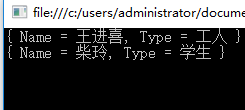
using Left outer joins
static void Main(string[] args)

{

    //AddTestData();

    using (MyContext db = new MyContext())

    {

        var result = from p in db.People

                     join t in db.PersonTypes

                     on p.PersonType.PersonTypeId equals t.PersonTypeId into finalGroup

                     from groupData in finalGroup.DefaultIfEmpty()

                     select new { Name = p.Name, Type = groupData.PersonTypeName??"Unknown" };

        foreach (var item in result)

        {

            Console.WriteLine(item);

        }

    }

    Console.ReadLine();
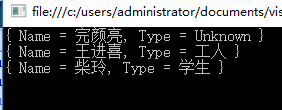
I think this tructure is hard to understand, but it's useful.
That's all.
Lerning Entity Framework 6 ------ Joins and Left outer Joins的更多相关文章
- Lerning Entity Framework 6 ------ Defining Relationships
There are three types of relationships in database. They are: One-to-Many One-to-One Many-to-Many Th ...
- Lerning Entity Framework 6 ------ Handling concurrency With SQL Server Database
The default Way to handle concurrency of Entity Framework is using optimistic concurrency. When two ...
- Lerning Entity Framework 6 ------ Working with in-memory data
Sometimes, you need to find some data in an existing context instead of the database. By befault, En ...
- Lerning Entity Framework 6 ------ Inserting, Querying, Updating, and Deleting Data
Creating Entities First of all, Let's create some entities to have a test. Create a project Add foll ...
- Lerning Entity Framework 6 ------ Defining the Database Structure
There are three ways to define the database structure by Entity Framework API. They are: Attributes ...
- Lerning Entity Framework 6 ------ Introduction to TPH
Sometimes, you have created two models. They have the same parent class like this: public class Pers ...
- Lerning Entity Framework 6 ------ Complex types
Complex types are classes that map to a subset of columns of a table.They don't contains key. They a ...
- Lerning Entity Framework 6 ------ Using a commandInterceptor
Sometimes, We want to check the original sql statements. creating a commandInterceptor is a good way ...
- Lerning Entity Framework 6 ------ A demo of using Entity framework with MySql
Create a new project named MySqlTest Install following packages by right-clicking on the References ...
随机推荐
- Spring MVC和Spring Boot的理解以及比较
Spring MVC是什么?(1)Spring MVC是Spring提供的一个强大而灵活的模块式web框架.通过Dispatcher Servlet, ModelAndView 和 View Reso ...
- model.form使用,配合form的钩子
一次model.form的使用记录,配合form钩子的过程 在写信息采集功能的时候,需要添加资产信息,使用modelform组件减少工作量 官网介绍:版本1.9.https://docs.django ...
- ---dd io测试
下面是一个简单测试,虽然不够准确但是简单立即可行, 当前目录的IO写读测试: (写) dd if=/dev/zero of=test bs=64k count=16k conv=fdatasync ( ...
- js 模拟css3 动画1
<html> <head> <title> javaScript缓动入门 </title> </head> <body> < ...
- html:class名命名规范
1 前端开发命名规范 1.1 为什么要制定CSS命名规范 统一的命名规范,便于多人开发维护时代码统一,减少项目沟通和交接的成本,增加代码的语义化. 1.2 CSS命名规则 样式类名全部用小写,首字符必 ...
- 深入剖析GPU Early Z优化
最近在公司群里同事发了一个UE4关于Mask材质的优化,比如在场景中有大面积的草和树的时候,可以在很大程度上提高效率.这其中的原理就是利用了GPU的特性Early Z,但是它的做法跟我最开始的理解有些 ...
- VC6的工程转到VC2010或更高版本出现fatal error C1189编译错误的解决方法
以前也遇到过,当时解决了没写下来,这次正好又遇到了,就顺手写一下吧,别下次又忘记了. 当VC6的工程转到VC2010或更高版本时编译出现如下错误: c:\program files\microsoft ...
- Spring MVC 自动为对象注入枚举类型
原文地址:http://1358440610-qq-com.iteye.com/blog/2079048 如果一个对象里面有枚举类型的话,则Spring MVC是不能够直接进行注入的,因为它只实现了一 ...
- git配置正确且权限已开但是pull或push提示无权限
因为之前提示输入用户名和密码时输入错误,之后就一直权限认证失败.这种情况下在git bash中输入: git config --system --unset credential.helper 就会重 ...
- django 环境配置.
1. 一个虚拟环境对应一个 dajngo项目 2. mkvirtruenv pycham 创建Pure Python 新项目,不是Django 2018.3 其他版本 3. Add Configur ...