
《DSP using MATLAB》Problem 5.13


1、 代码:
%% ++++++++++++++++++++++++++++++++++++++++++++++++++++++++++++++++++++++++++++++++

%%            Output Info about this m-file

fprintf('\n***********************************************************\n');

fprintf('        <DSP using MATLAB> Problem 5.13 \n\n');

banner();

%% ++++++++++++++++++++++++++++++++++++++++++++++++++++++++++++++++++++++++++++++++

% -----------------------------------------------------------------

%              1  x(n) = [1, 2, -3, 4, 5, 1, 2, -3, 4, 5]

%                   x(n) = x(n+N/2)  N=even integer

% -----------------------------------------------------------------

nn1 = [0:9];

xx1 = [1, 2, -3, 4, 5, 1, 2, -3, 4, 5];

NN1 = length(xx1);                                % length is 10

%m = mod_1(nn1, NN1);

%x = [xx1 zeros(1, 0)];                        % padding zeros

%n = [nn1 max(nn1)+1:max(nn1)+6];

x = xx1;

n = nn1;

figure('NumberTitle', 'off', 'Name', 'P5.13.1 x(n)')

set(gcf,'Color','white');

subplot(2,1,1); stem(nn1, xx1);

xlabel('n'); ylabel('x(n)');

title('x(n) ori sequence');  grid on;

subplot(2,1,2); stem(n, x);

xlabel('n'); ylabel('x(n)');

title('x(n) padding zeros');  grid on;

%% =============================================================================

%%                 DTFT X(w) of xn sequence, w=[0:2pi],

%% =============================================================================

MM = 500;

[Xw_DTFT, w] = dtft1(x, n, MM);

 magXw_DTFT = abs(Xw_DTFT);   angXw_DTFT = angle(Xw_DTFT)/pi;

realXw_DTFT = real(Xw_DTFT); imagXw_DTFT = imag(Xw_DTFT);

%% --------------------------------------------------------------

%%        START X_DTFT's  mag ang real imag

%% --------------------------------------------------------------

figure('NumberTitle', 'off', 'Name', 'P5.13.1 X(w) DTFT of x(n)');

set(gcf,'Color','white');

subplot(2,2,1); plot(w/pi,magXw_DTFT); grid on;  % axis([-2,2,0,15]);

title('Magnitude Part');

xlabel('frequency in \pi units'); ylabel('Magnitude  |X\_DTFT|');

subplot(2,2,3); plot(w/pi, angXw_DTFT); grid on;  % axis([-2,2,-1,1]);

title('Angle Part');

xlabel('frequency in \pi units'); ylabel('Rad \pi'); %axis([-200,200,0,2]);

subplot('2,2,2'); plot(w/pi, realXw_DTFT); grid on;

title('Real Part');

xlabel('frequency in \pi units'); ylabel('Real');

subplot('2,2,4'); plot(w/pi, imagXw_DTFT); grid on;

title('Imaginary Part');

xlabel('frequency in \pi units'); ylabel('Imaginary');

%% --------------------------------------------------------------

%%        END X_DTFT's  mag ang real imag

%% --------------------------------------------------------------

%% ------------------------------------------------------------------

%%                 DFT(k) of xn sequence, k=[0:N-1]

%%                      w=2pi*k/N       k=Nw/(2pi)

%% ------------------------------------------------------------------

N1 = length(x);

k1 = [0 : N1-1];

%k2 = [-N : N-1];

%k3 = [-N/2 : N/2];

Xk_DFT = dft(x, N1);                                         % DFT

    magXk_DFT = abs( [ Xk_DFT ] );                          % DFT magnitude

    angXk_DFT = angle( [Xk_DFT] )/pi;                       % DFT angle

   realXk_DFT = real(Xk_DFT); imagXk_DFT = imag(Xk_DFT);

figure('NumberTitle', 'off', 'Name', 'P5.13.1 DFT(k) of x(n)')

set(gcf,'Color','white');

subplot(2,1,1); stem(k1, magXk_DFT); hold on; plot(N1*w/(2*pi), magXw_DTFT,'r--'); hold off;

%axis([-N/2, N/2, -0.5, 50.5]);

xlabel('k'); ylabel('magnitude(k)');

title('DFT magnitude of x(n), N=10');  grid on;

subplot(2,1,2); stem(k1, angXk_DFT);  hold on; plot(N1*w/(2*pi), angXw_DTFT,'r--'); hold off;

%axis([-N/2, N/2, -0.5, 50.5]);

xlabel('k'); ylabel('angle(k)');

title('DFT angle of x(n), N=10');  grid on;
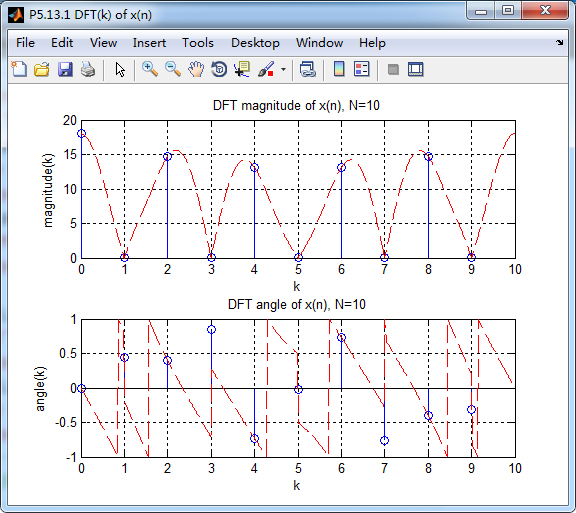
运行结果:



2、代码
%% ++++++++++++++++++++++++++++++++++++++++++++++++++++++++++++++++++++++++++++++++

%%            Output Info about this m-file

fprintf('\n***********************************************************\n');

fprintf('        <DSP using MATLAB> Problem 5.13 \n\n');

banner();

%% ++++++++++++++++++++++++++++++++++++++++++++++++++++++++++++++++++++++++++++++++

% -----------------------------------------------------------------

%              2  x(n) = [1, 2, -3, 4, 5, -1, -2, 3, -4, -5]

%                       x(n) = -x(n + N/2)   N=even integer

% -----------------------------------------------------------------

nn1 = [0:9];

xx1 = [1, 2, -3, 4, 5, -1, -2, 3, -4, -5];

NN1 = length(xx1);                                % length is 10

%m = mod_1(nn1, NN1);

%x = [xx1 zeros(1, 0)];                        % padding zeros

%n = [nn1 max(nn1)+1:max(nn1)+6];

x = xx1;

n = nn1;

figure('NumberTitle', 'off', 'Name', 'P5.13.2 x(n)')

set(gcf,'Color','white');

subplot(2,1,1); stem(nn1, xx1);

xlabel('n'); ylabel('x(n)');

title('x(n) ori sequence');  grid on;

subplot(2,1,2); stem(n, x);

xlabel('n'); ylabel('x(n)');

title('x(n) no padding zeros');  grid on;

%% =============================================================================

%%                 DTFT X(w) of xn sequence, w=[0:2pi],

%% =============================================================================

MM = 500;

[Xw_DTFT, w] = dtft1(x, n, MM);

 magXw_DTFT = abs(Xw_DTFT);   angXw_DTFT = angle(Xw_DTFT)/pi;

realXw_DTFT = real(Xw_DTFT); imagXw_DTFT = imag(Xw_DTFT);

%% --------------------------------------------------------------

%%        START X_DTFT's  mag ang real imag

%% --------------------------------------------------------------

figure('NumberTitle', 'off', 'Name', 'P5.13.2 X(w) DTFT of x(n)');

set(gcf,'Color','white');

subplot(2,2,1); plot(w/pi,magXw_DTFT); grid on;  % axis([-2,2,0,15]);

title('Magnitude Part');

xlabel('frequency in \pi units'); ylabel('Magnitude  |X\_DTFT|');

subplot(2,2,3); plot(w/pi, angXw_DTFT); grid on;  % axis([-2,2,-1,1]);

title('Angle Part');

xlabel('frequency in \pi units'); ylabel('Rad \pi'); %axis([-200,200,0,2]);

subplot('2,2,2'); plot(w/pi, realXw_DTFT); grid on;

title('Real Part');

xlabel('frequency in \pi units'); ylabel('Real');

subplot('2,2,4'); plot(w/pi, imagXw_DTFT); grid on;

title('Imaginary Part');

xlabel('frequency in \pi units'); ylabel('Imaginary');

%% --------------------------------------------------------------

%%        END X_DTFT's  mag ang real imag

%% --------------------------------------------------------------

%% ------------------------------------------------------------------

%%                 DFT(k) of xn sequence, k=[0:N-1]

%%                      w=2pi*k/N       k=Nw/(2pi)

%% ------------------------------------------------------------------

N1 = length(x);

k1 = [0 : N1-1];

%k2 = [-N : N-1];

%k3 = [-N/2 : N/2];

Xk_DFT = dft(x, N1);                                         % DFT

    magXk_DFT = abs( [ Xk_DFT ] );                          % DFT magnitude

    angXk_DFT = angle( [Xk_DFT] )/pi;                       % DFT angle

   realXk_DFT = real(Xk_DFT); imagXk_DFT = imag(Xk_DFT);

figure('NumberTitle', 'off', 'Name', 'P5.13.2 DFT(k) of x(n)')

set(gcf,'Color','white');

subplot(2,1,1); stem(k1, magXk_DFT); hold on; plot(N1*w/(2*pi), magXw_DTFT,'r--'); hold off;

%axis([-N/2, N/2, -0.5, 50.5]);

xlabel('k'); ylabel('magnitude(k)');

title('DFT magnitude of x(n), N=10');  grid on;

subplot(2,1,2); stem(k1, angXk_DFT);  hold on; plot(N1*w/(2*pi), angXw_DTFT,'r--'); hold off;

%axis([-N/2, N/2, -0.5, 50.5]);

xlabel('k'); ylabel('angle(k)');

title('DFT angle of x(n), N=10');  grid on;
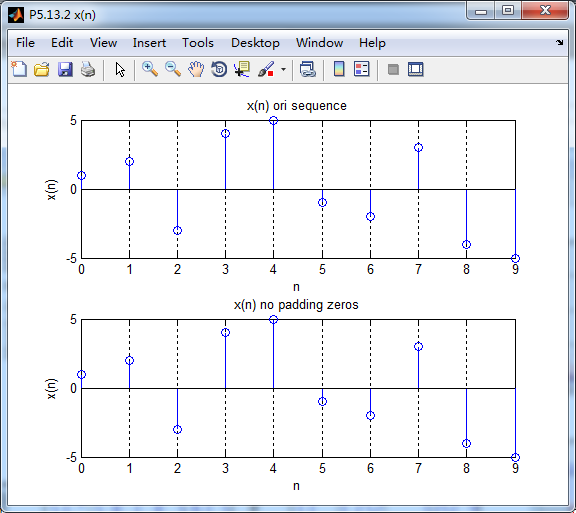
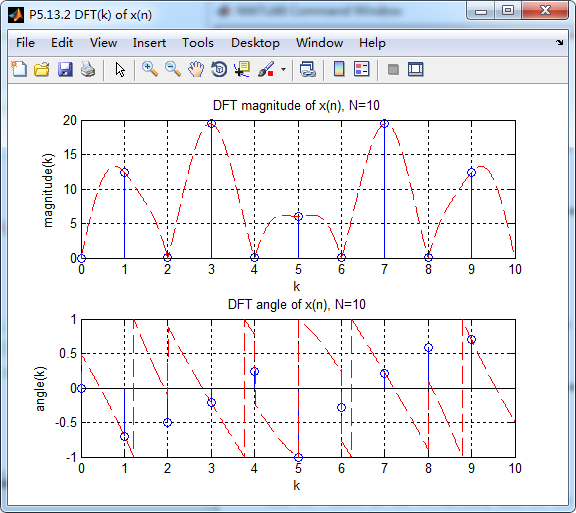
运行结果:

《DSP using MATLAB》Problem 5.13的更多相关文章
- 《DSP using MATLAB》Problem 7.13
代码: %% ++++++++++++++++++++++++++++++++++++++++++++++++++++++++++++++++++++++++++++++++ %% Output In ...
- 《DSP using MATLAB》Problem 6.13
代码: %% ++++++++++++++++++++++++++++++++++++++++++++++++++++++++++++++++++++++++++++++++ %% Output In ...
- 《DSP using MATLAB》Problem 4.13
代码: %% ---------------------------------------------------------------------------- %% Output Info a ...
- 《DSP using MATLAB》Problem 8.13
代码: %% ------------------------------------------------------------------------ %% Output Info about ...
- 《DSP using MATLAB》Problem 6.12
代码: %% ++++++++++++++++++++++++++++++++++++++++++++++++++++++++++++++++++++++++++++++++ %% Output In ...
- 《DSP using MATLAB》Problem 6.10
代码: %% ++++++++++++++++++++++++++++++++++++++++++++++++++++++++++++++++++++++++++++++++ %% Output In ...
- 《DSP using MATLAB》Problem 4.11
代码: %% ---------------------------------------------------------------------------- %% Output Info a ...
- 《DSP using MATLAB》Problem 3.3
按照题目的意思需要利用DTFT的性质,得到序列的DTFT结果(公式表示),本人数学功底太差,就不写了,直接用 书中的方法计算并画图. 代码: %% -------------------------- ...
- 《DSP using MATLAB》Problem 3.1
先写DTFT子函数: function [X] = dtft(x, n, w) %% --------------------------------------------------------- ...
随机推荐
- unity中让摄像机移动到鼠标点击的位置和鼠标控制平移视角
private Vector3 targetVector3; private float movespeed=0.5f; private bool IsOver = true; private Gam ...
- 数据泵导入 ORA-31626
Oracle,10G,数据泵导入时,报错如下: 解决方案:对当前用户做如下授权 . 具体操作:grant connect,resource to user;
- IO多路复用,select、poll、epoll 编程主要步骤
body, table{font-family: 微软雅黑; font-size: 13.5pt} table{border-collapse: collapse; border: solid gra ...
- vue.set动态新增对象属性,触发dom渲染
当我们给一个props或者data中被观测的对象添加一个新的属性的时候,不能直接添加,必须使用Vue.set方法 /** * ==== 选择产品 ==== * 因为vue实现双向数据绑定的机制是数据劫 ...
- 使用MyEclipse开发Java EE应用:用XDoclet创建EJB 2 Session Bean项目(一)
[MyEclipse最新版下载] 一.创建一个EJB项目 1. 选择File>New Project,选择EJB Project,然后单击Next. 2. 在Project name字段中输入f ...
- android 应用程序中执行Linux 命令
ADB 无线调试命令son = "setprop service.adb.tcp.port 5555\n" + "stop adbd\n" + "st ...
- capjoint conversations with Chenweiwen
This event is quite small for teleseismic stations, which means it will be more strongly affected by ...
- 强化学习9-Deep Q Learning
之前讲到Sarsa和Q Learning都不太适合解决大规模问题,为什么呢? 因为传统的强化学习都有一张Q表,这张Q表记录了每个状态下,每个动作的q值,但是现实问题往往极其复杂,其状态非常多,甚至是连 ...
- EF code first Mysql 更换主键类型
把主键从long 改为int 居然要删掉重建,不知道有没有更好的办法. 删除带外键的表: Add-Migration name 修改生成的文件,主要把dbo.删除 然后update-database
- L275 Climate Change Is Having a Major Impact on Global Health
Climate Change Is Having a Major Impact on Global Health A devastating heat wave swept across Europe ...